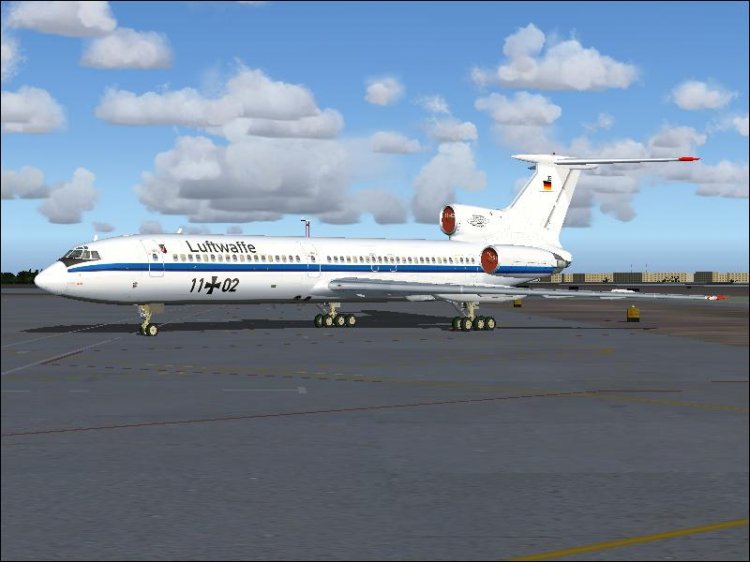
Luftwaffe 11+01 and 11+02 liveries for the Project Tupolev Tu-154M Final Release. 32bit Textures only, youґll need the legendary Project Tupolev Tu-154M model.

Download at ------> www.fs-proteam.com

Unzip and copy the texture.luftwaffe folder into the PT_Tu-154M directory. Modify your aircraft.cfg accordingly:


[fltsim.x]
title=PT_Tu-154M_Luftwaffe_11+01_no_VC
sim=154m_v3_06
model=noVC
panel=noVC
sound=
texture=luftwaffe/11+01
kb_checklists=
kb_reference=
atc_id=Luftwaffe
atc_airline=Luftwaffe
atc_flight_number=0815
editable=0
ui_manufacturer=ANTK Tupolev
ui_type=Tu-154M_noVC
ui_variation=Luftwaffe 11+01
visual_damage=0
description=Tu-154M Air-file version 154m_v3_06 Repaint by Heiko Flцther (Pipe)
atc_heavy=0

[fltsim.xx]
title=PT_Tu-154M_Luftwaffe_11+01_VC
sim=154m_v3_06
model=
panel=
sound=
texture=luftwaffe/11+01
kb_checklists=
kb_reference=
atc_id=Luftwaffe
atc_airline=Luftwaffe
atc_flight_number=0815
editable=0
ui_manufacturer=ANTK Tupolev
ui_type=Tu-154M_VC
ui_variation=Luftwaffe 11+01
visual_damage=0
description=Tu-154M Air-file version 154m_v3_06 Repaint by Heiko Flцther (Pipe)
atc_heavy=0

[fltsim.xxx]
title=PT_Tu-154M_Luftwaffe_11+02_no_VC
sim=154m_v3_06
model=noVC
panel=noVC
sound=
texture=luftwaffe/11+02
kb_checklists=
kb_reference=
atc_id=Luftwaffe
atc_airline=Luftwaffe
atc_flight_number=0815
editable=0
ui_manufacturer=ANTK Tupolev
ui_type=Tu-154M_Final_noVC
ui_variation=Luftwaffe 11+02
visual_damage=0
description=Tu-154M Air-file version 154m_v3_06 Repaint by Heiko Flцther (Pipe)
atc_heavy=0

[fltsim.xxxx]
title=PT_Tu-154M_Luftwaffe_11+02_VC
sim=154m_v3_06
model=
panel=
sound=
texture=luftwaffe/11+02
kb_checklists=
kb_reference=
atc_id=Luftwaffe
atc_airline=Luftwaffe
atc_flight_number=0815
editable=0
ui_manufacturer=ANTK Tupolev
ui_type=Tu-154M_Final_VC
ui_variation=Luftwaffe 11+02
visual_damage=0
description=Tu-154M Air-file version 154m_v3_06 Repaint by Heiko Flцther (Pipe)
atc_heavy=0
----------------------------------------------------------------------------------------------------


If you want to use the 16:9 wide panel, edit the line to panel=wide

NOTE: VC and night textures are not included in this package do save download size.

One word to reflections: It is always difficult for a repainter to configure a realistically looking reflection.  This one has been done with utmost care to give you a real eye candy. However, metal reflections and the way how they are mapped, depend on the alpha channels from the aircraft painter and mainly on a texture called -------> envmap.bmp which you can find in the FS9/texture folder. This texture defines the result of the alpha channel textures on YOUR sim system.

If you do a search in the avsim libraries, youґll find several envmap.bmp replacement textures for all tastes and preferences. For the simple reason that the default texture is limited and has its flaws, the flight sim community has tweaked them. I use an envmap from Pedro Padilla which I have attached to this package. I judge this one the most realistic and suitable for me. You might have your own preferences which I wouldnґt dare to question. If you want to try the attached envmap.bmp, just copy it to FS9/texture and overwrite the existing one. Not before backing it up somewhere, obviously!

Doubts, comments, critics, some texture corrections especially regarding over- or underdone reflections ............ feel free to contact me at the e-mail below. Or at Project Tupolevґs forum ------------> www.protu-154.com/forum


Now have fun with the repaint!

Heiko Flцther (Pipe)
[email protected]