Навороченная панель к Cessna 172 Просмотр ZIP-архива
Панель для С172/Installation.txt
***********************************************************************
INSTALLATION
***********************************************************************

This is a very simple installation process.

Inside of Skyhawk IFR Avionics Upgrade.zip there is another .zip
named guages. Open "guages.zip" and extract to your Main FS9 Guages
Folder.
Next, Place the panel.cfg inside the main .zip in the default
Cessna Skyhawk's IFR panel folder. Be shure to back up your original
skyhawks IFR panel .cfg

=======================================================================
To use the CD Radio.......
-----------------------------------------------------------------------
To use the radio, start fs and get in the 172 IFR Panel that i have
created.

Click on the FM button on the far right of the radio
Next, right click on the radio preset buttons. (#1-6)
simply browse to the song that you would like to have preset to this
number.

If you fill up all 6 FM Presets, simply click on AM and repeat the same
sequence. I hope this radio is enjoyed on those long flights!
=======================================================================

NOTE! I AM IN NO WAY RESPONSIBLE FOR ANY DAMAGE WHAT SO EVER CREATED
THIS PANEL. THOUGH I DO NOT BELEIVE IT WILL CAUSE ANY DAMAGE, BUT IF
IT DOES,I AM NOT RESPONSIBLE.	call microsoft, blame it on them.


This is my first panel for FS. I dont expect it to be perfect,
but i do hope it is enjoyed.
If you have any suggestions or comments, feel free to contact me
via email at
[email protected]


Thanks for downloading my file

Chase M. Barnett
[email protected]
Transload Airlines
Transload Connect CEO
Transload Airlines Director of Human Resources
~Transload Admin and Staff~

http://www.transloadairlines.com
55149-Panel-dlya-S172.zip
| Имя файла | Дата | Размер |
|---|---|---|
| Панель для С172/ | 30.10.2014 15:38 | |
| Панель для С172/1.JPG | 13.11.2004 03:11 | 194 KB |
| Панель для С172/Discription.txt | 13.11.2004 02:40 | 530 B |
| Панель для С172/guages/ | 30.10.2014 15:38 | |
| Панель для С172/guages/FS9Garmin.cab | 17.10.2003 10:54 | 263 KB |
| Панель для С172/guages/FS9Garmin330.cab | 08.12.2003 01:54 | 52 KB |
| Панель для С172/guages/radiocd4.gau | 15.11.2003 12:00 | 368 KB |
| Панель для С172/guages/XPDR_Garmin_GTX330.gau | 08.11.2002 18:45 | 145 KB |
| Панель для С172/Installation.txt | 13.11.2004 02:55 | 2 KB |
| Панель для С172/panel.cfg | 13.11.2004 02:23 | 5 KB |
| Панель для С172/userguide.gif | 15.11.2003 12:00 | 27 KB |
| avsim_su.diz | 30.10.2014 20:13 | 406 B |
| Итого: | 1 MB | |
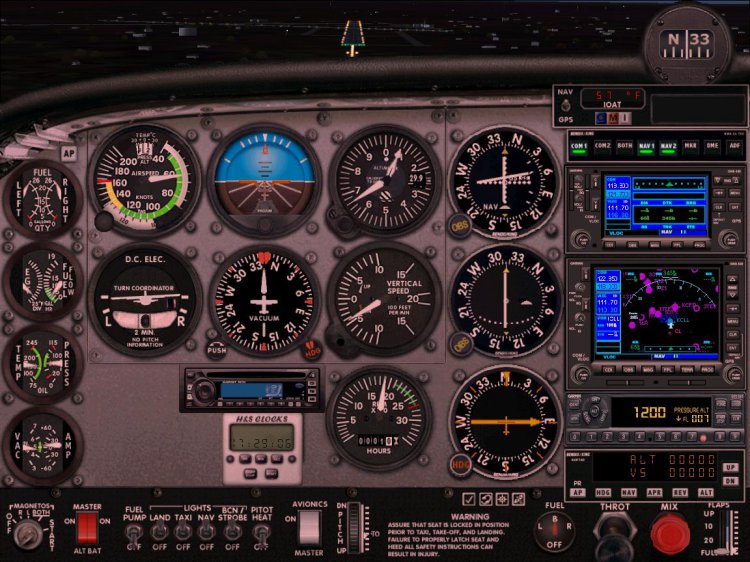
Нарыл вот такую панельку на дефолт. Есть даже магнитола. Сам немного поигрался , слишком мелковато, радио не удобно настраивать. Может кому сгодится.
→ Size:
626 KB
→ Date:
11 years ago (30.10.2014 17:15)
→ Author:
Chase Barnett
→ Approved by moderator:
dmi-shef
→ License:
Freeware - Free version, Unlimited Distribution
→ Downloaded:
355 time(s)