1938 Aeronca K Просмотр ZIP-архива
Program Files/Microsoft Games/Flight Simulator 9/Aircraft/AeroncaK/README_PLEASE_Model K.txt
1938 Aeronca Model K (straight K), by Steven D. Myers (for the most part, at least) for Microsoft Flight Simulator 2004, Century of Flight, FS9 or whatever you’d like to call it. It is my first successful attempt (of many) at a fully enclosed cabin plane. The K was built with FSDS2.
[email protected]

This Zip file should contain one Aeronca Model K with two versions, U.S. and Canadian. Here’s a brief look at how the K came to be…

By the early 30s’ Aeronca had a fairly good thing going with its’ model C, the familiar home-built looking affair with pylon bracing, an open cockpit and a 2 cylinder engine. As the decade progressed, the government began to frown on its’ design as the accident rate was climbing quite fast. Also, the Friedlanders, now in control of Aeronca, were aware of the competition, and wanted to move ahead with a safe, modern looking machine. Though it would seem a straightforward build, the K was held up in the design and testing stage for several months. A couple of major problems resulted from nothing more than appearance issues. The control yoke, the first applied to an American light plane, was another obstacle. The K was finally ATCed by late January of 1937. Then came the disastrous flood of the winter of 1936-37. At the time the K, the C and the low-wing (model L) were all in production. At the height of the flood, the plant was under 30 feet of water. Afterward, it was decided that only the K would remain in production, the C being obsolete, and the L not selling as well as hoped. The K remained in production through 1939, by which time the basic airframe was ATCed with most of the opposed 4 cylinder engines then coming into vogue. These aircraft evolved into the well known Chief series.
*By the way, a model K went on one of Lincoln Ellsworths’ Antarctic expeditions, and is said to have performed quite excellently. 15 minutes of fame for the K.

Your Aeronca K virtual model has a 2D panel, which I have no talent for, and at least a fairly good VC. I’ve used 16 bit and DXT3 textures to save a tad on file size, and they seem to look OK. The 2D panel texture is 32 bit, however. Included also, is Dave Eckerts’ well traveled pilot figure, standard animation and reflective textures. You can also open the doors (Shift + E) and toggle the wheelpants on or off with the Strobe Light key (the letter “O”).  Handy for you soft or snowy field operators. The aircraft will load with the wheelpants on. This is a daytime VFR aircraft and does not carry radios or avionics. They would weigh too much, anyway! 37 hp, you know!

Installation…

You should be able to install the Aeronca K right into FS9 by telling WinZip to Extract to: "C:\" (no quotes), assuming you have a default installation of FS9 (C:\Program Files\Microsoft Games\Flight Simulator 9\...). Be sure to check the Use Folder Names button, if not already checked. I've told WinZip to copy the path information so the Aeronca should drop right into your Aircraft folder and appear in the Select Aircraft menu in FS9. Alternatively, you can extract everything to a Temp folder of your choosing, find the AeroncaK folder, and cut and paste it into the ...Flight Simulator 9\Aircraft folder. In the Select Aircraft menu,look for Aeronca, near the top. If you have other Aeroncas,go to Aircraft Model and look for Model K. And remember, please to cut and paste the contents of the gauges folder into the main FS9 gauges folder.

Flying the K is pretty straightforward. With only 37 hp, there’s not a lot you can do except get from here to there. If you like the FS9 Cub, you should like the K, as I’ve used the Cub airfile as a start. I’ve reduced the thrust a bit, to accommodate the K’s lower hp, but that’s about it. Upon take-off, I’ll trim nose up a bit and aim for a 400FPM climb, the K’s max. It’ll climb faster, but airspeed drops off fast, as well. A good cruise configuration is 2175 RPM and 72 MPH. Above 6,000 ft, the engine begins to run out of steam. Aeronca said they’ve had one up to 13,000 ft. I wonder how long it took to get there, and if there was any fuel left when they did. Below 5,000 ft, it’s been a lot of fun. I love cruising the rural strips in my local area. This ship was made for grassroots flying. The K seems to prefer wheel landings, and comes in nicely at just under 40MPH.  Don’t forget, you have only 10 gallons of fuel, at 4 gallons per hour at cruise setting.


Issues…

Here are some known issues with the K, nothing at all serious, just to be aware of.
*** 2D Panel. I’ve compromised the proportions of the 2D panel a bit, to aid visibility. It still stinks, but it’s better than it might be. The original was a poor design, with the gauges on a lower level. Raise your seat height and zoom way out.
*** Moirй patterns. You may, depending on your graphics card, notice moirй patterns on the tire treads, cylinders and so on. This seems to be more so with the ATI cards, which I have. Updated drivers may cure this.
*** The VC. I’ve included only enough to be seen in a “normal” seating position. If you step outside the airplane in the VC or extend your head out the top, you’ll notice the missing parts. I’ll extend my head up a maximum of 4 Shift + Enter keystrokes. That seems to be enough.
*** Wheelpants. As I’ve mentioned, you can toggle the wheelpants with the Strobe (the letter "O") key. However, if you turn the nav lights on or off with the All Lights key (the letter “L”), you may change the status of the wheelpants. Just hit the “O” key to restore. To avoid this, use the switches for the nav and panel lights on the 2D panel or the VC. The switches don’t seem to affect the wheelpants.
*** Sound. Unfortunately, there isn’t much to choose from for sound. I’ve aliased the Wright Flyer as the only one that even comes close to the annoying (quite), popping two cylinder sound. There is, however, way too much wind noise for the K. You can copy the Wright sound folder to overwrite the AeroncaK sound folder and then cut the wind noise volume in the sound.cfg file. You can also raise the minimum wind noise speed to 80 MPH. Sorry about the sound issue.
*** Mixture Control. I don’t believe I’ve seen a mixture control in a 2 cyl K. I, therefore, did not include one.
*** Carb Heat. There is a carb heat knob to the left of the ASI. I wouldn’t use it, though, it’ll kill the engine.
*** Compass. The compass, which is from the Vega, is a bit hard to see in the VC when you zoom out. No problem from the 2D panel or when you zoom in. Keep the HUD (Shift + Z) on for an exact reading.
*** Fuel Gauge. The fuel gauge in spot view is cosmetic. Works fine in the VC and 2D panel. It’s the Cub fuel gauge.
*** Repainting. Though I haven’t reached the point where I can design a repaint-friendly aircraft, those of you who wish to try certainly have my blessings.

I’m placing no restrictions on my work, just credit me for the original and please consider the gauge designers, of which I am not one.

Thanks…

Thanks to all the boys at Flightsim.com, Avsim.com, Freeflightdesign.com, Sim-outhouse.com, the Golden Eagles Squadron and Blue Arrow. Your contributions to my knowledge base, knowingly or otherwise, are greatly appreciated.
…and to Louis Sinclair for FSDS2, without which I’d be S.O.L.
…and to the gauge designers. I wish I knew who you are. Though all the instruments are from the sim, the throttle, carb heat knob and light switches are from other freeware projects. I’m sure J.L. Stubbs had a hand in at least one of them, and I’ll gladly give credit to the designers of the others. I built none of them, and wouldn’t knowingly abuse someone else’s rights.

A special thanks goes to Russell Williams for maintaining one of the most valuable vintage aircraft web sites on the ‘net. Russell is an accomplished pilot and avid collector of old aircraft, in addition to being quite well versed in the subject of aircraft maintenance and repair. This fellow REALLY knows his s**t!

That’s about it, folks. I'm sure I've missed a detail or two here and there, and my model is by no means perfect, but I think it captures the spirit of the little princess fairly well. Please enjoy your K and remember to maintain thine airspeed, lest the earth rise up and smite thee.
aeroncak.zip
| Имя файла | Дата | Размер |
|---|---|---|
| Program Files/Microsoft Games/Flight Simulator 9/Aircraft/AeroncaK/2Dpan.jpg | 08.11.2003 16:54 | 34 KB |
| Program Files/Microsoft Games/Flight Simulator 9/Aircraft/AeroncaK/AeroncaK.air | 13.06.2003 00:24 | 6 KB |
| Program Files/Microsoft Games/Flight Simulator 9/Aircraft/AeroncaK/Aircraft.cfg | 08.11.2003 15:25 | 15 KB |
| Program Files/Microsoft Games/Flight Simulator 9/Aircraft/AeroncaK/aucanada.jpg | 08.11.2003 16:57 | 40 KB |
| Program Files/Microsoft Games/Flight Simulator 9/Aircraft/AeroncaK/gauges/ | 08.11.2003 15:01 | |
| Program Files/Microsoft Games/Flight Simulator 9/Aircraft/AeroncaK/gauges/A.carbheat.gau | 18.02.2000 20:39 | 49 KB |
| Program Files/Microsoft Games/Flight Simulator 9/Aircraft/AeroncaK/gauges/b18g_nav_lgt.gau | 21.07.2002 06:29 | 129 KB |
| Program Files/Microsoft Games/Flight Simulator 9/Aircraft/AeroncaK/gauges/Brab-toggle-pan1_0001.GAU | 24.12.2001 14:33 | 28 KB |
| Program Files/Microsoft Games/Flight Simulator 9/Aircraft/AeroncaK/gauges/canthrot.gau | 09.08.2001 10:42 | 48 KB |
| Program Files/Microsoft Games/Flight Simulator 9/Aircraft/AeroncaK/model/ | 09.11.2003 22:24 | |
| Program Files/Microsoft Games/Flight Simulator 9/Aircraft/AeroncaK/model/AeroncaK.mdl | 09.11.2003 22:24 | 1 MB |
| Program Files/Microsoft Games/Flight Simulator 9/Aircraft/AeroncaK/model/Model.cfg | 25.08.2003 00:43 | 27 B |
| Program Files/Microsoft Games/Flight Simulator 9/Aircraft/AeroncaK/panel/ | 08.11.2003 15:01 | |
| Program Files/Microsoft Games/Flight Simulator 9/Aircraft/AeroncaK/panel/2Dpanel.bmp | 08.11.2003 00:14 | 3 MB |
| Program Files/Microsoft Games/Flight Simulator 9/Aircraft/AeroncaK/panel/panel.cfg | 07.11.2003 23:55 | 2 KB |
| Program Files/Microsoft Games/Flight Simulator 9/Aircraft/AeroncaK/panel/VCbitmap2_16.bmp | 22.10.2003 00:36 | 2 MB |
| Program Files/Microsoft Games/Flight Simulator 9/Aircraft/AeroncaK/panel/VCbitmap_16.bmp | 31.10.2003 23:05 | 2 MB |
| Program Files/Microsoft Games/Flight Simulator 9/Aircraft/AeroncaK/README_PLEASE_Model K.txt | 08.11.2003 16:49 | 8 KB |
| Program Files/Microsoft Games/Flight Simulator 9/Aircraft/AeroncaK/sound/ | 08.11.2003 15:01 | |
| Program Files/Microsoft Games/Flight Simulator 9/Aircraft/AeroncaK/sound/Sound.cfg | 26.10.2003 22:49 | 36 B |
| Program Files/Microsoft Games/Flight Simulator 9/Aircraft/AeroncaK/texture/ | 08.11.2003 15:19 | |
| Program Files/Microsoft Games/Flight Simulator 9/Aircraft/AeroncaK/texture/$pan1 | 03.11.2002 08:22 | 65 KB |
| Program Files/Microsoft Games/Flight Simulator 9/Aircraft/AeroncaK/texture/$pan2 | 03.11.2002 08:22 | 65 KB |
| Program Files/Microsoft Games/Flight Simulator 9/Aircraft/AeroncaK/texture/exterior.bmp | 08.11.2003 00:28 | 1 MB |
| Program Files/Microsoft Games/Flight Simulator 9/Aircraft/AeroncaK/texture/fuselagetex_16.bmp | 02.11.2003 17:25 | 2 MB |
| Program Files/Microsoft Games/Flight Simulator 9/Aircraft/AeroncaK/texture/glass.bmp | 14.09.2003 00:03 | 256 KB |
| Program Files/Microsoft Games/Flight Simulator 9/Aircraft/AeroncaK/texture/interior_16.bmp | 08.11.2003 00:43 | 2 MB |
| Program Files/Microsoft Games/Flight Simulator 9/Aircraft/AeroncaK/texture/pilot_16.bmp | 08.11.2003 15:19 | 2 MB |
| Program Files/Microsoft Games/Flight Simulator 9/Aircraft/AeroncaK/texture/PropSpin.bmp | 03.11.2003 23:12 | 64 KB |
| Program Files/Microsoft Games/Flight Simulator 9/Aircraft/AeroncaK/texture/prop_16.bmp | 02.11.2003 17:42 | 512 KB |
| Program Files/Microsoft Games/Flight Simulator 9/Aircraft/AeroncaK/texture/Thumbs.db | 09.11.2003 20:55 | 69 KB |
| Program Files/Microsoft Games/Flight Simulator 9/Aircraft/AeroncaK/texture/various_16.bmp | 31.10.2003 19:54 | 2 MB |
| Program Files/Microsoft Games/Flight Simulator 9/Aircraft/AeroncaK/texture/wings_16.bmp | 19.10.2003 01:27 | 2 MB |
| Program Files/Microsoft Games/Flight Simulator 9/Aircraft/AeroncaK/texture.1/ | 08.11.2003 15:19 | |
| Program Files/Microsoft Games/Flight Simulator 9/Aircraft/AeroncaK/texture.1/$pan1 | 03.11.2002 08:22 | 65 KB |
| Program Files/Microsoft Games/Flight Simulator 9/Aircraft/AeroncaK/texture.1/$pan2 | 03.11.2002 08:22 | 65 KB |
| Program Files/Microsoft Games/Flight Simulator 9/Aircraft/AeroncaK/texture.1/exterior.bmp | 08.11.2003 00:28 | 1 MB |
| Program Files/Microsoft Games/Flight Simulator 9/Aircraft/AeroncaK/texture.1/fuselagetex_16.bmp | 07.11.2003 17:36 | 2 MB |
| Program Files/Microsoft Games/Flight Simulator 9/Aircraft/AeroncaK/texture.1/glass.bmp | 14.09.2003 00:03 | 256 KB |
| Program Files/Microsoft Games/Flight Simulator 9/Aircraft/AeroncaK/texture.1/interior_16.bmp | 08.11.2003 00:43 | 2 MB |
| Program Files/Microsoft Games/Flight Simulator 9/Aircraft/AeroncaK/texture.1/pilot_16.bmp | 08.11.2003 15:19 | 2 MB |
| Program Files/Microsoft Games/Flight Simulator 9/Aircraft/AeroncaK/texture.1/PropSpin.bmp | 07.11.2003 17:40 | 64 KB |
| Program Files/Microsoft Games/Flight Simulator 9/Aircraft/AeroncaK/texture.1/prop_16.bmp | 07.11.2003 17:38 | 512 KB |
| Program Files/Microsoft Games/Flight Simulator 9/Aircraft/AeroncaK/texture.1/Thumbs.db | 09.11.2003 20:55 | 46 KB |
| Program Files/Microsoft Games/Flight Simulator 9/Aircraft/AeroncaK/texture.1/various_16.bmp | 07.11.2003 17:40 | 2 MB |
| Program Files/Microsoft Games/Flight Simulator 9/Aircraft/AeroncaK/texture.1/wings_16.bmp | 07.11.2003 17:41 | 2 MB |
| Program Files/Microsoft Games/Flight Simulator 9/Aircraft/AeroncaK/usnopants1.jpg | 07.11.2003 19:58 | 25 KB |
| Program Files/Microsoft Games/Flight Simulator 9/Aircraft/AeroncaK/uswithpants1.jpg | 07.11.2003 20:01 | 25 KB |
| Program Files/Microsoft Games/Flight Simulator 9/Aircraft/AeroncaK/uswithpants2.jpg | 07.11.2003 19:55 | 36 KB |
| Program Files/Microsoft Games/Flight Simulator 9/Aircraft/AeroncaK/VC.jpg | 07.11.2003 19:46 | 38 KB |
| avsim_ru.diz | 14.03.2004 00:14 | 373 B |
| Итого: | 32 MB | |
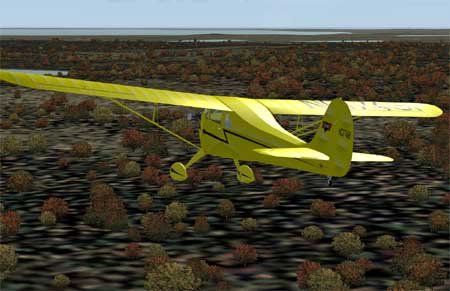
Aircraft 1938 Aeronca K. Complete VC
→ Size:
6 MB
→ Date:
22 years ago (12.11.2003 14:53)
→ Author:
Steven D. Myers
→ License:
Freeware - Free version, Unlimited Distribution
→ Downloaded:
730 time(s)