Diamond DA20-C1 Evolution Просмотр ZIP-архива
aircraft/DA20-C1_Katana_N811CT_D-ELFD/Panel_Gauge Information/README Taxispeed.txt
#######################################################
#                                                                                             #
# RCBts-10.zip:  A Taxispeed Gauge for FS20002 aircraft            #
#                                                                                             #
#                      By Rob Barendregt            23 febr. 2003             #
#                                                     Release 1.0                       #
#######################################################

1. Introduction
===============
I find that maintaining a proper, constant speed when taxiing on an airport
is one of the most difficult things in FS2K2, especially for heavy jets and
when making sharp turns on taxiways.

This gauge will help you solve that.

Features:
- The target taxispeed can be adjusted from 3 - 40 knots.
  Note: based on actual groundspeed, so will also work with wind enabled.
- The actual taxispeed is kept constant within 1-2 knots of the set target speed.
- Indicator light, that shows whether the gauge is on or off.
- Click sounds.
- Auto-shutoff when the Parking Brakes are set.


2. Taxispeed gauge indicators
=============================
The gauge consists of 3 areas (see also their Tooltips):
- A button, to activate/deactivate the gauge.
  This button has an indicator light, colored:
  - RED: Gauge cannot be activated.
    The gauge can only be active when:
    - The Parking Brakes are released.
    - The aircraft is on the ground.
    - The sim is not in Slew mode.
  - OFF: Click button to activate the gauge.
  - GREEN: The gauge is operative.
- The Target Taxispeed (3 - 40 knots, the left two digits). Default: 10 knots.
  Click to increment or decrement the value.
  You can change the target speed at any time, even if the gauge is operative.
- The Actual Groundspeed (the right two digits)


3. How the gauge works ....
===========================
The gauge operates by setting the throttles to a specific value, according
to the following algoritme:
- If ActualSpeed is smaller then 1 knots:
  Throttles are set to 70%
- If ActualSpeed is between 1 knots and (TargetSpeed-2):
  Throttles are set to 40%
- If ActualSpeed is between (TargetSpeed-2) and TargetSpeed:
  - If ActualSpeed is increasing: Throttles are set to 20%
  - If ActualSpeed is decreasing: Throttles are set to 40%
- If ActualSpeed is between TargetSpeed and (TargetSpeed+2):
  - If ActualSpeed is increasing: Throttles are set to 0%
  - If ActualSpeed is decreasing: Throttles are set to 20%
- If ActualSpeed is greater then (TargetSpeed+2):
  Throttles are set to 0%

Obviously such an algoritme is a compromise, influenced by the following factors:
- The weight of the aircraft
- Spoolup/spooldown times of the engine(s).
- Smooth throttle behaviour vs. accurate speed control.

But with this algoritme it should work for any aircraft.


5. Frequently Asked Questions (FAQ)
===================================
Q1: Can I use this gauge without having the Pushback gauge installed ?
A1: Yes, you can.
    With one exception: for aircraft of which Engine-3 has Magneto's.
    Plus: the click-sounds won't work.
    You can add the gauge to any panel (either on the main panel window, or as overlay),
    but you have to figure out yourself how to place the gauge; the Readme
    of the Pushback gauge gives a lot of info on how-to do this.
    PLEASE DON'T AS ME FOR SUPPORT IF YOU WANT TO USE IT THIS WAY !!

Q2: When the gauge is active, the Thottle levers on my panel are very 'jumpy' even
    when the throttle levers should be steady (ActualSpeed < Targetspeed-2 or
    > Targetspeed+2).
A2: This means that the throttle axis of your yoke/joystick 'jitters' a bit, which
    makes FS2K2 continously responding to changes of your throttle axis.
    Remedy: set the throttles on your controller to 'idle'.
    If this doesn't work (then you will also have problems with Reverse Thrusters !):
    Create a small deadzone, either by increasing the Nullzone for the Throttle axis
    in Options-Controls-Sensitivities or use FSUIPC for this.
    I recommend using FSUIPC for controller calibration anyway, since this is IMHO
    the ONLY way to accurately calibrate all your controller axis in FS2K2.
    You can download FSUIPC (made by Pete Dowson) a.o. from flightsim.com and avsim.com

Q3: Can I use this gauge to adjust the taxispeed of my AI aircraft ?
A3: No, just for the aircraft YOU are flying.


6. Copyrights and Disclaimer
============================
This gauge is freeware, and is available for your personal use.
It may NOT be sold, re-distributed, or (re-)uploaded to another website
(in ANY shape or form) without my explicite, written permission.

If you want to bundle this gauge with your (freeware !!) panel, you
may do so AFTER my written permission, provided you include this
README file AS-IS, without modification.

And obviously, installing & using this Taxispeed gauge is at your own risk !!


7. History
==========
Rel. 1.0: Initial release


I hope you enjoy using this gauge.
And I'm always open to questions, or suggestions for improvement.
(no guarantee that I will make them though).
But PLEASE, before asking me questions, make sure that the answer can not
be found in this Readme file.

Rob Barendregt, The Netherlands
Email: [email protected]

               **************************************
c1_evo24.zip
| Имя файла | Дата | Размер |
|---|---|---|
| aircraft/DA20-C1_Katana_N811CT_D-ELFD/ | 11.02.2004 23:09 | |
| aircraft/DA20-C1_Katana_N811CT_D-ELFD/Aircraft.cfg | 05.02.2004 14:45 | 11 KB |
| aircraft/DA20-C1_Katana_N811CT_D-ELFD/C1evolution.air | 19.01.2004 05:21 | 8 KB |
| aircraft/DA20-C1_Katana_N811CT_D-ELFD/C1evolution_check.htm | 24.01.2004 00:21 | 44 KB |
| aircraft/DA20-C1_Katana_N811CT_D-ELFD/C1evolution_ref.htm | 05.01.2004 14:00 | 6 KB |
| aircraft/DA20-C1_Katana_N811CT_D-ELFD/D-ELFD.jpg | 03.02.2004 12:42 | 32 KB |
| aircraft/DA20-C1_Katana_N811CT_D-ELFD/kat_elfd.gif | 05.02.2004 12:12 | 16 KB |
| aircraft/DA20-C1_Katana_N811CT_D-ELFD/c1_evo24.gif | 05.02.2004 12:30 | 13 KB |
| aircraft/DA20-C1_Katana_N811CT_D-ELFD/N811CT.jpg | 03.02.2004 12:44 | 32 KB |
| aircraft/DA20-C1_Katana_N811CT_D-ELFD/README FIRST.txt | 05.02.2004 10:42 | 5 KB |
| aircraft/DA20-C1_Katana_N811CT_D-ELFD/texture.N811/ | 11.02.2004 23:09 | |
| aircraft/DA20-C1_Katana_N811CT_D-ELFD/texture.N811/canopy 2.bmp | 17.01.2004 16:54 | 21 KB |
| aircraft/DA20-C1_Katana_N811CT_D-ELFD/texture.N811/cockpit back.bmp | 28.12.2003 18:01 | 256 KB |
| aircraft/DA20-C1_Katana_N811CT_D-ELFD/texture.N811/cockpit floor.bmp | 28.12.2003 18:29 | 256 KB |
| aircraft/DA20-C1_Katana_N811CT_D-ELFD/texture.N811/kat_fus1.bmp | 31.01.2004 01:38 | 256 KB |
| aircraft/DA20-C1_Katana_N811CT_D-ELFD/texture.N811/kat_fus2.bmp | 31.01.2004 01:38 | 256 KB |
| aircraft/DA20-C1_Katana_N811CT_D-ELFD/texture.N811/kat_fus3.bmp | 31.01.2004 00:21 | 256 KB |
| aircraft/DA20-C1_Katana_N811CT_D-ELFD/texture.N811/L wing.bmp | 21.01.2004 21:57 | 256 KB |
| aircraft/DA20-C1_Katana_N811CT_D-ELFD/texture.N811/new-1.bmp | 05.02.2004 12:50 | 256 KB |
| aircraft/DA20-C1_Katana_N811CT_D-ELFD/texture.N811/panel top.bmp | 21.01.2004 15:52 | 256 KB |
| aircraft/DA20-C1_Katana_N811CT_D-ELFD/texture.N811/pilot.bmp | 15.12.2003 22:05 | 17 KB |
| aircraft/DA20-C1_Katana_N811CT_D-ELFD/texture.N811/Prop_back.bmp | 15.11.2003 23:29 | 85 KB |
| aircraft/DA20-C1_Katana_N811CT_D-ELFD/texture.N811/Prop_front.bmp | 15.11.2003 23:08 | 85 KB |
| aircraft/DA20-C1_Katana_N811CT_D-ELFD/texture.N811/R wing.bmp | 21.01.2004 21:58 | 256 KB |
| aircraft/DA20-C1_Katana_N811CT_D-ELFD/texture.N811/ruder 2.bmp | 21.01.2004 20:42 | 341 KB |
| aircraft/DA20-C1_Katana_N811CT_D-ELFD/texture.N811/Tunel top1.bmp | 24.01.2004 02:25 | 256 KB |
| aircraft/DA20-C1_Katana_N811CT_D-ELFD/texture.ELFD/ | 11.02.2004 23:09 | |
| aircraft/DA20-C1_Katana_N811CT_D-ELFD/texture.ELFD/canopy 2.bmp | 17.01.2004 16:54 | 21 KB |
| aircraft/DA20-C1_Katana_N811CT_D-ELFD/texture.ELFD/cockpit back.bmp | 28.12.2003 18:01 | 256 KB |
| aircraft/DA20-C1_Katana_N811CT_D-ELFD/texture.ELFD/cockpit floor.bmp | 28.12.2003 18:29 | 256 KB |
| aircraft/DA20-C1_Katana_N811CT_D-ELFD/texture.ELFD/kat_fus1.bmp | 31.01.2004 01:38 | 256 KB |
| aircraft/DA20-C1_Katana_N811CT_D-ELFD/texture.ELFD/kat_fus2.bmp | 31.01.2004 20:08 | 256 KB |
| aircraft/DA20-C1_Katana_N811CT_D-ELFD/texture.ELFD/kat_fus3.bmp | 31.01.2004 20:08 | 256 KB |
| aircraft/DA20-C1_Katana_N811CT_D-ELFD/texture.ELFD/L wing.bmp | 21.01.2004 21:57 | 256 KB |
| aircraft/DA20-C1_Katana_N811CT_D-ELFD/texture.ELFD/new-1.bmp | 05.02.2004 12:49 | 256 KB |
| aircraft/DA20-C1_Katana_N811CT_D-ELFD/texture.ELFD/panel top.bmp | 21.01.2004 15:52 | 256 KB |
| aircraft/DA20-C1_Katana_N811CT_D-ELFD/texture.ELFD/pilot.bmp | 24.12.2003 19:36 | 32 KB |
| aircraft/DA20-C1_Katana_N811CT_D-ELFD/texture.ELFD/Prop_back.bmp | 15.11.2003 23:29 | 85 KB |
| aircraft/DA20-C1_Katana_N811CT_D-ELFD/texture.ELFD/Prop_front.bmp | 15.11.2003 23:08 | 85 KB |
| aircraft/DA20-C1_Katana_N811CT_D-ELFD/texture.ELFD/R wing.bmp | 21.01.2004 21:58 | 256 KB |
| aircraft/DA20-C1_Katana_N811CT_D-ELFD/texture.ELFD/ruder 2.bmp | 21.01.2004 20:42 | 341 KB |
| aircraft/DA20-C1_Katana_N811CT_D-ELFD/texture.ELFD/Tunel top1.bmp | 24.01.2004 02:25 | 256 KB |
| aircraft/DA20-C1_Katana_N811CT_D-ELFD/sound/ | 11.02.2004 23:09 | |
| aircraft/DA20-C1_Katana_N811CT_D-ELFD/sound/Sound.cfg | 16.01.2004 00:54 | 34 B |
| aircraft/DA20-C1_Katana_N811CT_D-ELFD/Panel_Gauge Information/ | 11.02.2004 23:09 | |
| aircraft/DA20-C1_Katana_N811CT_D-ELFD/Panel_Gauge Information/Coyote Bendix-King Avionics User's Guide.pdf | 18.08.2002 05:44 | 891 KB |
| aircraft/DA20-C1_Katana_N811CT_D-ELFD/Panel_Gauge Information/Coyote_Garmin_Avionics_User's Guide.pdf | 16.08.2002 23:54 | 773 KB |
| aircraft/DA20-C1_Katana_N811CT_D-ELFD/Panel_Gauge Information/Gauge Credits.txt | 21.01.2004 22:56 | 2 KB |
| aircraft/DA20-C1_Katana_N811CT_D-ELFD/Panel_Gauge Information/hghb Readme.txt | 20.07.2001 01:35 | 2 KB |
| aircraft/DA20-C1_Katana_N811CT_D-ELFD/Panel_Gauge Information/hotspots.jpg | 05.02.2004 10:33 | 168 KB |
| aircraft/DA20-C1_Katana_N811CT_D-ELFD/Panel_Gauge Information/INSTALL.jpg | 25.12.2003 14:04 | 166 KB |
| aircraft/DA20-C1_Katana_N811CT_D-ELFD/Panel_Gauge Information/popups.jpg | 24.01.2004 11:55 | 178 KB |
| aircraft/DA20-C1_Katana_N811CT_D-ELFD/Panel_Gauge Information/README Taxispeed.txt | 23.03.2003 22:13 | 5 KB |
| aircraft/DA20-C1_Katana_N811CT_D-ELFD/Panel_Gauge Information/VC.jpg | 05.02.2004 12:46 | 115 KB |
| aircraft/DA20-C1_Katana_N811CT_D-ELFD/panel.N811/ | 11.02.2004 23:09 | |
| aircraft/DA20-C1_Katana_N811CT_D-ELFD/panel.N811/N811CT.bmp | 05.02.2004 12:42 | 2 MB |
| aircraft/DA20-C1_Katana_N811CT_D-ELFD/panel.N811/Panel.cfg | 05.02.2004 15:03 | 10 KB |
| aircraft/DA20-C1_Katana_N811CT_D-ELFD/panel.ELFD/ | 11.02.2004 23:09 | |
| aircraft/DA20-C1_Katana_N811CT_D-ELFD/panel.ELFD/D-ELFD.BMP | 05.02.2004 12:41 | 2 MB |
| aircraft/DA20-C1_Katana_N811CT_D-ELFD/panel.ELFD/Panel.cfg | 11.02.2004 23:29 | 10 KB |
| aircraft/DA20-C1_Katana_N811CT_D-ELFD/model/ | 11.02.2004 23:09 | |
| aircraft/DA20-C1_Katana_N811CT_D-ELFD/model/c17 boots.mdl | 23.01.2004 16:44 | 1 MB |
| aircraft/DA20-C1_Katana_N811CT_D-ELFD/model/Model.cfg | 23.01.2004 17:11 | 28 B |
| aircraft/fsfsconv/ | 11.02.2004 23:32 | |
| aircraft/fsfsconv/kat_snd/ | 11.02.2004 23:36 | |
| aircraft/fsfsconv/kat_snd/da20_apdisconnect.wav | 29.06.2001 22:08 | 170 KB |
| aircraft/fsfsconv/kat_snd/da20_flaps.wav | 27.08.2001 23:51 | 226 KB |
| aircraft/fsfsconv/kat_snd/DA20_noncombust.wav | 01.02.2003 10:02 | 36 KB |
| aircraft/fsfsconv/kat_snd/DA20_prop.wav | 18.03.2003 19:15 | 262 KB |
| aircraft/fsfsconv/kat_snd/DA20_rpm1.wav | 01.02.2003 10:02 | 326 KB |
| aircraft/fsfsconv/kat_snd/DA20_rpm2.wav | 01.02.2003 10:02 | 510 KB |
| aircraft/fsfsconv/kat_snd/DA20_rpm3.wav | 01.02.2003 10:02 | 572 KB |
| aircraft/fsfsconv/kat_snd/DA20_rpm4.wav | 01.02.2003 10:02 | 651 KB |
| aircraft/fsfsconv/kat_snd/DA20_shutdown.wav | 13.05.2003 21:51 | 314 KB |
| aircraft/fsfsconv/kat_snd/da20_stallhorn.wav | 29.06.2001 22:08 | 238 KB |
| aircraft/fsfsconv/kat_snd/DA20_starter.wav | 13.05.2003 21:51 | 26 KB |
| aircraft/fsfsconv/kat_snd/DA20_startup.wav | 13.05.2003 21:51 | 110 KB |
| aircraft/fsfsconv/kat_snd/door_small_close.wav | 09.04.2003 19:06 | 56 KB |
| aircraft/fsfsconv/kat_snd/door_small_open.wav | 09.04.2003 19:06 | 60 KB |
| aircraft/fsfsconv/kat_snd/Sound.cfg | 27.12.2003 05:35 | 9 KB |
| aircraft/fsfsconv/kat_snd/xDA20_noncombust.wav | 01.02.2003 10:02 | 16 KB |
| aircraft/fsfsconv/kat_snd/xDA20_prop.wav | 18.03.2003 19:15 | 262 KB |
| aircraft/fsfsconv/kat_snd/xDA20_rpm1.wav | 03.04.2003 18:31 | 237 KB |
| aircraft/fsfsconv/kat_snd/xDA20_rpm2.wav | 01.02.2003 10:02 | 272 KB |
| aircraft/fsfsconv/kat_snd/xDA20_rpm3.wav | 01.02.2003 10:02 | 258 KB |
| aircraft/fsfsconv/kat_snd/xDA20_rpm4.wav | 01.02.2003 10:02 | 244 KB |
| aircraft/fsfsconv/kat_snd/xDA20_shutdown.wav | 21.02.2003 00:17 | 72 KB |
| aircraft/fsfsconv/kat_snd/xDA20_starter.wav | 13.05.2003 21:51 | 16 KB |
| aircraft/fsfsconv/kat_snd/xDA20_startup.wav | 03.04.2003 18:31 | 182 KB |
| aircraft/ | 11.02.2004 23:09 | |
| sound/soft_click.wav | 02.12.2002 12:19 | 115 B |
| sound/beep2.wav | 07.01.2003 22:18 | 9 KB |
| sound/beep3.wav | 07.01.2003 22:12 | 11 KB |
| sound/beep4.wav | 08.01.2003 14:02 | 17 KB |
| sound/click.wav | 26.04.2000 20:25 | 2 KB |
| sound/omi_test.wav | 02.12.2002 12:23 | 70 KB |
| sound/ | 01.01.2004 01:31 | |
| effects/fx_navgrex.fx | 15.01.2004 16:08 | 5 KB |
| effects/fx_navredx.fx | 15.01.2004 16:07 | 5 KB |
| effects/fx_strobex.fx | 15.01.2004 16:07 | 2 KB |
| effects/fx_vclightrx.fx | 28.12.2003 20:56 | 1 KB |
| effects/texture/ | 15.01.2004 17:33 | |
| effects/texture/fx_red.bmp | 28.12.2003 20:56 | 48 KB |
| effects/fx_vclightred.fx | 28.12.2003 20:56 | 1 KB |
| effects/ | 15.01.2004 17:33 | |
| gauges/kat_hour.gau | 17.11.2003 22:34 | 98 KB |
| gauges/kat.altimeter.gau | 18.04.2001 01:21 | 209 KB |
| gauges/kat_vert.gau | 05.01.2003 16:34 | 103 KB |
| gauges/kat_turn.gau | 05.01.2003 16:34 | 111 KB |
| gauges/kat_ign.gau | 07.12.2002 15:50 | 46 KB |
| gauges/DA20-C1_SW.cab | 31.01.2004 07:49 | 234 KB |
| gauges/kat_fuel.gau | 09.05.2003 23:17 | 129 KB |
| gauges/kat_cht.gau | 08.01.2004 13:55 | 104 KB |
| gauges/kat_volt.gau | 09.05.2003 23:17 | 100 KB |
| gauges/pad_flap.gau | 05.01.2003 16:34 | 18 KB |
| gauges/kat_amps.gau | 09.05.2003 23:17 | 100 KB |
| gauges/kat_oil_temp.gau | 17.11.2003 22:36 | 118 KB |
| gauges/kat_oil_pres.gau | 17.11.2003 22:35 | 118 KB |
| gauges/C1_tach.gau | 23.01.2004 02:10 | 101 KB |
| gauges/kat_airspeed.gau | 10.01.2004 02:59 | 100 KB |
| gauges/kat_egt.gau | 07.05.2003 12:39 | 104 KB |
| gauges/kat_suction.gau | 10.12.2002 03:40 | 100 KB |
| gauges/kat_vor1.gau | 13.12.2003 23:51 | 244 KB |
| gauges/pad_stick_1.gau | 05.12.2002 18:03 | 154 KB |
| gauges/pad_stick_2.gau | 05.12.2002 18:03 | 154 KB |
| gauges/kat_att.gau | 05.01.2003 16:33 | 324 KB |
| gauges/kat_dirg.gau | 08.12.2002 01:42 | 238 KB |
| gauges/KAT_FUEL_PRES.gau | 16.01.2004 12:43 | 128 KB |
| gauges/davtron.gau | 27.08.2003 13:53 | 92 KB |
| gauges/cad_bkavionics_vc.gau | 29.07.2002 22:53 | 576 KB |
| gauges/cad_kln90brored.gau | 19.07.2002 03:19 | 144 KB |
| gauges/cad_bkavionics.gau | 29.07.2002 22:53 | 576 KB |
| gauges/kat_trim.gau | 01.12.2003 12:10 | 60 KB |
| gauges/kat_stk.gau | 12.05.2003 04:32 | 85 KB |
| gauges/pad_oat.gau | 15.12.2002 04:56 | 17 KB |
| gauges/PAD_warn.parkbrake.gau | 07.12.2003 23:43 | 85 KB |
| gauges/PAD_warn.overspeed.gau | 07.12.2003 23:42 | 85 KB |
| gauges/PAD_warn.stall.gau | 07.12.2003 23:41 | 85 KB |
| gauges/PAD_VOR1.gau | 13.12.2003 23:51 | 244 KB |
| gauges/pad_dirg.gau | 08.12.2002 01:42 | 238 KB |
| gauges/KAT_ADF.gau | 13.12.2003 23:49 | 242 KB |
| gauges/cad_kln902brored.gau | 19.07.2002 03:19 | 144 KB |
| gauges/pad.oil.press.gau | 07.11.2002 02:36 | 128 KB |
| gauges/pad.oil.temp.gau | 07.11.2002 02:35 | 128 KB |
| gauges/pad.amps.gau | 07.11.2002 02:23 | 100 KB |
| gauges/pad_kat_fuel.gau | 12.11.2002 01:08 | 129 KB |
| gauges/pad_volt.gau | 19.11.2002 13:48 | 100 KB |
| gauges/kat_tach.gau | 31.12.2003 04:07 | 101 KB |
| gauges/cad_kln903brored.gau | 19.07.2002 03:19 | 144 KB |
| gauges/CAD_garminavionics.gau | 12.07.2002 21:05 | 404 KB |
| gauges/CAD_garminavionics2.gau | 12.07.2002 22:05 | 404 KB |
| gauges/kat_vor2.gau | 14.12.2002 18:46 | 242 KB |
| gauges/CAD_garminavionics3.gau | 12.07.2002 21:05 | 404 KB |
| gauges/ | 06.02.2004 21:07 | |
| avsim_ru.diz | 14.03.2004 00:16 | 448 B |
| Итого: | 26 MB | |
Diamond DA20-C1 Evolution
| Rating: 4!
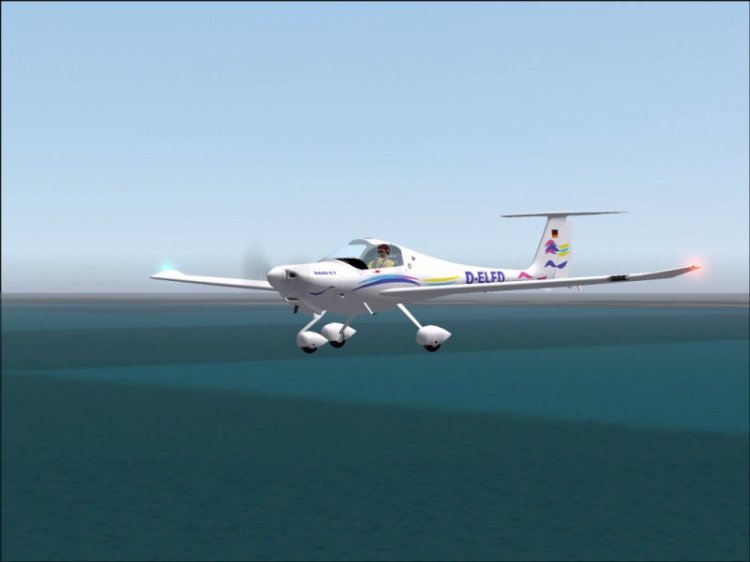
Aircraft Diamond DA20-C1 Evolution. The most complete package.
→ Size:
12 MB
→ Date:
22 years ago (12.02.2004 10:32)
→ Author:
Pavel Toman, Barry Blaisdell, Bob May - Premier Aircraft Design
→ License:
Freeware - Free version, Unlimited Distribution
→ Downloaded:
1309 time(s)