Fokker 100/70 patch Просмотр ZIP-архива
README rcbpf-20.txt
###############################################################################
#                                                                       #
#   Addon package for ProjectFokker PD10070v2 (FS2004)                  #
#                                                                       #
#   By Rob Barendregt                 Release 2.0          2 june 2005  #
#                                                                       #
#########################################################################

This addon package is created and released with the approval of the PF10070
team, and contains the following addon's:

1. A new MultiFunctionDisplayUnit (MFDU) replacing the old Powerplant gauge.
2. A new ATC-ID gauge, displaying the aircraft's registration.
3. Updated Seatbelt/Nosmoking gauges.


The new MFDU contains 3 pages, which can be selected by clicking the page number
on the right-top corner of the MFDU main gauge; it contains the following:

Page1:
- N1/N2/TGT/EPR indicators
  N1/N2/TGT numerals are displayed when the values are in amber or red zones.
- StaticAirTemperature and TotalAirTemperature.
- Warning messages for NoSmoking, Seatbelt, PAX Door and Service Door.
- Reverser(s) active indication.

Page2:
- Fuel info: total fuel, tank contents, fuel-flow and fuel-used.
  Fuel quantity numbers are Green if within limits, but are:
  - Flashing Red, if a tank content is below 5% capacity.
  - Flashing Red, if the total fuel less then 5% capacity (1135 pounds)
  - Red, if the total fuel above the max. allowed, given the weight and payload.
  FuelUsed is derived from FuelFlow, and doesNOT depend on fuel load/dump.
- Fuel units selector, toggling between Pounds, Kilograms, Liters and Gallons (/hour).
- Oil quantity.
- Oil pressure, with min. Oil pressure level depending on N2.
- Oil temperature.
- Engine vibration info.

Page3:
- My GroundProximitiyWarningSystem (V3.2)
  See the file GPWS3_2 User Manual.txt for full operation.
  (NOTE: Ignore the Installation part in this manual)
- A set of "groundhandling" gauges, like pushback, taxispeed control, brakes pressure, etc.
  See the file Groundhandling4_0 User Manual.txt for full operation.
  (NOTE: Ignore the Installation part in this manual)
- A Takeoff gauge, containing:
  - Calculated Vspeeds (V1,VR,V2) for takeoff, depending on weight and flaps.
    The Vspeeds are marked ----- (amber) if not available (wrong flaps or airborne)
  - Gear advisory messages after takeoff.
  - Takeoff warning messages, if the aircraft doesn't have the proper configuration
    for takeoff; like wrong flaps, over-weight and airbrakes/liftdumpers extended.
  - Warnings/advisories are both visible and audible.


Installation:
=============
NOTE1: These instructions assume that the original PF10070v2 aircraft is installed.
NOTE2: If you have my ADDON V1.0 installed: just install as specified below.
       All functionality of V1.0 is included in this version !!

- Extract all files to a temporary folder.
  NOTE: DONOT unzip the .cab files !!
- From this temporary folder:
  - Move the files:
    - panel.cfg
    - PF10070_XMLsound.gau
    - all *.cab files
    to folder ..\Flight Simulator 9\Aircraft\PF10070v2_panel\
    Overwrite the original PANEL.cfg when asked; this new panel.cfg contains a description
    of the changes compared to the original V2.0 panel.cfg file.
  - Extract all files in Sound.zip to folder ...\Flight Simulator 9\Aircraft\PF10070v2_sound\
  - Extract all files in Documentation.zip to a folder of your own choice.


Some IMPORTANT notes:
====================
1. Page3 of the MFDU is implemented as overlay window in the panel.cfg,
   but is selected from the main gauge; therefore the Window-ident in the panel.cfg
   for this window should NEVER be changed.
2. If you use toebrakes pedals and do NOT use a registered version of FSUIPC,
   you must change the panel.cfg:
   Under [Window05], use:
     gauge03=PF10070_Groundhandling!TaxispeedToeBrakes
   instead of
     gauge03=PF10070_Groundhandling!TaxispeedNoToeBrakes.
   In other words: exchange the // in front of these lines.
   The Groundhandling User Manual describes this in detail; failing to do so will
   cause the automatic braking function not to work.
3. All the sounds used in the Page3-gauges can be reduced in volume individually,
   to obtain the best balance between them and your other FS / environment audio.
   To do so:
   - Exit FS2004.
   - Open the file ...\Flight Simulator 9\Aircraft\PF10070v2_sound\XMLSound.ini
     with Notepad.
   - Find the appropriate .wav definition, and change the volume value to another
     value, with:
     - 100 (default): Max volume.
     - 75: Min volume (almost inaudible).
     or any other value between 75 and 100.
   - Save the file.

Copyrights and Disclaimer
============================
This package is freeware (NOT: public domain), and is available for your
personal use only.
Without my explicite permission, it may NOT be sold, re-distributed and/or
uploaded to another website or bulletin board in ANY shape or form.

And obviously, installing & using this package is at your own risk.
However, if you execute the Installation instructions properly, this package
should NOT crash you PC or FS, nor should it have a substantial impact on
performance.


Credits
=======
- The ProjectFokker team, for their wonderfull Fokker100 package.
- Doug Dawson, for his great gauge that allows playing sounds from an XML gauge.
  This gauge (dsd_xml_sound3.gau, V3.2.0.0) is included in this package, and
  renamed as PF10070_XMLSound.gau, to avoid possible future incompatibilities.
- Most of the callouts/warnings are modified versions of existing soundfiles,
  but I was unable to establish their exact origin. I think some originated from
  the FPDA group, and some from Tom Corson. If you recognise them as yours,
  please inform me so I can give you proper credit.
- A. Schouten for his idea to add a registration gauge in the panel (located
  just above the Marker lights)


Enjoy, and fly safe .....

Rob Barendregt, The Netherlands
Email: [email protected]


***************************** End Of Readme ********************************
rcbpf-20.zip
| Имя файла | Дата | Размер |
|---|---|---|
| Documentation.zip | 02.06.2005 04:53 | 79 KB |
| PANEL.cfg | 02.06.2005 04:04 | 16 KB |
| PF10070_ATCID.CAB | 21.05.2005 05:00 | 2 KB |
| PF10070_Cabin.CAB | 21.05.2005 05:01 | 4 KB |
| PF10070_GPWS.CAB | 21.05.2005 05:02 | 14 KB |
| PF10070_Groundhandling.CAB | 25.05.2005 17:13 | 33 KB |
| PF10070_MFDU.CAB | 21.05.2005 05:20 | 12 KB |
| PF10070_Takeoff.CAB | 21.05.2005 05:05 | 5 KB |
| PF10070_XMLsound.gau | 15.04.2005 23:31 | 80 KB |
| rcbpf-20.gif | 31.05.2005 04:50 | 4 KB |
| README rcbpf-20.txt | 02.06.2005 05:18 | 6 KB |
| Sound.zip | 21.05.2005 17:00 | 587 KB |
| avsim_ru.diz | 03.06.2005 05:31 | 637 B |
| Итого: | 842 KB | |
Fokker 100/70 patch
| Rating: 5!
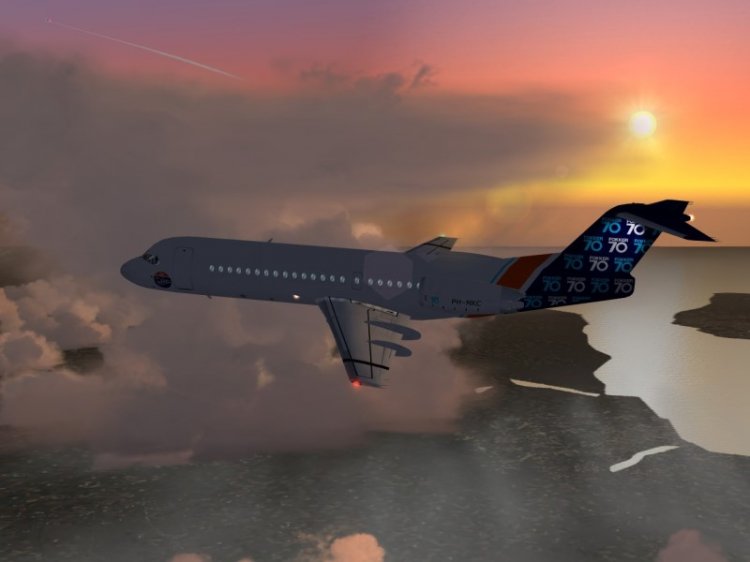
Fokker 100/70 series patches, fixes some bugs, contains new features, such as Pushback function (90 degrees turn, etc), new engine indicators, new sounds... Full package description is available in Readme.
→ Size:
784 KB
→ Date:
21 years ago (03.06.2005 01:30)
→ License:
License file included in archive
→ Downloaded:
4072 time(s)