Mirage F1 Просмотр ZIP-архива
Read First!!!.txt
**********************************************************************************************************************


                                Gmax Mirage F1 version 2.5
                              _____________________________

                                     for FS2004

Contents:

         - Authors
          - Installation
           - Directions
            - Radar info
             - Copyrights
              - Recommended Websites


**********************************************************************************************************************


      AUTHORS:

             Gmax F1 models by Kirk Olsson

             Gauges are from Romain Lucas and Laurent Lucas's excellent SUPER ETENDARD aircraft package.

             HUD, Radar and G-Meter gauges Eric Marciano-  http://emarciano.free.fr

             Engine RPM Gauge by Peter Dooley- (of www.dooley.co.za )

             Gear,flap gauge by Frank Safranek-  http://www.mirage4fs.com

             Airspeed and HSI Gauge - by FSD

***********************************************************************************************************************


I'd like to thank Romain Lucas, Laurent Lucas, Peter Dooley and Eric Marciano for allowing me to use their
gauges. Thanks guys.

I also want to thank Frank Safranek for sharing his knowledge of the F1 with me, helping with the 2d-panel
and making the gear gauge.

Jens-Ole Kjolberg for his repaint work on the SAAF F1CZ textures (SAAF old scheme) and allowing the
inclusion of them in this F1 package.

And Pierre Marchadier for the F1 sound samples that I used to make
my F1 soundset.

Thank you everyone.


***********************************************************************************************************************


File name: F1V25.zip
--------------------

Installation:


(STEP 1.)   Run the Mirage F1 V2.5 install program and follow the on screen directions.


*********************************************************************************************************************


  Important!!! a. Please read the readme.txt named Payload and Fuel before Flying the F1. Fuel and loadout weights will
                  change flight dynamics. This and all readme.txt files can be found in the Documentation folder in
                  the gmaxF1 aircraft folder (located in your main FS9 aircraft folder).
                   Please read all documentation.

               b. For best flight performance make sure realism settings are set to max.

               c. For Virtual Cockpit views I recommend 0.50 or 0.75 zoom.


**********************************************************************************************************************


DIRECTIONS:

1. (Shift+E)  opens canopy

2. (Shift+L) turns on and off ambient cockpit light.

3. (Ctrl+L) turns on and off landing lights.

4. (L) turns on and off all lights.

5. (G) contols the gear.

6. (/) controls Speedbrake.

7. (F5,F6,F7,F8) controls flaps

8. (F1,F2,F3,F4) control the throttle, though it's much easier to fly if you
   have a joystick with a throttle control of it's own.

9. Your (tailhook key) animates pilot visor and refuel probe (on AZ model).

10. Your (Wingfold key) Activates the parked aircraft scenery effects.


11. See JPEG named Cockpit Guide located in the documantation folder for how to turn
    on radar in the virtual cockpit.

12. This Gmax version of the F1 doesn't include the drag chute.

13. If you have the Active Camera program. There are 3 presets named F1a, F1b and F1c.
    They'll give you some cool perspectives to view. You can activate them with the Active Camera
    menu while in FS2004.

14. These Mirage F1's can be found under the manufacturer title of Dassault. Aircraft model names
    are:
          Mirage F1AZ (Medium VC)
          Mirage F1C  (Full VC)
          Mirage F1CR (Basic VC)
          Mirage F1CT (Medium VC)

***************************************************************************************************


2D Panel and virtual cockpit

WARNING: To work properly, the radar requires FSUIPC module, version 2.87 or higher.
You can download it on Pete Dowson's website (http://www.schiratti.com/dowson.html).

You may have to activate the 2D panel at least once so that the radar will work in the VR cockpit.
If that doesn't work you'll have to reload the aircraft from the FS aircraft menu. Also, loading the
aircraft from the 2D panel view may cause the radar not to show correctly in the VRcockpit. Loading
the F1 from a saved situation also will cause the radar in the VRcockpit to not show correctly or work.
--------------------------------------------------------------------------------------------------

Some radar functions are accessible through the following keys:
	- (numpad) / :  Previous radar mode
	- (numpad) * :  Next radar mode
	- (numpad) - :  Decrease radar range
	- (numpad) + :  Increase radar range

For more information about the radar usage, refer to the "panel_doc_radar.gif" file
and Eric Marciano's website: http://emarciano.free.fr
(look for "Mirage 4000"/"radar documentation")

"panel_doc_radar.gif" is located in the documentation folder inside the gmaxF1 aircraft folder.


***************************************************************************************************

Copyrights
----------

This is FREEWARE.

These files are strictly for your own personal, non-commercial use.

The gauges included with this Mirage F1 cannot be used with any other aircraft or panel without the
permission of the gauge authors.

The 2D panel included with this Mirage F1 cannot be used with any other aircraft or panel package without
the permission of the panel author.

Repaints:

This is not an easy plane to repaint, however you are welcome to make repaints as long as they
remain freeware and you acknowledge that you modified my plane. If you make repaints make sure not to
use mip maps. I recommend using the program DXTBMP to insure there will be no mip maps.

*************************************************************************************************************************

Recommended Websites
--------------------

Eric Marciano Home Page (Eric Marciano)- http://emarciano.free.fr

Mirage Aircraft (Frank Safranek) - http://www.mirage4fs.com

*************************************************************************************************************************

2005


-------------------------------------------------------------------------------------------------------------------------
13211_F1V25.zip
| Имя файла | Дата | Размер |
|---|---|---|
| f1v25_big.jpg | 09.08.2005 08:49 | 63 KB |
| f1v25_small.jpg | 09.08.2005 08:51 | 27 KB |
| Cockpit Guide.JPG | 09.08.2005 08:06 | 139 KB |
| Webmaster info..txt | 16.09.2005 21:25 | 1 KB |
| Read First!!!.txt | 02.10.2005 03:38 | 7 KB |
| setup Gmax F1v2.5.exe | 02.10.2005 18:47 | 31 MB |
| avsim_ru.diz | 30.04.2008 19:45 | 480 B |
| Итого: | 32 MB | |
Mirage F1
| Rating: 4.7!
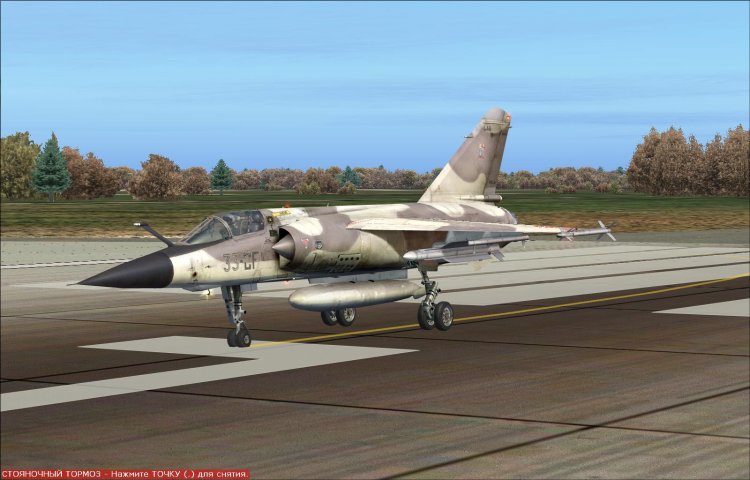
One more Mirage by Roland Laborie.
It was made with such love to this aircraft, that it will please your eyes.
Has virtual cockpit and a great cockpit!
It was made with such love to this aircraft, that it will please your eyes.
Has virtual cockpit and a great cockpit!
→ Size:
31 MB
→ Date:
18 years ago (01.05.2008 08:49)
→ Author:
By Roland Laborie
→ License:
Freeware - Free version, Unlimited Distribution
→ Downloaded:
4586 time(s)