Short 360 Просмотр ZIP-архива
Short 360/Documents/flying_tips.txt
яюGENERAL

The Shorts 360 is a 36-seat derivative of the earlier 30 seat Shorts 330.

Design and production was by Short Brothers of Belfast, Northern Ireland. The firm was later taken over by Bombardier.

The two Shorts airliners share a high degree of commonality and are very close in overall dimensions and size. The later 360 is easily identified by a larger, swept tail unit mounted on a revised rear fuselage. The 330 has a twin fin and rudder tail with a tail loading ramp.

The 360 has a 91 cm (3 ft) fuselage "plug" allowing two more seat rows and six extra passengers to be carried, while the extra length smoothed out the aerodynamic profile and reduced drag. Power is supplied by two Pratt & Whitney PT6A-65R turbo-props, and the 360's wingspan is slightly greater. The development was announced in 1980, the prototype's first flight was on 1 June 1981 with type certification awarded on 3 September 1981.

Today (2009) the 360 is still in service all over the world, as both a short range airliner and a freighter, and the 330 still serves with the U.S. National Guard.

The S360 is officially a STOL (short take off and landing) airliner but because of it's size and weight it can't be regarded as a bush plane. It was intended to serve small provincial airports and it does that job well but it's not suitable for short, semi-prepared, bush air strips.

FLYING TIPS
The model will initialize with the engines running, in FSX you must immediately set the parking brake.

Reduce the prop thrust to low idle by pulling down the fuel levers with your mouse or using keyboard Ctrl-Shift-F2.

Set the autofeather switch to ON.

Taxi with fuel levers in low idle position. For take-off and normal flight set the fuel levers to high.

For take-off at high weight ( full fuel and passengers) use 15 є of flap and also set some nose up trim.

80% power is enough for take-off on all but very short runways.

Raise wheels and flap at or before 150 kts. Re-trim as necessary.

Best cruise altitude is between 8000 ft and 10,000 ft. This aircraft is not pressurized, you can't fly above 10,000 ft and expect to bring back all the passengers alive. On ferry flights, with the crew on oxygen, you can cruise at 15,000 ft.

In cruise flight reduce the prop RPM to 80% - pull down the prop levers with mouse or keyboard Ctrl-F2. Return the prop RPM to 100% for landing.

At 85% power with the prop RPM set at 80% she will cruise at about 195 kts indicated air speed. Your GPS ground speed may show higher or lower than this depending on the current wind speed and direction. Air temperature and air density will also affect your groundspeed reading.

You know when you are best economical cruise when the fuel flow needles point straight up.

When approaching your destination reduce airspeed to 150 kts, lower the wheels and one notch of flap.

Fly your approach at 100-120 kts with 15 є ( 2 notches) of flap. For short runways lower full flaps on final approach but maintain at least 90 kts until you are at the runway threshold.

Use reverse thrust after landing if required.

Shut Down
Set the parking brake.
Set autofeather switch to off.
Pull down the fuel levers to the cut-off position using mouse or Ctrl-Shift-F2, the engines will stop.
Turn off all lights.
Turn off pitot heat.
Turn off avionics switch
Turn off generators ( alternators)
Turn off the battery. Emergency battery warning light will remain illuminated.
Open cargo/passenger doors as necessary.

Manual Start Up
Check parking brake ON.
Turn on battery.
Move fuel levers to Low Idle position.
Operate left starter switch until the engine starts.
Turn on left generator
Operate right starter switch.
Turn on right generator.
Turn on Avionics switch.
Turn on pitot heat.
Turn on Autofeather switch
Turn on beacons. Strobes and landing lights are not normally turned on until you are at the runway ready for take-off. At night/dusk/dawn turn on Nav lights.

Note: If you want to contact ATC before starting the engines the battery switch and the avionics switch must be on.

Useful things to know.
Shift-E opens passenger door and places the airstair.
Shift-E-2 opens the two baggage compartments.
On the cargo version Shift-E-2 also opens the large cargo loading door and the wing fold command (usually Shift-K) will start a cargo load/unload animation.
In VC view CTRL-Enter moves your eyepoint back. To see the passenger or cargo cabin press and hold. In the cabin you can use your hat switch to look around.
CTRL-Backspace moves your eyepoint forward.
Shift-W toggles the yoke on/off in VC panel (Ctrl-W in FSX)
To Raise your seat higher press SHIFT-ENTER (in FSX this only works in VC view)
The spinning props look better in flight if you dab Ctrl-F2 a few times

There are lots of other eypoint commands in FS9 and FSX, a few more are listed in the README_FIRST document.

                                                      end
30360-Short-360.zip
| Имя файла | Дата | Размер |
|---|---|---|
| Short 360/aircraft.cfg | 13.06.2010 18:15 | 17 KB |
| Short 360/CREDITS.txt | 20.02.2009 03:05 | 1 KB |
| Short 360/Documents/ | 13.06.2010 23:03 | |
| Short 360/Documents/flying_tips.txt | 11.02.2009 18:46 | 10 KB |
| Short 360/Documents/installation_UTO2_sound.txt | 10.02.2009 01:09 | 530 B |
| Short 360/Documents/S360_elevator_trim.jpg | 28.01.2009 00:52 | 29 KB |
| Short 360/Documents/S360_Panel_Map.jpg | 05.01.2009 17:04 | 177 KB |
| Short 360/Documents/Thumbs.db | 13.06.2010 23:00 | 9 KB |
| Short 360/model/ | 13.06.2010 23:03 | |
| Short 360/model/Model.cfg | 10.02.2009 23:36 | 36 B |
| Short 360/model/s360_fix12_vcd_up.mdl | 10.02.2009 21:43 | 2 MB |
| Short 360/PAD_s360.air | 07.05.2005 00:02 | 15 KB |
| Short 360/panel.s3609/ | 13.06.2010 23:03 | |
| Short 360/panel.s3609/CRJ700signs.gau | 08.02.2008 20:43 | 38 KB |
| Short 360/panel.s3609/CRJ700signs_0001.GAU | 31.01.2009 14:22 | 38 KB |
| Short 360/panel.s3609/Davtron.gau | 27.08.2003 12:53 | 92 KB |
| Short 360/panel.s3609/fs9gps.cab | 13.06.2003 08:17 | 297 KB |
| Short 360/panel.s3609/GH_Sound.gau | 15.04.2005 22:31 | 80 KB |
| Short 360/panel.s3609/Kingair_C90_Radio.gau | 28.02.2005 13:56 | 456 KB |
| Short 360/panel.s3609/Master.gau | 29.05.2008 18:15 | 4 MB |
| Short 360/panel.s3609/Overhead.bmp | 18.01.2009 15:26 | 2 MB |
| Short 360/panel.s3609/Panel.cfg | 17.02.2009 16:56 | 19 KB |
| Short 360/panel.s3609/rcb_Groundhandling4.cab | 25.05.2005 16:13 | 33 KB |
| Short 360/panel.s3609/rcb-gauges.CAB | 05.12.2007 20:33 | 27 KB |
| Short 360/panel.s3609/s360.CAB | 21.02.2009 15:29 | 614 KB |
| Short 360/panel.s3609/s360_208.gau | 07.12.2007 15:32 | 408 KB |
| Short 360/panel.s3609/s360_annun.CAB | 31.01.2009 12:57 | 34 KB |
| Short 360/panel.s3609/s360_autopilot.CAB | 31.12.2008 13:36 | 21 KB |
| Short 360/panel.s3609/s360_inst.CAB | 05.01.2009 15:34 | 293 KB |
| Short 360/panel.s3609/s360_main.bmp | 27.01.2009 16:22 | 2 MB |
| Short 360/panel.s3609/s360_sw.CAB | 31.01.2009 12:57 | 62 KB |
| Short 360/panel.s3609/weatheradar.CAB | 25.11.2008 03:26 | 802 KB |
| Short 360/README FIRST.txt | 17.02.2009 16:58 | 4 KB |
| Short 360/S360_check.htm | 09.02.2009 17:30 | 59 KB |
| Short 360/S360_ref.htm | 27.01.2009 14:56 | 5 KB |
| Short 360/sound.0/ | 13.06.2010 23:03 | |
| Short 360/sound.0/sound.CFG | 11.02.2009 02:34 | 72 B |
| Short 360/texture.Airlabrador/ | 13.06.2010 23:03 | |
| Short 360/texture.Airlabrador/chrome.bmp | 05.08.2006 18:14 | 64 KB |
| Short 360/texture.Airlabrador/cockpit.bmp | 20.01.2009 00:39 | 512 KB |
| Short 360/texture.Airlabrador/lights.bmp | 18.11.2007 00:55 | 32 KB |
| Short 360/texture.Airlabrador/lights_L.bmp | 17.05.2008 00:58 | 65 KB |
| Short 360/texture.Airlabrador/Overhead_VC.bmp | 19.01.2009 18:07 | 512 KB |
| Short 360/texture.Airlabrador/pilots.bmp | 05.10.2005 21:19 | 257 KB |
| Short 360/texture.Airlabrador/pilots_L.bmp | 06.10.2005 19:30 | 257 KB |
| Short 360/texture.Airlabrador/prop2_TBX.bmp | 26.10.2008 01:07 | 1 MB |
| Short 360/texture.Airlabrador/roue2.bmp | 16.09.2008 00:40 | 65 KB |
| Short 360/texture.Airlabrador/s360_elevator.bmp | 05.02.2009 19:50 | 256 KB |
| Short 360/texture.Airlabrador/s360_engines.bmp | 25.01.2009 02:02 | 1 MB |
| Short 360/texture.Airlabrador/s360_fuse.bmp | 19.02.2009 20:20 | 1 MB |
| Short 360/texture.Airlabrador/s360_interiors.bmp | 05.02.2009 19:50 | 512 KB |
| Short 360/texture.Airlabrador/s360_wings.bmp | 05.02.2009 19:49 | 1 MB |
| Short 360/texture.Airlabrador/VCpanelL.bmp | 12.01.2009 13:17 | 512 KB |
| Short 360/texture.Airlabrador/VCpanelR.bmp | 18.01.2009 01:59 | 512 KB |
| Short 360/texture.Airlabrador/YOKEmap.bmp | 20.01.2009 18:05 | 128 KB |
| Short 360/texture.aurigny puffin/ | 13.06.2010 23:03 | |
| Short 360/texture.aurigny puffin/chrome.bmp | 05.08.2006 18:14 | 64 KB |
| Short 360/texture.aurigny puffin/cockpit.bmp | 20.01.2009 00:39 | 512 KB |
| Short 360/texture.aurigny puffin/lights.bmp | 18.11.2007 00:55 | 32 KB |
| Short 360/texture.aurigny puffin/lights_L.bmp | 17.05.2008 00:58 | 65 KB |
| Short 360/texture.aurigny puffin/Overhead_VC.bmp | 19.01.2009 18:07 | 512 KB |
| Short 360/texture.aurigny puffin/pilots.bmp | 05.10.2005 21:19 | 257 KB |
| Short 360/texture.aurigny puffin/pilots_L.bmp | 06.10.2005 19:30 | 257 KB |
| Short 360/texture.aurigny puffin/prop2_TBX.bmp | 26.10.2008 01:07 | 1 MB |
| Short 360/texture.aurigny puffin/roue2.bmp | 16.09.2008 00:40 | 65 KB |
| Short 360/texture.aurigny puffin/s360_elevator.bmp | 25.01.2009 02:24 | 256 KB |
| Short 360/texture.aurigny puffin/s360_engines.bmp | 25.01.2009 02:02 | 1 MB |
| Short 360/texture.aurigny puffin/s360_fuse.bmp | 19.02.2009 20:22 | 1 MB |
| Short 360/texture.aurigny puffin/s360_interiors.bmp | 01.02.2009 01:00 | 512 KB |
| Short 360/texture.aurigny puffin/s360_wings.bmp | 25.01.2009 02:34 | 1 MB |
| Short 360/texture.aurigny puffin/VCpanelL.bmp | 12.01.2009 13:17 | 512 KB |
| Short 360/texture.aurigny puffin/VCpanelR.bmp | 18.01.2009 01:59 | 512 KB |
| Short 360/texture.aurigny puffin/YOKEmap.bmp | 20.01.2009 18:05 | 128 KB |
| avsim_su.diz | 14.06.2010 02:05 | 406 B |
| Итого: | 29 MB | |
Short 360
| Rating: 4.7!
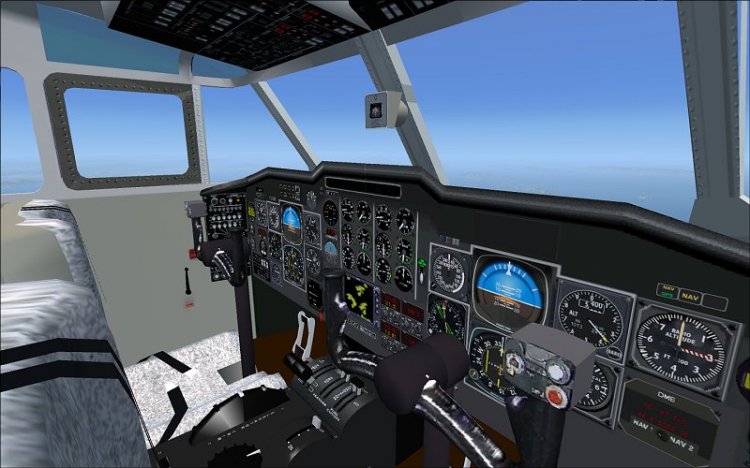
Short 360 with VC and 2 liveries
→ Size:
6 MB
→ Date:
16 years ago (13.06.2010 23:11)
→ Author:
Garrett Smith, Barry Blaisdell,Bob May,Jean-Pierre Brisard
→ Approved by moderator:
Lenya69
→ License:
License file included in archive
→ Downloaded:
1906 time(s)