PDFKneeboard Просмотр ZIP-архива
PDFKneeboard.txt
PDFKneeboard 1.7
================

Every serious flight-simmer eventually ends up referring to charts for their
flying adventures. Whether it's a VFR sectional or more likely an approach
chart for self-study or while flying under virtual ATC services (e.g. in IVAO).

The best coverage and free source for those charts are PDF files available
for download. Unless these pilots have a second screen to render those charts
in heavyweight PDF-apps this means juggling the external application, fighting
for screen estate and struggling to have flight-simulator as well as chart
right at hand ... without getting into each others way.

Now - imagine PDFKneeboard - this flight-sim module renders PDF documents
right inside FS9. It remembers what part of the chart the pilot is looking
at (section, zoom, rotation - for each page), it lets FS9 keep the focus,
remembers opened charts and offers a kneeboard-toggle button.
When the important instrument approach chart is needed a simply joystick
button click brings it right back where the pilot needs it while staying
out of the way when not needed.

Author  : Nils Meier
email   : [email protected]
homepage: http://code.google.com/p/fscode/wiki/PDFKneeboard

Installation:
-------------

This module comes in two versions - one for Flight Simulator 9/2004, the other for FSX.
Please make sure to download the correct version and follow the exact steps below.

 FS9/2004
 --------

 Copy the following file into the module-directory of your local Flight Simulator
 installation (c:\Program Files\Microsoft Games\Flight Simulator 9\Modules)

  PDFKneeboard.dll

 Note: previous releases also contained three more dlls

   jpeg62.dll
   freetype6.dll
   zlib1.dll

 these files are NOT provided NOR required anymore and can be deleted (optional) from
 the flight simulator directory (c:\Program Files\Microsoft Games\Flight Simulator 9)

 FSX
 -------

 Install FSX SP2 - otherwise the module might not work on first startup:

  http://www.fsinsider.com/downloads/Pages/FlightSimulatorXServicePack2.aspx

 Copy the following file into the module-directory of your local Flight Simulator
 installation (C:\Program Files\Microsoft Games\Microsoft Flight Simulator X\Modules)

  PDFKneeboard.dll

 Then open this file in a text editor (e.g. notepad) - on Windows XP

  C:\Documents and Settings\[your username]\Application Data\Microsoft\FSX\dll.xml

 on Windows Vista

  C:\Users\[your username]\AppData\Roaming\Microsoft\FSX\dll.xml

 and add the following lines before the last line like so

     ....
     <Launch.Addon>
        <Name>PDFKneeboard</Name>
        <Disabled>False</Disabled>
        <Path>.\modules\pdfkneeboard.dll</Path>
        <Commandline/>
    </Launch.Addon>
   </SimBase.Document>

 After starting Flight Simulator X confirm that you want to run PDFKneeboard.dll
 and have FSX remember that decision.


 Enjoy!

Uninstall:
----------

 Delete pdfkneeboard.dll from the modules directory (see Installation).

How To Use PDFKneeboard:
--------------------

 Find the kneeboard menu item in the modules/simconnect menu inside MS Flight Simulator.

  PDFKneeboard|Show Kneeboard             - show kneeboard
  PDFKneeboard|Hide kneeboard             - hide kneeboard
  PDFKneeboard|Open Document              - open PDF document
  PDFKneeboard|Close Document             - close currently displayed PDF document
  PDFKneeboard|Settings...     - open settings

The following keyboard shortcuts are pre-defined by default and available while
the flight simulator window is active (can be changed in settings):

  K              - toggle kneeboard visible/hidden
  Ctrl+O         - open PDF document

  Ctrl+W         - close currently displayed PDF document
  Ctrl+Shift+W   - close all PDF documents

  Ctrl+Tab       - switch to next document
  Ctrl+Shift+Tab - switch to previous document

  Page Up        - prev page
  Page Down      - next page

  Ctrl+=         - zoom in
  Ctrl+-         - zoom out
  Ctrl+0         - zoom to 100%

 Use the following mouse actions to manipulate the kneeboard view:

  Mouse Wheel Up/Down           - prev/next page
  Ctrl+Mouse Wheel Up/Down      - zoom in/out
  Shift+Mouse Wheel Up/Down     - counter/clockwise rotate page

License:
--------

 This Flight Simulator Module is Freeware. Copyright (C) Nils Meier.
 You can distribute this archive in its original released form. NO
 charge may be made for this archive whether as-is or repackaged in
 another archive.

 Disclaimer: PDFKneeboard should work and has been tested by the author
 but use it at your own risk ... boilerplate follows:

 THIS SOFTWARE IS PROVIDED BY THE AUTHOR ``AS IS'' AND ANY EXPRESS
 OR IMPLIED WARRANTIES, INCLUDING, BUT NOT LIMITED TO, THE IMPLIED
 WARRANTIES OF MERCHANTABILITY AND FITNESS FOR A PARTICULAR PURPOSE
 ARE DISCLAIMED.  IN NO EVENT SHALL THE AUTHOR OR CONTRIBUTORS BE
 LIABLE FOR ANY DIRECT, INDIRECT, INCIDENTAL, SPECIAL, EXEMPLARY, OR
 CONSEQUENTIAL DAMAGES (INCLUDING, BUT NOT LIMITED TO, PROCUREMENT
 OF SUBSTITUTE GOODS OR SERVICES; LOSS OF USE, DATA, OR PROFITS; OR
 BUSINESS INTERRUPTION) HOWEVER CAUSED AND ON ANY THEORY OF LIABILITY,
 WHETHER IN CONTRACT, STRICT LIABILITY, OR TORT (INCLUDING NEGLIGENCE
 OR OTHERWISE) ARISING IN ANY WAY OUT OF THE USE OF THIS SOFTWARE,
 EVEN IF ADVISED OF THE POSSIBILITY OF SUCH DAMAGE.
31193-PDFKneeboard17.zip
| Имя файла | Дата | Размер |
|---|---|---|
| PDFKneeboard.txt | 12.01.2009 11:54 | 5 KB |
| modules/ | 06.01.2009 22:26 | |
| modules/pdfkneeboard.dll | 12.01.2009 11:55 | 1 MB |
| avsim_su.diz | 18.07.2010 16:50 | 406 B |
| Итого: | 1 MB | |
PDFKneeboard
| Rating: 5!
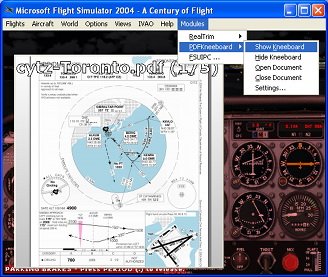
Convenient and simple utility for viewing PDF-files. Calling the program through the menu simulator or "hot-key".
→ Size:
589 KB
→ Date:
15 years ago (18.07.2010 12:57)
→ Author:
nils.meier
→ Approved by moderator:
Denizzz
→ License:
Freeware - Free version, Unlimited Distribution
→ Downloaded:
4998 time(s)