HECA - Cairo International, Egypt Просмотр ZIP-архива
Readme.txt
Thank you for downloading this Alpha India Group AFD/Afcad.  Alpha India Group Afcad Development Team produce high quality AFD's (Afcads) for FS2004 and for FSX.

*******************************************************************************

DETAILS:

Developed By: 	Matthew Brooks
Released By: 	Alpha-India Group
For FS Version: FSX (Default Airport)
Airport:        HECA - Cairo International Airport, Egypt
E-Mail: 	[email protected]
Support: 	www.alpha-india.net/forums/index.php

********************************************************************************
Join the Team:

AIG Ground is actively seeking Afcad developers eager to learn, share knowledge and willing to adapt to AIG standards to join our team developing high quality Afcads for FS2004 and for FSX.

If this interests you, please visit our Forums at www.alpha-india.net/forums/index.php and see the more detailed post about this.

********************************************************************************
Cairo International Airport is Egypt's largest international airport and is one of the major airports in the Middle East, with major expansion work well in hand - including the newly opened Terminal 3 for Egyptair and Star Alliance and a fourth runway opening this year.

Egyptair, a new Star Alliance member, is based at Cairo and the airport sees scheduled and charters traffic from many major Middle Eastern, European, North African and Asian airlines.  Second largest user of the airport is Saudi Arabian Airlines.

The airport has substantial cargo traffic from Egyptair, other Egypt based cargo airlines and a range of Middle Eastern, Russian, Ukrainian and U.S. based carriers.  A significant portion of the airport is still in military use by the Egyptian Air Force Hercules transports.  The airport is also the base of Petroleum Air Services, which has a parking area set aside and serves oilfields in Egypt and elsewhere in the middel East.

********************************************************************************

Main Changes:

1.  Re-drew all aprons and taxiways to real world, including re-aligning taxiways to the real position.

2.  Laid out parking throughout the airport as shown in Jeppesen charts from January 2010 - aside from miltary parking which was absed on Google Earth images of May 2008.

3.  Added the new Terminal 3 and supporting aprons. Terminal 3 was constructed from the FSX buildings library.  Added jetway extensions to terminals 2 and 3.

4.  Created a very much closer representation of Terminal 1 and added several hangars, side buildings, offices and more from the FSX buildings library.

5.  The original runway 05R/23L designation and approach code changed to 05C/23C - this change in designation has already taken place in reality.

6.  Added the new runway 05R/23L opening this year (2010) along with the new taxiways, taxi signs and an ILS approach.  Also added runway lighting based on that used on the other 3 runways as no data is currently available for the new runway.

7.  Set up an optional file with the activation of the crosswind runway 16/34, enabling all 4 runways to be in full operation.

8.  Closed Terminal 2 - as happened on 1st April 2010.  The terminal is to be completely refubrished and integrated more completely into the new Termianl 3 building.

9.  Added extra fuel trucks, support vehicle roads, edited all existing taxisigns, added a fire station and made numerous other airport improvements.

10.  Airport views are from inside the main the control tower (when in tower view).

11. Added extensive scenery items to the airport - and particularly to the area between terminals 1 and 3 - to add greater realism to the airport.

*********************************************************************************

Preparation, Verification and Testing:

1.  Verified against Jeppesen Charts dated January 2010, Google Earth imaged dated May 2008 and various Airliners.net photos dated in 2009.

2.  Tested with WOAI, UGA, custom AI, default AI and Henry Tomkiewicz's Cessna package (payware)

3.  Extensively Beta tested by members of the AIG Afcad Development team and other AIG team members - thanks guys !


*********************************************************************************
Personal thanks:  this airport was developed jointly with Ray Smith, who committed many hours over two months to developing several elements of it and to suggesting aspects which could be improved. Without Ray's experience and participation, the airport would not have been comprehensively covered as it has been.  Ray did not wish to be mentioned as joint author because he is not a member of the AIG Ground team and is mentioned in this way only by his own wish.

********************************************************************************

Credits:

Jon Masterson and the ADE (Airport Design Editor) development team for this by invaluable freeware utility for developing Airports.  The latest version - 1.47.07 - is designed for both FSX and FS9 use - using Jim Vile's graphical approach editor to FS9 use as well.  My thanks to both Jim and Jon for all their help and support on this and all AIG projects.

Jim Dhaenens for kind permission to use his lights, radars and hangars in any AIG projects and which are used widely here.

*********************************************************************************

Installation:

1.  Ensure that you do not have any other bgl file for Cairo International Airport - HECA - in FSX.  If you have, remove the file from FSX or delete it.

2.  Place the file of your choice: AIG_HECA_CW_ADEX_MB_Default.bgl or AIG_HECA_ADEX_MB_Default.bgl and AIG_HECA_ADEX_MB_Default_CVX.bgl in your Addon Scenery/scenery folder.

PLEASE NOTE:  AIG_HECA_CW_ADEX_MB_Default.bgl is the crosswind runway version and has all 4 runways in full operation.  AIG_HECA_ADEX_MB_Default.bgl is the same as the default runway operation.  AIG_HECA_ADEX_MB_Default_CVX.bgl contains landclass and other scenery elements and should be placed in your Addon Scenery/scenery folder together with whichever airport bgl you choose.

3.  Place lightobj.bgl and radars.bgl in your Scenery/Global/scenery folder.

4.  Place lights1.dds, almwht.dds, asr9.dds, asr9_N.dds and gray.dds in your Scenery/Global/Texture folder.

5.  There are static jetway extensions, and to see these you need to add the textures for them, please follow these steps:

Browse to the FSX\Scenery\NAME\Texture folder. Go down the list until you see jfk_jetway.dds (day texture) and  jfk_jetway_LM.dds (night texture).

"COPY" them from that folder and then "PASTE" them into the Scenery\Global\Texture folder.

Note:  If you have taken steps 3, 4 and 5 before with other airports and have these textures installed, you do not need to repeat them.


Uninstall:

1.  Remove or delete the file AIG_HECA_CW_ADEX_MB_Default.BGL or AIG_HECA_ADEX_MB_Default.bgl and AIG_HECA_ADEX_MB_Default_CVX.bgl from your Addon Scenery/scenery folder and re-start FSX.

Comments and feedback appreciated.  Look out for further Alpha India Group Afcads coming soon!

Matthew
31359-aig-heca-cairo-egypt-fsx-default.zip
| Имя файла | Дата | Размер |
|---|---|---|
| HECA.JPG | 02.05.2010 02:01 | 261 KB |
| AIG Ground FSX.png | 11.12.2009 22:58 | 16 KB |
| Readme.txt | 22.05.2010 22:57 | 7 KB |
| almwht.dds | 17.10.2008 02:22 | 64 KB |
| asr9.dds | 28.04.2009 21:06 | 128 KB |
| asr9_N.dds | 28.04.2009 21:11 | 128 KB |
| gray.dds | 23.01.2009 10:42 | 128 KB |
| lights1.dds | 06.11.2008 13:21 | 32 KB |
| radars.bgl | 28.04.2009 20:45 | 2 MB |
| lightobj.bgl | 04.09.2009 15:34 | 644 KB |
| AIG_HECA_CW_ADEX_MB_Default.BGL | 26.05.2010 19:16 | 287 KB |
| AIG_HECA_CW_ADEX_MB_Default_CVX.bgl | 26.05.2010 19:16 | 5 KB |
| avsim_su.diz | 26.07.2010 20:08 | 406 B |
| Итого: | 3 MB | |
HECA - Cairo International, Egypt
| Rating: 5!
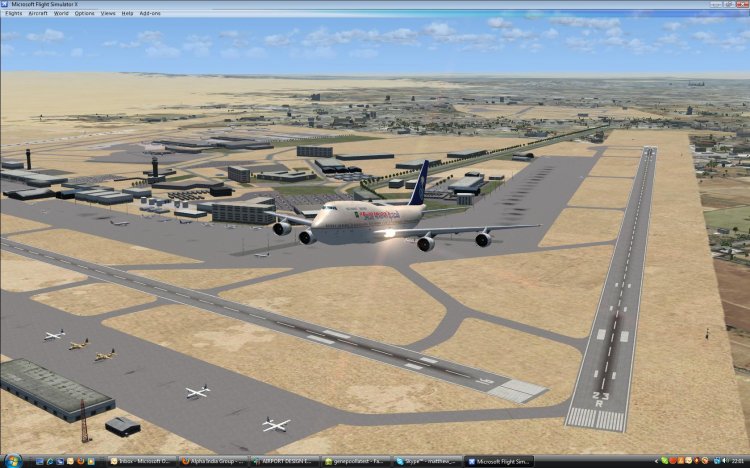
This is part of the ninth round of airports issued by Alpha India Group. AIG Ground aims to create high quality Afcads for both FS2004 and for FSX default and Add On Scenery airports. Our airports are created drawing on the best available resources and aim to simulate the real world airport as closely as possible but also to ensure good levels of traffic with realistic parking and good flow of traffic around the airport.
Please read and follow installation instructions in the Readme file carefully, as these do vary.
Visit us at www.alpha-india.net for more information.
Please read and follow installation instructions in the Readme file carefully, as these do vary.
Visit us at www.alpha-india.net for more information.
→ Size:
1 MB
→ Date:
16 years ago (26.07.2010 16:40)
→ Author:
Matthew Brooks & Alpha India Group
→ Approved by moderator:
SLAVJAN
→ License:
Freeware - Free version, Do Not Redistribute
→ Downloaded:
1749 time(s)