QualityWings 757 - Gem Airlines Просмотр ZIP-архива
GEM_AIRLINES_REPAINTS/752/Readme.txt
!!!THIS IS A FICTIONAL REPAINT!!!

752 P&W GEM MANUAL INSTALLATION

FOR FSX ONLY!!!!!!!!!!!

Use this method if your Livery Manager doesn't work, or you have some other problem along the lines of that.

1a. Extract this whole folder to a area of your choice.

1b. Please make backups before you start if you are not sure.

2. Simply copy and paste the texture.GEM folder into your ...[drive]:\Microsoft Games\Flight Simulator X\SimObjects\Airplanes\QualityWings 752 Passenger folder.

3. Then, add the following to your Aircrft.cfg file (replacing the XX’s with the next available number)

[fltsim.xx]
title = QWings Boeing 757-200WL GEM PW WV
model = PW_WV
ui_variation = GEM PW WV
texture = GEM
atc_id = N172GM
atc_airline = GEM
atc_parking_codes = TWA
atc_parking_types = GATE, RAMP
sim = QWSim Boeing 757-200 Pratt & Whitney PW2043
panel = mainHD
sound = pw
kb_checklists = QW757_Check
kb_reference = QW757_Ref
ui_manufacturer = Boeing-QWSim
ui_type = 757-200
atc_flight_number = 1332
atc_heavy =
description = Qualitywings Simulations \nBoeing 757-200\nVersion 1.2\n\nEngine Type: Pratt & Whitney PW2043 \n\nModel Designer\n   Stefano Anedda\n   Lars Roennig\nFlight Dynamics Designer\n   Brandon D. Henry, Nick Peterson\n\nMaster Texture Designer\n   Corey Ford\n\nFlightdeck Development\n   Jacob Kubique\n   Ernie Alston\n\nSounds\n   Emil Serafino\n\n Repaints\n   Tom Collins\n   Corey Ford\n   David Aquino\n\n
atc_id_color = 0x00000000
atc_id_font = Verdana,-11,1,600,0
visual_damage = 0
ui_typerole = Commercial Airliner
ui_createdby = QualityWings Simulations


If you have any problems, requests or suggestions, then just let me know, and I will try my best to assist.

Enjoy !

Jim Hodkinson

I repackaged this file a little and made it easier to manually install this repaint. Repaint by Jim Hodkinson, ALL credit goes to him.

Have fun,

Jacky Liang
52431-GEM-AIRLINES-REPAINTS.zip
| Имя файла | Дата | Размер |
|---|---|---|
| GEM_AIRLINES_REPAINTS/ | 27.12.2013 02:00 | |
| GEM_AIRLINES_REPAINTS/752/ | 27.12.2013 01:58 | |
| GEM_AIRLINES_REPAINTS/752/QW_752_PW_GEM_FSX_03.QWL | 25.05.2013 04:09 | 5 MB |
| GEM_AIRLINES_REPAINTS/752/QW_752_RR_GEM_FSX_03.QWL | 25.05.2013 04:16 | 5 MB |
| GEM_AIRLINES_REPAINTS/752/QW_752_RRC_GEM_FSX_03.QWL | 10.03.2013 17:24 | 5 MB |
| GEM_AIRLINES_REPAINTS/752/Readme.txt | 27.12.2013 01:58 | 2 KB |
| GEM_AIRLINES_REPAINTS/753/ | 27.12.2013 01:51 | |
| GEM_AIRLINES_REPAINTS/753/QW753PW_GEM_FSX_01.QWL | 25.05.2013 04:43 | 5 MB |
| GEM_AIRLINES_REPAINTS/753/QW753RR_GEM_FSX_01.QWL | 25.05.2013 04:41 | 6 MB |
| GEM_AIRLINES_REPAINTS/QW_753_GEM_01.jpg | 25.05.2013 04:54 | 251 KB |
| GEM_AIRLINES_REPAINTS/Readme.txt | 27.12.2013 02:09 | 1 KB |
| avsim_su.diz | 27.12.2013 09:22 | 406 B |
| Итого: | 26 MB | |
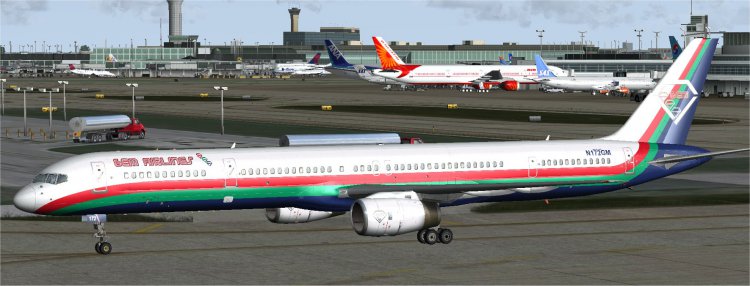
A fictional repaint for the QualityWings 757.
Вымышленный перекрасить для QualityWings 757.
Вымышленный перекрасить для QualityWings 757.
→ Size:
25 MB
→ Date:
12 years ago (27.12.2013 08:27)
→ Author:
James Hodkinson AKA hodge001
→ Approved by moderator:
freefrog
→ License:
Freeware - Free version, Unlimited Distribution
→ Downloaded:
89 time(s)