Genoa LIMJ - 2016 Просмотр ZIP-архива
README & Installation.txt
***Genoa (LIMJ) Airport***
Thank you for downloading the UltiMax Freeware Scenery for Genoa, Italy.
The new scenery includes:
Over 100km2 of Photorealistic Scenery
Accurate ports and city layout
Nearby roads with moving traffic
Static Ships nearby
Port cranes
Static Aircraft
Static Airport vehicles
Animated service vehicles (default)
Accurate Airport Layout
Animated Jetways
Accurate placement of terminal buildings
Hangars
Static and animated ground crew
Fire engines/ fire station
Car parks
Excellent night lighting including:
Ramp lighting
Road lighting
City Lighting
Some of Genoa city modelled
Similar FPS to Generic airport

***Installation***
The Scenery comes in 3 parts, the Airport, The Photoreal scenery and nearby city objects such as boats, cranes etc.
To install the scenery copy and paste the Genoa (LIMJ) scenery folder from here to:
C:\Program Files (x86)\Microsoft Games\Microsoft Flight Simulator X\Addon Scenery\scenery
Now all the scenery is in the FSX folder. To activate the scenery Open FSX and go to settings/scenery library.
Click Add new area and go to; C:\Program Files (x86)\Microsoft Games\Microsoft Flight Simulator X\Addon Scenery\scenery\Genoa (LIMJ)\Scenery
Now you should see 3 BGL files called:
Genoa Photoreal
LIMJ Airport
LIMJ Objects

Click on LIMJ airport and press OK. Now a loading box should appear, if so you have successfully dded the scenery to FSX,
However, if when you click add new area and go to the LIMJ scenery folder and you see NO BGL files, just type LIMJ Airport.BGL into the
directory box below and it should install fine!
Happy Flying ;-)

*NOTE*
The copyright bit
This scenery is FREEWARE and remains property of UltiMax FSX Sceneries. Do not under ANY circumstances try and pass this off as your own,
However, making a review or video of the scenery and clearly displaying it as UltiMax's scenery, is more than welcome.

Please feel free to email [email protected] if you have any issues, comments or suggestions for scenery,
thanks
58761-fsx-genoa-2016.zip
| Имя файла | Дата | Размер |
|---|---|---|
| Genoa (LIMJ)/Scenery/ | 08.04.2016 13:58 | |
| Genoa (LIMJ)/Scenery/enbseries.ini | 02.04.2016 16:50 | 2 KB |
| Genoa (LIMJ)/Scenery/Genoa Photoreal.bgl | 01.04.2016 23:48 | 38 MB |
| Genoa (LIMJ)/Scenery/LIMJ Airport.bgl | 05.04.2016 14:17 | 111 KB |
| Genoa (LIMJ)/Scenery/LIMJ Objects.BGL | 03.04.2016 23:21 | 4 KB |
| Genoa (LIMJ)/Texture/ | 01.04.2016 23:49 | |
| README & Installation.txt | 08.04.2016 14:20 | 2 KB |
| Airport Codes and flight info.txt | 08.04.2016 14:27 | 400 B |
| Screenshots/2016-04-04 (3).png | 04.04.2016 23:10 | 791 KB |
| Screenshots/2016-04-04 (4).png | 04.04.2016 23:10 | 772 KB |
| Screenshots/2016-04-04 (5).png | 04.04.2016 23:11 | 2 MB |
| Screenshots/2016-04-04 (6).png | 04.04.2016 23:12 | 815 KB |
| Screenshots/2016-04-04 (7).png | 04.04.2016 23:13 | 2 MB |
| Screenshots/2016-04-04 (8).png | 04.04.2016 23:14 | 1 MB |
| Screenshots/2016-04-04 (9).png | 04.04.2016 23:15 | 804 KB |
| avsim_su.diz | 17.04.2016 17:42 | 406 B |
| Итого: | 45 MB | |
Genoa LIMJ - 2016
| Rating: 4!
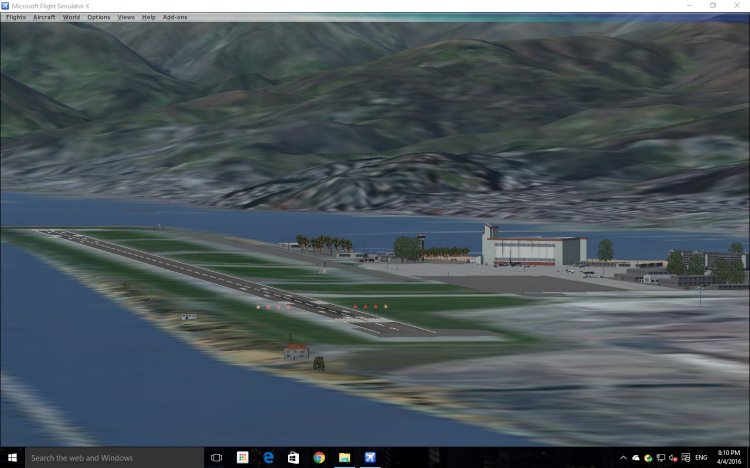
FSX Genoa (LIMJ) Scenery, Italy. This package contains over 70 square miles of photorealistic scenery of Genoa and the surrounding area. New features of the airport include: photorealistic scenery, accurate parking/taxiways, extra taxi signs, accurate placement of tower, terminals, etc., accurate road layout with moving traffic, accurate placement of buildings in the city, static/animated ground crew, static ships, static aircraft, excellent FPS, excellent night lighting including ramp lighting, 'back of airport' includes car park, etc., animated jetways. By UltiMax FSX Sceneries.
→ Size:
42 MB
→ Date:
10 years ago (17.04.2016 14:41)
→ Author:
→ Approved by moderator:
SLAVJAN
→ License:
Freeware - Free version, Unlimited Distribution
→ Downloaded:
976 time(s)