Guam airport FSX Просмотр ZIP-архива
guam x v2/Readme Guam.txt
PGUM A.B Won Pat International Airport V2 for FSX SP2/Acceleration
---------------------------------------------------------------

Software i have used, and with my special thanks to:

AWG simulations

Peter Fabian

Florian


Airport Design Editor 1.50 by Jon Masterson, ScruffyDuck Software


SBuilderX v3.13 by Luis Sa of ptsim.com


Google Sketchup 8.0


ModelConverterX 1.2 by Arno Gerretsen


VGDS Tweaker 1.02  by Arno Gerretsen


textures from http://www.cgtextures.com/

FX editor

Gimp 2

Photoshop

MS Paint

Autogen annotator

FSX SP2 SDK


---------------------------------------------------

New in this version:

-Added apron flood lightning (there will be light on the apron now)

-improved runway guard lights

-volumetric grass at the land side of the airport

-jetways m ore realistic

-tried to improve better frames

-smoother blending background

-removed taxiway signs from taxiway, and add them to the right places

-removed some FPS dropping objects

-added some  more cars

-animated flags

- runway details like skidmarks and some more, worked with layer technique

- custom road lightning

note: there are some buildings they i have improved because a lack of information about them.
if there is some more info about these buildings i will correct the layout of them.

---------------------------------------------
This version of the scenery comes with an installer
---------------------------------------------

How to install:


Important!
----------
extract the zip to a folder of choice, inside you will find the installer

1- First deactivate and remove all the old guam scenery folders

2- click on the installer, and browse to your directory where you have installed FSX, and browse to the addon scenery folder and
   install the scenery in that folder

3- put the effect files from the Guam folder manualy to your FSX effect folder

4- go to your addon scenery library, and add the scenery files in the following order

first the landscape folder and second the Guam airport folder

thats it!
------------------------------------


I hope you will enjoy the scenery


For ideas suggestions and bugs:

Contact M vd linden

E-mail: [email protected]
48647-guam-x-v2.zip
| Имя файла | Дата | Размер |
|---|---|---|
| guam x v2/ | 18.02.2013 17:59 | |
| guam x v2/Guam X v2.exe | 18.02.2013 17:54 | 169 MB |
| guam x v2/Readme Guam.txt | 18.02.2013 16:55 | 2 KB |
| guam x v2/screenshots/ | 18.02.2013 17:59 | |
| guam x v2/screenshots/Guam intl at night.BMP | 04.02.2013 02:54 | 5 MB |
| guam x v2/screenshots/guam x v2.bmp | 18.02.2013 16:11 | 4 MB |
| guam x v2/screenshots/guam x v2.jpg | 18.02.2013 17:17 | 108 KB |
| guam x v2/screenshots/jetway details.BMP | 18.02.2013 17:14 | 4 MB |
| guam x v2/screenshots/overview airport.BMP | 18.02.2013 17:16 | 5 MB |
| guam x v2/screenshots/overview city.BMP | 18.02.2013 17:15 | 4 MB |
| guam x v2/screenshots/runway guard lights.BMP | 18.02.2013 17:13 | 4 MB |
| guam x v2/screenshots/volumetrc grass.BMP | 18.02.2013 17:13 | 4 MB |
| avsim_su.diz | 19.02.2013 00:34 | 406 B |
| Итого: | 199 MB | |
Guam airport FSX
| Rating: 4.7!
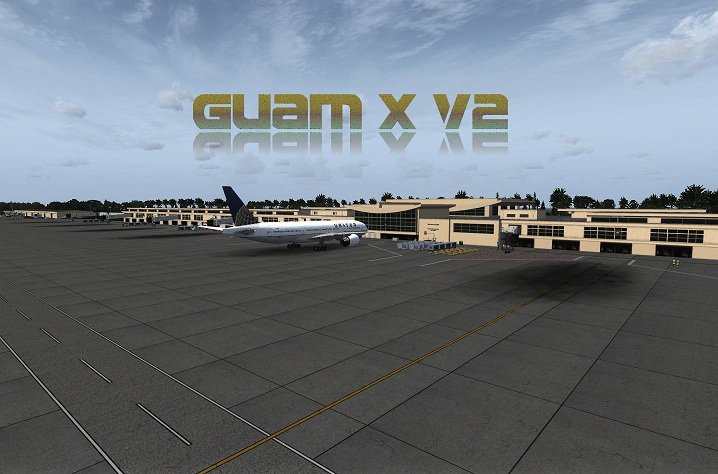
Antonio B. Won Pat International Airport (IATA: GUM, ICAO: PGUM), is an airport located in Tamuning and Barrigada, three miles east of the capital city of Haga in the United States territory of Guam.
→ Size:
180 MB
→ Date:
13 years ago (18.02.2013 22:20)
→ Author:
morten thomas van der linden
→ Approved by moderator:
SLAVJAN
→ License:
Freeware - Free version, Unlimited Distribution
→ Downloaded:
728 time(s)