sctdraw 1.0 Просмотр ZIP-архива
readme.txt
1. Basics

Sctdraw finds JeppView or AFCAD window.
For JeppView it searches for window, containing "JeppView" in it's title, for
AFCAD - "adcad" (JeppView 3.6.2.0 and AFCAD 2.21 were used while writing sctdraw).
It then grabs geographic coordinates from the status bar.
In JeppView set precision=3 in Tools->Options.
In AFCAD set Lat/Long Format=N49:15:45.1234 in Tools->Options.

2. Typical usage

- Single point
Press F8 to write single point.

- Line
Press F9 to grab first point, then F10 for next points to draw continious line.

- Area
Press F9 to grab first point, then F10 for nex points to draw continious line,
then F11 to connect the last and the first points.

Before and after fields are written before and after coordinates.
After each writing new line is started.
SCT/ESE button changes recording format (.sct/.ese files).
21344-sctdraw.zip
| Имя файла | Дата | Размер |
|---|---|---|
| readme.txt | 16.06.2009 03:53 | 862 B |
| sctdraw.exe | 16.06.2009 03:46 | 56 KB |
| avsim_su.diz | 16.06.2009 05:54 | 406 B |
| Итого: | 57 KB | |
sctdraw 1.0
| Rating: 4.5!
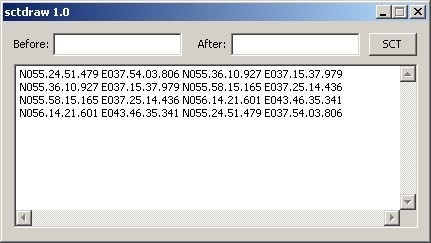
Sctdraw helps to get data for sector files (.sct & .ese) from JeppView and AFCAD. It grabs mouse coordinates and allows to draw points, lines and closed areas.
→ Size:
31 KB
→ Date:
17 years ago (16.06.2009 02:00)
→ Author:
Сергей Зырянов
→ Approved by moderator:
AirArt
→ License:
Freeware - Free version, Unlimited Distribution
→ Downloaded:
514 time(s)