Panel A340 Просмотр ZIP-архива
A340/Docs/Pedestal.htm
<!DOCTYPE HTML PUBLIC "-//W3C//DTD HTML 4.01 Transitional//EN">
<html>
<head>
<title>Pedestal</title>
<meta http-equiv="Content-Type" content="text/html; charset=iso-8859-1">
</head>

<body bgcolor="#00FFFF" text="#0000FF" link="#0066FF" vlink="#FF00FF">
<div align="center">
  <p><font size="+3">PEDESTAL</font></p>
  <p><img src="Images/PEDESTAL.jpg" width="916" height="966"></p>
  <table width="835" border="0">
    <tr>
      <td><font color="#0000FF" size="+2">1. Flight Information Panel Power switch.</font></td>
      <td><font color="#0000FF" size="+2">17. Selects Com 2 as active.</font></td>
    </tr>
    <tr>
      <td><font color="#0000FF" size="+2">2. Selects Time Display.</font></td>
      <td><font color="#0000FF" size="+2">18. Selects Com 1 as active.</font></td>
    </tr>
    <tr>
      <td><font color="#0000FF" size="+2">3. Selects Weather Display.</font></td>
      <td><font color="#0000FF" size="+2">19. Speed Brake handle.</font></td>
    </tr>
    <tr>
      <td><font color="#0000FF" size="+2">4. Selects Flight Data Display.</font></td>
      <td><font color="#0000FF" size="+2">20. Parking Brake.</font></td>
    </tr>
    <tr>
      <td><font color="#0000FF" size="+2">5. Selects Flight Plan Data Display.</font></td>
      <td><font color="#0000FF" size="+2">21. Air Ram switch (shift-w).</font></td>
    </tr>
    <tr>
      <td><font color="#0000FF" size="+2">6. Radio 1 Standby Freqs.</font></td>
      <td><font color="#0000FF" size="+2">22. Engines 1~4 starter switches.</font></td>
    </tr>
    <tr>
      <td><font color="#0000FF" size="+2">7. Swaps Standby to Active.</font></td>
      <td><font color="#0000FF" size="+2">23. Flap Lever.</font></td>
    </tr>
    <tr>
      <td><font color="#0000FF" size="+2">8. Radio 1 Active Freqs.</font></td>
      <td><font color="#0000FF" size="+2">24. Engines 1~4 Fuel Master switches.</font></td>
    </tr>
    <tr>
      <td><font color="#0000FF" size="+2">9. Standby Freq Tuning Knob.</font></td>
      <td><font color="#0000FF" size="+2">25. Throttles.</font></td>
    </tr>
    <tr>
      <td><font color="#0000FF" size="+2">10. Selects Com 1 for display and tuning.</font></td>
      <td><font color="#0000FF" size="+2">26. Transponder Power switch.</font></td>
    </tr>
    <tr>
      <td><font color="#0000FF" size="+2">11. Selects Nav 1 for display and tuning.</font></td>
      <td><font color="#0000FF" size="+2">27. Transponder Display.</font></td>
    </tr>
    <tr>
      <td><font color="#0000FF" size="+2">12. Radio 1 Power switch.</font></td>
      <td><font color="#0000FF" size="+2">28. Transponder Adjustment knobs.</font></td>
    </tr>
    <tr>
      <td><font color="#0000FF" size="+2">13.Marker Audio switch.</font></td>
      <td><font color="#0000FF" size="+2">29. ADF Power switch.</font></td>
    </tr>
    <tr>
      <td><font color="#0000FF" size="+2">14. ADF Ident switch.</font></td>
      <td><font color="#0000FF" size="+2">30. ADF Display.</font></td>
    </tr>
    <tr>
      <td><font color="#0000FF" size="+2">15. Nav 2 Ident switch.</font></td>
      <td><font color="#0000FF" size="+2">31. ADF Adjustment knobs.</font></td>
    </tr>
    <tr>
      <td><font color="#0000FF" size="+2">16. Nav 1 Ident switch.</font></td>
      <td><font color="#0000FF" size="+2"> </font></td>
    </tr>
  </table>
  <p> </p>
  <p align="left"><font size="+3">FLIGHT INFO PANEL- <font size="+2">The flight
    informational panel displays additional info, it is not an FMC (Flight Management
    Computer). If any one has the desire to build an FMC for this panel, I can
    supply a full set of graphics. The FIP right now has 4 different displays,
    F-Plan, Flight Data, Weather Data and Time Data. Following is a picture of
    the 4 different displays. The items are pretty self explanatory.</font></font></p>
  <p align="center"><font size="+3">F-Plan</font></p>
  <p align="center"><img src="Images/FIP_1.jpg" width="390" height="415"></p>
  <p align="center"><font size="+2">ETA is the time you will arrive at the next
    way point in Local Time.</font></p>
  <p align="center"> </p>
  <p align="center"><font size="+3">Flight Data</font></p>
  <p align="center"><img src="Images/FIP_2.jpg" width="390" height="415"></p>
  <p align="center"><font size="+2">MSL is Mean Sea Level, this is your altitude
    above sea level, it is also the altitude used by ATC and that you file your
    flight plans with.</font></p>
  <p align="center"><font size="+2">AGL is Above Ground Level, this is simply
    your height above the surrounding terrain.</font></p>
  <p align="center"> </p>
  <p align="center"><font size="+3">Weather Data</font></p>
  <p align="center"><img src="Images/FIP_3.jpg" width="390" height="415"></p>
  <p align="center"><font size="+2">The barometric pressure displayed here will
    always read the local sea level pressure, regardless of what altitude you
    are at or what is set in the altimeter.</font></p>
  <p align="center"> </p>
  <p align="center"><font size="+3">Time</font></p>
  <p align="center"><img src="Images/FIP_4.jpg" width="390" height="415"></p>
  <p align="center"><font size="+2">The Time to WayPoint and Time to Destination
    are the in local time.</font></p>
  <p align="center"> </p>
  <p align="center"><font size="+3">RADIOS</font></p>
  <p align="center"><img src="Images/RADIOS.jpg" width="581" height="556"></p>
  <p align="center"><font size="+2">The radios on the lower panel and on the pedestal
    are the same. One radio has Com 1 and Nav 1 the other is Com 2 and Nav 2.
    To display and tune Nav 1 select the Nav 1 button on the first radio. Now
    you can adjust the standby frequency with the adjustment knob. The outer ring
    of the knob adjust the whole numbers, the inner ring the fractional numbers.
    Once you have the standby set, to make it active push the swap button. To
    display and tune the Com 1 simply select the Com 1 button and adjust as you
    did with the Nav 1. The same procedures apply to the second (Nav 2- Com 2)
    radio.</font></p>
  <p align="center"> </p>
  <p align="left"><font color="#0000FF" size="+2">Note: The pics used here are
    from the A340, however the functions are the same.</font></p>
  <p align="left"><font size="+2"><a href="Start%20Here.htm">Start Menu</a></font></p>
  <p align="left"> </p>
</div>
</body>
</html>
39804-A340.zip
| Имя файла | Дата | Размер |
|---|---|---|
| A340/ | 03.08.2011 06:22 | |
| A340/Docs/ | 03.08.2011 06:22 | |
| A340/Docs/Images/ | 03.08.2011 06:22 | |
| A340/Docs/Images/AP.jpg | 18.06.2005 06:16 | 29 KB |
| A340/Docs/Images/files.jpg | 22.06.2005 19:05 | 14 KB |
| A340/Docs/Images/FIP_1.jpg | 19.06.2005 11:37 | 19 KB |
| A340/Docs/Images/FIP_2.jpg | 19.06.2005 11:38 | 19 KB |
| A340/Docs/Images/FIP_3.jpg | 19.06.2005 11:39 | 20 KB |
| A340/Docs/Images/FIP_4.jpg | 19.06.2005 11:51 | 16 KB |
| A340/Docs/Images/gauges.jpg | 17.06.2005 09:18 | 14 KB |
| A340/Docs/Images/ICONS.jpg | 18.06.2005 09:05 | 16 KB |
| A340/Docs/Images/Image1.jpg | 17.06.2005 08:25 | 102 KB |
| A340/Docs/Images/Image2.jpg | 22.06.2005 16:54 | 88 KB |
| A340/Docs/Images/LOWER_EICAS_1.jpg | 18.06.2005 09:32 | 22 KB |
| A340/Docs/Images/LOWER_EICAS_2.jpg | 22.06.2005 17:14 | 27 KB |
| A340/Docs/Images/LOWER_EICAS_3.jpg | 22.06.2005 17:15 | 18 KB |
| A340/Docs/Images/LOWER_EICAS_4.jpg | 22.06.2005 17:16 | 18 KB |
| A340/Docs/Images/LOWER_PANEL.jpg | 22.06.2005 17:01 | 85 KB |
| A340/Docs/Images/LOW_ICON.jpg | 17.06.2005 09:02 | 1005 B |
| A340/Docs/Images/Main.jpg | 22.06.2005 17:05 | 104 KB |
| A340/Docs/Images/MFD_add.jpg | 18.06.2005 08:20 | 23 KB |
| A340/Docs/Images/MFD_ARC.jpg | 18.06.2005 05:18 | 34 KB |
| A340/Docs/Images/MFD_ILS.jpg | 18.06.2005 04:10 | 29 KB |
| A340/Docs/Images/MFD_NAV.jpg | 18.06.2005 04:25 | 31 KB |
| A340/Docs/Images/MFD_PANEL.jpg | 18.06.2005 03:50 | 11 KB |
| A340/Docs/Images/MFD_PLAN.jpg | 18.06.2005 05:51 | 36 KB |
| A340/Docs/Images/MFD_VOR.jpg | 18.06.2005 04:17 | 30 KB |
| A340/Docs/Images/OH_ICON.jpg | 17.06.2005 09:03 | 1 KB |
| A340/Docs/Images/OVERHEAD.jpg | 19.06.2005 09:46 | 175 KB |
| A340/Docs/Images/PEDESTAL.jpg | 19.06.2005 11:10 | 179 KB |
| A340/Docs/Images/PED_ICON.jpg | 17.06.2005 09:03 | 1 KB |
| A340/Docs/Images/PFD.jpg | 18.06.2005 07:46 | 42 KB |
| A340/Docs/Images/RADIOS.jpg | 19.06.2005 12:01 | 35 KB |
| A340/Docs/Images/RMI.jpg | 18.06.2005 09:23 | 25 KB |
| A340/Docs/Images/UPPER_EICAS_1.jpg | 22.06.2005 16:51 | 35 KB |
| A340/Docs/Images/UPPER_EICAS_2.jpg | 22.06.2005 17:13 | 25 KB |
| A340/Docs/Installation.htm | 22.06.2005 16:56 | 3 KB |
| A340/Docs/Lower Panel.htm | 22.06.2005 19:06 | 2 KB |
| A340/Docs/Main Panel.htm | 22.06.2005 17:12 | 22 KB |
| A340/Docs/Overhead.htm | 22.06.2005 17:18 | 5 KB |
| A340/Docs/Pedestal.htm | 22.06.2005 17:21 | 6 KB |
| A340/Docs/Start Here.htm | 22.06.2005 19:04 | 5 KB |
| A340/Gauges/ | 03.08.2011 06:22 | |
| A340/Gauges/ab320km_config.ini | 22.06.2005 18:32 | 2 KB |
| A340/Gauges/ab320km_fuel_dump.ini | 19.06.2005 10:14 | 933 B |
| A340/Gauges/ab320km_sound.ini | 18.06.2005 02:58 | 387 B |
| A340/Gauges/AB340KM_airspeed.gau | 18.06.2005 07:14 | 46 KB |
| A340/Gauges/AB340KM_altimeter.gau | 18.06.2005 07:14 | 31 KB |
| A340/Gauges/AB340KM_STBATT.gau | 18.06.2005 07:15 | 385 KB |
| A340/Gauges/dsd_fuel_dump.gau | 05.12.2004 14:14 | 96 KB |
| A340/Gauges/dsd_xml_config.gau | 23.04.2005 20:37 | 56 KB |
| A340/Gauges/dsd_xml_sound2.gau | 22.11.2004 23:34 | 64 KB |
| A340/Gauges/Z_AB320KM.cab | 22.06.2005 18:34 | 977 KB |
| A340/Image1.gif | 22.06.2005 18:42 | 12 KB |
| A340/Image1.jpg | 22.06.2005 18:41 | 100 KB |
| A340/Image2.jpg | 22.06.2005 18:43 | 117 KB |
| A340/Image3.jpg | 22.06.2005 18:44 | 102 KB |
| A340/Panel/ | 03.08.2011 06:22 | |
| A340/Panel/a320 panel base.bmp | 05.04.2006 00:35 | 2 MB |
| A340/Panel/a320 upper panel.bmp | 05.04.2006 00:35 | 2 MB |
| A340/Panel/a321_left135.bmp | 21.03.2003 06:08 | 769 KB |
| A340/Panel/a321_left45.bmp | 22.05.2004 02:05 | 2 MB |
| A340/Panel/a321_left90.bmp | 21.03.2003 06:08 | 769 KB |
| A340/Panel/a321_right135.bmp | 21.03.2003 06:09 | 215 KB |
| A340/Panel/a321_right180.bmp | 21.03.2003 06:08 | 769 KB |
| A340/Panel/a321_right45.bmp | 21.06.2005 08:11 | 2 MB |
| A340/Panel/a321_right90.bmp | 21.03.2003 06:09 | 215 KB |
| A340/Panel/down.bmp | 07.12.2001 20:04 | 768 KB |
| A340/Panel/ED-A320.cab | 08.04.2005 14:24 | 37 KB |
| A340/Panel/FDSFX panel blue dark (A320).bmp | 10.03.2004 23:19 | 961 KB |
| A340/Panel/FDSFX.bmp | 11.03.2004 00:19 | 961 KB |
| A340/Panel/fl.bmp | 06.04.2005 02:48 | 769 KB |
| A340/Panel/forward.bmp | 06.04.2005 20:10 | 769 KB |
| A340/Panel/fr.bmp | 05.04.2005 20:41 | 769 KB |
| A340/Panel/headup.bmp | 13.04.2004 02:05 | 769 KB |
| A340/Panel/HUD_Bkgrnd.bmp | 12.05.2005 23:33 | 196 KB |
| A340/Panel/ll.bmp | 06.04.2005 03:00 | 769 KB |
| A340/Panel/LOWER_MAIN.bmp | 22.06.2005 19:05 | 1 MB |
| A340/Panel/lr.bmp | 06.04.2005 02:40 | 769 KB |
| A340/Panel/MAIN.bmp | 22.06.2005 19:05 | 5 MB |
| A340/Panel/main2.bmp | 12.05.2005 23:12 | 2 MB |
| A340/Panel/OVERHEAD.bmp | 21.06.2005 21:49 | 3 MB |
| A340/Panel/Panel.cfg | 07.05.2010 04:43 | 12 KB |
| A340/Panel/PEDESTAL.bmp | 21.06.2005 08:17 | 1 MB |
| A340/Panel/post.bmp | 06.04.2005 20:05 | 769 KB |
| A340/Panel/rb.bmp | 05.04.2005 21:11 | 769 KB |
| A340/Panel/rr.bmp | 06.04.2005 03:30 | 769 KB |
| A340/Panel/Thumbs.db | 08.04.2005 13:49 | 34 KB |
| A340/README.txt | 19.06.2005 12:44 | 146 B |
| A340/Sound/ | 03.08.2011 06:22 | |
| A340/Sound/a340/ | 03.08.2011 06:22 | |
| A340/Sound/a340/a340_xml_00.wav | 09.01.1998 01:55 | 32 KB |
| A340/Sound/a340/a340_xml_01.wav | 08.06.2000 22:00 | 79 KB |
| A340/Sound/a340/a340_xml_02.wav | 26.06.2004 02:36 | 10 KB |
| A340/Sound/a340/a340_xml_03.wav | 26.06.2004 02:36 | 79 KB |
| A340/Sound/a340/a340_xml_04.wav | 26.06.2004 02:36 | 150 KB |
| A340/Sound/a340/a340_xml_05.wav | 26.06.2004 02:36 | 18 KB |
| A340/Sound/a340/a340_xml_06.wav | 11.05.2000 16:47 | 14 KB |
| A340/Sound/a340/a340_xml_07.wav | 12.02.2004 17:48 | 90 KB |
| avsim_su.diz | 03.08.2011 07:25 | 406 B |
| Итого: | 39 MB | |
Panel A340
| Rating: 3.7!
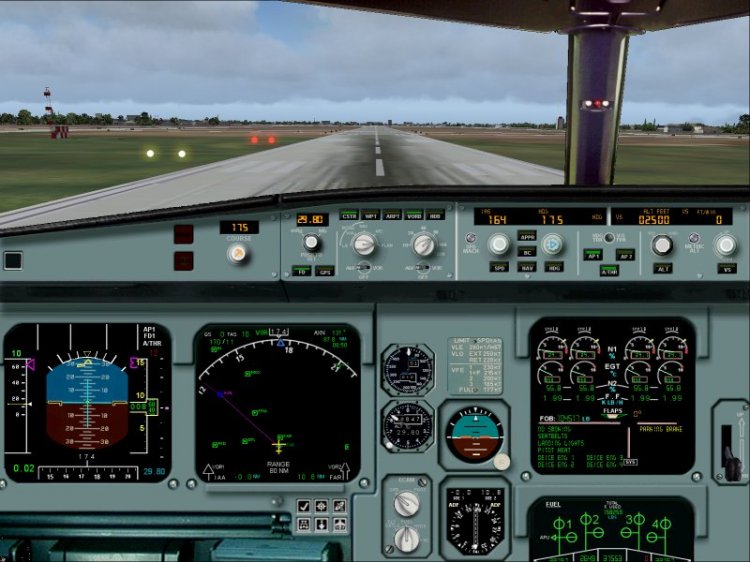
Long sought frishnuyu panel A340.Nashel panel, but some were missing Gough, Gough found and gathered all in one paket.Reshil share with you, someone may also need to be. PS Package assembled by avsim.com
→ Size:
9 MB
→ Date:
14 years ago (03.08.2011 06:34)
→ Author:
Ken Mitchell
→ Approved by moderator:
Lenya69
→ License:
Freeware - Free version, Unlimited Distribution
→ Downloaded:
2329 time(s)