fairchil metroliner Просмотр ZIP-архива
Pilots_Manual.htm
<html>

<head>
<title>Home Page</title>


<meta name="Microsoft Theme" content="none"><meta name="Microsoft Border" content="none"></head>

<body leftmargin="40">

<table border="0" width="701" cellspacing="0" cellpadding="0">
  <tr>
    <td width="701"></td>
  </tr>
  <tr>
    <td width="701"></td>
  </tr>
  <tr>
    <td width="701"></td>
  </tr>
  <tr>
    <td width="701"><p class="MsoNormal" style="margin-right:2.25pt"><font face="Arial"><small><img src="html_images/strik_gratt.gif" alt="strik_gratt.gif (919 bytes)" WIDTH="500" HEIGHT="5"><br>
    </small><big><strong>Blue Crown Airways<br>
    Revision 1.2.2<br>
    January 20th 2008<br>
    (Only for company pilots)</strong></big><small><br>
    <br>
    <img src="html_images/metro23.jpg" alt="metro23.jpg (6789 bytes)" WIDTH="469" HEIGHT="156"><br>
    <br>
     <br>
    </small><big><big><strong>Fairchild DC227 Metro 23<br>
    Pilots Manual</strong></big></big><small><br>
    </small><br>
    <small><br>
    <img src="html_images/strik_gratt.gif" alt="strik_gratt.gif (919 bytes)" WIDTH="500" HEIGHT="5"><br>
    <br>
    <br>
    </small><big><strong>A word from the manager</strong></big></font></p>
    <table border="0" width="100" align="left" cellspacing="5" cellpadding="0">
      <tr>
        <td><small><font face="Arial"><img src="html_images/metro23_frontsection_small.jpg" alt="metro23_frontsection_small.jpg (15825 bytes)" WIDTH="200" HEIGHT="134"></font></small></td>
      </tr>
    </table>
    <p class="MsoNormal" style="margin-right:2.25pt"><font face="Arial"><small>Dear newcomer.
    Welcome to Blue Crown Airways.  It is my hope that you will enjoy flying for
    us.  As a manager I must inform you that the company standards for pilots are high.
    We only accept pilots that are reliable and accurate in their profession.  If you can
    follow our procedures as described in this manual then you are in, otherwise not!<br>
    <br>
    Blue Crown Airways at this stage only operates the Fairchild Metro 23.  The Metro
    planes are not “in” these days with many companies.  But we see an
    opportunity.  We’ve managed to buy our Metro’s at very acceptable prices.<br>
    <br>
    Our target customers are primarily the people and businessmen of smaller towns and cities
    that bigger airline companies ignore. These customers appreciate our effort to provide
    flight service, low fares and efficient transportation to the bigger cities.  We
    typically don’t fly to the biggest airports, but maybe the next aside.<br>
    <br>
    The Metro 23 aircraft is a good performer in terms of speed and can swiftly and
    economically transfer up to 19 passengers on short haul routes.  But let us keep in
    mind that for its size the Metro 23 is a runway consuming and a fast takeoff and landing
    aircraft.  This makes the Fairchild Metro 23 a challenge for any pilot.  Anyone
    can jerk a Metro 23 between places, but to fly it smoothly and precisely is the art.
     Are you up to it?<br>
    </small><br>
    <img src="html_images/logo_BCA_79.gif" alt="logo_BCA_79.gif (2315 bytes)" WIDTH="79" HEIGHT="75"><small><br>
    My best wishes<br>
    P.L. Majorstone Jr.<br>
    Blue Crown Airways Manager<br>
    </small><br>
    <small><br>
    </small><img src="html_images/strik_gratt.gif" alt="strik_gratt.gif (919 bytes)" WIDTH="500" HEIGHT="5"><small><br>
    <br>
    <br>
    </small><big><strong>Pilot's manual index</strong></big><small><br>
    <br>
    <strong>1. The Metro23 power quadrant</strong><br>
    - Speed levers operation<br>
    - Power levers operation<br>
    <br>
    <strong>2. Blue Crown flight preperation procedures</strong><br>
    <br>
    <strong>3. Flying tips</strong><br>
    - Setting the panel in off position<br>
    - The Angle Of Attack gauge<br>
    - Autopilot tips<br>
    - Taxiing tips<br>
    - Take off tips<br>
    - Climb tips<br>
    - Cruise tips<br>
    - Descent tips<br>
    - Landing tips<br>
    <br>
    <strong>4. Checklists</strong><br>
    </small><br>
    <br>
    <img src="html_images/strik_gratt.gif" alt="strik_gratt.gif (919 bytes)" WIDTH="500" HEIGHT="5"><small><br>
    <br>
    <br>
    </small><big><strong>1. The Metro23 Power quadrant</strong></big><small><br>
    <br>
    Please take a moment to familiarize your self with the FS2004 Fairchild Metro23 power
    quadrant:<br>
    <br>
    <img src="html_images/Metro23quadrant.jpg" alt="Metro23quadrant.jpg (69074 bytes)" WIDTH="296" HEIGHT="251"><br>
    Picture 1: The Fairchild Metro 23 FS2004 Power Quadrant. <br>
    <br>
    </small><img src="html_images/3hyrn.gif" alt="3hyrn.gif (64 bytes)" WIDTH="12" HEIGHT="12"> <strong>Speed levers
    operation</strong><small><br>
    <br>
    To move the speed levers move prop lever on game throttle quadrant or use keyboard
    Ctrl+F1-F4.<br>
    <br>
    Marked orange between power levers on the left and flap lever on the right on picture 1
    are the speed levers.  These levers exist in aircraft types that operate the Garret
    TPE 331 direct shaft turbine engine like for instance the Metroliners, Jetstream 31 and
    Doirner 228. As the Metro23 pilot you must understand the operation of these levers!<br>
    <br>
    Speed levers basically control the rotational speed (RPM) of the Metro23 engines kind of
    like a gas pedal in a car controls the RPM of the car's engine.  One would step down
    the pedal in a car for higher RPM but in the Metro23 you push the speed levers forward for
    higher RPM.  </small><br>
    <br>
    <small>Although speed levers are fully scalable levers capable of small incriments back
    and forth they are only operated in three predefined settings: Fully backwards in LOW
    position (idle RPM), fully forward in HIGH position (100% RPM) and then cruise setting of
    97% RPM (speed levers moved tiny bit backwards).  This is indeed unusual operation of
    an engine, almost like our before mentioned car would be equiped with gas pedal that only
    would have two positions, pedal fully up or pedal fully down.  </small><br>
    <br>
    <small>LOW and HIGH settings are labelled on the power quadrant but there are no markings
    or labels for the cruise setting of 97% RPM.  Pilots will have to adjust speed levers
    carefully tiny bit backwards and read the RPM value of the RPM gauge. The 97% setting is
    the lower end of the tiny green arc on the RPM gauge.</small><br>
    <br>
    <img src="html_images/rpm_gauge.jpg" alt="rpm_gauge.jpg (17007 bytes)" WIDTH="187" HEIGHT="118"><small> </small><br>
    <small>Picture 2: The RPM gauge 97%, 100% and idle readings<br>
    <br>
    As probably noticed by the reader pilot will NOT be moving the speed levers much around in
    each flight, in fact pilot will only touch them about four times per flight. Here is a
    more specific description: Pilot will set them to HIGH before take off run (100% RPM) and
    maintain HIGH during climb , adjust them litle bit back for 97% RPM in the cruise phase
    and decent phase. On final approach pilot will again set them fully forward to 100% RPM
    and then fully back to LOW when the aircraft has slowed down to about 60 kts in the
    landing run.<br>
    <br>
    <br>
    </small><img src="html_images/3hyrn.gif" alt="3hyrn.gif (64 bytes)" WIDTH="12" HEIGHT="12"> <strong>Power levers
    operation</strong><small><br>
     <br>
    To move the power levers move the throttle lever on game throttle quadrant or use keyboard
    F1-F4.<br>
    <br>
    Marked green on picture 1 above are the power levers.  The power levers control power
    output or torque for a given engine RPM by altering the pitch of the propeller blades. The
    Metro 23 power levers can in some way be compared to conventional throttle levers as the
    plane accelerates when pushing forward and decelerates when pulling back. As the pilot you
    will be adjusting the power levers more or less through out the flight similar as you
    would with the conventional throttle levers.</small><br>
    <br>
    <small>Please get familiar with the power levers basic layout as shown below on picture 3:</small><br>
    <br>
    <img src="html_images/power_levers_markings.jpg" alt="power_levers_markings.jpg (44042 bytes)" WIDTH="352" HEIGHT="198"><br>
    <small>Picture 3: Metro23 power levers basic layout<br>
    <br>
    IMPORTANT AIRBORNE NOTE! Never pull the power levers into the ground beta zone while
    airborne. This will result in catastrophic mid air deceleration and might lead to terrain
    impact due to an uncontrollable decent.<br>
    <br>
    <br>
    <br>
    </small><img src="html_images/strik_gratt.gif" alt="strik_gratt.gif (919 bytes)" WIDTH="500" HEIGHT="5"><br>
    <small><br>
    <br>
    </small><big><strong>2. Blue Crown flight preperation procedures</strong></big><small><br>
    <br>
    Flight preparation is going to take 5-15 minutes of your time. This flight preperation
    procedure is company standard practise. Use real weather settings in you simulator if
    possible.   At Blue Crown Airways flight preparation consists of following
    steps:<br>
    <br>
    </small><img src="html_images/3hyrn_grar.gif" alt="3hyrn_grar.gif (56 bytes)" WIDTH="12" HEIGHT="12"> <small><u>STEP
    1</u>: Decide your flight departure airport and destination airport. <br>
    <br>
    </small><img src="html_images/3hyrn_grar.gif" alt="3hyrn_grar.gif (56 bytes)" WIDTH="12" HEIGHT="12"> <small><u>STEP
    2</u>: Optain weather information about your departure and destination airport from a
    website providing online METAR information like for instance <a href="http://en.allmetsat.com/metar-taf/index.html">http://en.allmetsat.com/metar-taf/index.html</a>
    .<br>
    <br>
    </small><img src="html_images/3hyrn_grar.gif" alt="3hyrn_grar.gif (56 bytes)" WIDTH="12" HEIGHT="12"> <small><u>STEP
    3</u>: Open the FS2004 flight planner and plan your flight in detail. Typically plan your
    cruising altitude at 16.000 to 25.000 ft. Flying high reduces in most cases fuel
    consumption, even though more fuel is spent climbing. <br>
    <br>
    </small><img src="html_images/3hyrn_grar.gif" alt="3hyrn_grar.gif (56 bytes)" WIDTH="12" HEIGHT="12"><small> <u>STEP
    4</u>: Still with your FS2004 flight planner open gather information about your departure
    and destination airports. This is done by zooming in on the airports in the flight planner
    and mouse click the airports. Then a facility information window will display as shown
    below. Take note of the following:<br>
    - Runway elevation<br>
    - Runway length<br>
    - Radio frequencies<br>
    - ILS frequencies</small><br>
    <small><br>
    <img src="html_images/flightplanner2.gif" alt="flightplanner2.gif (23872 bytes)" WIDTH="487" HEIGHT="391"><br>
    <br>
    <br>
    </small><img src="html_images/3hyrn_grar.gif" alt="3hyrn_grar.gif (56 bytes)" WIDTH="12" HEIGHT="12"><small> <u>STEP
    5</u>: Make conclusions from the weather information and airport facility information what
    runway you expect to use for landing (check also for your departure airport what runway to
    expect for takoff).<br>
    <br>
    </small><img src="html_images/3hyrn_grar.gif" alt="3hyrn_grar.gif (56 bytes)" WIDTH="12" HEIGHT="12"><small> <u>STEP
    6</u>: Still with your flight planner open hit the NavLog button and observe the total
    distance to be flown.</small><br>
    <small><br>
    <img src="html_images/navlog_button.gif" alt="navlog_button.gif (5745 bytes)" WIDTH="459" HEIGHT="89"><br>
    </small><br>
    <small><br>
    </small><img src="html_images/3hyrn_grar.gif" alt="3hyrn_grar.gif (56 bytes)" WIDTH="12" HEIGHT="12"><small> <u>STEP
    7</u>: Open the Blue Crown Airways L&P sheet (<a name="Load and Performance sheet">Load
    and Performance sheet</a>) "metro23_loadsheet.xls". It is located in the
    fs9\aircraft\Metro23 Blue Crown folder. This is an Excel calculating document for Excel
    5.0 or higher. User input fields are indicated with the blue cyan color. </small><br>
    <small><br>
    </small><img src="html_images/loadsheet.gif" alt="loadsheet.gif (49134 bytes)" WIDTH="520" HEIGHT="359"><small><br>
    </small><br>
    <small><br>
    </small><img src="html_images/3hyrn_grar.gif" alt="3hyrn_grar.gif (56 bytes)" WIDTH="12" HEIGHT="12"><small> <u>STEP
    8</u>: In the "Departure" section enter the weather information optained from
    the METAR website and airport facility information you've gathered.</small><br>
    <small><br>
    <img src="html_images/loadsheet_weather.gif" alt="loadsheet_weather.gif (6475 bytes)" WIDTH="321" HEIGHT="220"><br>
    </small><br>
    <small><br>
    </small><img src="html_images/3hyrn_grar.gif" alt="3hyrn_grar.gif (56 bytes)" WIDTH="12" HEIGHT="12"><small> <u>STEP
    9</u>: In the "Enroute" section enter the flight total distance obtained from
    fs2004 flightplanner NavLog, the preferred crusing altitude and the preferred power
    settings (60, 70 or 80% torque) and mean enroute wind component (if available).</small><br>
    <small><br>
    <img src="html_images/loadsheet_enroute.gif" alt="loadsheet_enroute.gif (4830 bytes)" WIDTH="310" HEIGHT="145"><br>
    </small><br>
    <small><br>
    </small><img src="html_images/3hyrn_grar.gif" alt="3hyrn_grar.gif (56 bytes)" WIDTH="12" HEIGHT="12"><small> <u>STEP
    10</u>: In the "Departure" section enter the number of passangers of today's
    flight and baggage loads.</small><br>
    <small><br>
    <img src="html_images/loadsheet_weight.gif" alt="loadsheet_weight.gif (2322 bytes)" WIDTH="319" HEIGHT="53"><br>
    <br>
    <br>
    </small><img src="html_images/3hyrn_grar.gif" alt="3hyrn_grar.gif (56 bytes)" WIDTH="12" HEIGHT="12"><small> <u>STEP
    11</u>: In the "Departure" section enter the preferred fuel quantity in
    accordance with the total flying distance. When flying to remote airports note that A1JET
    fuel might not be available. Then fuel forth and back has to be taken in account. Reserve
    fuel is automatically calculated in the Enroute section of the L&P sheet and must not
    be less than 45 minutes:</small><br>
    <small><br>
    <img src="html_images/loadsheet_fuel.gif" alt="loadsheet_fuel.gif (1949 bytes)" WIDTH="322" HEIGHT="36"><br>
    <br>
    <br>
    </small><img src="html_images/3hyrn_grar.gif" alt="3hyrn_grar.gif (56 bytes)" WIDTH="12" HEIGHT="12"><small> <u>STEP
    12</u>: Review the L&P sheet and observe if there are any "Attention!"
    remarks in the remark section.  Take appropriate action to correct if any.
    Attention remarks can be any of the following:</small><br>
    <small><br>
    <img src="html_images/warnings.gif" alt="warnings.gif (4182 bytes)" WIDTH="401" HEIGHT="66"><br>
    </small><br>
    <small><br>
    </small><img src="html_images/3hyrn_grar.gif" alt="3hyrn_grar.gif (56 bytes)" WIDTH="12" HEIGHT="12"><small> <u>STEP
    13</u>: Note down some key performance figures that have automatically been calculated on
    the L&P sheet as a result of the information input (or use File-Print to print them):</small><br>
    <small><br>
    </small><img src="html_images/print.gif" alt="print.gif (9783 bytes)" WIDTH="180" HEIGHT="226"><br>
    <small><br>
    <small>- TOW = Aircraft take off weight<br>
    - TOD = Take of distance</small></small><br>
    <small><small>- TO torque = Recommended take off torque<br>
    - VR = rotate speed <br>
    - VLOF =lift off speed<br>
    - Enroute = Estimated enroute speed IAS<br>
    - LW = Aircraft landing weight <br>
    - VREF = reference speed at threshold 50ft above runway when landing</small><br>
    <br>
    </small><img src="html_images/3hyrn_grar.gif" alt="3hyrn_grar.gif (56 bytes)" WIDTH="12" HEIGHT="12"><small> <u>STEP
    14</u>: Go to the "Fuel and Payload.." section in the MS Flight Simulator 2004
    and configure the Metro 23 in accordance with the L&P sheet: </small><br>
    <br>
    <img src="html_images/3hyrn_grar.gif" alt="3hyrn_grar.gif (56 bytes)" WIDTH="12" HEIGHT="12"><small> <u>STEP 15</u>:
    Congratulations! All set. You are a Pro indeed!<br>
    <br>
    <br>
    </small><img src="html_images/strik_gratt.gif" alt="strik_gratt.gif (919 bytes)" WIDTH="500" HEIGHT="5"><small><br>
    <br>
    <br>
    </small><big><strong>3. Flying tips</strong></big><small><br>
    <br>
    <br>
    </small><img src="html_images/3hyrn.gif" alt="3hyrn.gif (64 bytes)" WIDTH="12" HEIGHT="12"><strong> Setting the
    panel in off mode</strong><small><br>
    <br>
    In Flight simulator 2004 engines are running when you enter the plane.  If you want
    to enjoy starting the plane you have to turn everything off and save the flight. Thats
    more fun..<br>
    <br>
    <img src="html_images/panel_off.jpg" alt="panel_off.jpg (36360 bytes)" WIDTH="500" HEIGHT="390"><br>
    Picture 3: Panel in off mode</small><br>
    <small><br>
    To set the panel in off position do the following:<br>
    - Cut off the fuel (ctrl+shift+F1), engines will stop<br>
    - Drag fully down the power levers (A) and the speed levers (B)<br>
    - Turn off all light switches (C)<br>
    - Turn off the aviation master (D), the gen1 & 2 (E) and finally the master (battery)
    (F)<br>
    - Save the flight</small><br>
    <br>
    <br>
    <img src="html_images/3hyrn.gif" alt="3hyrn.gif (64 bytes)" WIDTH="12" HEIGHT="12"><strong> <a name="The Angle Of Attack gauge (AOA)">The Angle Of Attack gauge (AOA)</a></strong><br>
    <small>- AOA gauge basically helps pilot to avoid stalling the aircraft (red zone equals
    stall)</small><br>
    <small>- The AOA gauge needle moves anti clockvise green-white-yellow-red as angle of
    attack increases</small><br>
    <small>- The indication of AOA gauge is a combination of aircraft speed and nose up
    position, thus the relative airflow</small><br>
    <small>- Try to avoid yellow and red zones of the AOA gauge as the aircraft is then to
    slow and nose to high</small><br>
    <small>- In the lift off and touch down it is normal for AOA to enter (or almost enter)
    the white zone</small><br>
    <img src="html_images/aoa.jpg" alt="aoa.jpg (19150 bytes)" WIDTH="314" HEIGHT="84"><small><br>
    </small><br>
    <small><br>
    </small><img src="html_images/3hyrn.gif" alt="3hyrn.gif (64 bytes)" WIDTH="12" HEIGHT="12"><strong> Autopilot
    tips</strong><small><br>
    - Configure autopilot before taxiing if possible<br>
    - The climb performance value in the lower left corner of <a href="#Load and Performance sheet">L&P sheet</a> is a good start value for autopilot<br>
    - When autopilot is engaged reduce or increase climb rate to maintain 170 kts. IAS<br>
    - Climb performance is reduced as aircraft climbs higher and is tipically 800-1000 ft/min
    above 20.000 ft.<br>
    </small><br>
    <small><br>
    </small><img src="html_images/3hyrn.gif" alt="3hyrn.gif (64 bytes)" WIDTH="12" HEIGHT="12"><strong> Taxiing tips</strong><small><br>
    - Use speed levers LOW setting on ground while taxiing. Move power levers to control power
    while taxiing.<br>
    - On ground only move power levers within the ground beta zone<br>
    - Note that when aircraft is light loaded the aircraft can start taxiing at idle power<br>
    <img src="html_images/betazone_notxt.gif" alt="betazone_notxt.gif (7545 bytes)" WIDTH="226" HEIGHT="144"><br>
    </small><br>
    <small><br>
    </small><img src="html_images/3hyrn.gif" alt="3hyrn.gif (64 bytes)" WIDTH="12" HEIGHT="12"><strong> Take off tips</strong><small><br>
    - When aircraft is ready for take off, push the speed levers fully forward to HIGH. <br>
    <img src="html_images/splevers_high.gif" alt="splevers_high.gif (5529 bytes)" WIDTH="175" HEIGHT="139"><br>
    - With speed levers HIGH, engine noise increases as the RPM increases.  <br>
    - Aircraft moves very litle if nothing at this point even though engines RPM setting is
    HIGH </small><br>
    <small>- That is because the propeller blades are very flat and produce not much torque</small><br>
    <small>- Advance the power levers forward in steadily manner to the <a href="#Load and Performance sheet">L&P sheet</a> recommended take off torque</small><br>
    <small>- Blade angle increases and power is produced. Aircraft moves forward</small><br>
    <small>- Recommended take off torque depends on aircraft weight, rwy length and air
    density and can be 90%, 100% or 110%</small><br>
    <small>- When <a href="#Load and Performance sheet">L&P sheet</a> suggests 90% torque
    (long runway) adding few kts to lift off speed is in order for better initial climb</small><br>
    <small>- When V<small>R</small> (rotate speed) is reached (as stated on the <a href="#Load and Performance sheet">L&P sheet</a>), pull the controls and start raising
    the nose<br>
    - Have the nose raised 15°-20° as the aircraft reaches V<small>LOF</small> (lift off
    speed)</small><br>
    <small>- In the lift off keep the needle within the white zone on the <a href="#The Angle Of Attack gauge (AOA)">AOA gauge</a> for first 200-400 ft then move
    towards green.</small><br>
    <br>
    <img src="html_images/15degrees.jpg" alt="15degrees.jpg (30869 bytes)" WIDTH="340" HEIGHT="93"><small><br>
    <br>
    <br>
    </small><img src="html_images/3hyrn.gif" alt="3hyrn.gif (64 bytes)" WIDTH="12" HEIGHT="12"><strong> Climb tips</strong><small><br>
    - As aircraft lifts off keep nose 15-20° in the initial climb and use <a href="#The Angle Of Attack gauge (AOA)">AOA gauge</a> as guideline (needle on white zone)</small><br>
    <small>- Maintain speed safely above V<small>2</small> (typically add 10kts to V<small>2min</small>
    value on <a href="#Load and Performance sheet">L&P sheet</a>) while retracting
    flaps  </small><br>
    <small>- Take off power at more than 100% torque is only permitted for 1 minute</small><br>
    <small>- Take off power at 100% is only permitted for 5 minutes <br>
    - Reduce power to max continous power (90%) as soon as possible</small><br>
    <small>- As aircraft climbs and more hight is gained the torque drops. Pilot has to move
    throttle forward to maintain 90% torque<br>
    </small><img src="html_images/max_continous_power.jpg" alt="max_continous_power.jpg (57354 bytes)" WIDTH="363" HEIGHT="137"><small><br>
    <br>
    </small><img src="html_images/3hyrn.gif" alt="3hyrn.gif (64 bytes)" WIDTH="12" HEIGHT="12"><strong> Cruise tips</strong><small><br>
    - When aircraft is level and cruise speed is gained reduce RPM to 97% (speed levers tiny
    bit backwards)</small><br>
    <small>- Typical cruise power is 70% torque. Move power levers accordingly<br>
    - Cruise power of 60 or 80% is also an option<br>
    <br>
    <br>
    </small><img src="html_images/3hyrn.gif" alt="3hyrn.gif (64 bytes)" WIDTH="12" HEIGHT="12"><strong> Decent tips</strong><small><br>
    - The Metro23 is a hard to slow down in descent even at low power. Watch your speed in
    decent!<br>
    - Plan your descent and try to maintain 1000 ft/min descent rate or less<br>
    - 1500 ft/min descent rate is about maximum without use of flaps <br>
    - For speed control in 1500 ft/min descent pull power levers ABOVE flight idle line. <br>
    - Pilot will hear a distinct engine/prop sound when prop blades become more flat near
    ground beta zone<br>
    - Consider that a warning signal and don't retard power levers much further back<br>
    - Pilot can use flap1 settings to slow down in a descent more than 1500 ft/min (if speed
    is below 215 kts.)<br>
    - Flap settings and max speed (IAS) for operation are as follows:</small></font></p>
    <table border="0" width="303" cellpadding="0" cellspacing="0">
      <tr>
        <td width="52"><small><font face="Arial">Setting</font></small></td>
        <td width="67"><small><font face="Arial">Extention</font></small></td>
        <td width="184"><small><font face="Arial">Max speed operation (IAS)</font></small></td>
      </tr>
      <tr>
        <td width="52"><small><font face="Arial">Flap1</font></small></td>
        <td width="67"><small><font face="Arial">1/4</font></small></td>
        <td width="184"><small><font face="Arial">215 kts.</font></small></td>
      </tr>
      <tr>
        <td width="52"><small><font face="Arial">Flap2</font></small></td>
        <td width="67"><small><font face="Arial">1/2</font></small></td>
        <td width="184"><small><font face="Arial">188 kts.</font></small></td>
      </tr>
      <tr>
        <td width="52"><small><font face="Arial">Flap3</font></small></td>
        <td width="67"><small><font face="Arial">Fully ext.</font></small></td>
        <td width="184"><small><font face="Arial">166 kts.</font></small></td>
      </tr>
    </table>
    <p class="MsoNormal" style="margin-right:2.25pt"><font face="Arial"><small><br>
    </small><img src="html_images/3hyrn.gif" alt="3hyrn.gif (64 bytes)" WIDTH="12" HEIGHT="12"><strong> Landing tips</strong><small><br>
    - Landing gear can be extended at 176 kts. IAS</small><br>
    <small>- The fine pitched blade angle in the ground beta zone has effective braking action
    in the landing run.  <br>
    - As soon as the aircraft has touched down pull back the power levers into the ground beta
    zone.  <br>
    - This dramatically reduces speed, even without applying reverse thrust<br>
    - This is in fact sufficient when long runway for landing is available.  <br>
    - For extra deceleration on shorter runways apply reverse thrust and wheel brakes.  <br>
    - When speed has reduced to 60 knots pull speed lever to LOW position and taxi to ramp or
    gate.<br>
    </small><br>
    <br>
    <img src="html_images/strik_gratt.gif" alt="strik_gratt.gif (919 bytes)" WIDTH="500" HEIGHT="5"><br>
    <small><br>
    <br>
    </small><strong><big>4. FS2004 Metro 23 Checklist</big></strong><small><br>
    </small><br>
    <small><br>
    <strong>PREINSPECTION</strong><br>
    [   ]   Main doors - Closed and secure (ctrl+E)<br>
    [   ]   Parking brakes - ON <br>
    [   ]   Power levers - FULLY BACK<br>
    [   ]   Speed levers - LOW<br>
    [   ]   Generators - OFF<br>
    <br>
    <strong>BEFORE STARTUP</strong><br>
    [   ]   Battery - ON<br>
    [   ]   Navigation lights - ON<br>
    [   ]   Avionics - ON<br>
    [   ]   Rotating beacon - ON<br>
    [   ]   Fuel flow - ON (mixture rich or ctrl+shift+F4)<br>
    <br>
    <strong>STARTUP RIGHT</strong><br>
    [   ]   Starter - ENGAGE<br>
    [   ]   RPM rising - CHECK<br>
    [   ]   2000 RPM - IGNITION<br>
    [   ]   Fuel flow - CHECK OK<br>
    [   ]   Oil pressure in 30 sec - GREEN<br>
    [   ]   Generator  - ON<br>
    <br>
    <strong>STARTUP LEFT</strong><br>
    [   ]   Starter - ENGAGE<br>
    [   ]   RPM rising - CHECK<br>
    [   ]   2000 RPM - IGNITION<br>
    [   ]   Fuel flow - CHECK OK<br>
    [   ]   Oil pressure in 30 sec - GREEN<br>
    [   ]   Generator  - ON<br>
    <br>
    <strong>BEFORE TAXIING</strong><br>
    [   ]   Altimeter - SET<br>
    [   ]   Autopilot - SET<br>
    [   ]   Taxi lights - ON<br>
    [   ]   Passenger speech<br>
    <br>
    <strong>WHILE TAXIING</strong><br>
    [   ]   Flaps - SET FOR TAKE OFF<br>
    [   ]   Elevator trim - SET AS REQUIRED<br>
    [   ]   Pitot heat - ON<br>
    <br>
    <strong>ON RUNWAY</strong><br>
    [   ]   Strobe lights - ON<br>
    [   ]   Landing lights - ON<br>
    [   ]   Autopilot - CHECK RWY HEADING<br>
    [   ]   Altimeter - CHECK<br>
    [   ]   Engine instruments - CHECK<br>
    [   ]   Clock - CHECK TIME<br>
    <br>
    <strong>TAKE OFF</strong><br>
    [   ]   RPM - 100%<br>
    [   ]   Torque - 100%<br>
    [   ]   Positive climb - GEAR UP<br>
    [   ]   400 feet - FLAPS RETRACTED<br>
    [   ]   Autopilot - ENGAGE<br>
    <br>
    <strong>CLIMB</strong><br>
    [   ]   Torque - 95%<br>
    [   ]   Speed - 170 KTS<br>
    [   ]   Below 10.000 feet - SPEED < 250 KTS (IAS)<br>
    [   ]   10000 feet - LANDING/TAXI-LIGHT OFF<br>
    [   ]   18000 feet - ALTIMETER 29.92<br>
    <br>
    <strong>CRUISE</strong><br>
    [   ]   Speed levers - 97% RPM<br>
    [   ]   Power levers - CRUISE POWER<br>
    <br>
    <strong>DESCENT</strong><br>
    [   ]   18000 feet - ALTIMETER TO LOCAL QNH<br>
    [   ]   Below 10.000 feet - SPEED < 250 KTS (IAS)<br>
    <br>
    <strong>BEFORE LANDING</strong><br>
    [   ]   Landing lights - ON</small><br>
    <small>[   ]   Taxi lights - ON<br>
    [   ]   Gear - DOWN AND LOCKED<br>
    [   ]   Speed levers - HIGH<br>
    [   ]   Flaps - AS REQUIRED<br>
    [   ]   Speed - 140 KTS</small><br>
    <small>[   ]   Speed at threshold (50ft) - V<small>REF</small> + 10 KTS
    (see V<small>REF</small> on L&P sheet)</small><br>
    <br>
    <small><strong>AFTER LANDING</strong><br>
    [   ]   Speed levers (at 60 kts) - LOW<br>
    [   ]   Flaps - RETRACT</small><br>
    <br>
    <small><strong>OFF RUNWAY</strong><br>
    [   ]   Landing lights - OFF<br>
    [   ]   Strobe ligths - OFF</small><br>
    <br>
    <small><strong>SHUTDOWN</strong><br>
    [   ]   Fuel flow - OFF (Mixture cut off or ctrl+shift+F1)<br>
    [   ]   Rotating beacon - OFF<br>
    [   ]   Avionics - OFF<br>
    [   ]   Navigation lights - OFF<br>
    [   ]   Battery - OFF</small><br>
    <small>[   ]   Generators - OFF<br>
    </small></font></td>
  </tr>
</table>
</body>
</html>
73781-SA-227DC-AC.zip
| Имя файла | Дата | Размер |
|---|---|---|
| Aircraft.cfg | 07.03.2025 21:25 | 15 KB |
| html_images/ | 30.08.2023 15:40 | |
| html_images/15degrees.jpg | 18.01.2008 17:21 | 30 KB |
| html_images/15gradur_up.gif | 17.01.2008 01:26 | 6 KB |
| html_images/3hyrn.gif | 17.01.2008 01:45 | 64 B |
| html_images/3hyrn_grar.gif | 18.01.2008 13:18 | 56 B |
| html_images/aoa.jpg | 31.01.2008 13:13 | 19 KB |
| html_images/betazone.gif | 17.01.2008 17:26 | 8 KB |
| html_images/betazone_notxt.gif | 17.01.2008 17:26 | 7 KB |
| html_images/city.gif | 14.11.2007 21:58 | 14 KB |
| html_images/clip_image001.gif | 14.11.2007 22:39 | 919 B |
| html_images/clip_image004.gif | 14.11.2007 23:28 | 8 KB |
| html_images/flightplanner.gif | 15.11.2007 04:37 | 35 KB |
| html_images/flightplanner0.jpg | 15.11.2007 23:00 | 100 KB |
| html_images/flightplanner2.gif | 16.11.2007 02:33 | 23 KB |
| html_images/frontpag.gif | 14.11.2007 21:58 | 10 KB |
| html_images/loadsheet.gif | 01.02.2008 01:34 | 48 KB |
| html_images/loadsheet.jpg | 18.01.2008 20:35 | 186 KB |
| html_images/loadsheet_enroute.gif | 17.01.2008 17:27 | 5 KB |
| html_images/loadsheet_fuel.gif | 17.01.2008 17:28 | 2 KB |
| html_images/loadsheet_weather.gif | 17.01.2008 17:29 | 6 KB |
| html_images/loadsheet_weight.gif | 17.01.2008 17:29 | 2 KB |
| html_images/logo_BCA_79.gif | 14.11.2007 22:58 | 2 KB |
| html_images/max_continous_power.jpg | 01.02.2008 01:59 | 56 KB |
| html_images/metro23.jpg | 14.11.2007 22:17 | 7 KB |
| html_images/Metro23quadrant.jpg | 14.11.2007 23:28 | 67 KB |
| html_images/metro23_frontsection_small.jpg | 14.11.2007 23:28 | 15 KB |
| html_images/navlog_button.gif | 15.11.2007 23:00 | 6 KB |
| html_images/panel_dark.jpg | 13.11.2007 02:01 | 942 KB |
| html_images/panel_off.jpg | 15.11.2007 00:17 | 36 KB |
| html_images/power_levers_markings.jpg | 18.01.2008 15:42 | 43 KB |
| html_images/print.gif | 01.02.2008 01:32 | 10 KB |
| html_images/pspbrwse.jbf | 17.01.2008 17:30 | 62 KB |
| html_images/rpm_gauge.jpg | 24.01.2008 00:52 | 17 KB |
| html_images/splevers_high.gif | 17.01.2008 01:23 | 5 KB |
| html_images/strik_gratt.gif | 14.11.2007 23:31 | 919 B |
| html_images/sunset.gif | 14.11.2007 21:58 | 23 KB |
| html_images/warnings.gif | 17.01.2008 18:51 | 4 KB |
| metro23_loadsheet.xls | 26.05.2024 02:16 | 62 KB |
| Model/ | 25.01.2025 00:19 | |
| Model.Cargo/ | 25.01.2025 00:19 | |
| Model.Cargo/model.cfg | 01.05.2024 20:55 | 26 B |
| Model.Cargo/SA227AD-OLD.mdl | 21.05.2024 23:39 | 2 MB |
| Model.Cargo/SA227AD.mdl | 25.01.2025 15:52 | 2 MB |
| Model/model.cfg | 12.11.2024 16:41 | 26 B |
| Model/SA227AC-OLD.mdl | 24.01.2025 04:52 | 2 MB |
| Model/SA227AC.mdl | 25.01.2025 15:28 | 2 MB |
| panel.mio/ | 07.03.2025 21:24 | |
| panel.mio/ADI84.CAB | 07.03.2025 21:24 | 117 KB |
| panel.mio/Alert.CAB | 07.03.2025 21:24 | 320 KB |
| panel.mio/AP.CAB | 07.03.2025 21:24 | 385 KB |
| panel.mio/cabdir.exe | 06.09.2001 18:50 | 156 KB |
| panel.mio/Cockpit_Sounds/ | 22.06.2024 14:26 | |
| panel.mio/Cockpit_Sounds/10.wav | 01.10.2010 15:40 | 12 KB |
| panel.mio/Cockpit_Sounds/100.wav | 03.10.2010 03:43 | 32 KB |
| panel.mio/Cockpit_Sounds/1000.wav | 03.10.2010 03:42 | 33 KB |
| panel.mio/Cockpit_Sounds/20.wav | 03.10.2010 03:45 | 22 KB |
| panel.mio/Cockpit_Sounds/200.wav | 12.10.2010 17:19 | 35 KB |
| panel.mio/Cockpit_Sounds/2500.wav | 03.10.2010 03:42 | 49 KB |
| panel.mio/Cockpit_Sounds/30.wav | 03.10.2010 03:44 | 16 KB |
| panel.mio/Cockpit_Sounds/300.wav | 12.10.2010 17:18 | 37 KB |
| panel.mio/Cockpit_Sounds/40.wav | 03.10.2010 03:44 | 15 KB |
| panel.mio/Cockpit_Sounds/400.wav | 12.10.2010 17:18 | 32 KB |
| panel.mio/Cockpit_Sounds/50.wav | 03.10.2010 03:46 | 19 KB |
| panel.mio/Cockpit_Sounds/500.wav | 03.10.2010 03:42 | 34 KB |
| panel.mio/Cockpit_Sounds/AltAlert.wav | 25.08.2003 00:43 | 337 KB |
| panel.mio/Cockpit_Sounds/ATR_TCAS_adjust_vs.wav | 01.09.2004 13:38 | 108 KB |
| panel.mio/Cockpit_Sounds/ATR_TCAS_clear.wav | 01.09.2004 13:38 | 70 KB |
| panel.mio/Cockpit_Sounds/ATR_TCAS_climb.wav | 01.09.2004 13:38 | 67 KB |
| panel.mio/Cockpit_Sounds/ATR_TCAS_climb_crossing.wav | 01.09.2004 13:39 | 168 KB |
| panel.mio/Cockpit_Sounds/ATR_TCAS_climb_incr.wav | 01.09.2004 13:36 | 69 KB |
| panel.mio/Cockpit_Sounds/ATR_TCAS_climb_now.wav | 01.09.2004 13:37 | 84 KB |
| panel.mio/Cockpit_Sounds/ATR_TCAS_descend.wav | 01.09.2004 13:37 | 72 KB |
| panel.mio/Cockpit_Sounds/ATR_TCAS_descend_crossing.wav | 01.09.2004 13:37 | 178 KB |
| panel.mio/Cockpit_Sounds/ATR_TCAS_descend_incr.wav | 01.09.2004 13:36 | 136 KB |
| panel.mio/Cockpit_Sounds/ATR_TCAS_descend_now.wav | 01.09.2004 13:37 | 88 KB |
| panel.mio/Cockpit_Sounds/ATR_TCAS_SYS_OK.wav | 01.09.2004 13:35 | 104 KB |
| panel.mio/Cockpit_Sounds/ATR_TCAS_traffic.wav | 01.09.2004 13:35 | 45 KB |
| panel.mio/Cockpit_Sounds/ATR_TCAS_traffic_traffic.wav | 01.09.2004 13:34 | 87 KB |
| panel.mio/Cockpit_Sounds/ATR_TCAS_vs_crossing.wav | 01.09.2004 13:36 | 156 KB |
| panel.mio/Cockpit_Sounds/ATR_TCAS_vs_maintain.wav | 01.09.2004 13:36 | 117 KB |
| panel.mio/Cockpit_Sounds/ATR_TCAS_vs_monitor.wav | 01.09.2004 13:36 | 83 KB |
| panel.mio/Cockpit_Sounds/audible warnings calls.XML | 02.06.2024 12:48 | 2 KB |
| panel.mio/Cockpit_Sounds/AUDIBLE_WARNINGS.xml | 11.06.2024 14:50 | 17 KB |
| panel.mio/Cockpit_Sounds/Aux_Pump.wav | 05.10.2004 17:10 | 83 KB |
| panel.mio/Cockpit_Sounds/Bank_Angle.wav | 16.11.2004 12:56 | 65 KB |
| panel.mio/Cockpit_Sounds/Brakes_Sound.wav | 27.11.1999 03:48 | 67 KB |
| panel.mio/Cockpit_Sounds/Brake_Sound.wav | 04.01.2012 01:08 | 36 KB |
| panel.mio/Cockpit_Sounds/broadcast01.wav | 01.01.2006 05:38 | 4 MB |
| panel.mio/Cockpit_Sounds/broadcast02.wav | 01.01.2006 04:28 | 53 KB |
| panel.mio/Cockpit_Sounds/Caution_Caution.wav | 23.01.2004 23:50 | 15 KB |
| panel.mio/Cockpit_Sounds/Caution_Warning.wav | 23.01.2004 23:53 | 7 KB |
| panel.mio/Cockpit_Sounds/dsd_fsx_xml_sound.ini | 10.06.2024 18:35 | 3 KB |
| panel.mio/Cockpit_Sounds/dsd_fsx_xml_sound.txt | 14.03.2018 12:38 | 18 KB |
| panel.mio/Cockpit_Sounds/GPWS_DontSink.wav | 18.10.2004 11:00 | 69 KB |
| panel.mio/Cockpit_Sounds/GPWS_Glideslope.wav | 18.10.2004 11:00 | 88 KB |
| panel.mio/Cockpit_Sounds/GPWS_Minimums.wav | 18.10.2004 11:00 | 133 KB |
| panel.mio/Cockpit_Sounds/GPWS_PullUp.wav | 18.10.2004 11:00 | 108 KB |
| panel.mio/Cockpit_Sounds/GPWS_Sinkrate.wav | 18.10.2004 10:59 | 45 KB |
| panel.mio/Cockpit_Sounds/GPWS_Terrain.wav | 18.10.2004 10:59 | 103 KB |
| panel.mio/Cockpit_Sounds/GPWS_TooLowFlaps.wav | 18.10.2004 10:59 | 102 KB |
| panel.mio/Cockpit_Sounds/GPWS_TooLowGear.wav | 18.10.2004 10:59 | 89 KB |
| panel.mio/Cockpit_Sounds/GPWS_TooLowTerrain.wav | 18.10.2004 10:58 | 98 KB |
| panel.mio/Cockpit_Sounds/Lever_Sound.WAV | 25.09.2007 04:27 | 7 KB |
| panel.mio/Cockpit_Sounds/Over_Speed.WAV | 27.08.2005 16:27 | 86 KB |
| panel.mio/Cockpit_Sounds/Push_Sound.wav | 30.12.2011 16:02 | 348 B |
| panel.mio/Cockpit_Sounds/Switch_Light_Sound.wav | 25.09.2007 04:29 | 6 KB |
| panel.mio/Cockpit_Sounds/Switch_Rotary_Sound.wav | 09.07.2002 01:47 | 2 KB |
| panel.mio/Cockpit_Sounds/Switch_Sound.wav | 25.09.2007 04:29 | 6 KB |
| panel.mio/dfd_gpws.gau | 09.12.2001 14:43 | 76 KB |
| panel.mio/dn_left.bmp | 25.04.2024 14:15 | 375 KB |
| panel.mio/dn_right.bmp | 25.08.2023 14:23 | 375 KB |
| panel.mio/dsd_fsx_xml_sound.gau | 20.07.2014 19:33 | 162 KB |
| panel.mio/dsd_xml_sound3.gau | 12.08.2007 00:08 | 80 KB |
| panel.mio/FORWARD_LEFT.bmp | 31.03.2004 23:40 | 769 KB |
| panel.mio/FORWARD_RIGHT.bmp | 31.03.2004 23:37 | 769 KB |
| panel.mio/FSSound.dll | 15.05.2001 04:48 | 13 KB |
| panel.mio/FS_Metroliner_III.air | 20.03.2014 13:20 | 13 KB |
| panel.mio/HSI84.CAB | 07.03.2025 21:24 | 142 KB |
| panel.mio/instrument.CAB | 07.03.2025 21:24 | 11 MB |
| panel.mio/lateral_switches_L.bmp | 03.05.2024 23:06 | 1 MB |
| panel.mio/LEFT.bmp | 31.03.2004 23:41 | 769 KB |
| panel.mio/LEFT_Switches.bmp | 03.05.2024 23:06 | 1 MB |
| panel.mio/metromain.bmp | 28.05.2024 01:51 | 2 MB |
| panel.mio/metrosec.bmp | 28.05.2024 12:01 | 2 MB |
| panel.mio/Metro_RS_2C.png | 25.08.2023 21:09 | 8 MB |
| panel.mio/panel.cfg | 13.06.2024 18:04 | 14 KB |
| panel.mio/pedestal.bmp | 25.08.2023 22:09 | 652 KB |
| panel.mio/pressurization.CAB | 07.03.2025 21:23 | 83 KB |
| panel.mio/REAR.bmp | 24.01.2008 03:19 | 769 KB |
| panel.mio/REAR_LEFT.bmp | 11.07.2002 21:39 | 769 KB |
| panel.mio/REAR_RIGHT.bmp | 31.03.2004 23:41 | 769 KB |
| panel.mio/RIGHT.bmp | 31.03.2004 23:25 | 769 KB |
| panel.mio/run_gauges.bat | 08.07.2016 06:45 | 177 B |
| panel.mio/SFGPXSX.CAB | 07.03.2025 21:23 | 730 KB |
| panel.mio/TOL.CAB | 07.03.2025 21:23 | 186 KB |
| Pilots_Manual.htm | 03.02.2008 04:36 | 30 KB |
| sound/ | 25.04.2024 00:19 | |
| sound/closedoor.wav | 14.09.2012 06:30 | 246 KB |
| sound/cut.WAV | 14.09.2012 06:30 | 2 MB |
| sound/falsestart.wav | 14.09.2012 06:30 | 1 MB |
| sound/flaps.wav | 14.09.2012 06:30 | 238 KB |
| sound/fuelpump.wav | 14.09.2012 06:30 | 371 KB |
| sound/gyro.wav | 14.09.2012 06:30 | 3 MB |
| sound/opendoor.wav | 14.09.2012 06:30 | 185 KB |
| sound/prop1a.wav | 14.09.2012 06:30 | 308 KB |
| sound/prop1b.wav | 14.09.2012 06:30 | 262 KB |
| sound/prop2a.wav | 14.09.2012 06:30 | 276 KB |
| sound/prop2b.wav | 14.09.2012 06:30 | 340 KB |
| sound/rpm1.wav | 14.09.2012 06:30 | 662 KB |
| sound/rpm2.wav | 14.09.2012 06:30 | 683 KB |
| sound/rpm4.wav | 14.09.2012 06:30 | 774 KB |
| sound/rpmREV.wav | 14.09.2012 06:30 | 1 MB |
| sound/sound.cfg | 14.09.2012 06:30 | 8 KB |
| sound/stall.wav | 14.09.2012 06:30 | 173 KB |
| sound/stall2.wav | 14.09.2012 06:30 | 246 KB |
| sound/start.wav | 14.09.2012 06:30 | 721 KB |
| sound/startup.wav | 14.09.2012 06:30 | 4 MB |
| sound/xcut.wav | 14.09.2012 06:30 | 2 MB |
| sound/xfalsestart.wav | 14.09.2012 06:30 | 1 MB |
| sound/xrpm1.wav | 14.09.2012 06:30 | 662 KB |
| sound/xrpm2.wav | 14.09.2012 06:30 | 683 KB |
| sound/xrpm4.wav | 14.09.2012 06:30 | 774 KB |
| sound/xrpmREV.wav | 14.09.2012 06:30 | 1 MB |
| sound/xstart.wav | 14.09.2012 06:30 | 721 KB |
| sound/xstartup.wav | 14.09.2012 06:30 | 4 MB |
| Texture/ | 24.01.2025 21:52 | |
| Texture.Cargo/ | 24.01.2025 21:55 | |
| Texture.Cargo/light_t.bmp | 31.07.2023 19:32 | 256 KB |
| Texture.Cargo/SA-227 _SPINNER_L.bmp | 02.08.2023 02:43 | 4 MB |
| Texture.Cargo/SA-227 _SPINNER_t.bmp | 29.08.2023 01:30 | 4 MB |
| Texture.Cargo/SA-227AC_FUSELAGE_L.bmp | 16.08.2023 23:37 | 4 MB |
| Texture.Cargo/SA-227AC_FUSELAGE_T.bmp | 24.01.2025 21:51 | 4 MB |
| Texture.Cargo/SA-227_ENG_L.bmp | 31.07.2023 19:32 | 1 MB |
| Texture.Cargo/SA-227_ENG_T - GRAY.bmp | 19.05.2024 01:18 | 4 MB |
| Texture.Cargo/SA-227_ENG_T - WITHE.bmp | 19.05.2024 01:18 | 4 MB |
| Texture.Cargo/SA-227_ENG_T.bmp | 19.05.2024 01:19 | 4 MB |
| Texture.Cargo/SA-227_INT1_L.bmp | 31.07.2023 19:32 | 1 MB |
| Texture.Cargo/SA-227_INT1_T.bmp | 17.05.2024 23:23 | 4 MB |
| Texture.Cargo/SA-227_INT2_L.bmp | 31.07.2023 19:32 | 1 MB |
| Texture.Cargo/SA-227_INT2_T.bmp | 01.05.2024 03:45 | 4 MB |
| Texture.Cargo/SA-227_LANDING_GEAR_L.bmp | 02.08.2023 02:44 | 256 KB |
| Texture.Cargo/SA-227_LANDING_GEAR_T.bmp | 06.09.2024 22:12 | 4 MB |
| Texture.Cargo/SA-227_LANDING_GEAR_T1.bmp | 17.08.2023 02:07 | 4 MB |
| Texture.Cargo/SA-227_PROP.bmp | 10.12.2006 03:24 | 512 KB |
| Texture.Cargo/SA-227_TAIL_L.bmp | 31.07.2023 19:33 | 256 KB |
| Texture.Cargo/SA-227_TAIL_T.bmp | 08.05.2024 20:40 | 4 MB |
| Texture.Cargo/SA-227_WING_l_L.bmp | 10.08.2023 08:49 | 4 MB |
| Texture.Cargo/SA-227_WING_L_T.bmp | 17.08.2023 02:14 | 4 MB |
| Texture.Cargo/SA-227_WING_R_L.bmp | 16.08.2023 23:37 | 4 MB |
| Texture.Cargo/SA-227_WING_R_T.bmp | 17.08.2023 02:14 | 4 MB |
| Texture/light_t.bmp | 31.07.2023 19:32 | 256 KB |
| Texture/SA-227 _SPINNER_L.bmp | 02.08.2023 02:43 | 4 MB |
| Texture/SA-227 _SPINNER_t.bmp | 08.08.2023 03:51 | 4 MB |
| Texture/SA-227AC_FUSELAGE_L.bmp | 16.08.2023 23:37 | 4 MB |
| Texture/SA-227AC_FUSELAGE_T.bmp | 24.01.2025 21:51 | 4 MB |
| Texture/SA-227_ENG_L.bmp | 31.07.2023 19:32 | 1 MB |
| Texture/SA-227_ENG_T - GRAY.bmp | 19.05.2024 01:18 | 4 MB |
| Texture/SA-227_ENG_T - WITHE.bmp | 19.05.2024 01:18 | 4 MB |
| Texture/SA-227_ENG_T.bmp | 19.05.2024 01:19 | 4 MB |
| Texture/SA-227_INT1_L.bmp | 31.07.2023 19:32 | 1 MB |
| Texture/SA-227_INT1_T.bmp | 17.05.2024 23:23 | 4 MB |
| Texture/SA-227_INT2_L.bmp | 31.07.2023 19:32 | 1 MB |
| Texture/SA-227_INT2_T.bmp | 18.08.2023 14:45 | 4 MB |
| Texture/SA-227_LANDING_GEAR_L.bmp | 02.08.2023 02:44 | 256 KB |
| Texture/SA-227_LANDING_GEAR_T.bmp | 06.09.2024 22:12 | 4 MB |
| Texture/SA-227_LANDING_GEAR_T1.bmp | 17.08.2023 02:07 | 4 MB |
| Texture/SA-227_PROP.bmp | 10.12.2006 03:24 | 512 KB |
| Texture/SA-227_TAIL_L.bmp | 31.07.2023 19:33 | 256 KB |
| Texture/SA-227_TAIL_T.bmp | 08.05.2024 20:40 | 4 MB |
| Texture/SA-227_WING_l_L.bmp | 10.08.2023 08:49 | 4 MB |
| Texture/SA-227_WING_L_T.bmp | 17.08.2023 02:14 | 4 MB |
| Texture/SA-227_WING_R_L.bmp | 16.08.2023 23:37 | 4 MB |
| Texture/SA-227_WING_R_T.bmp | 17.08.2023 02:14 | 4 MB |
| TFE331.air | 03.07.2003 22:47 | 14 KB |
| avsim_su.diz | 20.03.2025 12:58 | 310 B |
| Итого: | 217 MB | |
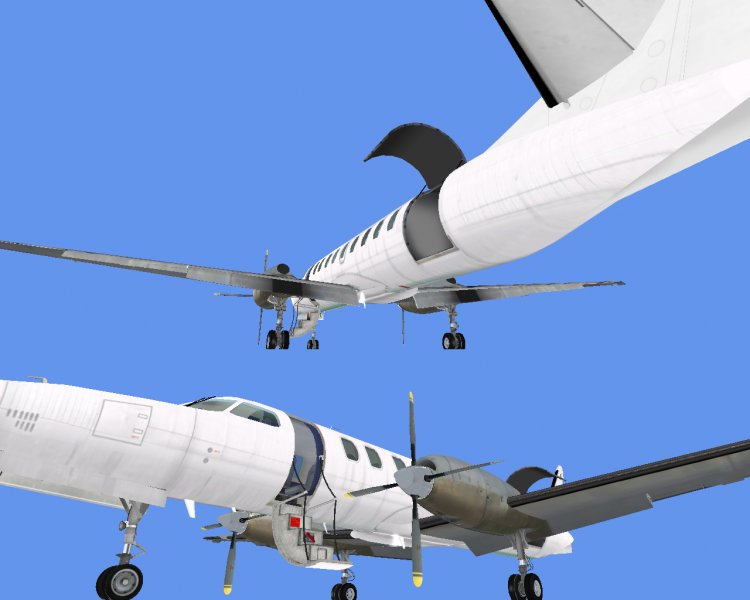
Fairchild metroliner III aircraft, both models, cargo and passenger. Simple panel. Later will upload an EFIS 84 version panel
→ Size:
77 MB
→ Date:
1 year ago (04.04.2025 20:39)
→ Author:
Ricardo García Marrero
→ Approved by moderator:
desmo
→ License:
Freeware - Free version, Do Not Redistribute
→ Downloaded:
175 time(s)