ALPHA XB-70 Valkyrie FSX Просмотр ZIP-архива
SimObjects/Airplanes/ALPHA XB-70 Valkyrie/valkyrie.htm
<html>

<head>
<meta http-equiv="Content-Language" content="en-us">
<meta http-equiv="Content-Type" content="text/html; charset=windows-1252">
<meta name="GENERATOR" content="Microsoft FrontPage 4.0">
<meta name="ProgId" content="FrontPage.Editor.Document">
<title>AlphaSim XB-70 Valkyrie Procedures</title>
</head>

<body>

<table border="0" cellspacing="0" width="45%" cellpadding="0">
  <tr>
    <td width="100%">

<b><i><font face="Arial" size="4">AlphaSim XB-70 Valkyrie - Condensed Procedures</font></i></b>
<p><img border="0" src="images/cover.jpg" width="500" height="616"></p>
<p><font face="Arial" size="2">A technological tour de force of epic proportions, the legend of the XB-70 Valkyrie very nearly surpasses the performance of this extraordinary aircraft.  Built in the 1960s as a result of a USAF proposal for a supersonic bomber with high subsonic cruising speed and supersonic dash capabilities, the massive XB-70 was to have carried the same bombload as the B-52 Stratofortress at a higher supersonic speed than the Air Force's current strategic bomber, the B-58 Hustler.  A later requirement specified that the plane be able to fly the entire mission at Mach 3.0 or greater, with a range of up to 10,500 miles and a maximum gross weight of 490,000 pounds.  In the event, technology quickly relegated the Valkyrie to the role of supersonic research testbed and flagship of the USAF's public relations fleet.  Ground-to-air missiles and advanced radar made the XB-70's supersonic mission impossible.  The bomb bay of the aircraft was instead packed with data acquisition equipment, and the information gathered helped propel the United States Air Force even further into the supersonic jet age, with the information going to help develop future generations of supersonic interceptors.</font></p>
<p><font face="Arial" size="2"><b><i>Flight Characteristics and Flight Modeling</i></b></font></p>
<p><font face="Arial" size="2">The AlphaSim XB-70 Valkyrie was created using the
original XB-70A Flight Manual, the cover of which is reproduced above.  The
Valkyrie is a "flagship" quality aircraft in the AlphaSim line and
extreme care was taken to replicate as closely as possible the features and
characteristics of this unusual and iconic aircraft.</font></p>
<p><font face="Arial" size="2">AlphaSim aircraft are primarily designed for
people who like to spend their time flying rather than following lengthy and
complicated procedures, so many of the design features of this plane are
automated, such as the fuel management.  This reflects the design
philosophy of the real plane, where as many of the complex systems as possible
were given over to fully automatic control.  We urge anyone truly
interested in the history and flight characteristics of this amazing aircraft to
purchase the actual XB-70A Flight Manual.  Our aircraft can be operated
according to the actual procedures and will match the published specifications
with a very high degree of accuracy.</font></p>
<p><font face="Arial" size="2">The Valkyrie is an advanced delta wing
design.  The delta wing does not stall as a conventional wing does.
There is no well-defined stall; the aircraft will begin to mush and pitch up
once a critical angle of attack is exceeded.  For this airplane, do not
exceed 17 degrees angle of attack.  If this is exceeded the nose will
continue to pitch up and it may take full forward stick to recover.  The
canard provides a good measure of control at high alpha, unlike other delta wing
designs, and the canard can be seen now on all modern delta wing aircraft, such
as the Gripen and Eurofighter Typhoon.</font></p>
<p><font face="Arial" size="2">The aircraft is quite stable and the controls are
very well harmonized, and it is surprisingly responsive for an aircraft of its
size.  However, the airframe is not up to high G maneuvers.  In fact,
negative Gs are prohibited as are all acrobatics and sudden maneuvers.
Please review the aircraft limitations for specific information.</font></p>
<p><font face="Arial" size="2"><b><i>Fuel Supply</i></b></font></p>
<p><font face="Arial" size="2">The XB-70 had fuel tanks crammed into every nook
and cranny of the wings and fuselage.  All the tanks were interconnected
through a complex system of transfer lines and pumps which allowed for
completely automatic fuel and weight management.  However, the actual
amount of fuel the plane could carry varied with the specific mission
configuration, and each of the two aircraft produced had a different fuel
capacity.  A normal takeoff fuel load was about 135,000 lbs of fuel, but
the plane could carry much more.  This flight model has been set up to
carry a maximum of 240,000 pounds of fuel, enough to allow it to meet the
published range specifications.  This results in a takeoff weight of just
over 470,000 lbs.</font></p>
<p><font face="Arial" size="2"><b><i>Engine Management</i></b></font></p>
<p><font face="Arial" size="2">Flight Simulator does not allow for more than
four engines.  The engines are arranged in the flight model as follows: (1,
1), 2, 3, (4, 4).  That is, the outer pairs of gages show information for Engines 1 and
4, while the inboard gages show information for Engine 2 and 3.  The thrust has been adjusted so that the four
engines in this flight model produce the same power as the six engines n the
real aircraft.  That is, each engine in the flight model makes 150 percent
of the rated power, which is the same as if we could have six at the normal
power rating.  Thus, there is no compromise in performance.  Unless
you are operating with one or more engines out, this arrangement will be
transparent; you'll perceive there are six operational engines, and each of the
six "virtual" engines has its own dedicated instruments.</font></p>
<p><b><i><font size="2" face="Arial">Specifications</font></i></b></p>
<ul>
  <li><font face="Arial" size="2"> Crew: 2</font></li>
  <li><font face="Arial" size="2"> Length: 185 ft 10 in (56.6 m)</font></li>
  <li><font face="Arial" size="2"> Wingspan: 105 ft 0 in (32 m)</font></li>
  <li><font face="Arial" size="2"> Height: 30 ft 9 in (9.4 m)</font></li>
  <li><font face="Arial" size="2"> Wing area: 6,296 ftІ (585 mІ)</font></li>
  <li><font face="Arial" size="2"> Empty weight: 231,215 lb (105,050 kg)</font></li>
  <li><font face="Arial" size="2"> Loaded weight: 471,214 lb (214,090 kg)</font></li>
  <li><font face="Arial" size="2"> Max takeoff weight: 550,000 lb (250,000 kg)</font></li>
  <li><font face="Arial" size="2"> Powerplant: (6) General Electric YJ93-GE-3 turbojet, 31,000 lbf (147
    kN) each</font></li>
  <li><font face="Arial" size="2"> Maximum speed: Mach 3.1 (2,360 mph, 3,800 km/h)</font></li>
  <li><font face="Arial" size="2"> Range: 4,288 mi (7,900 km) combat</font></li>
  <li><font face="Arial" size="2"> Service ceiling: 77,350 ft (23,600 m)</font></li>
  <li><font face="Arial" size="2"> Initial rate of climb: 27,450 ft/min (140 m/s)</font></li>
  <li><font face="Arial" size="2"> Armament: None.  Data acquisition equipment carried in central bay.</font></li>
</ul>
<p><b><i><font face="Arial" size="2">Aircraft Limitations</font></i></b></p>
<ul>
  <li><font face="Arial" size="2">Stall, clean: 165 knots IAS (470,000 lbs.)</font></li>
  <li><font face="Arial" size="2">Stall, canard flap and gear down: 155 knots IAS</font></li>
  <li><font face="Arial" size="2">Minimum flying speed, canard flap fully down: 190
    knots IAS</font></li>
  <li><font face="Arial" size="2">Maximum canard flap extension: 270 knots IAS</font></li>
  <li><font face="Arial" size="2">Maximum gear extension: 275 knots IAS</font></li>
  <li><font face="Arial" size="2">Gear damage: 325 knots IAS</font></li>
  <li><font size="2" face="Arial">Maximum G: +1.6, +0.4</font></li>
  <li><font size="2" face="Arial">Negative Gs prohibited</font></li>
  <li><font size="2" face="Arial">All acrobatics prohibited</font></li>
  <li><font size="2" face="Arial">Any sudden or sharp maneuver is to be avoided</font></li>
  <li><font size="2" face="Arial">Nose ramp positioning: no speed limitation
    (recommend UP for supersonic flight)</font></li>
  <li><font size="2" face="Arial">Wing tip positioning: see schedule below</font></li>
</ul>
<p><b><i><font face="Arial" size="2">Virtual Cockpit</font></i></b></p>
<p><font face="Arial" size="2"><img border="0" src="images/VC.jpg" width="500" height="400"></font></p>
<p><b><font size="2" face="Arial">Main Panel</font></b></p>
<p><font face="Arial" size="2"><img border="0" src="images/XB70-1jpg.JPG" width="500" height="375"></font></p>
<p><font face="Arial" size="2"><img border="0" src="images/XB70-2jpg.JPG" width="500" height="375"></font></p>
<p><font face="Arial" size="2"><img border="0" src="images/XB70-3jpg.JPG" width="500" height="375"></font></p>
<p><font face="Arial" size="2"><img border="0" src="images/ECU.jpg" width="500" height="607"></font></p>
<p><b><font face="Arial" size="2">Pop-up Panels</font></b></p>
<p><img border="0" src="images/pop-ups.jpg" width="500" height="400"></p>
<p><b><font face="Arial" size="2">Wing Fold Function</font></b></p>
<p><font face="Arial" size="2">The variable-fold wings are manually adjusted
and need to be set into the correct position by the pilot, depending on the
aircraft's indicated airspeed or Mach number.  Use the switch on the main
2D panel to position the wing tips, or use the "flaps" key to set this
position.</font></p>
<p><font face="Arial" size="2"><b>Nose Ramp</b></font></p>
<p><font face="Arial" size="2">The nose ramp reduced drag in the real aircraft
but has only a cosmetic function in this model.  It can be raised using the
button on the main 2D panel or by using the tailhook up/down command.</font></p>
<p><font face="Arial" size="2"><b>Canard Flap</b></font></p>
<p><font face="Arial" size="2">The canard flap extends to a single position on
the "spoilers" key or using the canard flap switch on the main panel.</font></p>
<p><b><font face="Arial" size="2">Power Schedule</font></b></p>
<p><font face="Arial" size="2">There are three ways to set the power in this
flight model:</font></p>
<ul>
  <li><font face="Arial" size="2">Reading the mouse tooltip when positioned over
    the ECU (throttles) popup</font></li>
  <li><font face="Arial" size="2">Noting the index mark on the ECU on the popup</font></li>
  <li><font face="Arial" size="2">Reading percent of engine RPM on the gages
    (tooltip is very accurate)</font></li>
</ul>
<p><font face="Arial" size="2">Your joystick throttle slider will provide an accurate and realistic way to set power
in the XB-70 Valkyrie.  The range from 0-35% of the throttle joystick position
(read this value using the mouse tooltip) will provide power from IDLE to full military (MIL)
power.  At exactly 35% throttle joystick position, 100 percent RPM will be
obtained which equals MIL power.  Above 35% throttle and 100 % RPM is
the afterburning range, which is the most important range for a supersonic
aircraft.  A full 65% of the range of the throttle control is available to
set exactly the right amount of afterburner power and this can be very finely
adjusted.  This takes the engine into the "overspeed" range from
100-106% RPM.  While it may seem that there is only a small range of
engine RPM to work with, keep in mind that engine RPM remains more or less
constant within a narrow band whilst the afterburners are on.  The actual
thrust is determined by the amount of fuel being sprayed into the burner cans,
not from the engine RPM.  However, higher engine RPM does correspond to
higher thrust.  Engine RPM can be read to 0.01 of a percent, and is easily
set and easily repeatable.</font></p>
<p><font face="Arial" size="2">Use the alternate view of the throttles by
cycling through the virtual cockpit views, or use the popup ECU panel to view
and set throttle position and power.  The tooltip in percent does not
correlate exactly to the ECU throttle index markings, but can be noted and recorded to help
set power.  See the images below for details, noting the relationship
between the mouse tooltip reading and the index marks on the ECU.</font></p>
<p><font face="Arial" size="2"><b><i>MIL power (for subsonic cruising and economical climbing)</i></b></font></p>
<p><font face="Arial" size="2"><img border="0" src="images/MIL-power.jpg" width="500" height="412"></font></p>
<p><font face="Arial" size="2"><b><i>MIN afterburner (for normal climbing).  Use
101.5 percent for a normal climb.</i></b></font></p>
<p><font face="Arial" size="2"><img border="0" src="images/MIN-AB.jpg" width="500" height="507"></font></p>
<p><b><font face="Arial" size="2">Engine Instruments</font></b></p>
<p><font face="Arial" size="2">Fuel flow, oil temperature, and oil pressure can
be read in the center of the main panel.  Use the mouse to get a direct
reading with the tooltip feature.</font></p>
<p><b><font face="Arial" size="2">Engine Start</font></b></p>
<ol>
  <li><font size="2" face="Arial">Set parking brake.</font></li>
  <li><font size="2" face="Arial">Set throttles to IDLE.</font></li>
  <li><font size="2" face="Arial">Turn OFF Avionics and Deice switches.</font></li>
  <li><font size="2" face="Arial">Turn all generators OFF.</font></li>
  <li><font size="2" face="Arial">Turn on Master Battery switch.</font></li>
  <li><font size="2" face="Arial">Turn on the main fuel supply to all engines
    (Ctrl-Shift-F4).</font></li>
  <li><font size="2" face="Arial">Check Fire Emergency fuel cutoff buttons are normal. </font></li>
  <li><font size="2" face="Arial">Start Engine 1 using the engine start switch.</font></li>
  <li><font size="2" face="Arial">Monitor oil pressure and temperature - wait
    until all annunciator and caution lights go out.</font></li>
  <li><font size="2" face="Arial">Turn on Generator 1.</font></li>
  <li><font size="2" face="Arial">Repeat for remaining engines.</font></li>
  <li><font size="2" face="Arial">Turn ON avionics and set radios as required.</font></li>
</ol>
<p><b><font face="Arial" size="2">Takeoff (470,000 lbs.)</font></b></p>
<ol>
  <li><font face="Arial" size="2">Make sure fuel is sufficient.</font></li>
  <li><font face="Arial" size="2">Set canard flap down.</font></li>
  <li><font face="Arial" size="2">Set all trim controls to neutral using the
    "Takeoff Trim" button on the 2D panel.</font></li>
  <li><font face="Arial" size="2">Line up on the runway centerline.</font></li>
  <li><font face="Arial" size="2">Set throttle to minimum afterburner and
    observe that afterburner lights are lit.</font></li>
  <li><font face="Arial" size="2">Advance throttles to full afterburner.</font></li>
  <li><font face="Arial" size="2">Release brakes.</font></li>
  <li><font face="Arial" size="2">Raise nose at 145 knots IAS.</font></li>
  <li><font face="Arial" size="2">Rotate smoothly at 165 knots/305 kph IAS to 10
    degrees
    pitch up.</font></li>
  <li><font face="Arial" size="2">Hold this pitch until the aircraft leaves the
    runway.</font></li>
  <li><font face="Arial" size="2">When positive rate of climb is established,
    retract landing gear.</font></li>
  <li><font face="Arial" size="2">Retract canard flap before 270 knots IAS.</font></li>
  <li><font face="Arial" size="2">Reduce power to minimum afterburner (101.5
    percent RPM or 50% throttle position).</font></li>
  <li><font face="Arial" size="2">Increase speed to 450 knots IAS until reaching
    0.9 Mach.</font></li>
  <li><font face="Arial" size="2">Hold 0.9 Mach for the initial climb to 30,000
    feet.</font></li>
  <li><font face="Arial" size="2">Observe transonic flight procedures below.</font></li>
</ol>
<p><b><font face="Arial" size="2">Tactical Climb and Transonic Flight - Level
Flight Technique</font></b></p>
<p><font face="Arial" size="2">The XB-70 is a powerful aircraft.  It is very
easy to overspeed, so keep your throttles under control at all times.
Throttle back to minimum afterburner after reaching 300 knots IAS on
climbout after gear is retracted.  Accelerate to 450 knots IAS,
adhering to the wing position schedule, and climb at that speed until reaching
0.9 Mach, either flying by hand, or using attitude hold to maintain your airspeed.
Maintain 0.9 Mach until reaching 30,000 feet.  Level off and accelerate
using full afterburner to approximately 1.2 Mach.  Be ready to throttle
back after the aircraft passes through Mach 1.2 as it will accelerate very
quickly.  Begin climb to desired altitude, maintaining 450 KIAS.  Hold this speed until reaching desired altitude.</font></p>
<p><b><font face="Arial" size="2">Tactical Climb and Transonic Flight -
Descending Flight Technique</font></b></p>
<p><font face="Arial" size="2">At altitudes higher than 30,000 feet, or at very
high aircraft weights, it may be necessary to climb to 33,000 feet at 0.90 Mach,
level off, and then descend to 30,000 feet at 3000 fpm to break through the sound
barrier.  Be ready to throttle back after the aircraft passes through Mach
1.2 as it will accelerate very quickly.  Begin climb to desired altitude,
accelerating to 450 knots IAS.  Hold this speed until reaching
desired altitude.</font></p>
<p><b><font face="Arial" size="2">Cruising</font></b></p>
<p><font face="Arial" size="2">When approaching cruising altitude, reduce vertical speed gradually as to intercept the
desired altitude smoothly and with minimum of pitching.  If pitching up and
down (porpoising) occurs, simply turn off the autopilot, stabilize the aircraft
at the desired altitude, and then turn the autopilot back on, ensuring that your
altitude hold value is the same (within a few feet) as the altitude at which you
have stabilized.  Set the throttles to obtain the desired cruising speed.</font></p>
<p><font face="Arial" size="2"><b>Fuel Management</b></font></p>
<p><font face="Arial" size="2">Fuel and center of gravity management in the
XB-70 is fully automatic as with the real aircraft.  Fuel is stored in the wings and fuselage.  No
tank selection or fuel transfer is necessary.</font></p>
<p><b><font face="Arial" size="2">Wingtip Position Schedule</font></b></p>
<p><font face="Arial" size="2">Wingtip position control is manual in this
aircraft.  Observe the following schedule for positioning.</font></p>
<table border="1" width="100%">
  <tr>
    <td width="106"><b><font size="2" face="Arial">Speed</font></b></td>
    <td width="146" align="center"><font size="2" face="Arial">< Mach 0.95/400
      KIAS</font></td>
    <td width="150" align="center"><font face="Arial" size="2">> 0.95/400
      KIAS</font></td>
    <td width="91" align="center"><font size="2" face="Arial">> 1.4 Mach</font></td>
  </tr>
  <tr>
    <td width="106"><b><font face="Arial" size="2">Wing Position</font></b></td>
    <td width="146" align="center"><font face="Arial" size="2">UP</font></td>
    <td width="150" align="center"><font face="Arial" size="2">HALF DOWN</font></td>
    <td width="91" align="center"><font face="Arial" size="2">DOWN</font></td>
  </tr>
</table>
<p><b><font size="2" face="Arial">Cruise Data: Fuel consumption and range
information</font></b></p>
<table border="1" width="100%">
  <tr>
    <td width="22%" align="center"><b><font face="Arial" size="2">Altitude</font></b></td>
    <td width="30%" align="center"><b><font face="Arial" size="2">Wing Tip</font></b></td>
    <td width="19%" align="center"><b><font face="Arial" size="2">Mach Number</font></b></td>
    <td width="28%" align="center"><b><font face="Arial" size="2">Fuel Consumption</font></b></td>
    <td width="22%" align="center"><b><font face="Arial" size="2">Nautical miles/1000 lbs.
      fuel</font></b></td>
    <td width="34%" align="center"><b><font size="2" face="Arial">Approximate<br>
      Range</font></b></td>
  </tr>
  <tr>
    <td width="22%" align="center" bgcolor="#00FFFF"><font face="Arial" size="2">27,000 feet</font></td>
    <td width="30%" align="center" bgcolor="#00FFFF"><font face="Arial" size="2">UP</font></td>
    <td width="19%" align="center" bgcolor="#00FFFF"><font face="Arial" size="2">0.85 Mach</font></td>
    <td width="28%" align="center" bgcolor="#00FFFF"><font face="Arial" size="2"> 31,784 pounds/hour</font></td>
    <td width="22%" align="center" bgcolor="#00FFFF"><font size="2" face="Arial">16.0</font></td>
    <td width="34%" align="center" bgcolor="#00FFFF"><font size="2" face="Arial">Calculate
      with FOB</font></td>
  </tr>
  <tr>
    <td width="22%" align="center" bgcolor="#00FF00"><font face="Arial" size="2">30,000 feet</font></td>
    <td width="30%" align="center" bgcolor="#00FF00"><font face="Arial" size="2">UP</font></td>
    <td width="19%" align="center" bgcolor="#00FF00"><font face="Arial" size="2">0.93 Mach</font></td>
    <td width="28%" align="center" bgcolor="#00FF00"><font face="Arial" size="2"> 47,300 pounds/hour</font></td>
    <td width="22%" align="center" bgcolor="#00FF00"><font size="2" face="Arial">11.6</font></td>
    <td width="34%" align="center" bgcolor="#00FF00"><font size="2" face="Arial">Calculate
      with FOB</font></td>
  </tr>
  <tr>
    <td width="22%" align="center" bgcolor="#FFFF00"><font face="Arial" size="2">75,000 feet</font></td>
    <td width="30%" align="center" bgcolor="#FFFF00"><font face="Arial" size="2">DOWN</font></td>
    <td width="19%" align="center" bgcolor="#FFFF00"><font size="2" face="Arial">2.7
      Mach</font></td>
    <td width="28%" align="center" bgcolor="#FFFF00"><font face="Arial" size="2">55,200 pounds/hour</font></td>
    <td width="22%" align="center" bgcolor="#FFFF00"><font size="2" face="Arial">28.5</font></td>
    <td width="34%" align="center" bgcolor="#FFFF00"><font size="2" face="Arial">Calculate
      with FOB</font></td>
  </tr>
  <tr>
    <td width="22%" align="center" bgcolor="#FF0000"><font face="Arial" size="2">75,000 feet</font></td>
    <td width="30%" align="center" bgcolor="#FF0000"><font face="Arial" size="2">DOWN</font></td>
    <td width="19%" align="center" bgcolor="#FF0000"><font size="2" face="Arial">3.0 Mach</font></td>
    <td width="28%" align="center" bgcolor="#FF0000"><font face="Arial" size="2">114,100 pounds/hour</font></td>
    <td width="22%" align="center" bgcolor="#FF0000"><font size="2" face="Arial">15.1</font></td>
    <td width="34%" align="center" bgcolor="#FF0000"><font size="2" face="Arial">Calculate
      with FOB</font></td>
  </tr>
</table>
<p><b><font size="2" face="Arial">Cruise Data: Engine Performance (may vary
slightly with flight conditions)</font></b></p>
<table border="1" width="100%">
  <tr>
    <td width="22%" align="center"><b><font face="Arial" size="2">Altitude</font></b></td>
    <td width="30%" align="center"><b><font size="2" face="Arial">ECU/Tooltip
      Index*</font></b></td>
    <td width="19%" align="center"><b><font size="2" face="Arial">KTAS</font></b></td>
    <td width="28%" align="center"><b><font size="2" face="Arial">Mach #</font></b></td>
    <td width="22%" align="center"><b><font size="2" face="Arial">KIAS</font></b></td>
    <td width="34%" align="center"><b><font size="2" face="Arial">% RPM</font></b></td>
  </tr>
  <tr>
    <td width="22%" align="center" bgcolor="#00FFFF"><font face="Arial" size="2">27,000 feet</font></td>
    <td width="30%" align="center" bgcolor="#00FFFF"><font size="2" face="Arial">38/27%</font></td>
    <td width="19%" align="center" bgcolor="#00FFFF"><font size="2" face="Arial">508</font></td>
    <td width="28%" align="center" bgcolor="#00FFFF"><font size="2" face="Arial">0.85</font></td>
    <td width="22%" align="center" bgcolor="#00FFFF"><font size="2" face="Arial">358</font></td>
    <td width="34%" align="center" bgcolor="#00FFFF"><font size="2" face="Arial">89.80</font></td>
  </tr>
  <tr>
    <td width="22%" align="center" bgcolor="#00FF00"><font face="Arial" size="2">30,000 feet</font></td>
    <td width="30%" align="center" bgcolor="#00FF00"><font size="2" face="Arial">45/35%</font></td>
    <td width="19%" align="center" bgcolor="#00FF00"><font size="2" face="Arial">548</font></td>
    <td width="28%" align="center" bgcolor="#00FF00"><font size="2" face="Arial">0.93</font></td>
    <td width="22%" align="center" bgcolor="#00FF00"><font size="2" face="Arial">370</font></td>
    <td width="34%" align="center" bgcolor="#00FF00"><font size="2" face="Arial">100.00</font></td>
  </tr>
  <tr>
    <td width="22%" align="center" bgcolor="#FFFF00"><font face="Arial" size="2">75,000 feet</font></td>
    <td width="30%" align="center" bgcolor="#FFFF00"><font size="2" face="Arial">56/50%</font></td>
    <td width="19%" align="center" bgcolor="#FFFF00"><font size="2" face="Arial">1547</font></td>
    <td width="28%" align="center" bgcolor="#FFFF00"><font size="2" face="Arial">2.7</font></td>
    <td width="22%" align="center" bgcolor="#FFFF00"><font size="2" face="Arial">372</font></td>
    <td width="34%" align="center" bgcolor="#FFFF00"><font size="2" face="Arial">101.40</font></td>
  </tr>
  <tr>
    <td width="22%" align="center" bgcolor="#FF0000"><font face="Arial" size="2">75,000 feet</font></td>
    <td width="30%" align="center" bgcolor="#FF0000"><font size="2" face="Arial">85/81%</font></td>
    <td width="19%" align="center" bgcolor="#FF0000"><font size="2" face="Arial">1721</font></td>
    <td width="28%" align="center" bgcolor="#FF0000"><font size="2" face="Arial">3.0</font></td>
    <td width="22%" align="center" bgcolor="#FF0000"><font size="2" face="Arial">416</font></td>
    <td width="34%" align="center" bgcolor="#FF0000"><font size="2" face="Arial">104.30</font></td>
  </tr>
</table>
<p><font face="Arial" size="2">*The first number is the index mark on the ECU;
the second number is the corresponding percentage of throttle displayed when
using the mouse to view the throttle position tooltip.</font></p>
<p><font face="Arial" size="2"><b>Legend</b></font></p>
<p><span style="background-color: #00FFFF"><font size="2" face="Arial">Optimal
Cruise</font></span></p>
<p><font face="Arial" size="2"><span style="background-color: #00FF00">Normal
Cruise</span></font></p>
<p><font face="Arial" size="2"><span style="background-color: #FFFF00">Maximum
Range</span></font></p>
<p><font face="Arial" size="2"><span style="background-color: #FF0000">Maximum
Cruise</span></font></p>
<p><font face="Arial" size="2"><b>Notes on Cruising in Flight Simulator</b></font></p>
<p><font face="Arial" size="2">Flight Simulator is limited in the degree to
which aircraft weight will affect cruise performance.  Weight has a very
small, mostly negligible effect on fuel consumption and range.  Thus, the
cruise weight selected will have very little effect on the aircraft's range and
performance.  However, all other cruise performance parameters are a very
close match to the real aircraft.  For example, at the optimal cruise for
maximum range (see the actual charts from the XB-70 flight manual below), the
specified range at 27,000 feet at 68 percent of military thrust at a speed of
0.85 Mach is 16 nautical miles/1000 pounds of fuel, achieved by setting the
throttles to 38 percent using the ECU index marks (27 percent using the mouse
tooltip).  Your AlphaSim XB-70 Valkyrie will match this performance
exactly, the only variation being that aircraft weight will not materially
affect cruise performance.  Likewise, setting the throttles to maximum
military thrust (45 percent on the ECU, 35 percent using the mouse tooltip) at
an altitude of 30,000 feet will yield a fuel economy of 11.6 nm/1000 pounds of
fuel, again, an exact match for the real aircraft.</font></p>
<p><font face="Arial" size="2">The variation in supersonic cruise also reflects
that of the actual aircraft, except with respect to weight.  A cruise of
3.0 Mach at 75,000 feet will result in a specific fuel consumption of 15.1
nm/1000 pounds, while backing the throttles down to minimum afterburner at the
same altitude will result in a specific fuel consumption of 28.5 nautical miles
per 1000 pounds of fuel. </font></p>
<p><font face="Arial" size="2">The chart information for percentage of either
military or maximum thrust versus throttle index position will vary with
conditions but is a good yardstick.  Set throttles as needed to achieve the
Mach number and fuel flow for the desired cruise performance.  Use the fuel
flow totalizer to set the throttles and then fine-tune from there.</font></p>
<p><img border="0" src="images/sub-cruise.jpg" width="500" height="651"></p>
<p><img border="0" src="images/max-rng-subsonic.jpg" width="500" height="601"></p>
<p><img border="0" src="images/super-cruise.jpg" width="500" height="610"></p>
<p><b><font face="Arial" size="2">Descent</font></b></p>
<ol>
  <li><font face="Arial" size="2">Descend at 450 KIAS maximum with throttles at
    IDLE for maximum rate of descent.</font></li>
  <li><font face="Arial" size="2">Set throttles to IDLE for maximum deceleration.</font></li>
  <li><font face="Arial" size="2">Set descent rate and speed per flight
    requirements if maximum rate is not needed.</font></li>
</ol>
<p><b><font face="Arial" size="2">Landing (350,000 lbs.)</font></b></p>
<p><b><font face="Arial" size="2"><a href="Valkyrie_landing.wmv">Watch movie</a>
(FSX users need to open directly from aircraft folder)</font></b></p>
<ol>
  <li><font face="Arial" size="2">Adjust speeds up or down if weight is higher
    or lower than 350,000 lbs.</font></li>
  <li><font face="Arial" size="2">Flare speed is 160 KIAS at this weight.</font></li>
  <li><font face="Arial" size="2">Approach the field at about 300 knots IAS
    with plenty of room to slow down.</font></li>
  <li><font face="Arial" size="2">Extend landing gear to assist with slowing
    below 275 KIAS.</font></li>
  <li><font face="Arial" size="2">Extend canard flap below 270 knots IAS.
    Use the switch on the 2D panel for this, or use the spoiler key to toggle
    the canard flap.</font></li>
  <li><font face="Arial" size="2">Downwind airspeed is flare + 50 = 210 KIAS.</font></li>
  <li><font face="Arial" size="2">Base leg airspeed is flare speed + 30 = 190
    KIAS.</font></li>
  <li><font face="Arial" size="2">Final approach is flare speed + 10 = 170 KIAS.</font></li>
  <li><font face="Arial" size="2">Over airfield boundary speed should be 170
    knots IAS.</font></li>
  <li><font face="Arial" size="2">Touch down at about 155 knots IAS.  The
    flare is almost non-existent as the ground effect is significant.  If
    the flare is not executed perfectly, some nose-down stick may be needed to
    prevent ballooning in ground effect.</font></li>
  <li><font face="Arial" size="2">After touchdown hold nose off
    as long as possible.</font> </li>
  <li><font face="Arial" size="2">Brake as necessary after nosewheel touches down.</font> </li>
  <li><font face="Arial" size="2">This model does not feature a drag chute; it
    should not be needed if a runway of sufficient length is used.</font> </li>
</ol>

<p><img border="0" src="images/landing.jpg" width="500" height="371">

    </td>
  </tr>
</table>

</body>

</html>
43149-ALPHA-XB-70-Valkyrie-FSX.zip
| Имя файла | Дата | Размер |
|---|---|---|
| SimObjects/Airplanes/ | 22.06.2007 23:32 | |
| SimObjects/Airplanes/ALPHA XB-70 Valkyrie/ | 23.06.2007 00:33 | |
| SimObjects/Airplanes/ALPHA XB-70 Valkyrie/Aircraft.cfg | 23.06.2007 00:37 | 16 KB |
| SimObjects/Airplanes/ALPHA XB-70 Valkyrie/valkyrie.htm | 21.06.2007 16:14 | 31 KB |
| SimObjects/Airplanes/ALPHA XB-70 Valkyrie/Valkyrie_landing.wmv | 23.04.2007 14:23 | 3 MB |
| SimObjects/Airplanes/ALPHA XB-70 Valkyrie/XB-70A_Valkyrie.air | 20.06.2007 16:21 | 9 KB |
| SimObjects/Airplanes/ALPHA XB-70 Valkyrie/texture.shared/ | 23.06.2007 00:33 | |
| SimObjects/Airplanes/ALPHA XB-70 Valkyrie/texture.shared/blk_C.bmp | 16.02.2007 07:38 | 64 KB |
| SimObjects/Airplanes/ALPHA XB-70 Valkyrie/texture.shared/Glass_t.dds | 11.06.2007 18:49 | 64 KB |
| SimObjects/Airplanes/ALPHA XB-70 Valkyrie/texture.shared/green_C.bmp | 16.02.2007 07:42 | 16 KB |
| SimObjects/Airplanes/ALPHA XB-70 Valkyrie/texture.shared/Pilot_T.dds | 11.06.2007 18:49 | 1 MB |
| SimObjects/Airplanes/ALPHA XB-70 Valkyrie/texture.shared/texture.cfg | 11.06.2007 17:46 | 95 B |
| SimObjects/Airplanes/ALPHA XB-70 Valkyrie/texture.shared/xb70_01.dds | 11.06.2007 18:49 | 1 MB |
| SimObjects/Airplanes/ALPHA XB-70 Valkyrie/texture.shared/xb70_02.dds | 11.06.2007 18:49 | 1 MB |
| SimObjects/Airplanes/ALPHA XB-70 Valkyrie/texture.shared/xb70_03.dds | 11.06.2007 18:49 | 1 MB |
| SimObjects/Airplanes/ALPHA XB-70 Valkyrie/texture.shared/xb70_04.dds | 11.06.2007 18:49 | 1 MB |
| SimObjects/Airplanes/ALPHA XB-70 Valkyrie/texture.shared/xb70_05.dds | 11.06.2007 18:49 | 1 MB |
| SimObjects/Airplanes/ALPHA XB-70 Valkyrie/texture.shared/xb70_06.dds | 11.06.2007 18:49 | 1 MB |
| SimObjects/Airplanes/ALPHA XB-70 Valkyrie/texture.shared/xb70_07.dds | 11.06.2007 18:49 | 1 MB |
| SimObjects/Airplanes/ALPHA XB-70 Valkyrie/texture.bump/ | 23.06.2007 00:33 | |
| SimObjects/Airplanes/ALPHA XB-70 Valkyrie/texture.bump/texture.cfg | 11.06.2007 17:46 | 95 B |
| SimObjects/Airplanes/ALPHA XB-70 Valkyrie/texture.bump/XB-70_1_bump.dds | 11.06.2007 18:47 | 1 MB |
| SimObjects/Airplanes/ALPHA XB-70 Valkyrie/texture.bump/XB-70_2_bump.dds | 14.06.2007 02:14 | 1 MB |
| SimObjects/Airplanes/ALPHA XB-70 Valkyrie/texture.bump/XB-70_3_bump.dds | 14.06.2007 02:14 | 1 MB |
| SimObjects/Airplanes/ALPHA XB-70 Valkyrie/texture.bump/XB-70_4_bump.dds | 11.06.2007 18:47 | 256 KB |
| SimObjects/Airplanes/ALPHA XB-70 Valkyrie/texture/ | 23.06.2007 00:33 | |
| SimObjects/Airplanes/ALPHA XB-70 Valkyrie/texture/texture.cfg | 11.06.2007 17:46 | 95 B |
| SimObjects/Airplanes/ALPHA XB-70 Valkyrie/texture/thumbnail.jpg | 12.06.2007 05:19 | 16 KB |
| SimObjects/Airplanes/ALPHA XB-70 Valkyrie/texture/XB-70_1a_T.dds | 11.06.2007 18:50 | 1 MB |
| SimObjects/Airplanes/ALPHA XB-70 Valkyrie/texture/XB-70_1b_T.dds | 11.06.2007 18:50 | 1 MB |
| SimObjects/Airplanes/ALPHA XB-70 Valkyrie/texture/XB-70_2_T.dds | 11.06.2007 18:50 | 1 MB |
| SimObjects/Airplanes/ALPHA XB-70 Valkyrie/texture/XB-70_3a_T.dds | 11.06.2007 18:50 | 1 MB |
| SimObjects/Airplanes/ALPHA XB-70 Valkyrie/texture/XB-70_3b_T.dds | 11.06.2007 18:50 | 1 MB |
| SimObjects/Airplanes/ALPHA XB-70 Valkyrie/texture/XB-70_4.dds | 11.06.2007 18:50 | 256 KB |
| SimObjects/Airplanes/ALPHA XB-70 Valkyrie/texture/XB-70_5.dds | 11.06.2007 18:50 | 1 MB |
| SimObjects/Airplanes/ALPHA XB-70 Valkyrie/sound/ | 23.06.2007 00:33 | |
| SimObjects/Airplanes/ALPHA XB-70 Valkyrie/sound/ban11.WAV | 17.04.2006 13:30 | 603 KB |
| SimObjects/Airplanes/ALPHA XB-70 Valkyrie/sound/ban12.WAV | 17.04.2006 13:31 | 998 KB |
| SimObjects/Airplanes/ALPHA XB-70 Valkyrie/sound/ban13.WAV | 17.04.2006 13:33 | 998 KB |
| SimObjects/Airplanes/ALPHA XB-70 Valkyrie/sound/ban14.WAV | 17.04.2006 14:15 | 998 KB |
| SimObjects/Airplanes/ALPHA XB-70 Valkyrie/sound/ban21.WAV | 17.04.2006 13:34 | 418 KB |
| SimObjects/Airplanes/ALPHA XB-70 Valkyrie/sound/ban22.WAV | 17.04.2006 13:35 | 418 KB |
| SimObjects/Airplanes/ALPHA XB-70 Valkyrie/sound/ban23.WAV | 17.04.2006 13:35 | 418 KB |
| SimObjects/Airplanes/ALPHA XB-70 Valkyrie/sound/ban24.WAV | 17.04.2006 13:36 | 418 KB |
| SimObjects/Airplanes/ALPHA XB-70 Valkyrie/sound/BAN2T.WAV | 30.06.2003 01:59 | 548 KB |
| SimObjects/Airplanes/ALPHA XB-70 Valkyrie/sound/bbn11.WAV | 17.04.2006 13:30 | 565 KB |
| SimObjects/Airplanes/ALPHA XB-70 Valkyrie/sound/bbn12.WAV | 17.04.2006 13:31 | 936 KB |
| SimObjects/Airplanes/ALPHA XB-70 Valkyrie/sound/bbn13.WAV | 17.04.2006 13:33 | 936 KB |
| SimObjects/Airplanes/ALPHA XB-70 Valkyrie/sound/bbn14.WAV | 17.04.2006 14:15 | 936 KB |
| SimObjects/Airplanes/ALPHA XB-70 Valkyrie/sound/bbn21.WAV | 17.04.2006 13:34 | 392 KB |
| SimObjects/Airplanes/ALPHA XB-70 Valkyrie/sound/bbn22.WAV | 17.04.2006 13:35 | 392 KB |
| SimObjects/Airplanes/ALPHA XB-70 Valkyrie/sound/bbn23.WAV | 17.04.2006 13:35 | 392 KB |
| SimObjects/Airplanes/ALPHA XB-70 Valkyrie/sound/bbn24.WAV | 17.04.2006 13:36 | 392 KB |
| SimObjects/Airplanes/ALPHA XB-70 Valkyrie/sound/BBN2T.WAV | 30.06.2003 02:01 | 647 KB |
| SimObjects/Airplanes/ALPHA XB-70 Valkyrie/sound/shutdown_ext.WAV | 30.06.2003 02:03 | 2 MB |
| SimObjects/Airplanes/ALPHA XB-70 Valkyrie/sound/shutdown_int.WAV | 30.06.2003 01:58 | 943 KB |
| SimObjects/Airplanes/ALPHA XB-70 Valkyrie/sound/sound.cfg | 23.06.2007 00:33 | 13 KB |
| SimObjects/Airplanes/ALPHA XB-70 Valkyrie/sound/starter_ext1.wav | 17.04.2006 14:06 | 3 MB |
| SimObjects/Airplanes/ALPHA XB-70 Valkyrie/sound/starter_ext2.WAV | 17.04.2006 14:08 | 338 KB |
| SimObjects/Airplanes/ALPHA XB-70 Valkyrie/sound/starter_int1.wav | 17.04.2006 14:06 | 3 MB |
| SimObjects/Airplanes/ALPHA XB-70 Valkyrie/sound/starter_int2.WAV | 17.04.2006 14:07 | 338 KB |
| SimObjects/Airplanes/ALPHA XB-70 Valkyrie/sound/xban11.wav | 30.06.2003 02:03 | 382 KB |
| SimObjects/Airplanes/ALPHA XB-70 Valkyrie/sound/xban12.wav | 30.06.2003 02:04 | 304 KB |
| SimObjects/Airplanes/ALPHA XB-70 Valkyrie/sound/xban13.wav | 30.06.2003 02:04 | 186 KB |
| SimObjects/Airplanes/ALPHA XB-70 Valkyrie/sound/xban14.wav | 30.06.2003 02:04 | 733 KB |
| SimObjects/Airplanes/ALPHA XB-70 Valkyrie/sound/xban21.wav | 30.06.2003 02:04 | 213 KB |
| SimObjects/Airplanes/ALPHA XB-70 Valkyrie/sound/xban22.wav | 30.06.2003 02:05 | 585 KB |
| SimObjects/Airplanes/ALPHA XB-70 Valkyrie/sound/xban23.wav | 30.06.2003 02:05 | 681 KB |
| SimObjects/Airplanes/ALPHA XB-70 Valkyrie/sound/xban24.wav | 30.06.2003 02:37 | 1 MB |
| SimObjects/Airplanes/ALPHA XB-70 Valkyrie/sound/XBAN2T.WAV | 30.06.2003 02:03 | 295 KB |
| SimObjects/Airplanes/ALPHA XB-70 Valkyrie/sound/xbbn11.wav | 30.06.2003 02:06 | 382 KB |
| SimObjects/Airplanes/ALPHA XB-70 Valkyrie/sound/xbbn12.wav | 30.06.2003 02:06 | 147 KB |
| SimObjects/Airplanes/ALPHA XB-70 Valkyrie/sound/xbbn13.wav | 30.06.2003 02:06 | 302 KB |
| SimObjects/Airplanes/ALPHA XB-70 Valkyrie/sound/xbbn14.wav | 30.06.2003 02:06 | 733 KB |
| SimObjects/Airplanes/ALPHA XB-70 Valkyrie/sound/xbbn21.wav | 30.06.2003 02:06 | 213 KB |
| SimObjects/Airplanes/ALPHA XB-70 Valkyrie/sound/xbbn22.wav | 30.06.2003 02:07 | 585 KB |
| SimObjects/Airplanes/ALPHA XB-70 Valkyrie/sound/xbbn23.wav | 30.06.2003 02:07 | 336 KB |
| SimObjects/Airplanes/ALPHA XB-70 Valkyrie/sound/xbbn24.wav | 30.06.2003 02:36 | 1 MB |
| SimObjects/Airplanes/ALPHA XB-70 Valkyrie/sound/XBBN2T.WAV | 30.06.2003 02:06 | 469 KB |
| SimObjects/Airplanes/ALPHA XB-70 Valkyrie/panel/ | 23.06.2007 00:33 | |
| SimObjects/Airplanes/ALPHA XB-70 Valkyrie/panel/$vpanel1.bmp | 06.06.2007 20:34 | 3 MB |
| SimObjects/Airplanes/ALPHA XB-70 Valkyrie/panel/$vpanel2.bmp | 03.05.2007 03:38 | 3 MB |
| SimObjects/Airplanes/ALPHA XB-70 Valkyrie/panel/All.bmp | 29.12.2003 17:56 | 768 KB |
| SimObjects/Airplanes/ALPHA XB-70 Valkyrie/panel/ALPHA_XB70.cab | 21.06.2007 15:23 | 1 MB |
| SimObjects/Airplanes/ALPHA XB-70 Valkyrie/panel/Electrics.bmp | 16.06.2007 17:18 | 106 KB |
| SimObjects/Airplanes/ALPHA XB-70 Valkyrie/panel/Panel.cfg | 21.06.2007 15:36 | 11 KB |
| SimObjects/Airplanes/ALPHA XB-70 Valkyrie/panel/ValkyriePnl.bmp | 19.06.2007 17:01 | 2 MB |
| SimObjects/Airplanes/ALPHA XB-70 Valkyrie/model/ | 23.06.2007 00:33 | |
| SimObjects/Airplanes/ALPHA XB-70 Valkyrie/model/ALPHA_XB-70_exterior.mdl | 19.06.2007 17:27 | 9 MB |
| SimObjects/Airplanes/ALPHA XB-70 Valkyrie/model/ALPHA_XB-70_interior.mdl | 19.06.2007 17:29 | 8 MB |
| SimObjects/Airplanes/ALPHA XB-70 Valkyrie/model/Model.cfg | 11.06.2007 17:44 | 70 B |
| SimObjects/Airplanes/ALPHA XB-70 Valkyrie/images/ | 23.06.2007 00:33 | |
| SimObjects/Airplanes/ALPHA XB-70 Valkyrie/images/cover.jpg | 21.06.2007 03:24 | 117 KB |
| SimObjects/Airplanes/ALPHA XB-70 Valkyrie/images/ECU.jpg | 20.06.2007 12:07 | 147 KB |
| SimObjects/Airplanes/ALPHA XB-70 Valkyrie/images/landing.jpg | 20.06.2007 15:47 | 70 KB |
| SimObjects/Airplanes/ALPHA XB-70 Valkyrie/images/max-rng-subsonic.jpg | 20.06.2007 14:28 | 145 KB |
| SimObjects/Airplanes/ALPHA XB-70 Valkyrie/images/MIL-power.jpg | 20.06.2007 12:33 | 111 KB |
| SimObjects/Airplanes/ALPHA XB-70 Valkyrie/images/MIN-AB.jpg | 21.06.2007 03:12 | 124 KB |
| SimObjects/Airplanes/ALPHA XB-70 Valkyrie/images/pop-ups.jpg | 21.06.2007 15:47 | 103 KB |
| SimObjects/Airplanes/ALPHA XB-70 Valkyrie/images/sub-cruise.jpg | 20.06.2007 13:32 | 170 KB |
| SimObjects/Airplanes/ALPHA XB-70 Valkyrie/images/super-cruise.jpg | 20.06.2007 13:37 | 150 KB |
| SimObjects/Airplanes/ALPHA XB-70 Valkyrie/images/VC.jpg | 18.06.2007 13:02 | 128 KB |
| SimObjects/Airplanes/ALPHA XB-70 Valkyrie/images/XB70-1jpg.JPG | 20.06.2007 11:36 | 190 KB |
| SimObjects/Airplanes/ALPHA XB-70 Valkyrie/images/XB70-2jpg.JPG | 20.06.2007 11:36 | 176 KB |
| SimObjects/Airplanes/ALPHA XB-70 Valkyrie/images/XB70-3jpg.JPG | 21.06.2007 15:14 | 164 KB |
| SimObjects/Airplanes/ALPHA XB-70 Valkyrie/Readme.txt | 23.06.2007 01:14 | 1 KB |
| SimObjects/ | 22.06.2007 23:32 | |
| Effects/ | 21.06.2007 16:03 | |
| Effects/fx_ALPHA_XB70_AB1.fx | 08.06.2007 04:16 | 37 KB |
| Effects/fx_ALPHA_XB70_smoke.fx | 08.06.2007 05:03 | 1 KB |
| Effects/fx_ALPHA_XB70_Td.fx | 07.06.2007 20:45 | 5 KB |
| Effects/fx_ALPHA_XB70_Vapour.fx | 07.06.2007 20:55 | 28 KB |
| Effects/fx_ALPHA_XB70_vclight_Red.fx | 12.01.2007 07:08 | 2 KB |
| Effects/fx_Alpha_XB70_Vortices.fx | 07.06.2007 20:54 | 3 KB |
| Effects/fx_Alpha_XB70_Vortices1.fx | 07.06.2007 20:59 | 3 KB |
| Effects/texture/ | 21.06.2007 16:03 | |
| Effects/texture/A_XB70-00.bmp | 12.01.2007 17:32 | 65 KB |
| Effects/texture/A_XB70-00a1.bmp | 12.03.2007 23:31 | 65 KB |
| Effects/texture/A_XB70-01a.bmp | 14.11.2006 06:48 | 65 KB |
| Effects/texture/A_XB70-1.bmp | 30.12.2006 06:08 | 65 KB |
| Effects/texture/A_XB70-2.bmp | 30.12.2006 06:08 | 65 KB |
| Effects/texture/A_XB70-3.bmp | 30.12.2006 06:09 | 65 KB |
| avsim_su.diz | 13.02.2012 04:15 | 406 B |
| Итого: | 79 MB | |
ALPHA XB-70 Valkyrie FSX
| Rating: 3!
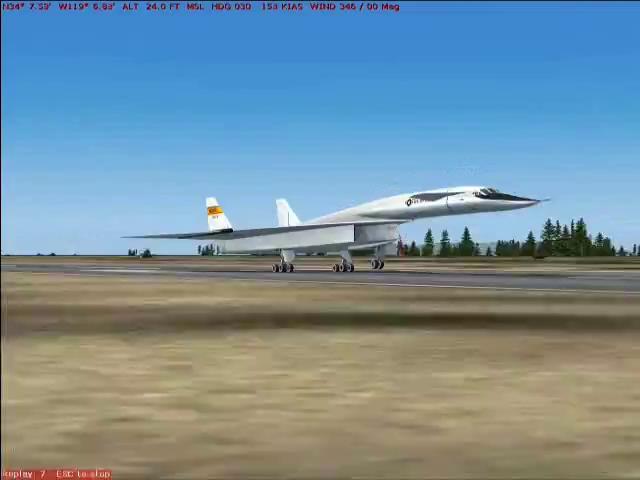
Единственная рабочая версия XB-70 Valkyrie для FS 2004 & FSX.Проверял на FSX.Работает отлично,много эфектов,вроде завихрений в нервюре крыла и т.п.
→ Size:
49 MB
→ Date:
14 years ago (13.02.2012 11:48)
→ Author:
Yoni
→ Approved by moderator:
RAID
→ License:
Freeware - Free version, Unlimited Distribution
→ Downloaded:
3803 time(s)