BOEING T-45 Просмотр ZIP-архива
T - 45/README.txt
**********************************************************
T-45C Goshawk for Flight Simulator X: Acceleration - V1.15
By Dino Cattaneo (realeased 16 January 2009)

Please visit my blog for updates:
indiafoxtecho.blogspot.com
**********************************************************

VERSION 1.15 - CHANGES FROM PREVIOUS RELEASE

Visual model:
- all textures have now .dds extension.
  Please note that they were already in dds "format", only the file
  extension was incorrect. Still, no mipmaps (slower frame rate but
  better clarity).
- slight improvement of reflections
- fixed minor misplacement on right trail edge flap
- fixed minor geometry issue on right air intake
- restored keypad on instructor seat
- gear door opening when engine is off is now an optional feature:
  in the real Goshawk, as in many other planes, when you turn the
  engine off the gear door open. I think it was nice to have it in
  the model and implemented that as a "special" animation.
  It now turns out that, in multiplayer, the gear doors of other T-45C
  you might be playing with will appear open.
  So, now the default model is without the additional gear door
  animation.
  An alternate model with the additional gear door animation is stored
  in the "model_with_gear_door_anim" folder, should you prefer to have
  the animation working, copy the t45c.mdl in that folder and paste it
  in your FSX/Simobjects/Airplanes/Boeing_T45C/model and overwrite the
  the existing one. A backup of the default model is stored in the
  "model_with_gear_door_anim" folder.

Interior model:
- added a NAV/OBS knob (which was missing) nearby the NAV control.
  I experienced some malfunctioning...so it may not work correctly.
- added scratchpad some more functionality.
  As this is dependendent on the Hornet avionics code, it may not work
  correctly.

Flight mode:
- Higher roll rate. This seems more accurate according to users' feedback

2D HUD:
- provided a 16:9 panel file for people who use the 2D HUD with a widescreen
  panel (like me);the folder panel16_9 contains the widescreen panel, just grab
  the panel.cfg in that folder and move it to your the panel folder in the Boeing_T45
  airplane folder. Panel4_3 contains a backup of the 4:3 panel.


VERSION 1.1 - CHANGES FROM PREVIOUS RELEASE

Visual model:
-added two liveries: USN without sq.insignia, USN Training Wing 1
-added user-defined identification numbers (numbers can be changed in aircraft selection window)
-added pilot & instruction animations
-fixed instructor HUD shape
-fixed light poistion (some lights are now hardcoded in the mdl)
-fixed point of view position in spot views
-fixed minor flaw in flaps animation
-added few minor details

Interior model:
-Added MFD functionality:
 Power/BRT/CNt controls work as well as all keys;
 as the code is from Accelleration Hornet,incorrectly show 2 engines and working radar.
-Added some HUD functionality (altimeter mode; power/brt; azimut & elevation controls)
-Added functional radios (COM1/COM2/NAV1).Only active frequency selector work.
 FSX stock radio and GPS can be brought to screen by pressing SHIFT+2 & SHIFT+3.
-Following controls/switches now working:
 Flood/cabin light;
 Fire test;
 Warning test (only few lights work actually);
 Formation light;
 COM 1 / COM 2 / NAV1 audio selector
-Slightly moved AoA indexed for readability

Flight model:
- Slightly higher roll rate

Misc:
- Update checklist to include new functionality

**************************************************

Thanks for downloading mt T-45C Goshawk model for Flight Simulator X.
The scope of this project si to provide virtual naval aviators with
"state of the art" jet trainer.
I was also a test-bed for several opportunities given by FSX, like virtual
gauges (modeled in 3D and harcoded into the .mdl), bump and shadow mapping,
complex 3D models.
I've tried to make a compromise between realism, playability and development time and resources.
Hope you'll like it.


INSTALLATION & COMPATIBILITY
****************************
Unzip the file (maintaining the proper folder structure) to your FSX Simobjects/Airplanes subfolder.
NOTE:
This aircraft requires Acceleration for full functionality.
It should be usable with FSX:SP2, but sound, MFDs, HUD and carrier functionality will not work.
It is NOT completely compatible with FSX:SP1 which may cause graphic glitches on some machines.
Tested on both XP (DX9.0c) and Vista (DX10.1).


VISUAL MODEL
************
Visual model feature more than 80k polygons in order to model even the smallest detail like canopy open handle,
main gear brakes systems and rudder trim actuators. This means that there are tons of polygons (roughly 80.000)
and this means that you may get slightly slower frame rates than stock FSX planes.
On my system (64X2 6400, 4Gb, 8800GT) the impact was negligible.

Visual model known issues/opportunities for improvement:
- Main landing gear animation has glitches
- The gear doors in the free flight selection menu appear open (this is done to recreate a real
feature of the Goshawk - and other jets - when the engine is off, the hydraulics "relax" and make
the door open)


COCKPIT
*******
Like Acceleration F/A-18 Hornet the model is supplied WITHOUT A 2D cockpit and gauges.
Virtual cockpit is functional and you can power up and down the plane by the checklist.
However many systems switches are not operational, such as HUD/MFD keypads, IFF and TACAN.
I've tried to maintain the cockpit as close as possible to the real one, but some artistic licence have
been taken here and there.
Standard radio stack and GPS are provided as pop-up windows.

Main differences between real and FSX Goshawk cockpits:
- Real bird has a AoA indicator instead of the g-meter. Sorry, but I could not make a functional Aoa indexer.
- Real bird has a cockpit pressurization altitude instead of the backup altitude.
- Warning and caution lights have been moved/changed due to both missing information and playability reasons.

FLIGHT MODEL
************
While may not be completely accurate, it seems a reasonable approximation of the real one.
The plane is stable and agile, and low-speed handling is good.
Carrier functionality has been tested in hundreds of traps and launches. Should work fine.
Approach speeds should be very close to the original.

KNOWN GLITCHES:
-If you keep full throttle with catapult engaged for too long - say 15secs, the bar may disengage.Also, the bar
will not be retracted automatically after launch (see below)
-If you start the sim "cold and dark", you may, in certain situations, not able to completely power up the engine.
I'm not sure what is the cause. If this happens start the engine with CTRL+E. If you have performed a manual shut-down
then no problem.


NOTE ABOUT CARRIER OPERATIONS
*****************************
As the real thing, this model is designed for carrier training: I've tried to have both a realistic behaviour and a reasonable
approach speeds. It should be easier to land than the F/A-18, and most pilots should be able to operate from a carrier
without too many problems.

HOW TO FIND THE CARRIERS IN FSX:A
***********************************
If you want to operate the Goshawk from a carrier, and you probably will, there are two ways to find "operational" (i.e. with
working cats and spaghetti):
- Pick one of the carrier missions from the mission menu and check "Enable changes".
  Start the mission (with the Hornet) and then you can switch to any other plane (inlcuding the Goshawk)
- Find one of the moving carriers around the world. They cruise on fixed weekly routes to and from several ports
 (e.g.San Diego, Norfolk and Hawaii). Search with google and you will find few pages with exact coordinates of the
  cruise

SUGGESTION FOR SCENERY AND MISSION DEVELOPERS:
- It would be great if someone would make a "carrier qualification mission" for the Goshawk.
  I never designed a mission before...so I hope that someone out there will take on this challenge.
- Afaik FSX community is still looking for a visually detailed and working carrier...

WARNING:
-Launch bar needs to be retracted after cat launch, by using the "LAUNCH BAR RETRACT" switch in the VC (or SHIFT+U).
 If the launch bar is down, you will not be able to retract the gear
-If you have collision detection enabled, you MUST pull the stick during cat launch, otherwise the plane may crash.
 This glitch should be fixed in the present releas, but I had not time to test if the fix works 100%

SOUNDS
******
Aliased from FSX:Acceleration Hornet.

TEXTURE AND REPAINT
*******************
All the textures are original and have been kept to the highest possible resolution.
Textures are in DTX3 format, without MIPMAPs for maximum sharpness. This has a slight impact on load times, and some
users may experience a slight delay switching from exterior/interior views.
NOTE FOR REPAINTERS:
Please contact me if you want to publish a repaint (specify T-45 repaint in the email subject).
As you will see some textures are mirrored left to right side so you cannot make fuselage strips
like in the Eagles/Tigers/Salty Dog paint schemes.
Identification numbers have been moved to a dynamic texture. You can set the default numbers for a given paintscheme in
the aicraft configuration file

LEGAL DISCLAIMER
****************
This software is hereby declared FREEWARE.
All the original material is copyrighted and may not be used without permission.
Repacking or modifying this package and its contents is not allowed without permission.
Distribution of this file on the internet or other media is allowed, provided it is done for free and without modifying the original file.
Every kind of distribution that implies exchange of money is not allowed without permission.

This software is distributed without warranty of any kind either expressed or implied.
This software should should and will not create any damage to your system, still the author is not responsible
for any damage caused (or supposed to be caused) by this software.


CREDITS
*******
Visual model, cockpit, flight model, textures...well...everything by Dino Cattaneo (indiafoxtecho.blogspot.com;[email protected]).

I wish to thank all the people who supported this project, especially my friends and my collegues for not killing me while
I talked about Gohsawk carrier operations during coffee breaks.
A special thank you for the beta tester team, with special mention to Jim Dhaenens (look out for his Pensacola NAS scenery),
John "Ford" Martin and Evan Levesque who have been the most active testers.

CONTACT INFORMATION
*******************

Dino Cattaneo,
Genova, Italy, EU
email: [email protected]
Xbox Live tag: ScimmiaSpaziale (average Halo player...waiting for Gears of War 2!)
Please visit my FSX blog: indiafoxtecho.blogspot.com
21877-T-45.zip
| Имя файла | Дата | Размер |
|---|---|---|
| T - 45/ | 12.02.2009 04:19 | |
| T - 45/Boeing_T45C/ | 12.02.2009 04:19 | |
| T - 45/Boeing_T45C/Aircraft.cfg | 16.01.2009 02:04 | 18 KB |
| T - 45/Boeing_T45C/model/ | 16.01.2009 03:34 | |
| T - 45/Boeing_T45C/model/Model.cfg | 22.07.2008 05:33 | 37 B |
| T - 45/Boeing_T45C/model/T45C.MDL | 10.01.2009 23:30 | 5 MB |
| T - 45/Boeing_T45C/model/T45C2.MDL | 16.01.2009 03:03 | 4 MB |
| T - 45/Boeing_T45C/model_without_additional_gear_door_anim/ | 16.01.2009 03:34 | |
| T - 45/Boeing_T45C/model_without_additional_gear_door_anim/t45c.MDL | 10.01.2009 23:30 | 5 MB |
| T - 45/Boeing_T45C/model_with_additional_gear_door_anim/ | 16.01.2009 03:34 | |
| T - 45/Boeing_T45C/model_with_additional_gear_door_anim/T45C.MDL | 05.01.2009 06:48 | 5 MB |
| T - 45/Boeing_T45C/panel/ | 16.01.2009 03:34 | |
| T - 45/Boeing_T45C/panel16_9/ | 16.01.2009 03:34 | |
| T - 45/Boeing_T45C/panel16_9/PANEL.CFG | 16.01.2009 01:59 | 4 KB |
| T - 45/Boeing_T45C/panel4_3/ | 16.01.2009 03:34 | |
| T - 45/Boeing_T45C/panel4_3/PANEL.CFG | 10.01.2009 23:51 | 4 KB |
| T - 45/Boeing_T45C/panel/PANEL.CFG | 10.01.2009 23:51 | 4 KB |
| T - 45/Boeing_T45C/README.txt | 11.09.2008 03:53 | 9 KB |
| T - 45/Boeing_T45C/sound/ | 16.01.2009 03:34 | |
| T - 45/Boeing_T45C/sound/sound.cfg | 30.03.2008 07:16 | 27 B |
| T - 45/Boeing_T45C/T45.air | 05.09.2006 03:04 | 8 KB |
| T - 45/Boeing_T45C/T45C_check.htm | 07.09.2008 07:05 | 33 KB |
| T - 45/Boeing_T45C/T45C_ref.htm | 26.08.2008 07:37 | 2 KB |
| T - 45/Boeing_T45C/texture/ | 16.01.2009 03:34 | |
| T - 45/Boeing_T45C/texture.1/ | 16.01.2009 03:34 | |
| T - 45/Boeing_T45C/texture.1/t45fuselage_T.dds | 05.09.2008 05:54 | 1 MB |
| T - 45/Boeing_T45C/texture.1/t45tail_T.dds | 05.09.2008 05:30 | 1 MB |
| T - 45/Boeing_T45C/texture.1/texture.cfg | 05.09.2008 05:29 | 162 B |
| T - 45/Boeing_T45C/texture.1/thumbnail.jpg | 05.09.2008 06:01 | 20 KB |
| T - 45/Boeing_T45C/texture.2/ | 16.01.2009 03:34 | |
| T - 45/Boeing_T45C/texture.2/t45fuselage_T.dds | 05.09.2008 05:55 | 1 MB |
| T - 45/Boeing_T45C/texture.2/t45tail_T.dds | 05.09.2008 06:20 | 1 MB |
| T - 45/Boeing_T45C/texture.2/texture.cfg | 05.09.2008 05:39 | 162 B |
| T - 45/Boeing_T45C/texture.2/thumbnail.jpg | 05.09.2008 06:04 | 20 KB |
| T - 45/Boeing_T45C/texture/Pilota_militare_T.dds | 25.03.2008 08:57 | 1 MB |
| T - 45/Boeing_T45C/texture/sju17ejectionseat_T.dds | 02.03.2008 00:07 | 1 MB |
| T - 45/Boeing_T45C/texture/t45canopy_T.dds | 29.08.2008 01:16 | 1 MB |
| T - 45/Boeing_T45C/texture/t45cockpit_front_T.dds | 25.03.2008 08:57 | 1 MB |
| T - 45/Boeing_T45C/texture/t45cockpit_T.dds | 25.08.2008 16:13 | 1 MB |
| T - 45/Boeing_T45C/texture/t45engine_T.dds | 17.08.2008 18:16 | 256 KB |
| T - 45/Boeing_T45C/texture/t45engine_T_bump.dds | 31.03.2008 19:17 | 256 KB |
| T - 45/Boeing_T45C/texture/t45fgear_T.dds | 27.08.2008 03:55 | 1 MB |
| T - 45/Boeing_T45C/texture/t45fuselage_T.dds | 05.09.2008 03:48 | 1 MB |
| T - 45/Boeing_T45C/texture/t45fuselage_T_bump.dds | 01.04.2008 05:43 | 1 MB |
| T - 45/Boeing_T45C/texture/t45sgear_T.dds | 03.09.2008 03:59 | 1 MB |
| T - 45/Boeing_T45C/texture/t45tailhook_T.dds | 31.03.2008 19:13 | 256 KB |
| T - 45/Boeing_T45C/texture/t45tail_T.dds | 05.09.2008 04:42 | 1 MB |
| T - 45/Boeing_T45C/texture/t45tail_T_bump.dds | 29.03.2008 07:28 | 1 MB |
| T - 45/Boeing_T45C/texture/t45wingdx_T.dds | 05.09.2008 04:42 | 1 MB |
| T - 45/Boeing_T45C/texture/t45wingdx_T_bump.dds | 01.04.2008 04:35 | 1 MB |
| T - 45/Boeing_T45C/texture/t45wingsx_T.dds | 05.09.2008 04:41 | 1 MB |
| T - 45/Boeing_T45C/texture/t45wingsx_T_bump.dds | 01.04.2008 04:35 | 1 MB |
| T - 45/Boeing_T45C/texture/thumbnail.jpg | 05.09.2008 06:05 | 20 KB |
| T - 45/Boeing_T45C/texture/Thumbs.db | 21.07.2008 07:59 | 5 KB |
| T - 45/Boeing_T45C/texture/VC_hull_side.dds | 19.08.2008 05:26 | 1 MB |
| T - 45/Boeing_T45C/texture/VC_T45_add_dials.dds | 07.09.2008 03:06 | 256 KB |
| T - 45/Boeing_T45C/texture/VC_t45_canopy.dds | 18.08.2008 05:51 | 1 MB |
| T - 45/Boeing_T45C/texture/VC_t45_dials.dds | 07.09.2008 07:45 | 1 MB |
| T - 45/Boeing_T45C/texture/VC_t45_frames.dds | 05.08.2008 04:30 | 1 MB |
| T - 45/Boeing_T45C/texture/VC_t45_fr_misc.dds | 25.08.2008 23:34 | 1 MB |
| T - 45/Boeing_T45C/texture/VC_t45_Glareshield.dds | 29.08.2008 20:18 | 1 MB |
| T - 45/Boeing_T45C/texture/VC_t45_glass_reflections.dds | 30.07.2008 08:04 | 1 MB |
| T - 45/Boeing_T45C/texture/VC_t45_HUDkeypad.dds | 16.01.2009 02:47 | 1 MB |
| T - 45/Boeing_T45C/texture/VC_t45_MFD.dds | 29.08.2008 20:19 | 1 MB |
| T - 45/Boeing_T45C/texture/VC_t45_Misc.dds | 29.08.2008 19:59 | 1 MB |
| T - 45/Boeing_T45C/texture/VC_t45_seat.dds | 27.08.2008 03:56 | 1 MB |
| T - 45/Boeing_T45C/texture/VC_t45_side_panels.dds | 16.01.2009 02:46 | 1 MB |
| T - 45/Boeing_T45C/texture/VC_t45_side_panels_aux.dds | 29.08.2008 19:59 | 1 MB |
| T - 45/README.txt | 16.01.2009 03:33 | 11 KB |
| T - 45/t45cappch.jpg | 31.08.2008 14:31 | 170 KB |
| T - 45/t45cfsxc.jpg | 31.08.2008 14:33 | 10 KB |
| T - 45/t45cfsxc.png | 31.08.2008 15:25 | 15 KB |
| T - 45/t45cinflight.jpg | 31.08.2008 15:28 | 154 KB |
| T - 45/T45CVC.jpg | 31.08.2008 15:28 | 182 KB |
| T - 45/T45CVCsm.jpg | 30.08.2008 13:45 | 17 KB |
| avsim_su.diz | 03.07.2009 01:48 | 406 B |
| Итого: | 52 MB | |
BOEING T-45
| Rating: 4.8!
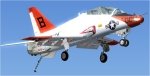
Training flight deck pilots Boeing T-45
→ Size:
15 MB
→ Date:
17 years ago (02.07.2009 21:59)
→ Author:
НЕИЗВЕСТНО
→ Approved by moderator:
ReDut
→ License:
Freeware - Free version, Unlimited Distribution
→ Downloaded:
6300 time(s)