Боинг 767F JAL Просмотр ZIP-архива
SSP763FV5_CF6-80C--LL_JAL_JA631J_FSX/Airplanes/B763FV5_CF6-80C--LL_JAL_JA631J/panel/rcb-gauges/README rcbgp-33.txt
###############################################################################
#                                                                       #
# GroundProximityWarningSystem (GPWS) User Manual          V3.3         #
#                                                                       #
#                By Rob Barendregt                         3 June 2005  #
#                                                                       #
#########################################################################


Introduction
===========-
This freeware GroundProximityWarningSystem (GPWS) for FS2004 can be added to any
aircraft that has RETRACTABLE gear and flaps.
It consists of three main gauges:
- GPWS3_3_Default.xml, the main gauge.
  It offers the following main features:
  - Clickable switch, with Test/Inhibit function and warning light.
  - 8 different warning modes, with all the usual aural warnings, like "Pullup",
    "Sinkrate", "TerrainTerrain", "Windshear" and normal Altitude callouts.
  - All modes can be deactivated individually, or even be permanently disabled.
  - Fully customiseable per aircraft type, by just editing the gauge with Notepad.
- GPWS3_3_MasterWarn.xml,  which does three things:
  - Displays the overall state of the warning modes.
  - Panel window switching.
  - Central aural warning (de-)activation for the main gauge.
  It appears as a small, clickable light that is Off, RED or Flashing.
- GPWS_Sound.gau, which "plays" the aural warnings initiated by the other two gauges.

All valid mouseclicks (i.e. causing a state change) on any of the clickspots
are confirmed by a Click sound.

The reason I developed this gauge, is because I was not able to find a freeware
gauge for FS2004 that did the job. Either because of:
- Too limited functionality.
- Not adaptable for a specific aircraft.
  E.g. the "flaps landing configuration" or "max. descent rate" DO depend on
  the aircraft type.
- Simply doesnot work correct in FS2004.
  Like a gauge that is continuously screaming "Pullup" when I'm trying to land
  with the correct landing configuration.

Based on various information about GPWS systems I found on the Internet, and
Doug Dawson's great XMLsound gauge (included), I created this gauge in XML,
which you can fully customise to your own preference.
I don't pretend that this gauge is perfect and 100% realistic as well: it
remains a simplification of a real-life, intelligent GPWS system which
probably is programmed with 10000+ lines of software code.
But you judge for yourself :-)

PLEASE, read this manual carefully, before asking questions or making comments.


Installation
============
NOTE: This description assumes a setup which IMO would suit most users best:
      - The MasterWarning gauge (the small lamp) in the main panel.
      - The main GPWS gauge in an overlay window.
      - Toggling this overlay window on/off by RightClicking the
        MasterWarning gauge.
      But of course you may choose to do it differently, especially if you
      already use a prior version of this GPWS; the main GPWS gauge does still
      work without the MasterWarn gauge.

1. Extract all files to the MAIN FS2004 folder, using the "Use folder names"
option. This will place each file in it's correct location.
Overwrite older files when asked.

2. Edit the panel.cfg file of your aircraft(s), to include the gauges.

- Under [Window00] (which usually is the main panel window), add:

gauge**=GPWS_Sound!dsd_xml_sound3, 0,0,,, ./sound/GPWS/Sound.ini
gauge**=rcb-gauges!GPWS3_3_MasterWarn, HOR,VERT,HOR-SIZE,VERT-SIZE

In this definition above, replace the strings:
- "**" by the next free number.
- "HOR" by the Horizontal position of a free spot in the panel.
- "VERT" by the Vertical position of a free spot in the panel.
- HOR-SIZE:  the horizontal size in pixels of the gauge (default: 19)
- VERT-SIZE: the vertical size in pixels of the gauge (default: 19)
TIP: use a free spot near the existing Icons in the panel.

EXAMPLE for the default Boeing747-400 panel:
gauge58=GPWS_Sound!dsd_xml_sound3, 0,0,,, ./sound/GPWS/Sound.ini
gauge59=rcb-gauges!GPWS3_3_MasterWarn, 16,95,13,13


- In the [Window Titles] section, add the line:

Window**=GPWS

where '**' is the next free number.

- After the last [Window..] section, add the lines (use copy/paste to avoid
  typing errors):

[Window**]
size_mm=82,31
position=2                 // Opens the window in the top-right corner of the screen.
window_size= 0.12,0.06     // Window screen size: 12 % Hor., 6 % Vert.
visible=0
Ident=10060                // Used by MasterWarn to toggle this window on/off.
gauge00=rcb-gauges!GPWS3_3_Default, 0,0,82,31

where '**' is the same number you used in the [Window Titles]


The main GPWS gauge: Detailed Functionality
===========================================
The GPWS3_3_Default.xml gauge has three main states:
- Off.
  When Off (light Red), all other lights/switches are make disabled and made
  invisible. By clicking this Master switch, the gauge state becomes Test.
- Test.
  - The gauge is tested (Test state, light Green), and a testsound is played
    (WhoopWhoopGlideslope).
  - When finished, the state is set to On (light Off)
  - The Mode switches/lights are made visible, according to their state defined
    in the parameter list in the .xml file (Default: all On).
- On.
  - The GPWS Modes (see below) become active.
  - When the Master switch is clicked again, the gauge is set Off again.
  - Red: when Off.

(NOTE: all thresholds and Mode states are easily customiseable in the gauge)

1. Excessive descent rate.
- When aircraft above GPWS_UpperRALT (default: 900 ft):
  - When VerticalSpeed < -4000 ft/min:  "WhoopWhoopPullup"
  - When VerticalSpeed between -2500 and -4000 ft/min: "Sinkrate"
- When aircraft below GPWS_UpperRALT:
  - When VerticalSpeed < -2000 ft/min:  "WhoopWhoopPullup"
  - When VerticalSpeed between -1500 and -2000 ft/min: "Sinkrate"
Two sets of limits can be defined: one for above and one for below 10000 ft.

2. Excessive terrain closure rate.
- Only entered when gear is up and flaps not in landing position.
- RadioAltitude decreasing: "TerrainTerrain"
- RadioAltitude < 250 ft AND decreasing:  "WhoopWhoopPullup"

3. Loss of altitude after takeoff
- RadioAltitude decreasing AND V/S > 0 ft/min: "TerrainTerrain"
- VerticalSpeed < 0 ft/min: "DontSink"

4. Insufficient terrain clearance.
- Gear is up AND flaps not in landing position: "TooLowTerrain"
- Gear is down AND flaps not in landing position: "TooLowFlaps"
- Gear is up AND flaps in landing position: "TooLowGear"

5. Excessive glideslope deviation.
- Only when gear is down, and flaps in landing position.
- Glideslope (in NAV1) is valid AND more then 1.5 dots below GS: "Glideslope"

6. Excessive banking.
- When the aircraft banks more then 35 degrees: "Bankangle"

7. Windshear.
- The longitudinal windspeed suddenly changes more then 15 knots:
  "WindshearWindshearWindshear"

8. Altitude callouts.
- RadioAltitude decreasing AND RadioAltitude passes heigth (x + y).
  - "x": R-ALT is: 10,20,30,40,50,100,200,300,400,500,1000,2500 or "Minimums".
  - "y": The basic R-ALT of the aircraft when on the ground (default: 18 feet)
  - "Minimums" callout: when the aircraft descends below the Decision Height
    (DH, see Notes) in landing configuration.

Notes:
- Modes 2,3,4,5,7 are only enabled when RadioAltitude is less then parameter
  "GPWS_UpperRALT" (default:900 ft).
  "RadioAltitude" as used in this gauge, is defined as the distance beween the
  earth surface and the gear in lowered position.
- Modes 1,2,3,4,5,6 remain active while the condition remains.
  While active, the warning sounds of these modes are repeated every 4 sec.
  Also, only one of these modes will give an aural warning at the same time,
  with a priority from mode-1 (highest) to mode-6 (lowest).
  Note that the mode-7 and mode-8 aural warnings are independant of these !!
- When On, the gauge can be in TOGA mode or not:
  - TOGA mode is set (light Amber) when:
    - The aircrafts lifts off the ground at Takeoff or Touch&Go.
    - The gear is being raised when the aircraft is below "GPWS_UpperRALT"
      RadioAltitude (i.e. the GPWS assumes a GoAround).
    When set, modes 1,2,4,5 are disabled.
  - TOGA mode is reset when the aircraft is above "GPWS_UpperRALT"
    When reset, mode 2 is disabled.
  Besides this, the TOGA mode can be toggled manually by clicking the switch/light.
- "Minimums" callout.
  Unfortunately, "Decision Height" isn't very nicely implemented in FS2004, since
  it is maintained in Meters, and can only be in/decreased in multiple units of meters
  (not Feet).
  Probably because of this, most addon gauges that implement a changeable DH use
  their own, local variables and clickspots which are NOT accessable by my gauge.
  This means that if you change the DH in your current instrument that DOESN'T
  use the standard FS2004 DH variables, you ALSO have to change the DH in my gauge
  (which does use/change the FS2004 variable) to get a correct "Minimums" callout.
  I (like most addon designers) choose to ignore this peculiar DH behaviour, and
  just INTERPRETE the DH value in FS2004 in Feet, to get more realistic settings.
  The value of DH, as used for the "Minimums" callout, can be changed by clicking
  the "GPWS" text in my gauge, and can be in/decreased in steps of 10 feet.
  The Tooltips give the current value in Feet.
- If your panel allready includes a gauge that partly overlaps with the
  functionality of this gauge (like: altitude callouts): each one of the modes
  can be deactivated (= made permanentally invisible) individually by editing
  the startup state of that mode in the .xml file.
- This gauge can only be added in a 2D-cockpit mode, since the VirtualCockpit
  is defined in the aircraft's .mdl file.

Each of the GPWS modes has its own state and switch/light. See tooltips on the row
of eight switches/lights.
These Mode states are:
0: Disabled. (= mode permanently invisible and inoperative)
1: Off (light Red).
   When clicked, the Mode state becomes On (state 4)
2: On/NoSound (light Off, with Red borders)
   The Mode is operational, but without aural warnings.
   This state is has become obsolete in V3.3.
3: On/NoSound/Active (light Amber, with Red borders).
   The Mode conditions are true, and the amber warning light is On.
   When clicked, the sound is set On again (state 5).
   When the Mode conditions become False, the state becomes state 4.
   I.o.w.: the Sound is automatically enabled again.
4: On/NotActive (light Off).
   The Mode is operational, with aural warnings.
   When clicked, the Mode state is set Off (state 1)
   When the Mode conditions become True, the state changes to state 5.
5: On/Active (light Amber).
   The Mode conditions are true, the warning light is set and the aural warning is given.
   When clicked, the sound is set off (state 3).
   When the Mode conditions become False, the state changes to state 4.


The GPWS3_3_MasterWarn gauge: Detailed Functionality
==================================================
This gauge allows you to have a small gauge (MasterWarn) on the main panel (which
usually has little space left), while the main GPWS gauge is in another (or it's own)
panel window that need not always be visible.

The gauge has a lamp bitmap, which is colored:
- OFF: no warning modes (1-6) are Active.
- RED: one or more warning modes (1-6) is Active with aural warnings.
- Flashing RED: one or more warning modes (1-6) is Active, but all aural warnings
  for these Active modes are disabled.
- LeftClicking the lamp when RED, disables the aural warnings of the highest priority
  mode (=lowest number) currently Active. This means that the switch may stay RED,
  because another mode might be Active as well (and now give its aural warnings).
  If so, you have to click it again untill it's All Active modes have disabled sound.
  I.o.w.: by LeftClicking a RED lamp, you acknowledge the mode that currently gives
  an aural warning
- LeftClicking the lamp when Flashing RED, enables all aural warnings again.
- RightClicking the lamp toggles an overlay panel window with Ident=10060.
  This allows placing the main GPWS gauge in a seperate panel window, with window
  open/close control using the MasterWarn gauge (like an Icon).
  This is the default setup. (see Installation).

Upon loading, the MasterWarn gauge quickly opens/closes the overlay window, to ensure
that the main GPWS gauge is always loaded and functional.


HowTo customise the GPWS3_3_Default.xml gauge
==============================================
A lot of the gauge parameters can be adapted easily to your own preference or
specific aircraft, by editing the gauge with a simple text editor like Windows
Notepad. This specifically applies to parameters like:
- The base RadioAltitude of the aircraft when on the ground.
  This is determined by the aircrafts gearheight and datum position.
  Examples: 18 ft for a Boeing747, 3 ft for a Cessna.
  This parameter is only relevant for the accuracy of low-altitude callouts.
- The "landing position" flaps-setting of the aircraft.
  Obviously this can be different for every aircraft type, and depends on the
  number of flaps positions and flaps "degrees" per position.
  Note: this limit is static, and doesnot take airspeed/weight into account.
  In this gauge, "landing position" is defined as any position where the
  "flap handle" percentage is equal or more than the set threshold.
  You can determine this percentage (default: 64%) as follows:
  - Determine the number of flap positions of your aircraft.
    For each flap position, the "flaps handle position" is a lineair percentage.
    Example for a B747-400:
    - Has 7 flap positions: 0 1 5 10 20 25 30 degrees
    - Which corresponds with "flaps handle": 0 17 33 50 67 83 100 %
    - So for threshold at 64%, "flaps landing position" is "flaps 20" or more.
    Example for a B737-400:
    - Has 9 flap positions: 0 1 2 5 10 15 25 30 40 degrees
    - Which corresponds with "flaps handle": 0 12 25 37 50 62 75 87 100 %
    - So for threshold at 64%, "flaps landing position" is "flaps 25" or more.
- The descent rate threshold before a "Sinkrate" warning is giving. Obviously
  this value is different for a jetfighter and a small GA aircraft :-).
- Repetition/interval time of aural warnings.
- Startup state of the gauge (On or Off) when the gauge is loaded.
- The Modes that are supported by the gauge, and their startup state.

Here's how to do this:
- In folder ...\Flight Simulator 9\Gauges\rcb-gauges\, make a COPY of file
  GPWS3_3_Default.xml.
- RENAME this copy to e.g. GPWS3_3_YourAircraft.xml
- Edit this copy with Notepad, read the Comment section and change the value of
  the default parameters to your preference.
- In the panel.cfg, change the default gauge definition
  gauge**=rcb-gauges!GPWS3_3_Default, ...
  to
  gauge**=rcb-gauges!GPWS3_3_YourAircraft, ...

In case you are in doubt what the parameters are: compare the default values
in the .xml file with those mentioned in section "Functionality" above.
Of course there are some logical restrictions on used values. Examples:
- GWPS_UpperAlt should always be higher then GWPS_LowerAlt.
- GWPS_LowerVS should always be more negative then GWPS_UpperVS.

!! NOTE for XML-gauge designers !!
The L:Var gauge parameters are initialised only at startup of the gauge; so you
can adjust the default values realtime, by, from another XML-gauge,  forcing the
L:GPWS_* vars to another value.
Or, change parameters in-flight, based on specific flight conditions.


HowTo adjust the volume of the callouts
=======================================
This archive contains the latest (V3.2.0.0, dated 15-4-2005) version
of Doug Dawson's XMLsound gauge, named GPWS_Sound.gau, which allows all sounds
to be reduced in volume individually to obtain the best balance between them
and your other FS / environment audio.
To do so:
- Exit FS2004.
- Open file ...\Flight Simulator 9\Sound\GPWS\Sound.ini with Notepad.
- Find the appropriate .wav definition, and change the volume value to another
  value, with:
  - 100 (default): Max volume.
  - 75: Min volume (almost inaudible).
    or any other value between 75 and 100.
  - Save the file.

You can also use this to effectively suppress a certain callout (set volume to 0)
if that callout interferes with another gauge you might use, while still having
the related Mode in the GPWS visible and enabled.


Copyrights and Disclaimer
============================
This package is freeware (NOT: public domain), and is available for your
personal use only.

Without my explicite permission, it may NOT be sold, re-distributed and/or
uploaded to another website or bulletin board in ANY shape or form.
If you want to bundle this package with your (freeware) aircraft, you may ONLY
do so AFTER my explicite permission and inclusion of the documentation file.

And obviously, installing & using this package is at your own risk.
However, if you execute the Installation instructions properly, this package
should NOT crash you PC or FS, nor should it have a substantial impact on
performance.
Although most of the testing was done on Windows-XP platforms, I don't expect
any problems with other Windows versions (provided FS2004 itself runs OK).


Credits
=======
- Doug Dawson, for his great gauge that allows playing sounds from an XML gauge.
- Most of the callouts/warnings are modified versions of existing soundfiles,
  but I was unable to establish their exact origin. I think some originated from
  the FPDA group, and some from Tom Corson. If you recognise them as yours,
  please inform me so I can give you proper credit.


As with all of my gauges, I'm always open for questions, or suggestions for
improvement. But PLEASE !!, READ this manual properly before mailing me.

Enjoy, and fly safe .....

Rob Barendregt, The Netherlands
Email: [email protected]


***************************** End Of Readme ********************************
45839-SSP763FV5-CF6-80C-LL-JAL-JA631J-FSX.zip
| Имя файла | Дата | Размер |
|---|---|---|
| SSP763FV5_CF6-80C--LL_JAL_JA631J_FSX/Airplanes/ | 31.07.2012 21:13 | |
| SSP763FV5_CF6-80C--LL_JAL_JA631J_FSX/Airplanes/B763FV5_CF6-80C--LL_JAL_JA631J/ | 31.07.2012 21:14 | |
| SSP763FV5_CF6-80C--LL_JAL_JA631J_FSX/Airplanes/B763FV5_CF6-80C--LL_JAL_JA631J/767-300FER-GE-CF6-80C2.air | 06.02.2005 15:03 | 9 KB |
| SSP763FV5_CF6-80C--LL_JAL_JA631J_FSX/Airplanes/B763FV5_CF6-80C--LL_JAL_JA631J/Aircraft.cfg | 31.07.2012 21:11 | 14 KB |
| SSP763FV5_CF6-80C--LL_JAL_JA631J_FSX/Airplanes/B763FV5_CF6-80C--LL_JAL_JA631J/model/ | 31.07.2012 21:14 | |
| SSP763FV5_CF6-80C--LL_JAL_JA631J_FSX/Airplanes/B763FV5_CF6-80C--LL_JAL_JA631J/model/B737_800_interior.mdl | 13.02.2012 04:55 | 2 MB |
| SSP763FV5_CF6-80C--LL_JAL_JA631J_FSX/Airplanes/B763FV5_CF6-80C--LL_JAL_JA631J/model/Model.cfg | 25.05.2012 14:43 | 70 B |
| SSP763FV5_CF6-80C--LL_JAL_JA631J_FSX/Airplanes/B763FV5_CF6-80C--LL_JAL_JA631J/model/OSX763FV5_CF6-80C--LL.MDL | 18.02.2012 13:39 | 2 MB |
| SSP763FV5_CF6-80C--LL_JAL_JA631J_FSX/Airplanes/B763FV5_CF6-80C--LL_JAL_JA631J/panel/ | 31.07.2012 21:14 | |
| SSP763FV5_CF6-80C--LL_JAL_JA631J_FSX/Airplanes/B763FV5_CF6-80C--LL_JAL_JA631J/panel/737-800_panel_background.bmp | 12.05.2006 14:18 | 769 KB |
| SSP763FV5_CF6-80C--LL_JAL_JA631J_FSX/Airplanes/B763FV5_CF6-80C--LL_JAL_JA631J/panel/737-800_panel_background_night.bmp | 12.05.2006 14:18 | 769 KB |
| SSP763FV5_CF6-80C--LL_JAL_JA631J_FSX/Airplanes/B763FV5_CF6-80C--LL_JAL_JA631J/panel/737_compass.BMP | 12.05.2006 14:18 | 96 KB |
| SSP763FV5_CF6-80C--LL_JAL_JA631J_FSX/Airplanes/B763FV5_CF6-80C--LL_JAL_JA631J/panel/737_Panel_Decals_2.bmp | 12.05.2006 14:18 | 257 KB |
| SSP763FV5_CF6-80C--LL_JAL_JA631J_FSX/Airplanes/B763FV5_CF6-80C--LL_JAL_JA631J/panel/B737_800.CAB | 13.02.2012 05:02 | 3 MB |
| SSP763FV5_CF6-80C--LL_JAL_JA631J_FSX/Airplanes/B763FV5_CF6-80C--LL_JAL_JA631J/panel/panel.cfg | 31.07.2012 20:56 | 7 KB |
| SSP763FV5_CF6-80C--LL_JAL_JA631J_FSX/Airplanes/B763FV5_CF6-80C--LL_JAL_JA631J/panel/Pky_util/ | 31.07.2012 21:14 | |
| SSP763FV5_CF6-80C--LL_JAL_JA631J_FSX/Airplanes/B763FV5_CF6-80C--LL_JAL_JA631J/panel/Pky_util/install.txt | 25.03.2008 18:50 | 143 B |
| SSP763FV5_CF6-80C--LL_JAL_JA631J_FSX/Airplanes/B763FV5_CF6-80C--LL_JAL_JA631J/panel/Pky_util/Pky_Init.xml | 16.12.2010 00:28 | 621 B |
| SSP763FV5_CF6-80C--LL_JAL_JA631J_FSX/Airplanes/B763FV5_CF6-80C--LL_JAL_JA631J/panel/Pky_util/Pky_Timer.xml | 16.12.2010 00:28 | 2 KB |
| SSP763FV5_CF6-80C--LL_JAL_JA631J_FSX/Airplanes/B763FV5_CF6-80C--LL_JAL_JA631J/panel/Pky_util/Pky_Util.xml | 16.12.2010 00:28 | 7 KB |
| SSP763FV5_CF6-80C--LL_JAL_JA631J_FSX/Airplanes/B763FV5_CF6-80C--LL_JAL_JA631J/panel/Pky_util/posky_sw_close.bmp | 16.12.2010 00:28 | 2 KB |
| SSP763FV5_CF6-80C--LL_JAL_JA631J_FSX/Airplanes/B763FV5_CF6-80C--LL_JAL_JA631J/panel/Pky_util/posky_sw_off.bmp | 16.12.2010 00:28 | 2 KB |
| SSP763FV5_CF6-80C--LL_JAL_JA631J_FSX/Airplanes/B763FV5_CF6-80C--LL_JAL_JA631J/panel/Pky_util/posky_sw_on.bmp | 16.12.2010 00:28 | 2 KB |
| SSP763FV5_CF6-80C--LL_JAL_JA631J_FSX/Airplanes/B763FV5_CF6-80C--LL_JAL_JA631J/panel/Pky_util/posky_sw_open.bmp | 16.12.2010 00:28 | 2 KB |
| SSP763FV5_CF6-80C--LL_JAL_JA631J_FSX/Airplanes/B763FV5_CF6-80C--LL_JAL_JA631J/panel/Pky_util/posky_tow_0.bmp | 16.12.2010 00:28 | 3 KB |
| SSP763FV5_CF6-80C--LL_JAL_JA631J_FSX/Airplanes/B763FV5_CF6-80C--LL_JAL_JA631J/panel/Pky_util/posky_tow_100.bmp | 16.12.2010 00:28 | 3 KB |
| SSP763FV5_CF6-80C--LL_JAL_JA631J_FSX/Airplanes/B763FV5_CF6-80C--LL_JAL_JA631J/panel/Pky_util/posky_utilbase.bmp | 16.12.2010 00:28 | 60 KB |
| SSP763FV5_CF6-80C--LL_JAL_JA631J_FSX/Airplanes/B763FV5_CF6-80C--LL_JAL_JA631J/panel/Pky_util/Thumbs.db | 21.05.2011 12:47 | 20 KB |
| SSP763FV5_CF6-80C--LL_JAL_JA631J_FSX/Airplanes/B763FV5_CF6-80C--LL_JAL_JA631J/panel/Posky762/ | 31.07.2012 21:14 | |
| SSP763FV5_CF6-80C--LL_JAL_JA631J_FSX/Airplanes/B763FV5_CF6-80C--LL_JAL_JA631J/panel/Posky762/Pky6WINGFLEX.xml | 03.12.2009 14:22 | 2 KB |
| SSP763FV5_CF6-80C--LL_JAL_JA631J_FSX/Airplanes/B763FV5_CF6-80C--LL_JAL_JA631J/panel/Posky762/PkyAileronL.xml | 16.09.2009 19:54 | 350 B |
| SSP763FV5_CF6-80C--LL_JAL_JA631J_FSX/Airplanes/B763FV5_CF6-80C--LL_JAL_JA631J/panel/Posky762/PkyAileronR.xml | 16.09.2009 19:49 | 345 B |
| SSP763FV5_CF6-80C--LL_JAL_JA631J_FSX/Airplanes/B763FV5_CF6-80C--LL_JAL_JA631J/panel/Posky762/PkyAPUDoor.xml | 21.05.2011 13:04 | 644 B |
| SSP763FV5_CF6-80C--LL_JAL_JA631J_FSX/Airplanes/B763FV5_CF6-80C--LL_JAL_JA631J/panel/Posky762/PkyCALC.xml | 12.01.2011 01:27 | 2 KB |
| SSP763FV5_CF6-80C--LL_JAL_JA631J_FSX/Airplanes/B763FV5_CF6-80C--LL_JAL_JA631J/panel/Posky762/Pkycondassign.xml | 10.12.2010 03:31 | 433 B |
| SSP763FV5_CF6-80C--LL_JAL_JA631J_FSX/Airplanes/B763FV5_CF6-80C--LL_JAL_JA631J/panel/Posky762/PkyEngRev.xml | 18.05.2008 13:59 | 699 B |
| SSP763FV5_CF6-80C--LL_JAL_JA631J_FSX/Airplanes/B763FV5_CF6-80C--LL_JAL_JA631J/panel/Posky762/PkyFlasher.xml | 10.06.2010 01:48 | 3 KB |
| SSP763FV5_CF6-80C--LL_JAL_JA631J_FSX/Airplanes/B763FV5_CF6-80C--LL_JAL_JA631J/panel/Posky762/Pkygearcalc.xml | 23.01.2012 04:09 | 2 KB |
| SSP763FV5_CF6-80C--LL_JAL_JA631J_FSX/Airplanes/B763FV5_CF6-80C--LL_JAL_JA631J/panel/Posky762/PkyLSAileron.xml | 03.12.2009 14:49 | 724 B |
| SSP763FV5_CF6-80C--LL_JAL_JA631J_FSX/Airplanes/B763FV5_CF6-80C--LL_JAL_JA631J/panel/Posky762/PkyNosegearsteerling.xml | 23.09.2010 14:08 | 1 KB |
| SSP763FV5_CF6-80C--LL_JAL_JA631J_FSX/Airplanes/B763FV5_CF6-80C--LL_JAL_JA631J/panel/Posky762/PkySEA.xml | 10.11.2009 01:47 | 1 KB |
| SSP763FV5_CF6-80C--LL_JAL_JA631J_FSX/Airplanes/B763FV5_CF6-80C--LL_JAL_JA631J/panel/Posky762/PkySpoiler.xml | 24.04.2008 21:36 | 4 KB |
| SSP763FV5_CF6-80C--LL_JAL_JA631J_FSX/Airplanes/B763FV5_CF6-80C--LL_JAL_JA631J/panel/Posky762/Pky_AdvInit.xml | 26.04.2011 13:25 | 1 KB |
| SSP763FV5_CF6-80C--LL_JAL_JA631J_FSX/Airplanes/B763FV5_CF6-80C--LL_JAL_JA631J/panel/Posky762/Pky_PB_Towhead.xml | 22.10.2008 16:44 | 809 B |
| SSP763FV5_CF6-80C--LL_JAL_JA631J_FSX/Airplanes/B763FV5_CF6-80C--LL_JAL_JA631J/panel/Posky762/poskydebug.xml | 21.05.2011 12:48 | 353 B |
| SSP763FV5_CF6-80C--LL_JAL_JA631J_FSX/Airplanes/B763FV5_CF6-80C--LL_JAL_JA631J/panel/Posky762/poskydebug2.xml | 08.12.2009 00:52 | 439 B |
| SSP763FV5_CF6-80C--LL_JAL_JA631J_FSX/Airplanes/B763FV5_CF6-80C--LL_JAL_JA631J/panel/Posky762/poskydebug3.xml | 08.12.2009 00:48 | 468 B |
| SSP763FV5_CF6-80C--LL_JAL_JA631J_FSX/Airplanes/B763FV5_CF6-80C--LL_JAL_JA631J/panel/rcb-gauges/ | 31.07.2012 21:14 | |
| SSP763FV5_CF6-80C--LL_JAL_JA631J_FSX/Airplanes/B763FV5_CF6-80C--LL_JAL_JA631J/panel/rcb-gauges/GPWS3_3_Default.xml | 03.06.2005 21:56 | 32 KB |
| SSP763FV5_CF6-80C--LL_JAL_JA631J_FSX/Airplanes/B763FV5_CF6-80C--LL_JAL_JA631J/panel/rcb-gauges/GPWS3_3_MasterWarn.xml | 03.06.2005 21:07 | 4 KB |
| SSP763FV5_CF6-80C--LL_JAL_JA631J_FSX/Airplanes/B763FV5_CF6-80C--LL_JAL_JA631J/panel/rcb-gauges/GPWS3_Background.bmp | 03.06.2005 23:40 | 1 KB |
| SSP763FV5_CF6-80C--LL_JAL_JA631J_FSX/Airplanes/B763FV5_CF6-80C--LL_JAL_JA631J/panel/rcb-gauges/GPWS3_MasterWarnOff.bmp | 03.06.2005 21:18 | 346 B |
| SSP763FV5_CF6-80C--LL_JAL_JA631J_FSX/Airplanes/B763FV5_CF6-80C--LL_JAL_JA631J/panel/rcb-gauges/GPWS3_MasterWarnOn.bmp | 03.06.2005 21:16 | 346 B |
| SSP763FV5_CF6-80C--LL_JAL_JA631J_FSX/Airplanes/B763FV5_CF6-80C--LL_JAL_JA631J/panel/rcb-gauges/GPWS3_ModeS1.bmp | 07.05.2005 22:55 | 174 B |
| SSP763FV5_CF6-80C--LL_JAL_JA631J_FSX/Airplanes/B763FV5_CF6-80C--LL_JAL_JA631J/panel/rcb-gauges/GPWS3_ModeS2.bmp | 15.05.2005 00:53 | 174 B |
| SSP763FV5_CF6-80C--LL_JAL_JA631J_FSX/Airplanes/B763FV5_CF6-80C--LL_JAL_JA631J/panel/rcb-gauges/GPWS3_ModeS3.bmp | 15.05.2005 00:54 | 174 B |
| SSP763FV5_CF6-80C--LL_JAL_JA631J_FSX/Airplanes/B763FV5_CF6-80C--LL_JAL_JA631J/panel/rcb-gauges/GPWS3_ModeS4.bmp | 09.02.2005 20:25 | 174 B |
| SSP763FV5_CF6-80C--LL_JAL_JA631J_FSX/Airplanes/B763FV5_CF6-80C--LL_JAL_JA631J/panel/rcb-gauges/GPWS3_ModeS5.bmp | 07.05.2005 22:44 | 174 B |
| SSP763FV5_CF6-80C--LL_JAL_JA631J_FSX/Airplanes/B763FV5_CF6-80C--LL_JAL_JA631J/panel/rcb-gauges/GPWS3_SwitchAmber.bmp | 07.05.2005 22:58 | 214 B |
| SSP763FV5_CF6-80C--LL_JAL_JA631J_FSX/Airplanes/B763FV5_CF6-80C--LL_JAL_JA631J/panel/rcb-gauges/GPWS3_SwitchGreen.bmp | 07.05.2005 23:00 | 214 B |
| SSP763FV5_CF6-80C--LL_JAL_JA631J_FSX/Airplanes/B763FV5_CF6-80C--LL_JAL_JA631J/panel/rcb-gauges/GPWS3_SwitchOff.bmp | 09.02.2005 20:29 | 214 B |
| SSP763FV5_CF6-80C--LL_JAL_JA631J_FSX/Airplanes/B763FV5_CF6-80C--LL_JAL_JA631J/panel/rcb-gauges/GPWS3_SwitchRed.bmp | 07.05.2005 23:01 | 214 B |
| SSP763FV5_CF6-80C--LL_JAL_JA631J_FSX/Airplanes/B763FV5_CF6-80C--LL_JAL_JA631J/panel/rcb-gauges/README rcbgp-33.txt | 03.06.2005 23:50 | 18 KB |
| SSP763FV5_CF6-80C--LL_JAL_JA631J_FSX/Airplanes/B763FV5_CF6-80C--LL_JAL_JA631J/panel/rcb-gauges/UPGRADE GPWS V2.0 to V3.3.txt | 03.06.2005 16:53 | 2 KB |
| SSP763FV5_CF6-80C--LL_JAL_JA631J_FSX/Airplanes/B763FV5_CF6-80C--LL_JAL_JA631J/panel/Thumbs.db | 09.11.2010 13:53 | 11 KB |
| SSP763FV5_CF6-80C--LL_JAL_JA631J_FSX/Airplanes/B763FV5_CF6-80C--LL_JAL_JA631J/sound/ | 31.07.2012 21:14 | |
| SSP763FV5_CF6-80C--LL_JAL_JA631J_FSX/Airplanes/B763FV5_CF6-80C--LL_JAL_JA631J/sound/sound.cfg | 13.06.2012 23:06 | 53 B |
| SSP763FV5_CF6-80C--LL_JAL_JA631J_FSX/Airplanes/B763FV5_CF6-80C--LL_JAL_JA631J/texture.JAL/ | 31.07.2012 21:14 | |
| SSP763FV5_CF6-80C--LL_JAL_JA631J_FSX/Airplanes/B763FV5_CF6-80C--LL_JAL_JA631J/texture.JAL/737_Refection.dds | 05.09.2006 04:54 | 171 KB |
| SSP763FV5_CF6-80C--LL_JAL_JA631J_FSX/Airplanes/B763FV5_CF6-80C--LL_JAL_JA631J/texture.JAL/Alpha_Front_Left.bmp | 05.05.2012 16:02 | 1 MB |
| SSP763FV5_CF6-80C--LL_JAL_JA631J_FSX/Airplanes/B763FV5_CF6-80C--LL_JAL_JA631J/texture.JAL/Alpha_Front_mitte.bmp | 05.05.2012 16:03 | 1 MB |
| SSP763FV5_CF6-80C--LL_JAL_JA631J_FSX/Airplanes/B763FV5_CF6-80C--LL_JAL_JA631J/texture.JAL/Alpha_Front_rear.bmp | 05.05.2012 16:04 | 1 MB |
| SSP763FV5_CF6-80C--LL_JAL_JA631J_FSX/Airplanes/B763FV5_CF6-80C--LL_JAL_JA631J/texture.JAL/B737_800_1_C.dds | 05.09.2006 04:54 | 683 KB |
| SSP763FV5_CF6-80C--LL_JAL_JA631J_FSX/Airplanes/B763FV5_CF6-80C--LL_JAL_JA631J/texture.JAL/b737_800_1_LM.dds | 05.09.2006 04:54 | 171 KB |
| SSP763FV5_CF6-80C--LL_JAL_JA631J_FSX/Airplanes/B763FV5_CF6-80C--LL_JAL_JA631J/texture.JAL/B737_800_1_night_C.dds | 03.02.2012 19:36 | 512 KB |
| SSP763FV5_CF6-80C--LL_JAL_JA631J_FSX/Airplanes/B763FV5_CF6-80C--LL_JAL_JA631J/texture.JAL/b737_800_1_T.dds | 05.09.2006 04:54 | 1 MB |
| SSP763FV5_CF6-80C--LL_JAL_JA631J_FSX/Airplanes/B763FV5_CF6-80C--LL_JAL_JA631J/texture.JAL/b737_800_1_T_Bump.dds | 05.09.2006 04:54 | 1 MB |
| SSP763FV5_CF6-80C--LL_JAL_JA631J_FSX/Airplanes/B763FV5_CF6-80C--LL_JAL_JA631J/texture.JAL/b737_800_1_T_Specular.dds | 05.09.2006 04:54 | 1 MB |
| SSP763FV5_CF6-80C--LL_JAL_JA631J_FSX/Airplanes/B763FV5_CF6-80C--LL_JAL_JA631J/texture.JAL/B737_800_2_C.dds | 05.09.2006 04:54 | 683 KB |
| SSP763FV5_CF6-80C--LL_JAL_JA631J_FSX/Airplanes/B763FV5_CF6-80C--LL_JAL_JA631J/texture.JAL/B737_800_2_night_C.dds | 03.02.2012 19:38 | 512 KB |
| SSP763FV5_CF6-80C--LL_JAL_JA631J_FSX/Airplanes/B763FV5_CF6-80C--LL_JAL_JA631J/texture.JAL/b737_800_2_T.dds | 05.09.2006 04:54 | 1 MB |
| SSP763FV5_CF6-80C--LL_JAL_JA631J_FSX/Airplanes/B763FV5_CF6-80C--LL_JAL_JA631J/texture.JAL/b737_800_2_T_Bump.dds | 05.09.2006 04:54 | 1 MB |
| SSP763FV5_CF6-80C--LL_JAL_JA631J_FSX/Airplanes/B763FV5_CF6-80C--LL_JAL_JA631J/texture.JAL/b737_800_2_T_Specular.dds | 05.09.2006 04:54 | 1 MB |
| SSP763FV5_CF6-80C--LL_JAL_JA631J_FSX/Airplanes/B763FV5_CF6-80C--LL_JAL_JA631J/texture.JAL/B737_800_3_C.dds | 05.09.2006 04:54 | 683 KB |
| SSP763FV5_CF6-80C--LL_JAL_JA631J_FSX/Airplanes/B763FV5_CF6-80C--LL_JAL_JA631J/texture.JAL/B737_800_3_night_C.dds | 03.02.2012 19:39 | 512 KB |
| SSP763FV5_CF6-80C--LL_JAL_JA631J_FSX/Airplanes/B763FV5_CF6-80C--LL_JAL_JA631J/texture.JAL/B737_800_4_C.dds | 05.09.2006 04:54 | 683 KB |
| SSP763FV5_CF6-80C--LL_JAL_JA631J_FSX/Airplanes/B763FV5_CF6-80C--LL_JAL_JA631J/texture.JAL/B737_800_4_night_C.dds | 03.02.2012 19:41 | 512 KB |
| SSP763FV5_CF6-80C--LL_JAL_JA631J_FSX/Airplanes/B763FV5_CF6-80C--LL_JAL_JA631J/texture.JAL/B737_800_5_C.dds | 05.09.2006 04:54 | 171 KB |
| SSP763FV5_CF6-80C--LL_JAL_JA631J_FSX/Airplanes/B763FV5_CF6-80C--LL_JAL_JA631J/texture.JAL/B737_800_5_night_C.dds | 05.09.2006 04:54 | 171 KB |
| SSP763FV5_CF6-80C--LL_JAL_JA631J_FSX/Airplanes/B763FV5_CF6-80C--LL_JAL_JA631J/texture.JAL/B737_800_C.bmp | 12.05.2006 14:18 | 683 KB |
| SSP763FV5_CF6-80C--LL_JAL_JA631J_FSX/Airplanes/B763FV5_CF6-80C--LL_JAL_JA631J/texture.JAL/B737_800_Interior.dds | 05.09.2006 04:54 | 171 KB |
| SSP763FV5_CF6-80C--LL_JAL_JA631J_FSX/Airplanes/B763FV5_CF6-80C--LL_JAL_JA631J/texture.JAL/DECAL_OS763V5.bmp | 26.06.2011 00:17 | 4 MB |
| SSP763FV5_CF6-80C--LL_JAL_JA631J_FSX/Airplanes/B763FV5_CF6-80C--LL_JAL_JA631J/texture.JAL/DECAL_OS763V5TAILLOGO.bmp | 02.07.2011 22:18 | 4 MB |
| SSP763FV5_CF6-80C--LL_JAL_JA631J_FSX/Airplanes/B763FV5_CF6-80C--LL_JAL_JA631J/texture.JAL/Fresnel_Ramp.dds | 05.09.2006 04:54 | 640 B |
| SSP763FV5_CF6-80C--LL_JAL_JA631J_FSX/Airplanes/B763FV5_CF6-80C--LL_JAL_JA631J/texture.JAL/lluvia.dds | 23.01.2012 16:25 | 1 MB |
| SSP763FV5_CF6-80C--LL_JAL_JA631J_FSX/Airplanes/B763FV5_CF6-80C--LL_JAL_JA631J/texture.JAL/OS763F_L1_INTERIOR_L.BMP | 22.06.2011 04:50 | 1 MB |
| SSP763FV5_CF6-80C--LL_JAL_JA631J_FSX/Airplanes/B763FV5_CF6-80C--LL_JAL_JA631J/texture.JAL/OS763F_L1_INTERIOR_T.BMP | 22.06.2011 04:49 | 1 MB |
| SSP763FV5_CF6-80C--LL_JAL_JA631J_FSX/Airplanes/B763FV5_CF6-80C--LL_JAL_JA631J/texture.JAL/OS763F_Maindeck_Cargo_T.bmp | 30.11.2010 01:20 | 4 MB |
| SSP763FV5_CF6-80C--LL_JAL_JA631J_FSX/Airplanes/B763FV5_CF6-80C--LL_JAL_JA631J/texture.JAL/OS763F__INTERIOR_T.bmp | 23.06.2011 02:17 | 4 MB |
| SSP763FV5_CF6-80C--LL_JAL_JA631J_FSX/Airplanes/B763FV5_CF6-80C--LL_JAL_JA631J/texture.JAL/Os763V5_FLCARGOBAY_T.BMP | 03.10.2009 02:08 | 1 MB |
| SSP763FV5_CF6-80C--LL_JAL_JA631J_FSX/Airplanes/B763FV5_CF6-80C--LL_JAL_JA631J/texture.JAL/OS763V5_FSCARGOBAY_T.BMP | 17.09.2009 03:14 | 1 MB |
| SSP763FV5_CF6-80C--LL_JAL_JA631J_FSX/Airplanes/B763FV5_CF6-80C--LL_JAL_JA631J/texture.JAL/OS763V5_LFUSE_Front_L.BMP | 23.12.2010 02:54 | 4 KB |
| SSP763FV5_CF6-80C--LL_JAL_JA631J_FSX/Airplanes/B763FV5_CF6-80C--LL_JAL_JA631J/texture.JAL/OS763V5_LFUSE_Front_T.BMP | 02.07.2011 19:52 | 4 MB |
| SSP763FV5_CF6-80C--LL_JAL_JA631J_FSX/Airplanes/B763FV5_CF6-80C--LL_JAL_JA631J/texture.JAL/OS763V5_LFUSE_Mid_L.BMP | 23.12.2010 02:54 | 4 KB |
| SSP763FV5_CF6-80C--LL_JAL_JA631J_FSX/Airplanes/B763FV5_CF6-80C--LL_JAL_JA631J/texture.JAL/OS763V5_LFUSE_Mid_T.bmp | 02.07.2011 19:53 | 4 MB |
| SSP763FV5_CF6-80C--LL_JAL_JA631J_FSX/Airplanes/B763FV5_CF6-80C--LL_JAL_JA631J/texture.JAL/OS763V5_LFUSE_Rear_L.BMP | 23.12.2010 02:54 | 4 KB |
| SSP763FV5_CF6-80C--LL_JAL_JA631J_FSX/Airplanes/B763FV5_CF6-80C--LL_JAL_JA631J/texture.JAL/OS763V5_LFUSE_Rear_T.bmp | 02.07.2011 17:40 | 4 MB |
| SSP763FV5_CF6-80C--LL_JAL_JA631J_FSX/Airplanes/B763FV5_CF6-80C--LL_JAL_JA631J/texture.JAL/OS763V5_RFUSE_Front_L.BMP | 23.12.2010 02:54 | 4 KB |
| SSP763FV5_CF6-80C--LL_JAL_JA631J_FSX/Airplanes/B763FV5_CF6-80C--LL_JAL_JA631J/texture.JAL/OS763V5_RFUSE_Front_T.BMP | 02.07.2011 20:21 | 4 MB |
| SSP763FV5_CF6-80C--LL_JAL_JA631J_FSX/Airplanes/B763FV5_CF6-80C--LL_JAL_JA631J/texture.JAL/OS763V5_RFUSE_Mid_L.BMP | 23.12.2010 02:54 | 4 KB |
| SSP763FV5_CF6-80C--LL_JAL_JA631J_FSX/Airplanes/B763FV5_CF6-80C--LL_JAL_JA631J/texture.JAL/OS763V5_RFUSE_Mid_T.bmp | 02.07.2011 20:21 | 4 MB |
| SSP763FV5_CF6-80C--LL_JAL_JA631J_FSX/Airplanes/B763FV5_CF6-80C--LL_JAL_JA631J/texture.JAL/OS763V5_RFUSE_Rear_L.BMP | 23.12.2010 02:54 | 4 KB |
| SSP763FV5_CF6-80C--LL_JAL_JA631J_FSX/Airplanes/B763FV5_CF6-80C--LL_JAL_JA631J/texture.JAL/OS763V5_RFUSE_Rear_T.bmp | 02.07.2011 20:21 | 4 MB |
| SSP763FV5_CF6-80C--LL_JAL_JA631J_FSX/Airplanes/B763FV5_CF6-80C--LL_JAL_JA631J/texture.JAL/Os763V5_RLCARGOBAY_T.bmp | 03.10.2009 02:08 | 1 MB |
| SSP763FV5_CF6-80C--LL_JAL_JA631J_FSX/Airplanes/B763FV5_CF6-80C--LL_JAL_JA631J/texture.JAL/Os763V5_RSCARGOBAY_T.BMP | 17.09.2009 03:14 | 1 MB |
| SSP763FV5_CF6-80C--LL_JAL_JA631J_FSX/Airplanes/B763FV5_CF6-80C--LL_JAL_JA631J/texture.JAL/OS767Antenna.bmp | 29.11.2010 22:14 | 256 KB |
| SSP763FV5_CF6-80C--LL_JAL_JA631J_FSX/Airplanes/B763FV5_CF6-80C--LL_JAL_JA631J/texture.JAL/Os767CF6-80_fan.bmp | 23.10.2010 04:46 | 1 MB |
| SSP763FV5_CF6-80C--LL_JAL_JA631J_FSX/Airplanes/B763FV5_CF6-80C--LL_JAL_JA631J/texture.JAL/Os767CF6-80_fan1.bmp | 23.10.2010 04:46 | 1 MB |
| SSP763FV5_CF6-80C--LL_JAL_JA631J_FSX/Airplanes/B763FV5_CF6-80C--LL_JAL_JA631J/texture.JAL/Os767cf6-80_L.bmp | 05.12.2010 19:47 | 4 MB |
| SSP763FV5_CF6-80C--LL_JAL_JA631J_FSX/Airplanes/B763FV5_CF6-80C--LL_JAL_JA631J/texture.JAL/Os767cf6-80_Pylon_L.bmp | 05.12.2010 19:47 | 4 MB |
| SSP763FV5_CF6-80C--LL_JAL_JA631J_FSX/Airplanes/B763FV5_CF6-80C--LL_JAL_JA631J/texture.JAL/Os767cf6-80_Pylon_t.bmp | 14.06.2012 07:31 | 4 MB |
| SSP763FV5_CF6-80C--LL_JAL_JA631J_FSX/Airplanes/B763FV5_CF6-80C--LL_JAL_JA631J/texture.JAL/Os767cf6-80_t.bmp | 17.12.2010 00:56 | 4 MB |
| SSP763FV5_CF6-80C--LL_JAL_JA631J_FSX/Airplanes/B763FV5_CF6-80C--LL_JAL_JA631J/texture.JAL/Os767cf6-80_tW.bmp | 13.06.2012 02:45 | 4 MB |
| SSP763FV5_CF6-80C--LL_JAL_JA631J_FSX/Airplanes/B763FV5_CF6-80C--LL_JAL_JA631J/texture.JAL/OS767FGSU1_T.bmp | 30.11.2010 01:14 | 4 MB |
| SSP763FV5_CF6-80C--LL_JAL_JA631J_FSX/Airplanes/B763FV5_CF6-80C--LL_JAL_JA631J/texture.JAL/OS767GSU1_T.BMP | 29.11.2010 23:53 | 4 MB |
| SSP763FV5_CF6-80C--LL_JAL_JA631J_FSX/Airplanes/B763FV5_CF6-80C--LL_JAL_JA631J/texture.JAL/OS767GSU2_T.BMP | 29.11.2010 23:55 | 4 MB |
| SSP763FV5_CF6-80C--LL_JAL_JA631J_FSX/Airplanes/B763FV5_CF6-80C--LL_JAL_JA631J/texture.JAL/OS767Option.bmp | 03.11.2010 16:11 | 64 KB |
| SSP763FV5_CF6-80C--LL_JAL_JA631J_FSX/Airplanes/B763FV5_CF6-80C--LL_JAL_JA631J/texture.JAL/OS767Option2.bmp | 26.04.2011 13:24 | 64 KB |
| SSP763FV5_CF6-80C--LL_JAL_JA631J_FSX/Airplanes/B763FV5_CF6-80C--LL_JAL_JA631J/texture.JAL/OS767V5_Parts2_L.bmp | 06.12.2010 05:44 | 4 MB |
| SSP763FV5_CF6-80C--LL_JAL_JA631J_FSX/Airplanes/B763FV5_CF6-80C--LL_JAL_JA631J/texture.JAL/OS767V5_Parts2_T.bmp | 31.10.2010 05:09 | 4 MB |
| SSP763FV5_CF6-80C--LL_JAL_JA631J_FSX/Airplanes/B763FV5_CF6-80C--LL_JAL_JA631J/texture.JAL/OS767V5_Parts3_T.bmp | 19.12.2010 23:19 | 4 MB |
| SSP763FV5_CF6-80C--LL_JAL_JA631J_FSX/Airplanes/B763FV5_CF6-80C--LL_JAL_JA631J/texture.JAL/OS767V5_Parts3_T1.bmp | 20.11.2010 05:15 | 4 MB |
| SSP763FV5_CF6-80C--LL_JAL_JA631J_FSX/Airplanes/B763FV5_CF6-80C--LL_JAL_JA631J/texture.JAL/OS767V5_Parts_L.bmp | 26.03.2007 00:45 | 1 KB |
| SSP763FV5_CF6-80C--LL_JAL_JA631J_FSX/Airplanes/B763FV5_CF6-80C--LL_JAL_JA631J/texture.JAL/OS767V5_Parts_T.BMP | 20.11.2010 04:55 | 4 MB |
| SSP763FV5_CF6-80C--LL_JAL_JA631J_FSX/Airplanes/B763FV5_CF6-80C--LL_JAL_JA631J/texture.JAL/Os767v5_wheeltire_t.bmp | 21.03.2009 20:46 | 4 MB |
| SSP763FV5_CF6-80C--LL_JAL_JA631J_FSX/Airplanes/B763FV5_CF6-80C--LL_JAL_JA631J/texture.JAL/OS767Wing2_L_L.bmp | 05.12.2010 19:43 | 1 MB |
| SSP763FV5_CF6-80C--LL_JAL_JA631J_FSX/Airplanes/B763FV5_CF6-80C--LL_JAL_JA631J/texture.JAL/OS767Wing2_L_T.bmp | 02.12.2010 02:06 | 1 MB |
| SSP763FV5_CF6-80C--LL_JAL_JA631J_FSX/Airplanes/B763FV5_CF6-80C--LL_JAL_JA631J/texture.JAL/OS767Wing2_R_L.bmp | 05.12.2010 19:43 | 1 MB |
| SSP763FV5_CF6-80C--LL_JAL_JA631J_FSX/Airplanes/B763FV5_CF6-80C--LL_JAL_JA631J/texture.JAL/OS767Wing2_R_T.bmp | 02.12.2010 02:06 | 1 MB |
| SSP763FV5_CF6-80C--LL_JAL_JA631J_FSX/Airplanes/B763FV5_CF6-80C--LL_JAL_JA631J/texture.JAL/OS767Wing_L_L.BMP | 05.12.2010 19:49 | 4 MB |
| SSP763FV5_CF6-80C--LL_JAL_JA631J_FSX/Airplanes/B763FV5_CF6-80C--LL_JAL_JA631J/texture.JAL/OS767Wing_L_T.BMP | 02.07.2011 20:27 | 4 MB |
| SSP763FV5_CF6-80C--LL_JAL_JA631J_FSX/Airplanes/B763FV5_CF6-80C--LL_JAL_JA631J/texture.JAL/OS767Wing_R_L.BMP | 05.12.2010 19:49 | 4 MB |
| SSP763FV5_CF6-80C--LL_JAL_JA631J_FSX/Airplanes/B763FV5_CF6-80C--LL_JAL_JA631J/texture.JAL/OS767Wing_R_T.BMP | 02.07.2011 20:27 | 4 MB |
| SSP763FV5_CF6-80C--LL_JAL_JA631J_FSX/Airplanes/B763FV5_CF6-80C--LL_JAL_JA631J/texture.JAL/Os767_chock.bmp | 29.11.2010 23:37 | 256 KB |
| SSP763FV5_CF6-80C--LL_JAL_JA631J_FSX/Airplanes/B763FV5_CF6-80C--LL_JAL_JA631J/texture.JAL/Os767_Container_T.BMP | 29.11.2010 23:50 | 4 MB |
| SSP763FV5_CF6-80C--LL_JAL_JA631J_FSX/Airplanes/B763FV5_CF6-80C--LL_JAL_JA631J/texture.JAL/Os767_Interior_L.BMP | 10.12.2010 02:34 | 4 MB |
| SSP763FV5_CF6-80C--LL_JAL_JA631J_FSX/Airplanes/B763FV5_CF6-80C--LL_JAL_JA631J/texture.JAL/Os767_Interior_T.BMP | 10.12.2010 02:33 | 4 MB |
| SSP763FV5_CF6-80C--LL_JAL_JA631J_FSX/Airplanes/B763FV5_CF6-80C--LL_JAL_JA631J/texture.JAL/OS767_SPRING_T.BMP | 13.10.2010 23:22 | 16 KB |
| SSP763FV5_CF6-80C--LL_JAL_JA631J_FSX/Airplanes/B763FV5_CF6-80C--LL_JAL_JA631J/texture.JAL/OS767_Wheel1_T.bmp | 21.03.2009 13:47 | 1 MB |
| SSP763FV5_CF6-80C--LL_JAL_JA631J_FSX/Airplanes/B763FV5_CF6-80C--LL_JAL_JA631J/texture.JAL/OS767_Wheel2_T.bmp | 21.03.2009 13:47 | 1 MB |
| SSP763FV5_CF6-80C--LL_JAL_JA631J_FSX/Airplanes/B763FV5_CF6-80C--LL_JAL_JA631J/texture.JAL/Os_wt500e_l.bmp | 30.11.2010 00:00 | 1 MB |
| SSP763FV5_CF6-80C--LL_JAL_JA631J_FSX/Airplanes/B763FV5_CF6-80C--LL_JAL_JA631J/texture.JAL/Os_wt500e_t.bmp | 29.11.2010 23:57 | 1 MB |
| SSP763FV5_CF6-80C--LL_JAL_JA631J_FSX/Airplanes/B763FV5_CF6-80C--LL_JAL_JA631J/texture.JAL/Pilots_737.dds | 05.09.2006 04:54 | 43 KB |
| SSP763FV5_CF6-80C--LL_JAL_JA631J_FSX/Airplanes/B763FV5_CF6-80C--LL_JAL_JA631J/texture.JAL/thumbnail.jpg | 02.07.2011 23:07 | 73 KB |
| SSP763FV5_CF6-80C--LL_JAL_JA631J_FSX/Airplanes/B763FV5_CF6-80C--LL_JAL_JA631J/texture.JAL/Thumbs.db | 10.11.2010 11:25 | 245 KB |
| SSP763FV5_CF6-80C--LL_JAL_JA631J_FSX/Airplanes/B763FV5_CF6-80C--LL_JAL_JA631J/texture.JAL/Копия B737_800_5_night_C.dds | 05.09.2006 04:54 | 171 KB |
| SSP763FV5_CF6-80C--LL_JAL_JA631J_FSX/Airplanes/B763FV5_CF6-80C--LL_JAL_JA631J/texture.JAL/Копия B737_800_C.bmp | 12.05.2006 14:18 | 683 KB |
| SSP763FV5_CF6-80C--LL_JAL_JA631J_FSX/Airplanes/B763FV5_CF6-80C--LL_JAL_JA631J/texture.JAL/Копия B737_800_Interior.dds | 05.09.2006 04:54 | 171 KB |
| SSP763FV5_CF6-80C--LL_JAL_JA631J_FSX/Airplanes/B763FV5_CF6-80C--LL_JAL_JA631J/texture.JAL/Копия Fresnel_Ramp.dds | 05.09.2006 04:54 | 640 B |
| SSP763FV5_CF6-80C--LL_JAL_JA631J_FSX/Airplanes/B763FV5_CF6-80C--LL_JAL_JA631J/texture.JAL/Копия lluvia.dds | 23.01.2012 16:25 | 1 MB |
| SSP763FV5_CF6-80C--LL_JAL_JA631J_FSX/Effects/ | 31.07.2012 20:14 | |
| SSP763FV5_CF6-80C--LL_JAL_JA631J_FSX/Effects/Opensky_747_vclight.fx | 02.10.2002 13:32 | 1 KB |
| SSP763FV5_CF6-80C--LL_JAL_JA631J_FSX/Effects/Opensky_beacon.fx | 12.02.2002 19:14 | 3 KB |
| SSP763FV5_CF6-80C--LL_JAL_JA631J_FSX/Effects/Opensky_conden.fx | 04.10.2002 02:44 | 3 KB |
| SSP763FV5_CF6-80C--LL_JAL_JA631J_FSX/Effects/Opensky_condens.fx | 08.09.2002 18:24 | 3 KB |
| SSP763FV5_CF6-80C--LL_JAL_JA631J_FSX/Effects/Opensky_logo_light.fx | 04.10.2002 00:09 | 1 KB |
| SSP763FV5_CF6-80C--LL_JAL_JA631J_FSX/Effects/Opensky_nacelle_refl.fx | 29.09.2002 14:13 | 1 KB |
| SSP763FV5_CF6-80C--LL_JAL_JA631J_FSX/Effects/Opensky_nav_yellow.fx | 24.03.2004 15:03 | 3 KB |
| SSP763FV5_CF6-80C--LL_JAL_JA631J_FSX/Effects/Opensky_sparks.fx | 08.09.2002 14:49 | 7 KB |
| SSP763FV5_CF6-80C--LL_JAL_JA631J_FSX/Effects/Opensky_vortex.fx | 08.10.2003 21:14 | 1 KB |
| SSP763FV5_CF6-80C--LL_JAL_JA631J_FSX/Effects/Opensky_wing_light.fx | 29.09.2002 14:13 | 1 KB |
| SSP763FV5_CF6-80C--LL_JAL_JA631J_FSX/ja631j.jpg | 02.07.2011 23:07 | 73 KB |
| SSP763FV5_CF6-80C--LL_JAL_JA631J_FSX/Panel Read_me.txt | 21.02.2012 13:46 | 7 KB |
| SSP763FV5_CF6-80C--LL_JAL_JA631J_FSX/Readme.txt | 25.05.2012 15:10 | 7 KB |
| SSP763FV5_CF6-80C--LL_JAL_JA631J_FSX/ | 31.07.2012 20:14 | |
| avsim_su.diz | 31.07.2012 23:48 | 406 B |
| Итого: | 170 MB | |
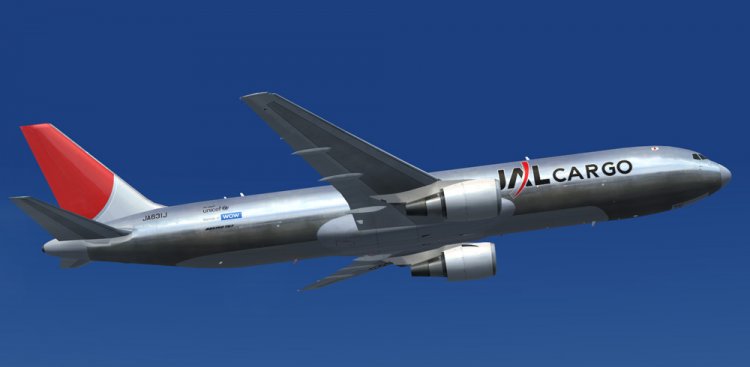
Грузовой вариант 767 JAL Хром
JAL CARGO Silver Bullet Boeing 767-300ER JA631J Upgraded to FSX using Alrot's revised Boeing 737-800 VC. This model includes Working wipers (right mouse click on switch) with rain effect. Switches for LCD Screens, EICAS, PFD, MFT. Autobrake switch. Opening pilots window. Cabin Lights switch. Realistic FMC. Ground Proximity Warning System (GPWS), More Realistic night textures. Model features High resolution textures, Dynamic flexing wings, Body gear steering, Nose gear steering, Rudder lock, Ground spoilers, Low speed aileron locks at high speed, Fully animated control surfaces, Fully independent suspension, Trim Animation, Opening Passenger Doors, Animated tilting bogies, Rolling wheels, Animated thrust reverser's with reverser block doors, Detailed textures, Full night lighting, Crash affects, Ground Service Vehicles (Activate under Views-Instrument panel - Posky Utilities).. Model Designer Hiroshi Igami/Yosuke Ube. Flight Dynamics Designer Warren C. Daniel. Painted by Yosuke Ube. FSX native model by Skyspirit. VC by Alejandro Rojas Lucena (Alrot). Modified for FSX by Chris Evans.
JAL CARGO Silver Bullet Boeing 767-300ER JA631J Upgraded to FSX using Alrot's revised Boeing 737-800 VC. This model includes Working wipers (right mouse click on switch) with rain effect. Switches for LCD Screens, EICAS, PFD, MFT. Autobrake switch. Opening pilots window. Cabin Lights switch. Realistic FMC. Ground Proximity Warning System (GPWS), More Realistic night textures. Model features High resolution textures, Dynamic flexing wings, Body gear steering, Nose gear steering, Rudder lock, Ground spoilers, Low speed aileron locks at high speed, Fully animated control surfaces, Fully independent suspension, Trim Animation, Opening Passenger Doors, Animated tilting bogies, Rolling wheels, Animated thrust reverser's with reverser block doors, Detailed textures, Full night lighting, Crash affects, Ground Service Vehicles (Activate under Views-Instrument panel - Posky Utilities).. Model Designer Hiroshi Igami/Yosuke Ube. Flight Dynamics Designer Warren C. Daniel. Painted by Yosuke Ube. FSX native model by Skyspirit. VC by Alejandro Rojas Lucena (Alrot). Modified for FSX by Chris Evans.
→ Size:
29 MB
→ Date:
14 years ago (31.07.2012 21:03)
→ Author:
Skyspirit/Project Opensky
→ Approved by moderator:
Den Yu
→ License:
Freeware - Free version, Unlimited Distribution
→ Downloaded:
3026 time(s)