Tupolev Tu-114 for FSX Просмотр ZIP-архива
Tupolev Tu-114/doc/panel.html
<HTML>
<body bgcolor="#dddddd"><font face="Arial">

<center>
<h1>Panel instructions</h1>
</center>

<hr>

<a name="descr"></a>
<h2>Description</h2>

Tupolev Tu-114 was flied by a crew of 5: captain, second pilot, navigator, flight engineer and radio. We modelled all the panels, although some of them are not as complete as on the real plane - mostly because of FS limitations, but also to make panels easy to use and to understand.

When you first load the aircraft, you find yourself face to the captain's panel. To switch to the navigator's and the second pilot's panels, use red arrows pointing to the right and down ("hot spots" B and C on the screenshot below). Some of the panels can be shown directly in the usual way by pressing numbers on the keyboard:
<ul>
<li>2 : <a href="#Radio">radio's panel</a>
<li>3 : <a href="#Bort">flight engineer's panel</a>
<li>4 : standard GPS
</ul>

<b>ATTENTION: the panel uses metric system (except some gauges - we mention all these cases). 1ft = 0.304m, 1nm = 1.852km, 1kts=1.852km/h. 1km = 3000ft, 100km/h = 54kts, 1m/s = 200ft/min</b><p>

For all switches, the lower position is "OFF" and the upper position is "ON"<p>

We recommend you turn the help messages on since some of the gauges are quite small and hardly readable.

<hr>
<a name="KVS"></a>
<h2>Captain's panel</h2>

<p align="center">
<img src="panelKvs.gif">
</p>

<ol>
<li> headlights group. Left to right: taxi lights on/off, landing lights on/off, landing lights deploy. <font size="-1"><i>You can also deploy the landing lights by using the tailhook shortcut (usually Shift+T). Switch on/off the landing lights by the usual shortcut Ctrl+L</i></font>
<li> autopilot led (red: "AP on") <font size=-1><i>Unlike the other planes, here the "autopilot on" light is red and not green</i></font>
<li> autopilot turn left/right adjust. <font size=-1><i>Use this to change the cap. Don't forget to return the button to vertical position to stop turning</i></font>
<li> throttle levers
<li> elevator trimmer
<li> altitude radar and a scale switch.  <font size=-1><i>1 - from 0 to 120m, 2 - from 0 to 1200m. Press the button in the lower left corner to activate the radar. Use this gauge at low altitude, it indicates the right flight altitude regardless the pressure. Use the lower scale to land - the aircraft is high and you can touch the ground before you've planned. The red led to the right of the scale is altitude warning</i></font>
<li> Mach-meter
<li> pitch indicator
<li> indicated airspeed (km/h x10)  <font size=-1><i>To the left of the indicator - three red leds: critical pitch warning and overspeed warning</i></font>
<li> cabin lights group  <font size=-1><i>above: main panel lights, below: navigator's panel lights, flight engineer's panel lights</i></font>
<li> altitude (m x100). Big arrow: hundreds of meters, small arrow: kilometers
<li> horizon.  <font size=-1><i>Be careful, if you inclinate too much the aircraft (more than 35° yaw), some of the engines can stop. Use the second pilot's panel to start them when airborne</i></font>
<li> yaw indicator
<li> ILS indicator
<li> vertical speed (m/s)
<li> horizon
<li> radio compass  <font size=-1><i>The yellow led to the left of the gauge is marker warning</i></font>
<li> VOR indicator
<li> flaps indicators
<li> landing gears deploy. <font size=-1><i>click on the lid</i></font>
<li> ILS setting panel. <font size=-1><i>Three buttons in the bottom serve to test the indicator. Switch the test mode on (the leftmost switch), then press each of the three buttons and check that the arrows on the ILS indicator #14 are moving. Then switch off the test mode</i></font>
<li> propellers feathering buttons <font size=-1><i>Since propeller feathering is effective only when the engines are off, these buttons can also stop the engines.</i></font>
<li> autopilot hold speed
<li> autopilot hold cap
<li> autopilot hold ILS
<li> open feathering buttons lid
<li> autobrake on/off
<li> fuel pressure
<li> throttle level
<li> gears state leds
<li> altimeter (feet) and pressure adjust.
<li> clock
<li> autopilot cap adjust ("TURN" handle)
<li> autopilot vertical speed adjust ("Vertical speed" handle)
<li> autopilot hold: (top to bottom) nav. hold / cap hold / vertical speed hold
<li> autopilot leds: (left to right) autopilot power switch / green led: autopilot's off / white led: autopilot's operational / red led: autopilot on / nav. hold / cap hold / altitude hold
</ol>

three additional "hot spots" for switching to another panels (in yellow on the screenshot):

<ul>
<li>A : <a href="#Easy">"easy navigation group"</a>
<li>B : <a href="#Nav">navigator's panel</a>
<li>C : <a href="#2P">second pilot's panel</a> <font size=-1><i>Latest update: a switch has been added here - the cabin heating on/off. Use it when the windows start covering with ice</i></font>
</ul>

<hr>
<a name="2P">
<h2>Second pilot's panel</h2>

<p align="center">
<img src="panel2P.gif">
</p>


<ol>
<li> flight instructions notice.  <font size=-1><i>The text stays: "Before takeoff: set stabilizer pitch -2°, elevator trimmer 1.5-2°, flaps 25°, switch off front gear steering, deploy and switch on headlights. After takeoff: brake the wheels, retract gears, set stabilizer to 0°, retract landing lights, retract flaps. Before landing: deploy gears, set stabilizer to -4°, deploy flaps"</i></font>
<li> fuel quantity indicator.  <font size=-1><i>One arrow per tank, the arrows are numbered</i></font>
<li> fuel indicator switch. <font size=-1><i>The leftmost position makes the indicator show the total fuel quantity. Other positions show the quantity per tank</i></font>
<li> airborne engines start  <font size=-1><i>The led to the left is a warning "Fuel left for 1h of flight"</i></font>
<li> turbine rpm (forward prop/rear prop)
<li> torque
<li> ILS setting panel  <font size=-1><i>the same as on the captain's panel. Above: red autopilot on led, three white leds: "passenger doors open", "cargo doors open", "locks". Actually all three lit together</i></font>
<li> pitot heating
<li> autopilot hold speed
<li> autopilot hold cap
<li> autopilot hold ILS
<li> nav.lights
<li> beacon lights
<li> landing lights deploy (on/off)
<li> landing lights on/off
<li> taxi lights on/off
<li> altimeter (m x100)
<li> indicated airspeed (km/h x10)
<li> Mach-meter  <font size=-1><i>to the right: overspeed warning</i></font>
<li> ILS indicator  <font size=-1><i>below: marker warning</i></font>
<li> horizon
<li> yaw indicator
<li> radiocompass
<li> vertical speed (m/s)
<li> cabin lights
<li> flaps indicators
<li> VOR/ADF?
<li> VOR?
<li> pitch warning
</ol>

"Hot spots" for switching to other panels:

<ul>
<li>A : back to <a href="#KVS">Captain's panel</a>
<li>B : <a href="#Easy">"easy navigation group"</a>
<li>C : <a href="#Radio">radio panel</a>
<li>D : <a href="#Bort">flight engineer's panel</a>
</ul>

<hr>
<a name="Nav">

<h2>Navigator's panel</h2>

To offer a comfortable view, the panel has been split into pieces and organized around the navigator's windows. On the real plane (and in the VC), the navigator sits turned left to the direction of flight and the window is at his right side.

<p align="center">
<img src="panelNav.gif">
</p>


<ol>
<li> cabin lights  <font size=-1><i>to the right: oxygene on led</i></font>
<li> precision radiocompass
<li> autopilot cap setting
<li> DME indicator
<li> autopilot on/off
<li> autopilot cap hold
<li> DME1/DME2 switch
<li> autopilot nav. hold
<li> radio panel 1 (see <a href="#Radio">below</a>)
<li> radio panel 2 (idem)
<li> switch ADF1/ADF2 for signal intensity indicator
<li> signal intensity indicator
<li> left to right: pilot's heating switch / battery switch / avionics switch / pitot heating switch
<li> lights group
<li> clock  <font size=-1><i>above: de-ice on led</i></font>
<li> overspeed warning
<li> indicated airspeed (km/h x10)
<li> altimeter (m x100)
<li> vertical speed (m/s)
<li> navigation mode NAV/GPS switch
<li> outside temperature indicator
</ol>

"hot spots":

<ul>
<li>A : shows a bigger autopilot cap setting gauge that can be kept in other panel views
<li>B : <a href="#Easy">"easy navigation group"</a>
<li>C : back to <a href="#KVS">Captain's panel</a>
</ul>

<p>
ATTENTION: don't forget to switch pilot's heating on, otherwise the windows will soon cover with ice. It will look like this:<br>
<img src="panelInei.gif">
<p>

<hr>
<a name="Radio">
<h2>Radio's panel</h2>

<p align="center">
<img src="panelRadio.gif">
</p>

Radio's and Flight engineer's panels are simplified and can be used from within other panels.

<ol>
<li> COM1 frequency setting
<li> COM1 frequency indicator
<li> COM1/COM2 switch
<li> signals indicators
<li> receivers power on indicators
<li> NAV1 frequency
<li> NAV1/ADF1 switch
<li> ADF1 indicator and setting
<li> VOR1 setting
<li> ADF1 frequency zones
<li> Morse signal ADF1/VOR1 on/off
<li> ADF signal intensity
<li> switch ADF1/ADF2 for signal intensity indicator
<li> squawk
</ol>

The right side is for VOR2/ADF2, it is similar to the left one.

<hr>
<a name="Bort">
<h2>Flight Engineer's panel</h2>

<p align="center">
<img src="panelBortIng.gif">
</p>

<ol>
<li> fuel pumps switches
<li>"Fuel left for 1h of flight" warning
<li> emergency fuel pumps
<li> fuel quantity indicator
<li> fuel indicator switch (see explanations for the captain's panel)
<li> stop starting engines button
<li> engines start
<li> magneto combined switches
<li> battery switch
<li> avionics switch
<li> de-ice group (left to right: exterior wing section, wing between the engines, propellers, Pitot tube)
<li> exterior lights (left to right: nav.lights, beacons, landing lights deploy, landing lights, taxi lights)
<li> autopilot speed setting (knots or Mach)
<li> autopilot speed hold (Mach / knots)
<li> autothrottle switch
<li> cabin lights
</ol>

<hr>
<a name="Easy">

<h2>"Easy Navigation group"</h2>
<p align="center">
<img src="panelChainik.gif">
</p>

if you are lost, you can still use the "easy navigation group" that is accessible from most of the panels (through a little red hotspot). It shows the principal navigation instruments and autopilot controls. These are default FS gauges and should be familiar to any simmer, so we don't stop on them. Click on the hotspot or anywhere in the background of this panel to close it.


<hr>
<a name="Autopilot">

<h2>Autopilot AP-15PS</h2>

<h3>Technical characteristics and purpose</h3>

Autopilot AP-15PS is designed to assure automatic stabilization and guidance of the aircraft<p>

The autopilot AP-15PS assures:<br>
<ul>
<li> Stabilization of the aircraft's angle coordinates (cap, pitch, banking)
<li> Altitude hold
<li> Coordinated turns
<li> Vertical speed hold
<li> ILS approach hold
</ul>

<b>Principal technical characteristics:</b>
<ul>
<li>Precision:
	<ul><li> cap hold......................................... ±0.5°
	<li> bank hold............................................ ±1.5°
	<li> pitch hold........................................... ±0.6°
	</ul>
<li>Maximal banking angle in a coordinated turn................. ±25 - 30є
<li>Maximal pitch angle variation............................... ±3 - 5є
<li>Startup time................................................ less than 3min
</ul>

The autopilot receives the following information:
<ul>
<li>From the radio device "RUMB": cap, pitch, banking. Switch-off signals when the banking is greater than 35° or the pitch is greater than 15°
<li>From the altitude metering device RV-5N2: dangerous altitude signal
<li>From the automate AUASP: critical pitch signal and max vertical acceleration signal
</ul>

<h3>Preparing AP-15PS</h3>

<ul><li>
<b>Before switching on</b><br>
Before switching on the autopilot, make sure that:<br>
<ul>
<li>the devices "RUMB" and "BORT-42" are switched on (switch the Avionics on)
<li>the handles "Turn" and "Vertical speed" on the autopilot panel are in the neutral position (#33 and 34 on the scheme)
<li>the handle "Turn" on the captain's panel is in the neutral position (#3)
<li>yokes and pedals aren't blocked
</ul>

<li><b>Switch on the autopilot</b>
<ul>
<li>switch on the power on the autopilot panel (leftmost button #36). A green led should light after 30-40 sec.
<li>check the red leds are off (#36) next to the three hold switches (#35). Switch them on
<li>move the yoke and the pedals back and forth and let them return to the neutral position
<li>press the button "ON" on the autopilot panel (third button from the left on #36). A white led should light from the button and the green led should go off. The green altitude correction led on the captain's panel should light.
</ul>
After that, you should follow some standard check-up procedures. Since they are not implemented, we don't stop on them.<p>
Switch the autopilot off.
<p>

You can also switch on/off the autopilot from the navigator's cabin and the flight engineer's place (respectively #5 and #15 on the schemes)
</ul>

<h3>Using the autopilot</h3>

After the takeoff, use elevator trimmers to stabilize the aircraft vertical speed at 10-12m/sec. Now, switch the autopilot on.<p>

Note that you cannot set the altitude you wish to reach. However, you can control the vertical speed with the handle "Vertical Speed" (#34) on the autopilot panel. Make sure you have the help tooltips on (in the FS settings) - the tooltip indicate the actual value for the vertical speed hold. Once you've set the desired value, switch on the vertical speed hold using the correspondent switch.<p>

As the plane climbs to the higher altitudes, reduce the vertical speed. Be careful not to exceed 10° pitch and keep the indicated airspeed higher than 350 km/h. Tipically use the following vertical speed settings:<p>

<table bgcolor="white" border=1>
<tr><td>0-3000m (0-10000ft)</td><td>10 m/s (2000 ft/min)</td></tr>
<tr><td>3000-6000m (10000-20000ft)</td><td>7.5 m/s (1500 ft/min)</td></tr>
<tr><td>6000-8000m (21000-26000ft)</td><td>6 m/s (1200 ft/min)</td></tr>
<tr><td>8000-10000m (26000-32000ft)</td><td>3-4 m/s (600-800ft/min)</td></tr>
</table>

If the pitch increases reaching 10° (and/or the speed decreases), set immediately the vertical speed to 0 and fly some time horizontally to gain speed. Then set again positive vertical speed and continue climbing.
<p>

When the vertical speed is less than 1.5m/s (300 ft/min), the autopilot sets it to zero.<p>

Use the "TURN" handle (as well the one on the autopilot panel #33 as the one on the captain's panel #3) to make coordinated turns. Setting the handle one position from the center makes the plane bank 5°.<p>

Note that you cannot set the cap directly. Use the coordinated turn to reach the desired cap. Set the "TURN" handle to zero 5-10 degrees before you reach the cap. <p>

There is the IAS/Mach hold possibility, but it isn't a part of standard AP-15PS features. The correspondent buttons are situated on the flight engineer's panel (#13-14)

</font>
</body>
</HTML>
31792-tu114fsx.zip
| Имя файла | Дата | Размер |
|---|---|---|
| Effects/ | 15.08.2010 16:24 | |
| Effects/fx_vclight_yellow.fx | 05.11.2003 03:35 | 1 KB |
| Tupolev Tu-114/ | 15.08.2010 16:19 | |
| Tupolev Tu-114/Aircraft.cfg | 15.08.2010 19:48 | 13 KB |
| Tupolev Tu-114/doc/ | 15.08.2010 16:19 | |
| Tupolev Tu-114/doc/114_engines.jpg | 23.07.2004 23:29 | 96 KB |
| Tupolev Tu-114/doc/bort76464.jpg | 23.07.2004 22:59 | 59 KB |
| Tupolev Tu-114/doc/bort76490.jpg | 23.07.2004 22:45 | 38 KB |
| Tupolev Tu-114/doc/bortL5611.jpg | 23.07.2004 22:40 | 52 KB |
| Tupolev Tu-114/doc/content.html | 14.09.2004 23:42 | 488 B |
| Tupolev Tu-114/doc/hangar.html | 14.09.2004 23:39 | 1 KB |
| Tupolev Tu-114/doc/hangarMdl1.jpg | 27.07.2004 00:31 | 14 KB |
| Tupolev Tu-114/doc/hangarMdl2.jpg | 27.07.2004 00:36 | 21 KB |
| Tupolev Tu-114/doc/hangarMdl3.jpg | 27.07.2004 00:46 | 35 KB |
| Tupolev Tu-114/doc/hangarMdl4.jpg | 27.07.2004 00:49 | 62 KB |
| Tupolev Tu-114/doc/hangarMdl5.jpg | 27.07.2004 01:11 | 101 KB |
| Tupolev Tu-114/doc/hangarMdl6.jpg | 03.07.2004 01:20 | 66 KB |
| Tupolev Tu-114/doc/hangarPnl1.jpg | 27.07.2004 02:40 | 87 KB |
| Tupolev Tu-114/doc/hangarPnl2.jpg | 27.07.2004 02:51 | 64 KB |
| Tupolev Tu-114/doc/hangarPnl3.jpg | 26.08.2004 22:46 | 157 KB |
| Tupolev Tu-114/doc/hangarTxtr1.jpg | 23.07.2004 23:40 | 106 KB |
| Tupolev Tu-114/doc/hangarTxtr2.jpg | 27.07.2004 03:03 | 48 KB |
| Tupolev Tu-114/doc/hangarVC1.jpg | 27.07.2004 02:35 | 20 KB |
| Tupolev Tu-114/doc/hangarVC2.jpg | 27.07.2004 02:35 | 24 KB |
| Tupolev Tu-114/doc/hangarVC3.jpg | 27.07.2004 02:36 | 33 KB |
| Tupolev Tu-114/doc/hangarVC4.jpg | 27.07.2004 02:38 | 53 KB |
| Tupolev Tu-114/doc/hangarVC5.jpg | 26.07.2004 04:26 | 55 KB |
| Tupolev Tu-114/doc/hangarVC6.jpg | 14.09.2004 23:36 | 50 KB |
| Tupolev Tu-114/doc/history.html | 14.09.2004 18:44 | 30 KB |
| Tupolev Tu-114/doc/komponovka.jpg | 27.07.2004 03:58 | 33 KB |
| Tupolev Tu-114/doc/m3_photo1.jpg | 22.11.2004 12:25 | 19 KB |
| Tupolev Tu-114/doc/model.html | 14.09.2004 18:21 | 8 KB |
| Tupolev Tu-114/doc/navig.html | 16.12.2004 02:56 | 3 KB |
| Tupolev Tu-114/doc/navig126.html | 16.12.2004 02:50 | 957 B |
| Tupolev Tu-114/doc/panel.html | 16.12.2004 02:57 | 15 KB |
| Tupolev Tu-114/doc/panel126.gif | 16.12.2004 00:10 | 245 KB |
| Tupolev Tu-114/doc/panel2P.gif | 23.08.2004 01:43 | 246 KB |
| Tupolev Tu-114/doc/panelBortIng.gif | 23.08.2004 02:08 | 111 KB |
| Tupolev Tu-114/doc/panelChainik.gif | 23.08.2004 02:00 | 63 KB |
| Tupolev Tu-114/doc/panelInei.gif | 31.08.2004 22:19 | 128 KB |
| Tupolev Tu-114/doc/panelKVS.gif | 23.08.2004 01:31 | 235 KB |
| Tupolev Tu-114/doc/panelLiana.gif | 16.12.2004 01:24 | 189 KB |
| Tupolev Tu-114/doc/panelNav.gif | 23.08.2004 01:58 | 239 KB |
| Tupolev Tu-114/doc/panelRadio.gif | 23.08.2004 02:16 | 198 KB |
| Tupolev Tu-114/doc/photo04.jpg | 27.07.2004 03:05 | 125 KB |
| Tupolev Tu-114/doc/photo05.jpg | 27.07.2004 03:06 | 50 KB |
| Tupolev Tu-114/doc/photo06.jpg | 27.07.2004 03:11 | 22 KB |
| Tupolev Tu-114/doc/photo07.jpg | 27.07.2004 03:11 | 103 KB |
| Tupolev Tu-114/doc/photo08.jpg | 27.07.2004 03:12 | 71 KB |
| Tupolev Tu-114/doc/photo09.jpg | 27.07.2004 03:14 | 56 KB |
| Tupolev Tu-114/doc/photo11.jpg | 27.07.2004 03:48 | 65 KB |
| Tupolev Tu-114/doc/photo12.jpg | 27.07.2004 03:40 | 45 KB |
| Tupolev Tu-114/doc/photo13.jpg | 05.08.2004 21:36 | 75 KB |
| Tupolev Tu-114/doc/photos.html | 14.09.2004 17:26 | 481 B |
| Tupolev Tu-114/doc/RLE.html | 14.09.2004 18:56 | 5 KB |
| Tupolev Tu-114/doc/textures.jpg | 24.07.2004 04:16 | 62 KB |
| Tupolev Tu-114/doc/Tu-95-76462.jpg | 28.07.2004 22:05 | 61 KB |
| Tupolev Tu-114/doc/Tu126.html | 21.12.2004 03:14 | 19 KB |
| Tupolev Tu-114/doc/tu126_01.jpg | 27.10.2000 05:06 | 82 KB |
| Tupolev Tu-114/doc/tu126_02.jpg | 16.12.2004 00:00 | 36 KB |
| Tupolev Tu-114/doc/zapravka.jpg | 16.12.2004 01:04 | 41 KB |
| Tupolev Tu-114/doc/zastavka.html | 14.09.2004 23:42 | 437 B |
| Tupolev Tu-114/doc/zastavka126.html | 16.12.2004 02:36 | 378 B |
| Tupolev Tu-114/doc/zastavkaTu114.gif | 14.09.2004 17:23 | 20 KB |
| Tupolev Tu-114/doc.html | 25.08.2004 12:35 | 399 B |
| Tupolev Tu-114/doc126.html | 16.12.2004 02:37 | 400 B |
| Tupolev Tu-114/model.126/ | 15.08.2010 16:19 | |
| Tupolev Tu-114/model.126/Model.cfg | 23.06.2004 02:29 | 33 B |
| Tupolev Tu-114/model.126/Tupolev Tu-126.mdl | 09.08.2010 04:02 | 2 MB |
| Tupolev Tu-114/model.hruschev/ | 15.08.2010 16:19 | |
| Tupolev Tu-114/model.hruschev/Model.cfg | 04.09.2004 17:09 | 29 B |
| Tupolev Tu-114/model.hruschev/Tu-114_hru.mdl | 28.07.2010 03:51 | 4 MB |
| Tupolev Tu-114/panel/ | 15.08.2010 16:19 | |
| Tupolev Tu-114/panel/114.cab | 15.09.2004 00:49 | 3 MB |
| Tupolev Tu-114/panel/114_Sturman.bmp | 19.08.2004 12:48 | 769 KB |
| Tupolev Tu-114/panel/2PILOT.bmp | 20.08.2004 13:38 | 769 KB |
| Tupolev Tu-114/panel/GPS.bmp | 16.10.2003 02:05 | 769 KB |
| Tupolev Tu-114/panel/Panel.cfg | 27.07.2010 02:04 | 12 KB |
| Tupolev Tu-114/panel/Pilot.bmp | 20.08.2004 13:27 | 769 KB |
| Tupolev Tu-114/panel/STT_OS_1_V1_1.gau | 23.08.2004 00:21 | 432 KB |
| Tupolev Tu-114/panel/STT_RV5m_UVID.gau | 23.08.2004 00:21 | 460 KB |
| Tupolev Tu-114/panel/Ugol_Kart_Podl.bmp | 19.08.2004 13:18 | 27 KB |
| Tupolev Tu-114/panel.126/ | 15.08.2010 16:19 | |
| Tupolev Tu-114/panel.126/114.cab | 15.09.2004 00:49 | 3 MB |
| Tupolev Tu-114/panel.126/126.cab | 16.12.2004 03:18 | 2 MB |
| Tupolev Tu-114/panel.126/126_Sturman.bmp | 30.11.2004 14:47 | 769 KB |
| Tupolev Tu-114/panel.126/2PILOT.bmp | 26.09.2004 16:53 | 769 KB |
| Tupolev Tu-114/panel.126/GPS.bmp | 16.10.2003 03:05 | 769 KB |
| Tupolev Tu-114/panel.126/Panel.cfg | 06.12.2004 16:18 | 13 KB |
| Tupolev Tu-114/panel.126/Pilot.bmp | 01.12.2004 14:36 | 769 KB |
| Tupolev Tu-114/panel.126/STT_OS_1_V1_1.gau | 23.08.2004 00:21 | 432 KB |
| Tupolev Tu-114/panel.126/STT_RV5m_UVID.gau | 23.08.2004 00:21 | 460 KB |
| Tupolev Tu-114/panel.126/Ugol_Kart_Podl.bmp | 19.08.2004 14:18 | 27 KB |
| Tupolev Tu-114/panel.glass/ | 15.08.2010 16:19 | |
| Tupolev Tu-114/panel.glass/114.cab | 15.09.2004 00:49 | 3 MB |
| Tupolev Tu-114/panel.glass/114_Sturman.bmp | 19.08.2004 12:48 | 769 KB |
| Tupolev Tu-114/panel.glass/2PILOT.bmp | 20.08.2004 13:38 | 769 KB |
| Tupolev Tu-114/panel.glass/GPS.bmp | 16.10.2003 02:05 | 769 KB |
| Tupolev Tu-114/panel.glass/info/ | 15.08.2010 16:19 | |
| Tupolev Tu-114/panel.glass/info/fuel_eco.xml | 14.08.2010 04:24 | 10 KB |
| Tupolev Tu-114/panel.glass/info/vlnav.xml | 14.08.2010 04:22 | 8 KB |
| Tupolev Tu-114/panel.glass/panel.bak | 13.08.2010 03:18 | 14 KB |
| Tupolev Tu-114/panel.glass/Panel.cfg | 15.08.2010 02:32 | 14 KB |
| Tupolev Tu-114/panel.glass/Pilot.bmp | 20.08.2004 13:27 | 769 KB |
| Tupolev Tu-114/panel.glass/STT_OS_1_V1_1.gau | 23.08.2004 00:21 | 432 KB |
| Tupolev Tu-114/panel.glass/STT_RV5m_UVID.gau | 23.08.2004 00:21 | 460 KB |
| Tupolev Tu-114/panel.glass/Ugol_Kart_Podl.bmp | 19.08.2004 13:18 | 27 KB |
| Tupolev Tu-114/sound/ | 15.08.2010 16:19 | |
| Tupolev Tu-114/sound/KAGEAR.WAV | 09.09.1999 17:54 | 344 KB |
| Tupolev Tu-114/sound/KAN11.WAV | 08.08.2001 17:36 | 78 KB |
| Tupolev Tu-114/sound/KAN12.WAV | 08.08.2001 17:37 | 101 KB |
| Tupolev Tu-114/sound/KAN13.WAV | 08.08.2001 17:37 | 108 KB |
| Tupolev Tu-114/sound/KAN14.WAV | 08.08.2001 17:37 | 54 KB |
| Tupolev Tu-114/sound/KAN1SHUT.WAV | 08.08.2001 17:38 | 271 KB |
| Tupolev Tu-114/sound/KAN1STRT.WAV | 08.08.2001 17:38 | 240 KB |
| Tupolev Tu-114/sound/KAN21.WAV | 08.08.2001 17:41 | 84 KB |
| Tupolev Tu-114/sound/KAN22.WAV | 08.08.2001 17:42 | 76 KB |
| Tupolev Tu-114/sound/KAN23.WAV | 08.08.2001 17:42 | 66 KB |
| Tupolev Tu-114/sound/KAN24.WAV | 08.08.2001 17:42 | 79 KB |
| Tupolev Tu-114/sound/KAN2SHUT.WAV | 08.08.2001 17:43 | 271 KB |
| Tupolev Tu-114/sound/KAN2STRT.WAV | 08.08.2001 17:48 | 70 KB |
| Tupolev Tu-114/sound/KAP1A.WAV | 08.08.2001 17:49 | 59 KB |
| Tupolev Tu-114/sound/KAP1B.WAV | 08.08.2001 17:49 | 58 KB |
| Tupolev Tu-114/sound/KAP1C.WAV | 08.08.2001 17:49 | 70 KB |
| Tupolev Tu-114/sound/KAP1D.WAV | 08.08.2001 17:49 | 47 KB |
| Tupolev Tu-114/sound/KAP2A.WAV | 08.08.2001 18:10 | 67 KB |
| Tupolev Tu-114/sound/KAP2B.WAV | 08.08.2001 17:49 | 65 KB |
| Tupolev Tu-114/sound/KAPR.WAV | 08.08.2001 18:10 | 93 KB |
| Tupolev Tu-114/sound/KASTALL.WAV | 08.08.2001 17:50 | 91 KB |
| Tupolev Tu-114/sound/KMFLAP.WAV | 08.08.2001 17:55 | 62 KB |
| Tupolev Tu-114/sound/KMGEARDN.WAV | 08.08.2001 17:55 | 113 KB |
| Tupolev Tu-114/sound/KMGEARUP.WAV | 08.08.2001 17:55 | 113 KB |
| Tupolev Tu-114/sound/sound.cfg | 29.07.2004 01:17 | 15 KB |
| Tupolev Tu-114/sound/xbearjb4.wav | 25.04.2000 15:37 | 171 KB |
| Tupolev Tu-114/sound/XKAN11.WAV | 08.08.2001 17:57 | 159 KB |
| Tupolev Tu-114/sound/XKAN12.WAV | 08.08.2001 17:58 | 147 KB |
| Tupolev Tu-114/sound/XKAN13.WAV | 08.08.2001 17:58 | 130 KB |
| Tupolev Tu-114/sound/XKAN14.WAV | 08.08.2001 17:59 | 122 KB |
| Tupolev Tu-114/sound/XKAN1SHUT.WAV | 08.08.2001 17:59 | 236 KB |
| Tupolev Tu-114/sound/XKAN1STRT.WAV | 08.08.2001 18:00 | 240 KB |
| Tupolev Tu-114/sound/XKAN21.WAV | 08.08.2001 18:02 | 85 KB |
| Tupolev Tu-114/sound/XKAN22.WAV | 08.08.2001 18:03 | 89 KB |
| Tupolev Tu-114/sound/XKAN23.WAV | 08.08.2001 18:03 | 70 KB |
| Tupolev Tu-114/sound/XKAN24.WAV | 08.08.2001 18:04 | 112 KB |
| Tupolev Tu-114/sound/XKAN2STRT.WAV | 08.08.2001 18:04 | 62 KB |
| Tupolev Tu-114/sound/XKAP1A.WAV | 08.08.2001 18:05 | 59 KB |
| Tupolev Tu-114/sound/XKAP1B.WAV | 08.08.2001 18:05 | 65 KB |
| Tupolev Tu-114/sound/XKAP1C.WAV | 08.08.2001 18:06 | 36 KB |
| Tupolev Tu-114/sound/XKAP1D.WAV | 08.08.2001 18:06 | 33 KB |
| Tupolev Tu-114/sound/XKAP2A.WAV | 08.08.2001 18:06 | 65 KB |
| Tupolev Tu-114/sound/XKAP2B.WAV | 08.08.2001 18:06 | 67 KB |
| Tupolev Tu-114/sound/XKAPR.WAV | 08.08.2001 18:07 | 86 KB |
| Tupolev Tu-114/sound/xrumblebear.wav | 16.03.2000 21:34 | 171 KB |
| Tupolev Tu-114/texture.126/ | 15.08.2010 16:19 | |
| Tupolev Tu-114/texture.126/pilot.dds | 04.08.2010 00:21 | 43 KB |
| Tupolev Tu-114/texture.126/prozrachnoe.dds | 04.08.2010 03:21 | 43 KB |
| Tupolev Tu-114/texture.126/prozrachnoe_LM.dds | 04.08.2010 00:22 | 85 KB |
| Tupolev Tu-114/texture.126/thumbnail.jpg | 15.08.2010 02:38 | 7 KB |
| Tupolev Tu-114/texture.126/tu114cabina.dds | 09.08.2010 04:07 | 512 KB |
| Tupolev Tu-114/texture.126/tu114cabina_LM.dds | 05.08.2010 02:16 | 512 KB |
| Tupolev Tu-114/texture.126/tu114engines.dds | 09.08.2010 03:50 | 512 KB |
| Tupolev Tu-114/texture.126/tu114engines_l.dds | 05.08.2010 02:17 | 4 KB |
| Tupolev Tu-114/texture.126/tu114fuselage.dds | 09.08.2010 03:51 | 512 KB |
| Tupolev Tu-114/texture.126/tu114fuselage_l.dds | 15.08.2010 15:49 | 512 KB |
| Tupolev Tu-114/texture.126/tu114instruments.dds | 09.08.2010 03:52 | 512 KB |
| Tupolev Tu-114/texture.126/tu114instruments2.dds | 09.08.2010 03:52 | 512 KB |
| Tupolev Tu-114/texture.126/tu114instruments2_LM.dds | 05.08.2010 02:19 | 512 KB |
| Tupolev Tu-114/texture.126/tu114instruments3.dds | 09.08.2010 03:52 | 512 KB |
| Tupolev Tu-114/texture.126/tu114instruments3_LM.dds | 05.08.2010 02:20 | 512 KB |
| Tupolev Tu-114/texture.126/tu114instruments_LM.dds | 05.08.2010 02:20 | 512 KB |
| Tupolev Tu-114/texture.126/tu114peredok.dds | 15.08.2010 15:51 | 128 KB |
| Tupolev Tu-114/texture.126/tu114peredok_l.dds | 15.08.2010 15:51 | 128 KB |
| Tupolev Tu-114/texture.126/tu114propellers.dds | 09.08.2010 04:14 | 256 KB |
| Tupolev Tu-114/texture.126/tu114raznoe.dds | 09.08.2010 03:55 | 256 KB |
| Tupolev Tu-114/texture.126/tu114salon2.dds | 05.08.2010 02:23 | 512 KB |
| Tupolev Tu-114/texture.126/tu114salon2_LM.dds | 05.08.2010 02:23 | 512 KB |
| Tupolev Tu-114/texture.126/tu114tires.dds | 09.08.2010 03:55 | 128 KB |
| Tupolev Tu-114/texture.126/tu114wings.dds | 15.08.2010 02:23 | 512 KB |
| Tupolev Tu-114/texture.126/tu114wings_l.dds | 05.08.2010 02:24 | 4 KB |
| Tupolev Tu-114/texture.126/tu126_raznoe.dds | 09.08.2010 03:56 | 128 KB |
| Tupolev Tu-114/texture.hruschev/ | 15.08.2010 16:19 | |
| Tupolev Tu-114/texture.hruschev/pilot.dds | 04.08.2010 00:21 | 43 KB |
| Tupolev Tu-114/texture.hruschev/prozrachnoe.dds | 04.08.2010 03:21 | 43 KB |
| Tupolev Tu-114/texture.hruschev/prozrachnoe_LM.dds | 04.08.2010 00:22 | 85 KB |
| Tupolev Tu-114/texture.hruschev/thumbnail.jpg | 15.08.2010 02:38 | 7 KB |
| Tupolev Tu-114/texture.hruschev/tu114cabina.dds | 05.08.2010 02:15 | 512 KB |
| Tupolev Tu-114/texture.hruschev/tu114cabina_LM.dds | 05.08.2010 02:16 | 512 KB |
| Tupolev Tu-114/texture.hruschev/tu114engines.dds | 15.08.2010 14:51 | 512 KB |
| Tupolev Tu-114/texture.hruschev/tu114engines_l.dds | 05.08.2010 02:17 | 4 KB |
| Tupolev Tu-114/texture.hruschev/tu114fuselage.dds | 15.08.2010 14:59 | 512 KB |
| Tupolev Tu-114/texture.hruschev/tu114fuselage_l.dds | 15.08.2010 15:22 | 512 KB |
| Tupolev Tu-114/texture.hruschev/tu114instruments.dds | 05.08.2010 02:18 | 512 KB |
| Tupolev Tu-114/texture.hruschev/tu114instruments2.dds | 05.08.2010 02:19 | 512 KB |
| Tupolev Tu-114/texture.hruschev/tu114instruments2_LM.dds | 05.08.2010 02:19 | 512 KB |
| Tupolev Tu-114/texture.hruschev/tu114instruments3.dds | 05.08.2010 02:19 | 512 KB |
| Tupolev Tu-114/texture.hruschev/tu114instruments3_LM.dds | 05.08.2010 02:20 | 512 KB |
| Tupolev Tu-114/texture.hruschev/tu114instruments_LM.dds | 05.08.2010 02:20 | 512 KB |
| Tupolev Tu-114/texture.hruschev/tu114peredok.dds | 15.08.2010 15:03 | 128 KB |
| Tupolev Tu-114/texture.hruschev/tu114peredok_l.dds | 15.08.2010 15:54 | 128 KB |
| Tupolev Tu-114/texture.hruschev/tu114propellers.dds | 05.08.2010 02:21 | 256 KB |
| Tupolev Tu-114/texture.hruschev/tu114raznoe.dds | 05.08.2010 02:22 | 256 KB |
| Tupolev Tu-114/texture.hruschev/tu114salon.dds | 05.08.2010 02:22 | 512 KB |
| Tupolev Tu-114/texture.hruschev/tu114salon2.dds | 05.08.2010 02:23 | 512 KB |
| Tupolev Tu-114/texture.hruschev/tu114salon2_LM.dds | 05.08.2010 02:23 | 512 KB |
| Tupolev Tu-114/texture.hruschev/tu114salon_LM.dds | 05.08.2010 02:23 | 512 KB |
| Tupolev Tu-114/texture.hruschev/tu114tires.dds | 05.08.2010 02:24 | 128 KB |
| Tupolev Tu-114/texture.hruschev/tu114wings.dds | 15.08.2010 02:14 | 512 KB |
| Tupolev Tu-114/texture.hruschev/tu114wings_l.dds | 05.08.2010 02:24 | 4 KB |
| Tupolev Tu-114/Tupolev Tu-114.air | 15.09.2004 00:09 | 13 KB |
| Tupolev Tu-114/Tupolev Tu-126.air | 16.12.2004 03:03 | 13 KB |
| README.TXT | 16.08.2010 01:05 | 2 KB |
| avsim_su.diz | 16.08.2010 06:17 | 406 B |
| Итого: | 54 MB | |
Tupolev Tu-114 for FSX
| Rating: 4.9!
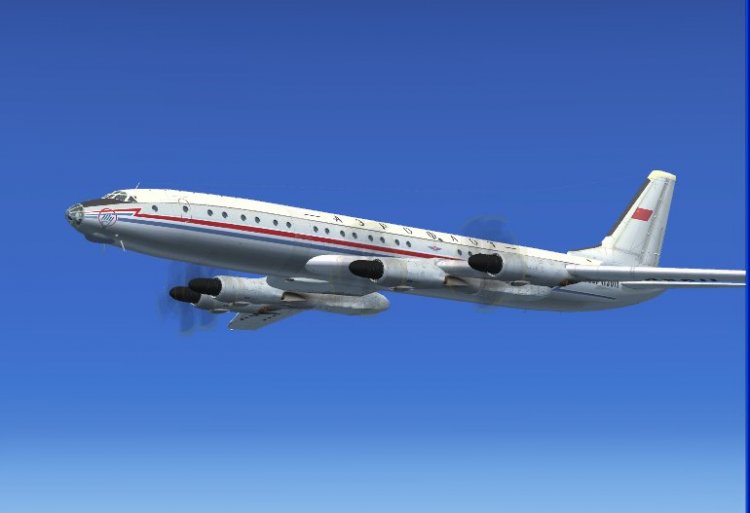
Samdim Design Tupolev Tu-114 adapted for FSX.
Featuring DDS textures, full virtual cockpit (VC), custom gauges,
custom sounds, passenger cabin with camera definitions.
1959 Khruschev livery.
Also includes Soviet Army Tu-126 Moss AWACS variant.
Adapted by Branislav Jansik
Featuring DDS textures, full virtual cockpit (VC), custom gauges,
custom sounds, passenger cabin with camera definitions.
1959 Khruschev livery.
Also includes Soviet Army Tu-126 Moss AWACS variant.
Adapted by Branislav Jansik
→ Size:
30 MB
→ Date:
16 years ago (16.08.2010 03:44)
→ Author:
Branislav Jansik
→ Approved by moderator:
UDVA
→ License:
Freeware - Free version, Unlimited Distribution
→ Downloaded:
23456 time(s)