Обновленная панель "DX_ExtDoors v1.2" для Level-D 767-300ER Просмотр ZIP-архива
ReadMe_v1.2.txt
* * * * * DX_ExtDoors Gauge * * * * *

 External Doors gauge by Jim "DX" Dickinson. 4/11/2006

 Version 1.2, 14.04.2013, added buttons for separate control of the cargo doors. Tatyana "Lyapuchka" Mikhailova :-)

 This gauge is designed for use with the LVL-D B767.  It contains buttons for the Main Exit and the Front/Rear Cargo doors.  It will also work with other aircraft that are modeled to use the "Fold Wing" action to open/close the rear cargo door.  Because of this, the FS message "Wings Extended" and "Wings Folded" will appear when the Cargo button is depressed. This gauge remains backlit at night until the main battery switch is turned off.  If the main battery is off, then it will remain backlit until the main BUS turned off.

* * * * * Installation * * * * *

 1. Unzip the DX_ExtDoors.zip to a temporary location.
 2. Place the DX_ExtDoors.cab file in the "\Flight Simulator 9\Gauges" folder.
 3. MAKE A BACKUP of your panel.cfg
 4. Open you Panel.cfg file and add the gauge to the Overhead window, should be [Window04].
    Add: (if 05 is the next gauge) "gauge05=DX_ExtDoors!DX_ExtDoors,  139,728,116,118"

 5. Enjoy.

* * * * * license * * * * *

You may modify or re-distribute this gauge for free.  Any distribution or inclusion in any product for profit requires authorization from me.

* * * * * Please * * * * *

 If you know how to change the code so that the backlight goes out with the rest of the panel, regardless of the battery condition, please make the change and let me know.  I've got some placards that behave the same way, and I'd love to fix all of them.

Jim Dickinson    email:   [email protected]


Установка.

 1. Распаковать DX_ExtDoors.zip в любую временную папку.

 2. Файл DX_ExtDoors.cab  скопировать в папку "\Flight Simulator 9\Gauges" или "\Microsoft Flight Simulator X\Gauges".

 3. Сделать резервную копию файла panel.cfg (Microsoft Flight Simulator X\SimObjects\Airplanes\LVLD_B763\Panel).

 4. Открыть Panel.cfg и добавить в секцию [Window04] строку: gauge05=DX_ExtDoors!DX_ExtDoors,  139,728,116,118
49372-DX-ExtDoors-v1.2.zip
| Имя файла | Дата | Размер |
|---|---|---|
| DX_ExtDoors.cab | 14.04.2013 12:58 | 4 KB |
| ReadMe_v1.2.txt | 14.04.2013 13:28 | 2 KB |
| 1.JPG | 14.04.2013 13:09 | 150 KB |
| 2.JPG | 14.04.2013 13:09 | 236 KB |
| 3.JPG | 14.04.2013 13:09 | 238 KB |
| avsim_su.diz | 14.04.2013 08:43 | 406 B |
| Итого: | 630 KB | |
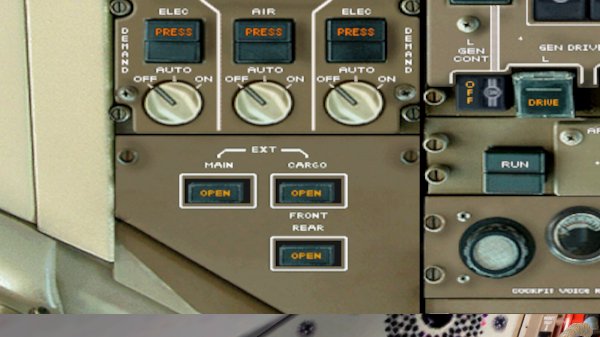
В версии 1.2 добавлено раздельное управление передней и задней дверью грузовых отсеков.
→ Size:
629 KB
→ Date:
13 years ago (14.04.2013 09:28)
→ Author:
Jim "DX" Dickinson, Ляпучка
→ Approved by moderator:
Alex_buka
→ License:
Freeware - Free version, Unlimited Distribution
→ Downloaded:
811 time(s)