FSLaunchPad 2.22 for FS2004, FSX or Prepar3D Просмотр ZIP-архива
readme.txt
FSLaunchpad Version 2.22
April 2016
by Pierre Legault

Thanks for downloading FSLaunchPad!
If your FS9, FSX or P3D is slow to start because you have a lot of sceneries, FsLaunchpad (FSL) is for you.
FSL allows to Select your Sceneries, Load your Addons and Launch FSX in same time.

Visit fslauncher.com you will find videos on Youtube and more information about FsLaunchpad.

[Installation]
- Please make copy of {Installation dir}FSLaunchpad/data if FSL is installed
- Windows XP/7/8/10 OS
- Ensure FS9, FSX or P3D is installed
- Ensure Java 1.7 is installed
- Unzip FSLaunchPad.zip
- Run setup.exe program AS AN ADMINISTATOR.

[Versions]
2.22: Add several sceneries simultaneously.
2.12: Inverse the checkbox selection to select only the applications that you need to launch with FSL/P3D instead of deselected ones that you don't need.
	: Correct problem when FSL load some other addons.
2.01: Correct problem with Fly Tampa path Airport especially for Toronto.
2.0 : Start more rapidly without blinking Launching message.
	: New functionality to create a Google Earth file from Flight Plan and see airports and your adds-on near from each waypoint. Compatible with FSX, P3D, FS9 and Plan-G Flight Plans.
	: Select your Addon Sceneries from Flight Plan Result Search. (If ICAO code is part of your title scenery like CYEG-Edmonton Intl, UK2000 EGBB Birmingham, FlyTampa-Montreal_CYUL but not "ISDProject - LIMC2005" because ICAO is not separated from another word and "Seychelles 2010" because don't have ICAO in title).
	-Note: You can modify your title by double click on scenery in Addon Source or Destination list.
	: More than 400 airports for Google Earth Search. All 24490 airports from FSX instead of 24014 airports from FS9.
	: Each Airport Google Earth Popup includes now links for weather from Aviation Digital Data Service (ADDS) (if available) and  Airport Information from Wikipedia and More (google search from google earth). Also includes the BGL file name where I grabbed the airport informations. And some surpirses... Thanks to Robert-Jan Oosterloo pour freewarescenery.com
	: Improve Addons Source and Destination separators. This correction resolve problem if Addon Scenery folder title is in another language than English or not exist....
	: Detect if you run FSL as Administrator
	: Tested with Windows 7, 8 and 10!

1.20 : Reload the last launch or selected group.
1.12a : Allows accented letters and correct mistake in user scenery.cfg
1.12 : Allows display alphabetically or by priority your sceneries.
1.11 : Allows compatibilty with FS9, FSX and P3D.
1.1 : Correct blinking "Launching" message at startup cause by differents scenery.dfg configuration and alow at startup to select your FS configuration.

[Contributor]
Thanks for my contributors form All around the World who sent me their scenery.cfg files and for their comments and good ideas. Without them FSL can't be like now!
Big Thanks to Micheal T., Dave M., George H., Luc B., Josй P., Aarmin B., Marc R. and Jean Pierre F. for their Help and Comments!

[Description]
With FSL loading FSX and selected sceneries will be up to 5 times faster than if FSX loads all your scenes. FSL is a software that can manage your scenes easily. Add, edit, delete and even move your scenes in a different directory.

[Features]

- Allows to select rapidly and easily the sceneries that you needs.
- Allows to select your Addons and Launch them with FSX (Active Sky Next, Aerosoft addons, Calculators, FMS, Excel Sheets, FuelPlanners, etc.)
- Add, Edit and  Reorganize your Sceneries easily and quickly.
- Move your Sceneries into another Folder without modify Scenery.CFG. FSL will do this for you!
- Retrieve your Sceneries Folder and Open it with One Click!
- Select Sceneries Required to avoid to select them each time you create a set of them.
- Googlize your Sceneries on Google Search and Map.
- Google Earth Airport Information (Altitude, Runways #, Lenght(feet/meters), ILS,  Course, Type, etc).
- And More!


[FAQ}
Please visit fslauncher.com

[Uninstal]
- Run {group}/FSLaunchPad/uninstall.exe

[Disclaimer]
These files are used at your own risk. There is absolutely NO warranty or guarantee of any kind, expressed or implied, for any problems arising from the use of these files. This includes, but is not limited to, any hardware and/or software problems. All use of these textures and its related files is at the user’s own risk.

A copy of scenery.cfg is create first time you launch FSLaunchPad  (C:\ProgramData\Microsoft\FSX\Scenery_original_before_FSL.CFG)

[Distribution]
FSLaunchPad is released as FREEWARE. DO NOT UPLOAD anywhere without my permission. These files may not be sold or included on a CD without prior agreement. The use of these files is at your own risk, the author cannot be held responsible.

This is FREEWARE. These files are strictly for your own personal, non-commercial use.  Any redistribution, repackaging or reselling of these files in any form is expressly prohibited without the permission of the author.


Pierre Legault
[email protected]
58834-FSLaunchpad-2-22.zip
| Имя файла | Дата | Размер |
|---|---|---|
| add_multiple.jpg | 28.04.2016 16:18 | 84 KB |
| lisezmoi.txt | 28.04.2016 14:42 | 5 KB |
| readme.txt | 28.04.2016 14:43 | 5 KB |
| setup.exe | 28.04.2016 16:12 | 3 MB |
| avsim_su.diz | 28.04.2016 22:03 | 406 B |
| Итого: | 3 MB | |
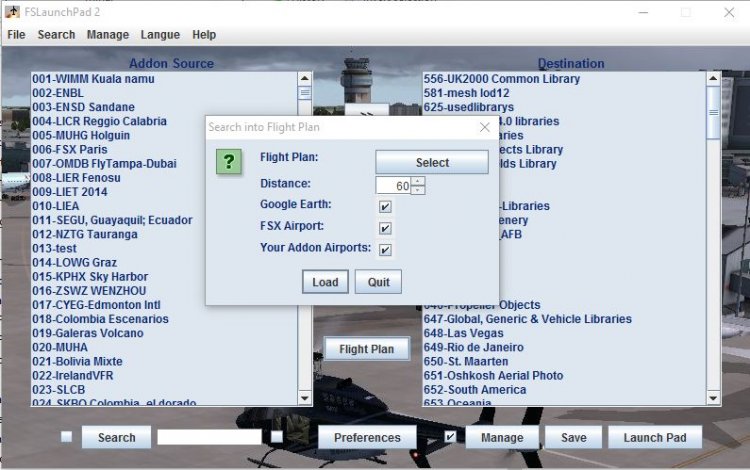
If your Flight Simulator is slow to start because you have a lot of sceneries, FsLaunchpad (FSL) is for you. FSL allows to Select your Sceneries, Load your Addons and Launch FSX in same time in few minutes. This version allows to see your Source Addons alphabetically or by priority your and some new features. FSL User Interface is available in English and French.
Now FSLaunchPad 2.22 allows to add several sceneries simultaneously. Any questions or suggestions will be appreciated.
Now FSLaunchPad 2.22 allows to add several sceneries simultaneously. Any questions or suggestions will be appreciated.
→ Size:
3 MB
→ Date:
10 years ago (29.04.2016 05:46)
→ Author:
pierre legault
→ Approved by moderator:
Aleck
→ License:
Freeware - Free version, Do Not Redistribute
→ Downloaded:
470 time(s)