Messerschmitt ME-262 Просмотр ZIP-архива
ME262/Me262A/1% Aircraft Installation ME-252A-1A.txt
ME-262A-1A SCHWALBE "Swallow" (GMAX)
V2.80.55

714/257th 1% Aircraft General Statement and Installation Instructions

It is the intention of the 714/257th 1% project to over time build the most accurate aircraft that the CFS2 software can support. The development of a 1% aircraft requires specific and in many cases dramatic changes to the aircraft delivered with the MS game as well as the addition of aircraft built from the ground up by third parties which were never included in the original MS game. We believe that because the 714/257th 1% aircraft are materially different they should not be mixed with "box stock" aircraft in online combat.

All the planes 1% listed for download are qualified for use in our 714/257th William Tell Meet Air Combat Ladder. For information and to get the sign up sheet for the ladder please go to the LINKS section at http://www.avhistory.org

ME-262A-1A SCHWALBE

This aircraft was built by Jerry Beckwidth using version 2.80.53 of the 714's Assembly Line and contains the newly developed Reality-X (RX) functions.  It is based on the outstanding new Gmax ME-262 by Graham of VB planes, please take time to review his original readme which is included in the package. The special engine damage effects are by SARGE.

To install:

1. Unzip the entire aircraft into your CFS2/AIRCRAFT folder.

2. Unzip the 279Effects.ZIP into the CFS2/EFFECTS folder

3. Unzip the Gauges.ZIP into the CFS2/GAUGES folder

4. Unzip the ExhaustEffects.zip into the CFS2/EFFECTS folder

5. If this is your first RX equipped aircraft download the RX-DLL from our web site and unzip it into your CFS2/MODULES folder. The aircraft will have all the standard 1% attributes with out the RX-DLL being installed, but will have none of the Reality-X features.  Any addition 1% planes that have RX features you install will NOT require a additional RX.DLL

This is the 1% version of the ME-262A-1A has the following modifications:

  - Updated 1% V 2.80.55 Air File
  - Updated MDL file.
  - Simplified cockpit panel with 714 gauges added to improve frame  rates.
    NOTE: if you have not done so please download and install the 1% gauges from our site. This is a one time install and will cover all our planes.
  - Updated 1% V-1.82 high resolution DP file.

The 1% aircraft are designed to be flown at the "HARD" flight model setting in the game. Additionally, select "strongest" guns, "g-forces" enabled, "sun glare" enabled, "unlimited fuel" unchecked, "unlimited ammo" unchecked, "enable auto-rudder" unchecked, "auto fuel management" unchecked and "enable auto-mixture" unchecked. Settings at other levels will greatly impair the 1% Flight/Damage/Weapons Models.

All Pilots Read this!
===================================
If you don’t know what trim is or how to use it, please start reading about it. You will need to know about elevator and rudder trim to get the most out of your aircraft.

If you can trim the aircraft for any speed/configuration for hands off flight in under 3 seconds, you’re ready. If not, practice, practice, practice, practice, practice!

Second, you need to learn how to use the rudder. This is where rudder pedals are worth gold. What ever you use for yaw control, practice, practice, practice, practice, practice!

Third, the concept of Vmca is introduced to the multi-engine aircraft. You need to get a feel for how the aircraft handles at low speed with the loss of an engine.

The fidelity of the 2.80 flight models is very high now in the "normal" flight part of the envelope. If you go to the pilot shop at your local airport there are several books that show you how to do the basic maneuvers. William Kersher had some excellent books on flying the aircraft through the basic maneuvers.

New for V2.80.55

1. New to the Main ME-262A-1A panel on the lower left side are the Cannon and Machinegun ammo counters in tape format.

2. The Engine Controls are acessed by pushing the "Aircraft" icon just below the Altimeter. It is recommended that you cancel the use of the Auto Mixture feature which will degrade the performance of the 1% aircraft and use the control levers to manually control the engines.


We now also have three new gauges which can be acessed by pushing the "Fuel Pump" icon in the center of the panel below the CHT gauge:

  - "Trim Gauge" shows the actual trim positions for all 3 trim functions. This gauge is now required since the aircrafts Center of Gravity (CG) changes as fuel and ammo is consumed. Therefore constant trim adjustments are necessary. The trim controls are included on the panal for ease of use.

  - "Current CG position"  Just below the Trim Gauges is the is the current CG expressed as a %. 25% is the optimum for air combat maneuvering (ACM). However when flying at high altitudes near the aircrafts service ceiling, you will want a more forward CG to provide additional stability.

     a) Smaller numbers (less then 25) move the CG forward, making the
aircraft less maneuverable.

     b) Larger numbers (greater then 25) move the CG aft, providing full
maneuverability but this increased capability makes easier to stall/spin the aircraft

  - "Control Surface deflection" Before you fly, ALWAYS! Verify you have full control authority. Start on the ground with the engine off and bring up the checklist. The first section of the checklist will give you the control values for your aircraft. Deflect all your control and make sure they match. If the checklist says 20.0 and you see 19.9, YOU MUST RECALIBRATE YOUR JOYSTICK. Do not fly. Many, many pilots are missing out on the full flying experience because their joystick is not giving them full control deflection. Ever wonder why some people can out maneuver you on the ZONE, this is why. We cannot stress how important this is. Please spread the word so others can enjoy the full flight modeling.

3. The Green ACM switch and Red Fuel Tank Dump burrons are now standard on all 1% aircraft.

  - "Green ACM" switch is located to the right side of the panel. The new 2.80 flight models set neutral trim to occur at their corner speed. Because of the way trim adjustment is modeled it's difficult to set the trim, so we designed the ACM Trim button to set the neutral trim for you. Having neutral trim set to the aircraft's corner speed allows you to have direct feedback on the aircraft in relation to the aircrafts corner speed (the speed where the aircraft's rate of turn is fastest). If after hitting the ACM trim button the aircraft wants to nose down, this feedback is telling you the pilot the aircraft is below corner speed and you need to speed up. If the aircraft tends to nose up, this feedback is telling you the speed is above corner and you need to slow down.

Note: If you fly with nose up trim above corner speed, you can over-g the airframe.

  - "Red Fuel Dump" switches are located to the left of the ACM switch. The Top Fuel Dump switch will empty tank #1 . The Bottom Fuel Dump switch will empty tank #3. Fly your normal patrol flights on tanks #1/3, when you fly quick combat or multiplayer online, select tank #2 to feed the engine then hit the Red switches to configure the aircraft for it's best ACM center of gravity position.

Note: If you dump a tank that is feeding the engine it will stall because of fuel starvation and you may or may not be able to restart it.

Remember, the CG will still change as you burn fuel off or expend ordinance. The FD switches do NOT dump all the fuel on the aircraft, they only dump the selected tanks. It will set the aircraft to approximately the same fuel load of the actual aircraft when it flew ACM if the tanks were full when you took off. Some aircraft may have more than 1 switch, some will not have any, so be sure to hit all of them. The 1% aircraft are optimized to fly with the same fuel load in the tanks as the real aircraft when they flew ACM.  You must pay attention to the tanks fuel status and selectively feed from different tanks to keep the aircraft CG balanced as you consume fuel.

4. The "Compass" icon to the right of the panel will call up the ADF system and the "Compass card" icon below the Cpmpass will bring up the inflight map.

5. New Checklists - use them to get maximum performance from the aircraft
and to prevent you from breaking the aircraft.

6. RealityX - A special feature of the 1% planes that adds greatly to the
pilots workload creating a more immersive flightsim experience. You will
need to start watching the following

     a. Max G - The ME-262A-1A  is limited to +7.65, -7.65. If you exceed this limit, the aircraft will explode.

     b. Max Speed - The ME-262A-1A  is limited to 671mph IAS. If you exceed this limit, the aircraft will explode.

NOTE: RealityX Temperature Limits do not effect Jet Engines at this time.

NOTE 2: 1% Experimental Jet Aircraft

This is an experimental Me262a to test the Jet spreadsheet functions. Please understand that it is a work in progress and still in development. You can help improve the quality of the Jet Engine flight models by posting your feedback on the 1% Squawks message board at www.AvHistory.org.

Regards,

714/257th 1% Team
me262.zip
| Имя файла | Дата | Размер |
|---|---|---|
| ME262/Effects/ | 19.02.2004 06:42 | |
| ME262/Effects/fx_262_exhaust.FX | 15.04.2001 23:00 | 1 KB |
| ME262/Effects/fx_smoke_rx.fx | 21.10.2001 16:59 | 1 KB |
| ME262/Effects/fx_Vapourtrail_s.FX | 14.04.2001 17:38 | 1 KB |
| ME262/Gauges/ | 19.02.2004 06:43 | |
| ME262/Gauges/01.avro.adf.gau | 30.03.2000 21:14 | 260 KB |
| ME262/Gauges/aSw_BF109.GYRO.gau | 31.05.1998 18:00 | 238 KB |
| ME262/Gauges/JWB.analog_canv.gau | 14.12.1999 21:14 | 36 KB |
| ME262/Gauges/JWB.analog_rocv.gau | 14.12.1999 21:12 | 36 KB |
| ME262/Gauges/MAPE_Jap_4Eng_v11_ReadMe.txt | 20.11.2001 02:18 | 1 KB |
| ME262/Gauges/MAPE_Luft_4Eng.gau | 06.04.2002 14:25 | 639 KB |
| ME262/Gauges/mr.tr-002a.gau | 02.08.2000 21:15 | 47 KB |
| ME262/Gauges/PARKBREMSE.gau | 26.05.2000 15:14 | 175 KB |
| ME262/Me262A/ | 19.02.2004 06:42 | |
| ME262/Me262A/1% Aircraft Installation ME-252A-1A.txt | 13.09.2002 02:51 | 9 KB |
| ME262/Me262A/Aircraft.cfg | 19.02.2004 03:01 | 9 KB |
| ME262/Me262A/AssemblyLineAeroV2.80.55-GR-Me-262A-1A.xls | 11.09.2002 21:08 | 2 MB |
| ME262/Me262A/AssemblyLineDamgeV1.82-GR-Me-262A-1A.xls | 02.06.2002 04:48 | 93 KB |
| ME262/Me262A/CheckList_Me262A-1A Schwalbe.txt | 07.09.2002 14:15 | 1 KB |
| ME262/Me262A/ExhaustEffects/ | 19.02.2004 05:46 | |
| ME262/Me262A/ExhaustEffects/fx_262_exhaust.FX | 15.04.2001 23:00 | 1 KB |
| ME262/Me262A/ExhaustEffects/fx_Vapourtrail_s.FX | 14.04.2001 17:38 | 1 KB |
| ME262/Me262A/ME262a.air | 11.09.2002 21:09 | 9 KB |
| ME262/Me262A/ME262a.dp | 12.09.2002 00:31 | 20 KB |
| ME262/Me262A/model/ | 19.02.2004 05:46 | |
| ME262/Me262A/model/262A.mdl | 06.09.2002 20:33 | 1 MB |
| ME262/Me262A/model/FSDS_ME262a.mdl | 15.04.2001 03:39 | 1 MB |
| ME262/Me262A/model/Model.cfg | 06.09.2002 03:55 | 23 B |
| ME262/Me262A/Panel/ | 19.02.2004 05:46 | |
| ME262/Me262A/Panel/714PopUp.BMP | 06.10.2001 17:28 | 15 KB |
| ME262/Me262A/Panel/ME262A1cpt.bmp | 20.06.2002 21:28 | 769 KB |
| ME262/Me262A/Panel/ME262A1revi.bmp | 24.03.2001 03:25 | 769 KB |
| ME262/Me262A/Panel/p63con.bmp | 08.12.2001 23:17 | 179 KB |
| ME262/Me262A/Panel/PANEL.CFG | 19.02.2004 01:19 | 7 KB |
| ME262/Me262A/Panel/RDF.bmp | 04.10.2001 11:26 | 16 KB |
| ME262/Me262A/Panel/Thumbs.db | 29.03.2003 20:52 | 12 KB |
| ME262/Me262A/RealityX.cfg | 07.09.2002 14:12 | 405 B |
| ME262/Me262A/sound/ | 19.02.2004 05:46 | |
| ME262/Me262A/sound/B211.WAV | 13.10.2001 14:05 | 52 KB |
| ME262/Me262A/sound/B212.WAV | 09.08.2003 02:52 | 65 KB |
| ME262/Me262A/sound/b213.wav | 09.08.2003 02:38 | 97 KB |
| ME262/Me262A/sound/B214.WAV | 15.12.2002 22:41 | 169 KB |
| ME262/Me262A/sound/B221.WAV | 06.02.2002 12:47 | 42 KB |
| ME262/Me262A/sound/B222.WAV | 06.02.2002 12:48 | 34 KB |
| ME262/Me262A/sound/B223.WAV | 06.02.2002 12:50 | 42 KB |
| ME262/Me262A/sound/B224.WAV | 15.12.2002 21:42 | 473 KB |
| ME262/Me262A/sound/B2APDIS.WAV | 11.08.1997 09:10 | 102 KB |
| ME262/Me262A/sound/B2FLAPS.WAV | 06.02.2002 17:13 | 12 KB |
| ME262/Me262A/sound/B2GEARDW.WAV | 06.02.2002 14:18 | 432 KB |
| ME262/Me262A/sound/B2GEARUP.WAV | 06.02.2002 14:16 | 384 KB |
| ME262/Me262A/sound/B2N2SHUT.WAV | 06.02.2002 12:54 | 260 KB |
| ME262/Me262A/sound/B2N2STRT.WAV | 06.02.2002 12:56 | 62 KB |
| ME262/Me262A/sound/B2N2T.WAV | 06.02.2002 13:57 | 115 KB |
| ME262/Me262A/sound/B2OVER.WAV | 11.08.1997 09:10 | 86 KB |
| ME262/Me262A/sound/B2STALL.WAV | 09.04.2002 16:51 | 38 KB |
| ME262/Me262A/sound/B2STRT.WAV | 06.02.2002 12:41 | 389 KB |
| ME262/Me262A/sound/sound.cfg | 17.02.2004 04:59 | 7 KB |
| ME262/Me262A/sound/XB211.wav | 09.08.2003 02:38 | 97 KB |
| ME262/Me262A/sound/XB212.WAV | 09.08.2003 02:52 | 65 KB |
| ME262/Me262A/sound/XB213.wav | 11.08.2003 02:28 | 43 KB |
| ME262/Me262A/sound/XB214.WAV | 25.07.2003 01:04 | 326 KB |
| ME262/Me262A/sound/XB221.WAV | 06.02.2002 13:32 | 36 KB |
| ME262/Me262A/sound/XB222.WAV | 06.02.2002 13:31 | 40 KB |
| ME262/Me262A/sound/XB223.WAV | 14.02.2003 01:33 | 188 KB |
| ME262/Me262A/sound/Xb224.WAV | 17.04.2003 00:36 | 171 KB |
| ME262/Me262A/sound/xb2n2shut.wav | 06.02.2002 13:48 | 162 KB |
| ME262/Me262A/sound/xb2n2strt.wav | 06.02.2002 13:51 | 50 KB |
| ME262/Me262A/sound/XB2N2T.WAV | 06.02.2002 14:02 | 109 KB |
| ME262/Me262A/sound/XB2STRT.WAV | 06.02.2002 13:46 | 428 KB |
| ME262/Me262A/texture/ | 19.02.2004 05:46 | |
| ME262/Me262A/texture/gunsight.bmp | 12.03.2001 21:45 | 22 KB |
| ME262/Me262A/texture/me262_d.bmp | 31.07.2002 02:23 | 683 KB |
| ME262/Me262A/texture/ME262_Interior.bmp | 30.07.2002 23:42 | 683 KB |
| ME262/Me262A/texture/me262_t.bmp | 30.07.2002 23:31 | 683 KB |
| ME262/Me262A/texture/Thumbs.db | 30.03.2003 01:26 | 9 KB |
| ME262/Me262A/VB Plane Copyright.txt | 15.04.2001 23:08 | 1 KB |
| ME262/Me262B/ | 19.02.2004 06:43 | |
| ME262/Me262B/1% Aircraft Installation ME-252B-U1.txt | 19.10.2002 20:59 | 9 KB |
| ME262/Me262B/Aircraft.cfg | 19.02.2004 03:01 | 9 KB |
| ME262/Me262B/AssemblyLineAeroV2.80.55-GR-Me-262B-U1.xls | 19.10.2002 00:55 | 2 MB |
| ME262/Me262B/AssemblyLineDamgeV1.82-GR-Me-262B-U1.xls | 19.10.2002 00:59 | 93 KB |
| ME262/Me262B/CheckList_Me262B-U1 Night Schwalbe.txt | 19.10.2002 00:55 | 1 KB |
| ME262/Me262B/ME262B.air | 19.10.2002 00:51 | 9 KB |
| ME262/Me262B/ME262B.dp | 19.10.2002 20:28 | 20 KB |
| ME262/Me262B/ME262B_notes.txt | 29.04.2003 22:43 | |
| ME262/Me262B/model/ | 19.02.2004 05:46 | |
| ME262/Me262B/model/262BU1.mdl | 06.09.2002 20:39 | 1 MB |
| ME262/Me262B/model/FSDS_ME262a.mdl | 15.04.2001 03:39 | 1 MB |
| ME262/Me262B/model/Model.cfg | 28.12.2001 17:51 | 23 B |
| ME262/Me262B/panel/ | 19.02.2004 05:46 | |
| ME262/Me262B/panel/714PopUp.BMP | 06.10.2001 17:28 | 15 KB |
| ME262/Me262B/panel/ME262A1cpt.bmp | 20.06.2002 21:28 | 769 KB |
| ME262/Me262B/panel/ME262A1revi.bmp | 24.03.2001 03:25 | 769 KB |
| ME262/Me262B/panel/p63con.bmp | 08.12.2001 23:17 | 179 KB |
| ME262/Me262B/panel/PANEL.CFG | 19.02.2004 01:19 | 7 KB |
| ME262/Me262B/panel/RDF.bmp | 04.10.2001 11:26 | 16 KB |
| ME262/Me262B/panel/Thumbs.db | 29.03.2003 20:52 | 12 KB |
| ME262/Me262B/panel.alt/ | 19.02.2004 05:46 | |
| ME262/Me262B/panel.alt/Me262cpt2.bmp | 17.03.2003 14:58 | 769 KB |
| ME262/Me262B/panel.alt/Me262navigator.bmp | 24.03.2003 13:57 | 770 KB |
| ME262/Me262B/panel.alt/Me262revi.bmp | 12.03.2003 01:33 | 769 KB |
| ME262/Me262B/panel.alt/Me262revi2.bmp | 12.03.2003 00:58 | 769 KB |
| ME262/Me262B/panel.alt/Panel.cfg | 24.03.2003 14:23 | 4 KB |
| ME262/Me262B/panel.alt/Thumbs.db | 27.04.2003 21:44 | 14 KB |
| ME262/Me262B/RealityX.cfg | 19.10.2002 02:03 | 267 B |
| ME262/Me262B/sound/ | 19.02.2004 05:46 | |
| ME262/Me262B/sound/B211.WAV | 13.10.2001 14:05 | 52 KB |
| ME262/Me262B/sound/B212.WAV | 09.08.2003 02:52 | 65 KB |
| ME262/Me262B/sound/b213.wav | 09.08.2003 02:38 | 97 KB |
| ME262/Me262B/sound/B214.WAV | 15.12.2002 22:41 | 169 KB |
| ME262/Me262B/sound/B221.WAV | 06.02.2002 12:47 | 42 KB |
| ME262/Me262B/sound/B222.WAV | 06.02.2002 12:48 | 34 KB |
| ME262/Me262B/sound/B223.WAV | 06.02.2002 12:50 | 42 KB |
| ME262/Me262B/sound/B224.WAV | 15.12.2002 21:42 | 473 KB |
| ME262/Me262B/sound/B2APDIS.WAV | 11.08.1997 09:10 | 102 KB |
| ME262/Me262B/sound/B2FLAPS.WAV | 06.02.2002 17:13 | 12 KB |
| ME262/Me262B/sound/B2GEARDW.WAV | 06.02.2002 14:18 | 432 KB |
| ME262/Me262B/sound/B2GEARUP.WAV | 06.02.2002 14:16 | 384 KB |
| ME262/Me262B/sound/B2N2SHUT.WAV | 06.02.2002 12:54 | 260 KB |
| ME262/Me262B/sound/B2N2STRT.WAV | 06.02.2002 12:56 | 62 KB |
| ME262/Me262B/sound/B2N2T.WAV | 06.02.2002 13:57 | 115 KB |
| ME262/Me262B/sound/B2OVER.WAV | 11.08.1997 09:10 | 86 KB |
| ME262/Me262B/sound/B2STALL.WAV | 09.04.2002 16:51 | 38 KB |
| ME262/Me262B/sound/B2STRT.WAV | 06.02.2002 12:41 | 389 KB |
| ME262/Me262B/sound/sound.cfg | 17.02.2004 04:59 | 7 KB |
| ME262/Me262B/sound/XB211.wav | 09.08.2003 02:38 | 97 KB |
| ME262/Me262B/sound/XB212.WAV | 09.08.2003 02:52 | 65 KB |
| ME262/Me262B/sound/XB213.wav | 11.08.2003 02:28 | 43 KB |
| ME262/Me262B/sound/XB214.WAV | 25.07.2003 01:04 | 326 KB |
| ME262/Me262B/sound/XB221.WAV | 06.02.2002 13:32 | 36 KB |
| ME262/Me262B/sound/XB222.WAV | 06.02.2002 13:31 | 40 KB |
| ME262/Me262B/sound/XB223.WAV | 14.02.2003 01:33 | 188 KB |
| ME262/Me262B/sound/Xb224.WAV | 17.04.2003 00:36 | 171 KB |
| ME262/Me262B/sound/xb2n2shut.wav | 06.02.2002 13:48 | 162 KB |
| ME262/Me262B/sound/xb2n2strt.wav | 06.02.2002 13:51 | 50 KB |
| ME262/Me262B/sound/XB2N2T.WAV | 06.02.2002 14:02 | 109 KB |
| ME262/Me262B/sound/XB2STRT.WAV | 06.02.2002 13:46 | 428 KB |
| ME262/Me262B/texture/ | 19.02.2004 05:46 | |
| ME262/Me262B/texture/gunsight.bmp | 12.03.2001 21:45 | 22 KB |
| ME262/Me262B/texture/me262b_d.bmp | 31.07.2002 02:28 | 683 KB |
| ME262/Me262B/texture/me262b_interior.bmp | 31.07.2002 00:20 | 683 KB |
| ME262/Me262B/texture/me262b_t.bmp | 31.07.2002 01:38 | 683 KB |
| ME262/Me262B/texture/Thumbs.db | 30.03.2003 01:26 | 9 KB |
| ME262/Me262B/VB Plane Copyright.txt | 15.04.2001 23:08 | 1 KB |
| ME262/Me262small.jpg | 19.02.2004 06:01 | 23 KB |
| ME262/Readme.txt | 19.02.2004 06:49 | 2 KB |
| ME262/ss431.jpg | 19.02.2004 05:29 | 176 KB |
| ME262/ss432.jpg | 19.02.2004 05:30 | 223 KB |
| ME262/ss433.jpg | 19.02.2004 05:30 | 158 KB |
| ME262/ss434.jpg | 19.02.2004 05:30 | 152 KB |
| ME262/ss435.jpg | 19.02.2004 05:30 | 161 KB |
| ME262/ss436.jpg | 19.02.2004 05:30 | 168 KB |
| ME262/ss437.jpg | 19.02.2004 05:52 | 174 KB |
| ME262/ss438.jpg | 19.02.2004 05:52 | 182 KB |
| ME262/ss439.jpg | 19.02.2004 05:53 | 132 KB |
| ME262/ss440.jpg | 19.02.2004 05:55 | 147 KB |
| ME262/ss441.jpg | 19.02.2004 05:55 | 209 KB |
| ME262/ss442.jpg | 19.02.2004 05:57 | 177 KB |
| ME262/ | 19.02.2004 06:49 | |
| avsim_ru.diz | 14.03.2004 00:20 | 385 B |
| Итого: | 31 MB | |
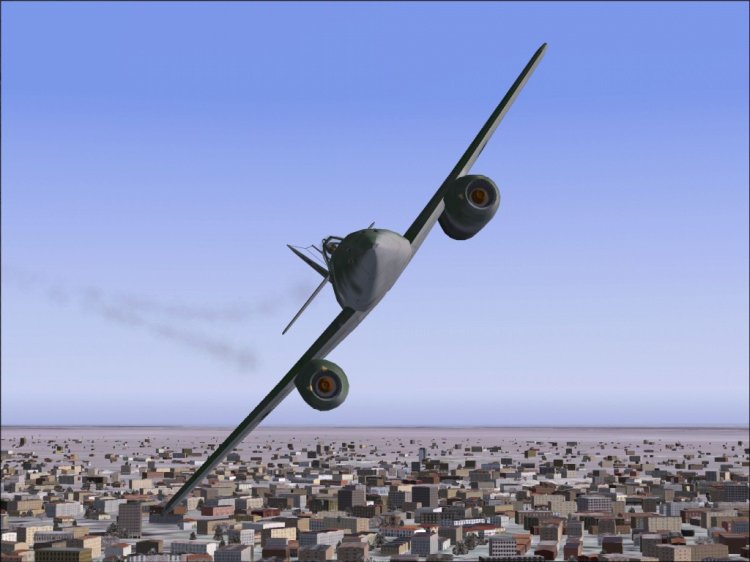
Airplane Messerschmitt ME-262. The most complete package.
→ Size:
13 MB
→ Date:
22 years ago (19.02.2004 09:38)
→ Author:
Rene Spaan
→ License:
Freeware - Free version, Unlimited Distribution
→ Downloaded:
2154 time(s)