PAD C-295MP new panel set Просмотр ZIP-архива
PAD C-295MP/Panel.MIO/XML_sounds/dsd_fsx_xml_sound.txt
Gauge: dsd_fsx_xml_sound.gau
Although its name refers to FSX, this gauge will also work in FS2004.  It is heavily based on dsd_xml_sound3.gau.

Panel.cfg syntax
gauge10=dsd_fsx_xml_sound!Sound,  2,2,2,2,./gauges/dsd_xml_sound.ini
gauge11=dsd_fsx_xml_sound!Debugger,  420,550,600,80

The most important change in gauge function is the way it handles volume settings.  Previous versions of the gauge used a range from 0 to 100 to get/set volume levels.  I have changed this to the range used by DirectSound, -10000 (representing very, very quiet) to 0 (representing full volume).  If this change is going to cause you problems with your existing code, you can set a variable (L:Old Volume Control) to force the gauge back to the old method of handling volume settings.  See below.

For those who haven’t used earlier versions of the gauge, each sound is controlled by a separate XML L:Variable (hereinafter referred to as an LVar.)   You control the sound by setting the control variable (LVar) to the value that corresponds to the action you want.  You assign LVars to sounds using a configuration file.  Specify the configuration file in panel.cfg, as a fifth parameter for the “Sound” gauge element – see the example above.  The gauge will follow the following methods in evaluating a supplied configuration file string:

1. You specify a relative path by starting it with a ‘dot’ – see the sample syntax, above.  This dot effectively anchors us in the main FS folder.  In the example above, the .ini file is located in the main FS gauges folder, and it is called dsd_xml_sound.ini.  You are not limited to the FS gauges folder, you may specify any folder you like  Your only challenge is ensuring the end user has the folder you specify in their FS folder system.  This is the method used by previous versions of the sound gauge.

2. Alternatively, you may construct an absolute path to your configuration file.  The gauge will look up its own path qualified name.  By stripping off the name of the gauge itself, we are left with the path to the specific folder where the gauge is installed.  To this path name, you will add the specific folder and file name for your configuration file.  For example, my usual test aircraft is installed in a folder called:
D:\fsx\Aircraft\b777_300
Installing the gauge in the panel folder, and specifying a configuration file thusly:
gauge37=dsd_fsx_xml_sound!Sound,  2,2,2,2, \dsd_fsx_test_sound.ini
will result in a configuration specification of
D:\fsx\Aircraft\b777_300\panel\dsd_fsx_test_sound.ini – placing the configuration file in the aircraft’s panel folder, with the sound gauge
 Please note that with this method, there is no ‘dot’ at the beginning of the panel.cfg parameter string, but the string starts with a / or \ character.  The gauge will treat the / and \ characters equivalently.

3. If the gauge does not find a dot or slash character at the beginning of the parameter string, it will search the string for a colon character “:” If it finds one, it will assume that you have provided a complete path including drive letter, to the configuration file and will attempt to load it without any adjustments.
I don’t recommend this approach for anything other than private use on your own computer.  Specifying a configuration file string like “D:\fsx\gauges\sound_config.ini” is asking for trouble if you are distributing the panel.  We really don’t know where the end user has installed FS.

4. If the gauge does not find a “:” character, it will presume that you are attempting to specify a path in the same manner as in procedure 2, above.  It will append the supplied parameter string to the path where the gauge is loaded from, providing the slash character as necessary.  Staying with the example of my test aircraft, with the gauge loaded from the panel folder, providing a configuration file string like this:
gauge37=dsd_fsx_xml_sound!Sound,  2,2,2,2, panel_sounds\dsd_fsx_test_sound.ini
will result in a configuration specification of
D:\fsx\Aircraft\b777_300\panel\panel_sounds\dsd_fsx_test_sound.ini

5. Default configuration file.  If no configuration file is specified, or if the gauge cannot find the file specified, it will use the default name.  The gauge will look up its own path qualified name (in case you or the end user have renamed it,) strip off the “.gau” file extension, and add “.ini”    The default configuration file is therefore in the same folder as the gauge, with the same base name.  This method should reduce the requirement to specify the configuration file in a great many cases.  Note that if the gauge is using the default because you did not specify a configuration file, it will simply do so without further ado.  However, if it is using the default because it could not find the file you specified, it will pop up a Windows message box telling you so.

Creating the Configuration File
The configuration file is used for a number of things.  The most important of these is establishing paring between the sounds you want to play and the LVars you will use to control those sounds.  If you look at the sample .ini file listing at the end of this document, you will find that it contains three section headings.  Of these, one is labeled [Sounds] and one is labeled [LVars].  Each has a listing of numbered entries.  The numbering is how the link between sound and LVar is established.  Please note that that is the only significance to the numbering of the entries.  The sound at entry Sound00 is matched with the LVar at Lvar00, the sound at entry Sound01 is matched with the LVar at Lvar01, etc.

As you may have gathered by now, in specifying LVars in the configuration file, you just supply the bare name.  You do not add “L:” at the beginning, or “, number” at the end.   This has nothing to do with how you will access the variables in XML, it is only relevant to the way a C/C++ gauge works with these variables.

When you are creating entries for the sounds themselves in your configuration file, you can, if you wish, specify a volume to be applied to the sound when it is loaded.  See the first two sound entries in the sample .ini file below.  This option is useful if you, or the end user of your product, feel a particular sound or sounds, as recorded, are too loud.  You can specify the volume to be used and thus not have to bother setting it within your gauge.  Specifying a volume setting in this way will not preclude you from changing the volume level later.

When you are specifying sounds in the configuration file, the gauge will follow the same protocols for specifying sound names as it does for specifying the configuration file name.  You can use a relative path (starting with a “dot” and referring to a folder within the FS folder tree) or you can construct an absolute path, using the path to the configuration file as a base ( by specifying a \ or / as the first character of the parameter string, or by listing a folder and file without the leading slash.)  See the first sound setting in the sample .ini file below.  It specifies a folder called PanelSounds, located within the folder where the configuration file is found, as the location for the sound file.
The gauge will not verify individual sound names at gauge load time.  However, it will use a Windows message box to notify the user that a particular sound cannot be found when an attempt is made to play the sound.

The settings in the third group, [Config] are each reviewed later.

Working with sounds
To control a given sound, it is just a matter of setting its corresponding LVar to the value listed below for the action you want:
1 (>L:SomeXMLControlVar, number)  will play the sound once, with no changes made to volume or pan settings.
0 (>L:SomeOtherXMLControlVar, number)   will stop the sound if it is playing.
8 (>L:YetAnotherXMLControlVar, number)  will first retrieve the current volume and pan input settings.  It will then apply them to the sound in question, and finally,
   with start playing the sound in looping mode.

Gauge control variables can use the following values:
	0 - Stop Sound
	1 - Play sound once, without changing the existing volume or pan settings.
	2 - Play sound as a loop, without changing the existing volume or pan settings.
	3 - Set the sound's volume, using the setting found in the specified VolumeIn variable, see below.
	4 - Get the sound's current volume setting, placing it in the specified VolumeOut variable.
	5 - Set the sound's pan, using the setting found in the specified PanIn variable.
	6 - Get the sound's current pan setting, placing it in the specified PanOut variable.
	7 - Play sound once, but first set the volume and pan to the settings found in the VolumeIn and PanIn variables.
	8 - Play sound as a loop, but first set the volume and pan to the settings found in the VolumeIn and PanIn variables.
	9 - Get sound's looping status.  Will return 1 if a playing sound is looping, 0 if the sound is in play once mode or is not playing at all.
	10 – Unload a sound.  Sounds will be automatically unloaded on gauge exit, but if the sound file is large, and you are done with it, you might want to unload it immediately, and reclaim the memory.  This command may also be useful during testing.  You can make changes to a sound and reload it, without reloading the whole panel.
	11 – Load a sound, using the Windows voice device.  By default the gauge will use the Windows sound device for playing sounds.  If you want to use the Windows voice device (typically a second sound card, or USB sound device) you can use the value of 11 to load the sound for playing on the voice device.  All of the other commands, if they have to load a sound before carrying out their own function, will load the sound for the Windows sound device.  If you want to use the voice device, you will need to use this command to first load the sound before you do anything else with it.  Should the voice device be the same device as the sound device, the sound will be loaded using the available sound device.  If you want the sound to play through the user’s headset, if present, you can use this value.  If another user does not have a headset, the same sound will be played by whatever sound device the user does have.  Included with this package is a utility which will allow the user to explicitly specify the sound devices for the gauge to use.  I expect that in almost all cases, this utility will not be required.  It will only be needed if the user feels that the Windows default values are not appropriate for FS, but does not wish to change the Windows defaults.
	12 – As 11 above, but loads the sound using the Windows sound device.

In the Config Section of the .ini file, the following items can be set.  They are all shown with their corresponding default values.

MaxSounds=10
The default is 10, but the maximum is now 1000. (Yes, you read that right!)  I can't see anyone using that many, but the memory is allocated dynamically now, so there is
no harm in the very high limit.  It will allow dedicated users to avoid loading more than one instance of the gauge in the same panel.  I have seen that happen.
Keeping the maximum to the number of sounds you will actually use will minimize both CPU and memory use by the gauge.

ErrorFlag= -1
In the event of some kind of error occurring, the gauge's control variable will be set to this value.  The default is -1.  You can pick any integer value you like,
except the range from 1 to 99, which is reserved for actual commands.  The gauge now has several Windows Message Boxes built in that will appear in the event of an error.
  I expect that the only one you will ever see will occur if the gauge does not find a sound file specified in the .ini file.  In order to ease problem solving, it will
inform the user which file was not found.  If an error does occur, any further changes to that sound's control variable will be ignored.  Other sounds will be processed
however.

GlobalCommands=DSDGlobals
You can set this variable to 3 meaningful values.
	1 - stops all sounds currently playing.
	2 - mutes all sounds.  It set's their volume to -10000, but does not stop them from actually playing.
	3 - unmutes all sounds previously muted.  It restores their previously stored volume settings.
In each case, the variable will be reset to 0.

VolumeVarIn=dsd_xml_sound_volume_in
Use this variable to specify the volume setting for use with the SetVolume command (3).  Volume is specified as a value between 0 (full volume) and -10000 (100 db attenuation, inaudible.)  In practice, any setting less than about -3000 (30 db attenuation) will be inaudible.

PanVarIn=dsd_xml_sound_pan_in
Use this variable to specify the pan setting for use with the SetPan command (5).  Pan is specified as a value between -10000 (full left) and 10000 (full right).  0 is centered.

VolumeVarOut=dsd_xml_sound_volume_out
Use this variable to receive the volume setting retrieved with the GetVolume command (4).

PanVarOut=dsd_xml_sound_pan_out
Use this variable to receive the pan setting retrieved with the GetPan command (6).

LoopOut=dsd_xml_sound_loop_out
Use this variable to receive the loop setting retrieved with the Get Looping Status command (9).

VolumePlayed=dsd_volume_played
This variable will automatically receive the volume setting used when the last play sound command was issued.  Note that this volume level may no longer apply - it may have been changed with the SetVolume command.

PanPlayed=dsd_pan_played
This variable will automatically receive the pan setting used when the the last play command was issued.  Note that this pan setting may no longer apply - it may have been changed with the SetPan command.

LoopPlayed=dsd_loop_played
This variable will automatically receive the loop setting used when the last play command was issued.

Other LVARS, names not selectable:

FSSoundIsOn:
In both FS9 and FSX, this variable will return 1 if FS's sounds are active and 0 if they are not.  The gauge's own sounds will follow FS sound status - they will mute if FS's sound is off or if the sim is paused.

Old Volume Control:
Settable.  If set to 1, the gauge will use the old volume range of 0 to 100, with 100 representing full volume and 0 representing fully muted.  If set to 0, the gauge will use the actual DirectSound range, which is -10000 for fully muted, to 0, which represents full volume.  Note that if the gauge encounters positive values for volumes in the [Sounds] section of the .ini file, it will presume that you want to use the old range and will set this variable accordingly.  For the technically inclined, the DirectSound range represents attenuation in 100ths of decibels, so the value of -10000 represents an attenuation of 100 decibels.  Don't change this variable once it is set - bad things will happen.

VoiceAvailable:
This variable will indicate whether a separate voice device is available.  Returns 1 if the system has separate Windows sound and voice devices, and 0 otherwise.

FSVersionMajor, FSVersionMinor, FSVersionBuild:
These variables return detailed information about the version of Flight Simulator that the gauge is running on.
FSVersionMajor returns 9 for FS2004 and 10 for FSX.  Supplied in case you want to use any version specific code in your own gauges.

SimConnected:
FSX Only.  Returns 1 if a link to SimConnect was established and 0 if it was not.

FSSimIsPaused:
Returns 1 if the simulation is paused, and 0 if it is not.

SoundIsMuted:
In both FS9 and FSX, this variable will return 1 if the gauge has muted its own sounds and 0 if the sounds are not muted.

UserMutedSounds
In both FS9 and FSX, this variable will return 1 if an XML gauge has muted the sounds by setting the GlobalCommands variable to a value of 2.  While individual sounds will able to be unmuted by setting their volume levels, sounds will not automatically unmute with a change in sound variable or pause status.  You will need to manually unmute by setting the Global Commands variable to 3.  If sounds have not been so muted, the variable will have a value of zero.

ViewSystemStatus:
FSX Only.  Retrieved via SimConnect.
0 – Outside (spot) view.
1 – 2D cockpit view
2 – 3D VC view
4 – Orthogonal (map) view
ViewSystemMessages:
FSX Only.  Default value is zero.  If set to a non-zero value, the ViewSystemStatus value, above, will be published in a Windows Message Box, each time it changes.  Obviously, for experimentation only.

TimeOfDay:
FS2004 Only.  Returns the otherwise broken Time of Day variable.

Example .ini:
With the exception of the first two entries in the [Sounds] section, the following example illustrates default values that the gauge will use in the absence of a user specified value, or in the absence of a configuration file altogether. The first Sound entry illustrates the specification of a sound located within a folder named PanelSounds, with this folder being located within the aircraft’s panel folder.  The first two Sound entries show the specification of a volume value to be assigned to the sound when it is first loaded by the gauge.  The first and third entries illustrate the specification of a file, within a folder, with that folder being located in the same folder as the configuration file.

[Config]
MaxSounds=10
GlobalCommands=DSDGlobals
VolumeVarIn=dsd_xml_sound_volume_in
PanVarIn=dsd_xml_sound_pan_in
VolumeVarOut=dsd_xml_sound_volume_out
PanVarOut=dsd_xml_sound_pan_out
LoopOut=dsd_xml_sound_loop_out
VolumePlayed=dsd_volume_played
PanPlayed=dsd_pan_played
LoopPlayed=dsd_loop_played

[Sounds]
Sound00=\PanelSounds\dsd_xml_00.wav, -1500
Sound01=.\Sound\dsd\dsd_xml_01.wav, -2000
Sound02=Sound\dsd\dsd_xml_02.wav
Sound03=.\Sound\dsd\dsd_xml_03.wav
Sound04=.\Sound\dsd\dsd_xml_04.wav
Sound05=.\Sound\dsd\dsd_xml_05.wav
Sound06=.\Sound\dsd\dsd_xml_06.wav
Sound07=.\Sound\dsd\dsd_xml_07.wav
Sound08=.\Sound\dsd\dsd_xml_08.wav
Sound09=.\Sound\dsd\dsd_xml_09.wav
Sound100=.\Sound\dsd\dsd_xml_100.wav
Sound999=.\Sound\dsd\dsd_xml_999.wav

[LVars]
Lvar00=dsd_fsx_sound_id_00
Lvar01=dsd_fsx_sound_id_01
Lvar02=dsd_fsx_sound_id_02
Lvar03=dsd_fsx_sound_id_03
Lvar04=dsd_fsx_sound_id_04
Lvar05=dsd_fsx_sound_id_05
Lvar06=dsd_fsx_sound_id_06
Lvar07=dsd_fsx_sound_id_07
Lvar08=dsd_fsx_sound_id_08
Lvar09=dsd_fsx_sound_id_09
LVar100=dsd_fsx_sound_id_100
LVar999=dsd_fsx_sound_id_999
73755-PAD-C-295MP.zip
| Имя файла | Дата | Размер |
|---|---|---|
| PAD C-295MP/ | 27.01.2025 01:28 | |
| PAD C-295MP/aircraft.cfg | 27.01.2025 01:30 | 13 KB |
| PAD C-295MP/CASA295_check.htm | 30.05.2011 10:05 | 54 KB |
| PAD C-295MP/CASA295_ref.htm | 30.05.2011 12:48 | 10 KB |
| PAD C-295MP/model.MP/ | 27.01.2025 01:28 | |
| PAD C-295MP/model.MP/casa295_fix10mar.mdl | 31.05.2011 06:12 | 2 MB |
| PAD C-295MP/model.MP/Model.cfg | 30.05.2011 10:03 | 35 B |
| PAD C-295MP/PAD_casa295.air | 10.05.2011 15:51 | 15 KB |
| PAD C-295MP/Panel.MIO/ | 27.01.2025 01:32 | |
| PAD C-295MP/Panel.MIO/Auto Pilot.CAB | 27.01.2025 01:32 | 587 KB |
| PAD C-295MP/Panel.MIO/cabdir.exe | 06.09.2001 18:50 | 156 KB |
| PAD C-295MP/Panel.MIO/CLOCK_ATR.CAB | 27.01.2025 01:32 | 27 KB |
| PAD C-295MP/Panel.MIO/C_295.CAB | 27.01.2025 01:32 | 630 KB |
| PAD C-295MP/Panel.MIO/dfd_gpws.gau | 09.12.2001 14:43 | 76 KB |
| PAD C-295MP/Panel.MIO/dsd_fsx_xml_sound.gau | 20.07.2014 19:33 | 162 KB |
| PAD C-295MP/Panel.MIO/dsd_xml_sound3.gau | 12.08.2007 00:08 | 80 KB |
| PAD C-295MP/Panel.MIO/DU_MFD.CAB | 27.01.2025 01:32 | 840 KB |
| PAD C-295MP/Panel.MIO/DU_PFD.CAB | 27.01.2025 01:32 | 481 KB |
| PAD C-295MP/Panel.MIO/EFIS.CAB | 27.01.2025 01:32 | 4 MB |
| PAD C-295MP/Panel.MIO/ENGINES.CAB | 27.01.2025 01:32 | 184 KB |
| PAD C-295MP/Panel.MIO/FMS220.CAB | 27.01.2025 01:32 | 260 KB |
| PAD C-295MP/Panel.MIO/GNS530.bmp | 19.09.2019 17:18 | 562 KB |
| PAD C-295MP/Panel.MIO/IESI.CAB | 27.01.2025 01:32 | 138 KB |
| PAD C-295MP/Panel.MIO/main_panel.bmp | 20.12.2024 02:21 | 6 MB |
| PAD C-295MP/Panel.MIO/Overhead.bmp | 29.10.2024 22:03 | 2 MB |
| PAD C-295MP/Panel.MIO/Overhead.CAB | 27.01.2025 01:32 | 659 KB |
| PAD C-295MP/Panel.MIO/Overhead_Panel.bmp | 05.11.2024 23:11 | 3 MB |
| PAD C-295MP/Panel.MIO/Panel.cfg | 22.12.2024 04:10 | 9 KB |
| PAD C-295MP/Panel.MIO/PANEL_CPT.bmp | 20.12.2024 02:20 | 6 MB |
| PAD C-295MP/Panel.MIO/radar.CAB | 27.01.2025 01:32 | 56 KB |
| PAD C-295MP/Panel.MIO/run_gauges.bat | 08.07.2016 06:45 | 177 B |
| PAD C-295MP/Panel.MIO/Throttle_Panel.bmp | 06.12.2024 13:03 | 5 MB |
| PAD C-295MP/Panel.MIO/XML_sounds/ | 27.01.2025 01:28 | |
| PAD C-295MP/Panel.MIO/XML_sounds/10-alternate.wav | 15.02.2006 07:27 | 6 KB |
| PAD C-295MP/Panel.MIO/XML_sounds/10.wav | 01.10.2010 15:40 | 12 KB |
| PAD C-295MP/Panel.MIO/XML_sounds/100.wav | 03.10.2010 03:43 | 32 KB |
| PAD C-295MP/Panel.MIO/XML_sounds/1000.wav | 03.10.2010 03:42 | 33 KB |
| PAD C-295MP/Panel.MIO/XML_sounds/20.wav | 03.10.2010 03:45 | 22 KB |
| PAD C-295MP/Panel.MIO/XML_sounds/200.wav | 12.10.2010 17:19 | 35 KB |
| PAD C-295MP/Panel.MIO/XML_sounds/2500.wav | 03.10.2010 03:42 | 49 KB |
| PAD C-295MP/Panel.MIO/XML_sounds/30-alternate.wav | 15.02.2006 07:29 | 6 KB |
| PAD C-295MP/Panel.MIO/XML_sounds/30.wav | 03.10.2010 03:44 | 16 KB |
| PAD C-295MP/Panel.MIO/XML_sounds/300.wav | 12.10.2010 17:18 | 37 KB |
| PAD C-295MP/Panel.MIO/XML_sounds/40.wav | 03.10.2010 03:44 | 15 KB |
| PAD C-295MP/Panel.MIO/XML_sounds/400.wav | 12.10.2010 17:18 | 32 KB |
| PAD C-295MP/Panel.MIO/XML_sounds/50.wav | 03.10.2010 03:46 | 19 KB |
| PAD C-295MP/Panel.MIO/XML_sounds/500.wav | 03.10.2010 03:42 | 34 KB |
| PAD C-295MP/Panel.MIO/XML_sounds/alarm_sn.WAV | 01.01.2006 03:13 | 15 KB |
| PAD C-295MP/Panel.MIO/XML_sounds/alert_chime.wav | 27.07.2008 10:30 | 189 KB |
| PAD C-295MP/Panel.MIO/XML_sounds/altalert.wav | 25.08.2003 00:43 | 337 KB |
| PAD C-295MP/Panel.MIO/XML_sounds/APU_RUN.wav | 10.02.2006 13:09 | 5 MB |
| PAD C-295MP/Panel.MIO/XML_sounds/APU_START.wav | 10.02.2006 13:09 | 19 MB |
| PAD C-295MP/Panel.MIO/XML_sounds/APU_STOP.wav | 10.02.2006 13:10 | 20 MB |
| PAD C-295MP/Panel.MIO/XML_sounds/ATHRdisengage.wav | 24.01.2007 22:00 | 24 KB |
| PAD C-295MP/Panel.MIO/XML_sounds/ATR_PNF_70.wav | 03.03.2003 21:54 | 38 KB |
| PAD C-295MP/Panel.MIO/XML_sounds/ATR_PNF_ClbSeq.wav | 03.03.2003 21:54 | 46 KB |
| PAD C-295MP/Panel.MIO/XML_sounds/ATR_PNF_Flaps15.wav | 12.02.2003 16:45 | 47 KB |
| PAD C-295MP/Panel.MIO/XML_sounds/ATR_PNF_flaps25.wav | 10.03.2003 23:45 | 62 KB |
| PAD C-295MP/Panel.MIO/XML_sounds/ATR_PNF_Flaps30.wav | 12.02.2003 16:46 | 40 KB |
| PAD C-295MP/Panel.MIO/XML_sounds/ATR_PNF_flaps35.wav | 12.02.2003 17:47 | 54 KB |
| PAD C-295MP/Panel.MIO/XML_sounds/ATR_PNF_Flaps45.wav | 04.03.2003 23:24 | 59 KB |
| PAD C-295MP/Panel.MIO/XML_sounds/ATR_PNF_FlapsUp.wav | 12.02.2003 16:49 | 42 KB |
| PAD C-295MP/Panel.MIO/XML_sounds/ATR_PNF_Gear_Dn.wav | 20.10.2004 17:00 | 21 KB |
| PAD C-295MP/Panel.MIO/XML_sounds/ATR_PNF_Gear_Up.wav | 20.10.2004 17:00 | 15 KB |
| PAD C-295MP/Panel.MIO/XML_sounds/ATR_PNF_PosClimb.wav | 12.02.2003 17:33 | 58 KB |
| PAD C-295MP/Panel.MIO/XML_sounds/ATR_PNF_V1.wav | 06.05.2003 23:10 | 71 KB |
| PAD C-295MP/Panel.MIO/XML_sounds/ATR_PNF_V2.wav | 12.02.2003 17:31 | 24 KB |
| PAD C-295MP/Panel.MIO/XML_sounds/audible warnings calls.XML | 02.06.2024 12:48 | 2 KB |
| PAD C-295MP/Panel.MIO/XML_sounds/AUDIBLE_WARNINGS.xml | 12.12.2024 02:20 | 17 KB |
| PAD C-295MP/Panel.MIO/XML_sounds/autopilot.wav | 30.07.2008 23:18 | 133 KB |
| PAD C-295MP/Panel.MIO/XML_sounds/Aux_Pump.wav | 05.10.2004 17:10 | 83 KB |
| PAD C-295MP/Panel.MIO/XML_sounds/bank_angle.wav | 16.11.2004 12:56 | 65 KB |
| PAD C-295MP/Panel.MIO/XML_sounds/Brakes_Sound.wav | 27.11.1999 03:48 | 67 KB |
| PAD C-295MP/Panel.MIO/XML_sounds/broadcast01.wav | 01.01.2006 05:38 | 4 MB |
| PAD C-295MP/Panel.MIO/XML_sounds/broadcast02.wav | 01.01.2006 04:28 | 53 KB |
| PAD C-295MP/Panel.MIO/XML_sounds/broadcast03.wav | 01.01.2006 04:29 | 53 KB |
| PAD C-295MP/Panel.MIO/XML_sounds/caped_sw.wav | 01.01.2006 05:51 | 8 KB |
| PAD C-295MP/Panel.MIO/XML_sounds/Caution_Caution.wav | 23.01.2004 23:50 | 15 KB |
| PAD C-295MP/Panel.MIO/XML_sounds/Caution_Warning.wav | 23.01.2004 23:53 | 7 KB |
| PAD C-295MP/Panel.MIO/XML_sounds/dsd_fsx_xml_sound.ini | 12.12.2024 04:11 | 3 KB |
| PAD C-295MP/Panel.MIO/XML_sounds/dsd_fsx_xml_sound.txt | 14.03.2018 12:38 | 18 KB |
| PAD C-295MP/Panel.MIO/XML_sounds/engine_control.wav | 27.07.2008 10:25 | 155 KB |
| PAD C-295MP/Panel.MIO/XML_sounds/FlapsLever.wav | 06.08.2003 06:14 | 67 KB |
| PAD C-295MP/Panel.MIO/XML_sounds/GPWS_DontSink.wav | 18.10.2004 11:00 | 69 KB |
| PAD C-295MP/Panel.MIO/XML_sounds/GPWS_GlideSlope.wav | 18.10.2004 11:00 | 88 KB |
| PAD C-295MP/Panel.MIO/XML_sounds/GPWS_Minimums.wav | 18.10.2004 11:00 | 133 KB |
| PAD C-295MP/Panel.MIO/XML_sounds/GPWS_PullUp.wav | 18.10.2004 11:00 | 108 KB |
| PAD C-295MP/Panel.MIO/XML_sounds/GPWS_SinkRate.wav | 18.10.2004 10:59 | 45 KB |
| PAD C-295MP/Panel.MIO/XML_sounds/GPWS_Terrain.wav | 18.10.2004 10:59 | 103 KB |
| PAD C-295MP/Panel.MIO/XML_sounds/GPWS_TooLowFlaps.wav | 18.10.2004 10:59 | 102 KB |
| PAD C-295MP/Panel.MIO/XML_sounds/GPWS_TooLowGear.wav | 18.10.2004 10:59 | 89 KB |
| PAD C-295MP/Panel.MIO/XML_sounds/GPWS_TooLowTerrain.wav | 18.10.2004 10:58 | 98 KB |
| PAD C-295MP/Panel.MIO/XML_sounds/GPWS_WINDSHEAR.wav | 15.02.2006 06:23 | 128 KB |
| PAD C-295MP/Panel.MIO/XML_sounds/high_speed.wav | 02.07.2004 10:13 | 6 KB |
| PAD C-295MP/Panel.MIO/XML_sounds/landing_gear.wav | 02.07.2004 11:12 | 7 KB |
| PAD C-295MP/Panel.MIO/XML_sounds/lever_sn.wav | 27.02.2004 18:53 | 3 KB |
| PAD C-295MP/Panel.MIO/XML_sounds/MasterWarn.wav | 23.01.2004 23:53 | 7 KB |
| PAD C-295MP/Panel.MIO/XML_sounds/oil.wav | 27.07.2008 10:27 | 87 KB |
| PAD C-295MP/Panel.MIO/XML_sounds/Over_Speed.WAV | 27.08.2005 16:27 | 86 KB |
| PAD C-295MP/Panel.MIO/XML_sounds/push_sw.wav | 27.02.2004 18:52 | 1 KB |
| PAD C-295MP/Panel.MIO/XML_sounds/SEATBELTS.wav | 10.02.2006 13:32 | 368 KB |
| PAD C-295MP/Panel.MIO/XML_sounds/single_chime.wav | 23.01.2004 23:50 | 15 KB |
| PAD C-295MP/Panel.MIO/XML_sounds/small_sw.wav | 12.05.2006 03:19 | 6 KB |
| PAD C-295MP/Panel.MIO/XML_sounds/SMOKING.wav | 10.02.2006 13:32 | 368 KB |
| PAD C-295MP/Panel.MIO/XML_sounds/stall_warning.wav | 16.11.2004 13:53 | 162 KB |
| PAD C-295MP/Panel.MIO/XML_sounds/turbine_sn.wav | 01.01.2006 07:27 | 437 KB |
| PAD C-295MP/PW-127.air | 30.10.2004 12:45 | 15 KB |
| PAD C-295MP/sound.heavyturbo/ | 27.01.2025 01:28 | |
| PAD C-295MP/sound.heavyturbo/afgys-shut.wav | 19.01.2001 09:25 | 906 KB |
| PAD C-295MP/sound.heavyturbo/afgys-start1.wav | 24.04.2002 09:16 | 866 KB |
| PAD C-295MP/sound.heavyturbo/afgys-start2.wav | 19.01.2001 10:12 | 2 MB |
| PAD C-295MP/sound.heavyturbo/afgys-xshut.wav | 19.01.2001 09:25 | 906 KB |
| PAD C-295MP/sound.heavyturbo/afgys-xstart1.wav | 24.04.2002 09:17 | 864 KB |
| PAD C-295MP/sound.heavyturbo/afgys-xstart2.wav | 19.01.2001 10:12 | 2 MB |
| PAD C-295MP/sound.heavyturbo/bagear.wav | 22.04.2007 05:03 | 126 KB |
| PAD C-295MP/sound.heavyturbo/bmflaps.wav | 22.04.2007 05:03 | 201 KB |
| PAD C-295MP/sound.heavyturbo/bmgear.wav | 22.04.2007 05:03 | 438 KB |
| PAD C-295MP/sound.heavyturbo/Can11.wav | 27.04.2007 20:29 | 977 KB |
| PAD C-295MP/sound.heavyturbo/Can12.wav | 27.04.2007 20:29 | 977 KB |
| PAD C-295MP/sound.heavyturbo/Can13.wav | 27.04.2007 20:26 | 1 MB |
| PAD C-295MP/sound.heavyturbo/Can14.wav | 27.04.2007 20:20 | 698 KB |
| PAD C-295MP/sound.heavyturbo/CAN1SHUT.WAV | 22.04.2007 05:03 | 181 KB |
| PAD C-295MP/sound.heavyturbo/CAN1STRT.WAV | 22.04.2007 05:03 | 378 KB |
| PAD C-295MP/sound.heavyturbo/Can21.wav | 27.04.2007 21:14 | 977 KB |
| PAD C-295MP/sound.heavyturbo/Can22.wav | 27.04.2007 21:08 | 2 MB |
| PAD C-295MP/sound.heavyturbo/Can23.wav | 27.04.2007 21:16 | 1 MB |
| PAD C-295MP/sound.heavyturbo/Can24.wav | 27.04.2007 21:16 | 1 MB |
| PAD C-295MP/sound.heavyturbo/CAN2SHUT.WAV | 22.04.2007 05:03 | 140 KB |
| PAD C-295MP/sound.heavyturbo/CAN2STRT.WAV | 22.04.2007 05:03 | 61 KB |
| PAD C-295MP/sound.heavyturbo/CBN1SHUT.WAV | 22.04.2007 05:03 | 193 KB |
| PAD C-295MP/sound.heavyturbo/CBN1STRT.WAV | 22.04.2007 05:03 | 364 KB |
| PAD C-295MP/sound.heavyturbo/CBN2SHUT.WAV | 22.04.2007 05:03 | 140 KB |
| PAD C-295MP/sound.heavyturbo/CBN2STRT.WAV | 22.04.2007 05:03 | 57 KB |
| PAD C-295MP/sound.heavyturbo/CCMGEARDN.wav | 22.04.2007 05:03 | 122 KB |
| PAD C-295MP/sound.heavyturbo/CCMGEARUP.wav | 22.04.2007 05:03 | 133 KB |
| PAD C-295MP/sound.heavyturbo/CCN1SHUT.WAV | 22.04.2007 05:03 | 306 KB |
| PAD C-295MP/sound.heavyturbo/CCN1STRT.WAV | 22.04.2007 05:03 | 371 KB |
| PAD C-295MP/sound.heavyturbo/CCN2SHUT.WAV | 22.04.2007 05:03 | 138 KB |
| PAD C-295MP/sound.heavyturbo/CCN2STRT.WAV | 22.04.2007 05:03 | 58 KB |
| PAD C-295MP/sound.heavyturbo/CDN1SHUT.WAV | 22.04.2007 05:03 | 312 KB |
| PAD C-295MP/sound.heavyturbo/CDN1STRT.WAV | 22.04.2007 05:03 | 393 KB |
| PAD C-295MP/sound.heavyturbo/CDN2SHUT.WAV | 22.04.2007 05:03 | 140 KB |
| PAD C-295MP/sound.heavyturbo/CDN2STRT.WAV | 22.04.2007 05:03 | 64 KB |
| PAD C-295MP/sound.heavyturbo/glidewarn.wav | 07.05.2007 20:23 | 246 KB |
| PAD C-295MP/sound.heavyturbo/pitchsnd1.wav | 15.05.2007 12:10 | 3 MB |
| PAD C-295MP/sound.heavyturbo/Readme.txt | 16.05.2007 01:20 | 2 KB |
| PAD C-295MP/sound.heavyturbo/reversthrust.wav | 21.04.2007 16:30 | 1 MB |
| PAD C-295MP/sound.heavyturbo/Sound.cfg | 14.11.2009 21:43 | 32 KB |
| PAD C-295MP/sound.heavyturbo/xcan11.wav | 24.04.2007 06:50 | 236 KB |
| PAD C-295MP/sound.heavyturbo/xcan12.wav | 24.04.2007 06:50 | 236 KB |
| PAD C-295MP/sound.heavyturbo/xcan13.wav | 24.04.2007 06:50 | 223 KB |
| PAD C-295MP/sound.heavyturbo/xcan14.wav | 22.04.2007 05:03 | 325 KB |
| PAD C-295MP/sound.heavyturbo/XCAN1SHUT.WAV | 22.04.2007 05:03 | 189 KB |
| PAD C-295MP/sound.heavyturbo/XCAN1STRT.WAV | 22.04.2007 05:03 | 416 KB |
| PAD C-295MP/sound.heavyturbo/xcan21.wav | 14.05.2007 21:49 | 2 MB |
| PAD C-295MP/sound.heavyturbo/xcan22.wav | 14.05.2007 21:49 | 2 MB |
| PAD C-295MP/sound.heavyturbo/xcan23.wav | 14.05.2007 21:49 | 2 MB |
| PAD C-295MP/sound.heavyturbo/xcan24.wav | 14.05.2007 21:49 | 2 MB |
| PAD C-295MP/sound.heavyturbo/XCAN2SHUT.WAV | 22.04.2007 05:03 | 178 KB |
| PAD C-295MP/sound.heavyturbo/XCAN2STRT.WAV | 22.04.2007 05:03 | 62 KB |
| PAD C-295MP/sound.heavyturbo/xcan2t.wav | 14.05.2007 22:29 | 107 KB |
| PAD C-295MP/sound.heavyturbo/XCBN1SHUT.WAV | 22.04.2007 05:03 | 195 KB |
| PAD C-295MP/sound.heavyturbo/XCBN1STRT.WAV | 22.04.2007 05:03 | 409 KB |
| PAD C-295MP/sound.heavyturbo/XCBN2SHUT.WAV | 22.04.2007 05:03 | 192 KB |
| PAD C-295MP/sound.heavyturbo/XCBN2STRT.WAV | 22.04.2007 05:03 | 57 KB |
| PAD C-295MP/sound.heavyturbo/XCCN1SHUT.WAV | 22.04.2007 05:03 | 180 KB |
| PAD C-295MP/sound.heavyturbo/XCCN1STRT.WAV | 22.04.2007 05:03 | 408 KB |
| PAD C-295MP/sound.heavyturbo/XCCN2SHUT.WAV | 22.04.2007 05:03 | 158 KB |
| PAD C-295MP/sound.heavyturbo/XCCN2STRT.WAV | 22.04.2007 05:03 | 59 KB |
| PAD C-295MP/sound.heavyturbo/XCDN1SHUT.WAV | 22.04.2007 05:03 | 178 KB |
| PAD C-295MP/sound.heavyturbo/XCDN1STRT.WAV | 22.04.2007 05:03 | 411 KB |
| PAD C-295MP/sound.heavyturbo/XCDN2SHUT.WAV | 22.04.2007 05:03 | 190 KB |
| PAD C-295MP/sound.heavyturbo/XCDN2STRT.WAV | 22.04.2007 05:03 | 65 KB |
| PAD C-295MP/sound.heavyturbo/xreversthrust.wav | 27.04.2007 21:37 | 1 MB |
| PAD C-295MP/texture.NAVALChile/ | 27.01.2025 01:31 | |
| PAD C-295MP/texture.NAVALChile/Casa_cockpit.bmp | 17.12.2024 04:04 | 4 MB |
| PAD C-295MP/texture.NAVALChile/casa_Interiors.bmp | 11.12.2024 13:06 | 4 MB |
| PAD C-295MP/texture.NAVALChile/Decals.bmp | 24.05.2011 20:36 | 1 MB |
| PAD C-295MP/texture.NAVALChile/Elevator.bmp | 20.12.2024 00:41 | 1 MB |
| PAD C-295MP/texture.NAVALChile/Engines.bmp | 20.12.2024 00:41 | 4 MB |
| PAD C-295MP/texture.NAVALChile/fuse.bmp | 20.12.2024 00:41 | 4 MB |
| PAD C-295MP/texture.NAVALChile/Glass.bmp | 29.05.2011 22:39 | 64 KB |
| PAD C-295MP/texture.NAVALChile/lights.bmp | 05.08.2010 20:37 | 32 KB |
| PAD C-295MP/texture.NAVALChile/lights_L.bmp | 19.05.2011 03:43 | 65 KB |
| PAD C-295MP/texture.NAVALChile/ovhd.bmp | 27.05.2011 21:32 | 1 MB |
| PAD C-295MP/texture.NAVALChile/PanelVCL.bmp | 21.12.2024 04:16 | 4 MB |
| PAD C-295MP/texture.NAVALChile/PanelVCR.bmp | 20.12.2024 01:53 | 4 MB |
| PAD C-295MP/texture.NAVALChile/pilots.bmp | 13.05.2011 01:35 | 256 KB |
| PAD C-295MP/texture.NAVALChile/pilots_L.bmp | 24.06.2011 04:51 | 257 KB |
| PAD C-295MP/texture.NAVALChile/prop2_TBX.bmp | 25.05.2013 19:07 | 1 MB |
| PAD C-295MP/texture.NAVALChile/roue2.bmp | 10.01.2007 23:12 | 65 KB |
| PAD C-295MP/texture.NAVALChile/thumbnail.jpg | 29.05.2013 01:30 | 7 KB |
| PAD C-295MP/texture.NAVALChile/Wings.bmp | 20.12.2024 00:41 | 4 MB |
| PAD C-295MP/texture.NAVALChile/Yoke.bmp | 11.12.2024 13:05 | 1 MB |
| avsim_su.diz | 27.01.2025 22:25 | 310 B |
| Итого: | 159 MB | |
PAD C-295MP new panel set
| Rating: 5!
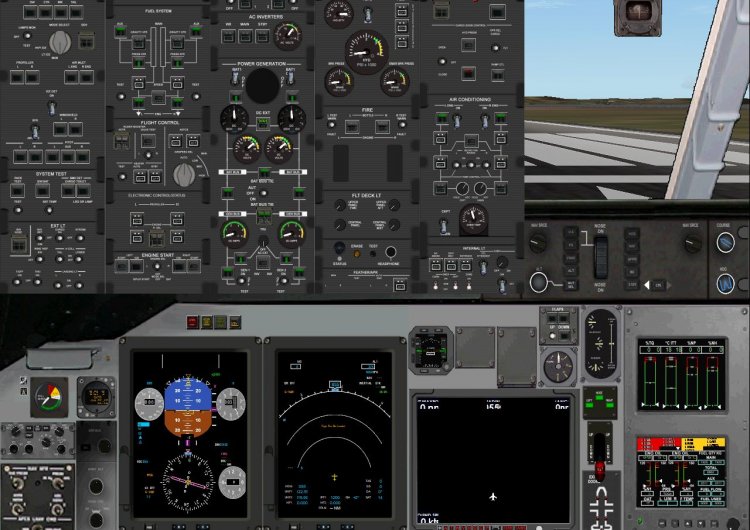
PAD C-295MP model with new panel and sound sets. based on early works at the emb-120, Dash-8 and ATR panel project. hope al folks enjoy. Any bug or request, let me know...
→ Size:
74 MB
→ Date:
1 year ago (29.01.2025 15:18)
→ Author:
Ricardo García Marrero
→ Approved by moderator:
U-HCK
→ License:
Freeware - Free version, Unlimited Distribution
→ Downloaded:
176 time(s)