fs9 | Softhor 2020 Просмотр ZIP-архива
Softhore2020/SweetFX/Presets/sky_setting_04.txt
   /*-----------------------------------------------------------.
  /                       Description                           /
  '------------------------------------------------------------/

Game: FS2004
Author: Aldus
SweetFX version: 1.5.1
Description: Sky environment and Blue soft horizon effect


   /*-----------------------------------------------------------.
  /                      Choose effects                         /
  '-----------------------------------------------------------*/

// Set to 1 for ON or 0 for OFF
#define USE_SMAA_ANTIALIASING  0            // [0 or 1] SMAA Anti-aliasing : Smoothens jagged lines using the SMAA technique.
#define USE_FXAA_ANTIALIASING  0            // [0 or 1] FXAA Anti-aliasing : Smoothens jagged lines using the FXAA technique. WIP - Currently only works in DX9 and you need to use the FXAA injector dlls.
#define USE_EXPLOSION          0            // [0 or 1] Explosion : Scatters the pixels, making the image look fuzzy.
#define USE_CARTOON            0            // [0 or 1] Cartoon : "Toon"s the image. (Interferes with SMAA, CRT, Bloom, HDR and Lumasharpen)
#define USE_ADVANCED_CRT       0            // [0 or 1] Advanced CRT : Simulates an old CRT TV display. (Interferes with SMAA, Cartoon, Bloom, HDR and Lumasharpen, and it has a very high performance cost)
#define USE_BLOOM              0            // [0 or 1] Bloom : Makes bright lights bleed their light into their surroundings (relatively high performance cost)
#define USE_HDR                0            // [0 or 1] HDR : Not actual HDR - It just tries to mimic an HDR look (relatively high performance cost)
#define USE_LUMASHARPEN        1            // [0 or 1] LumaSharpen : Also sharpens the antialiased edges which makes them less smooth - I'm working on fixing that.
#define USE_LEVELS             0            // [0 or 1] Levels : Sets a new black and white point. This increases contrast but causes clipping. Use Curves instead if you want to avoid that.
#define USE_TECHNICOLOR        0            // [0 or 1] TECHNICOLOR : Attempts to mimic the look of an old movie using the Technicolor three-strip color process (Techicolor Process 4)
#define USE_DPX                1            // [0 or 1] Cineon DPX : Should make the image look like it's been converted to DXP Cineon - basically it's another movie-like look similar to technicolor.
#define USE_MONOCHROME         0            // [0 or 1] Monochrome : Monochrome makes the colors disappear.
#define USE_LIFTGAMMAGAIN      1            // [0 or 1] Lift Gamma Gain : Adjust brightness and color of shadows, midtones and highlights
#define USE_TONEMAP            1            // [0 or 1] Tonemap : Adjust gamma, exposure, saturation, bleach and defog. (may cause clipping)
#define USE_VIBRANCE           1            // [0 or 1] Vibrance : Intelligently saturates (or desaturates if you use negative values) the pixels depending on their original saturation.
#define USE_CURVES             1            // [0 or 1] Curves : Contrast adjustments using S-curves.
#define USE_SEPIA              0            // [0 or 1] Sepia : Sepia tones the image.
#define USE_VIGNETTE           0            // [0 or 1] Vignette : Darkens the edges of the image to make it look more like it was shot with a camera lens. May cause banding artifacts.
#define USE_DITHER             1            // [0 or 1] Dither : Applies dithering to simulate more colors than your monitor can display. This lessens banding artifacts (mostly caused by Vignette)
#define USE_BORDER             0            // [0 or 1] Border : Makes the screenedge black as a workaround for the bright edge that forcing some AA modes sometimes causes.
#define USE_SPLITSCREEN        0            // [0 or 1] Splitscreen : Enables the before-and-after splitscreen comparison mode.

#define USE_CUSTOM             0            // [0 or 1] Custom : Write your own shader by editing custom.h, and then enable it here.

   /*-----------------------------------------------------------.
  /                  SMAA Anti-aliasing settings                /
  '-----------------------------------------------------------*/

#define SMAA_THRESHOLD         0.10         // [0.05 to 0.20] Edge detection threshold. If SMAA misses some edges try lowering this slightly. I prefer between 0.08 and 0.12.
#define SMAA_MAX_SEARCH_STEPS  96           // [0 to 98] Determines the radius SMAA will search for aliased edges
#define SMAA_MAX_SEARCH_STEPS_DIAG 16           // [0 to 16] Determines the radius SMAA will search for diagonal aliased edges
#define SMAA_CORNER_ROUNDING   0            // [0 to 100] Determines the percent of antialiasing to apply to corners. 0 seems to affect fine text the least so it's the default.

// -- Advanced SMAA settings --
#define COLOR_EDGE_DETECTION   0            // [0 or 1] 1 Enables color edge detection (slower but slightly more acurate) - 0 uses luma edge detection (faster)
#define SMAA_DIRECTX9_LINEAR_BLEND 1            // [0 or 1] Using DX9 HARDWARE? (software version doesn't matter) if so this needs to be 1 - If not, leave it at 0.
                                         //Enable this only if you use a Geforce 7xxx series or older card, or a Radeon X1xxx series or older card.

   /*-----------------------------------------------------------.
  /                  FXAA Anti-aliasing settings                /
  '-----------------------------------------------------------*/
#define FXAA_QUALITY__PRESET   9            // [1 to 9] Choose the quality preset. 9 is the highest quality.
#define fxaa_Subpix            0.400        // [0.000 to 1.000] Choose the amount of sub-pixel aliasing removal.
#define fxaa_EdgeThreshold     0.250        // [0.000 to 1.000] Edge detection threshold. The minimum amount of local contrast required to apply algorithm.
#define fxaa_EdgeThresholdMin  0.060        // [0.000 to 1.000] Darkness threshold. Trims the algorithm from processing darks.

   /*-----------------------------------------------------------.
  /                     Explosion settings                      /
  '-----------------------------------------------------------*/
#define Explosion_Radius       2.5          // [0.2 to 100.0] Amount of effect you want.


   /*-----------------------------------------------------------.
  /                      Cartoon settings                       /
  '-----------------------------------------------------------*/
#define CartoonPower           1.5          // [0.1 to 10.0] Amount of effect you want.
#define CartoonEdgeSlope       1.5          // [0.1 to 8.0] Raise this to filter out fainter edges. You might need to increase the power to compensate. Whole numbers are faster.


   /*----------------------------------------------------------.
  /                    Advanced CRT settings                   /
  '----------------------------------------------------------*/
#define CRTAmount              1.00         // [0.00 to 1.00] Amount of CRT effect you want

#define CRTResolution          2.0          // [1.0 to 8.0] Input size coefficent (low values gives the "low-res retro look"). Default is 1.2
#define CRTgamma               2.2          // [0.0 to 4.0] Gamma of simulated CRT (default 2.2)
#define CRTmonitorgamma        2.4          // [0.0 to 4.0] Gamma of display monitor (typically 2.2 is correct)
#define CRTBrightness          1.2          // [1.0 to 3.0] Used to boost brightness a little. Default is 1.0
#define CRTScanlineIntensity   2.0          // [2.0 to 4.0] Scanlines intensity (use integer values preferably). Default is 2.0
#define CRTScanlineGaussian    1            // [0 or 1] Use the "new nongaussian scanlines bloom effect". Default is on

#define CRTCurvature           1            // [[0 or 1] "Barrel effect" enabled (1) or off (0)
#define CRTCurvatureRadius     2.0          // [0.0 to 2.0] Curvature Radius (only effective when Curvature is enabled). Default is 1.5
#define CRTCornerSize          0.0100       // [0.0000 to 0.0020] Higher values, more rounded corner. Default is 0.001
#define CRTDistance            2.00         // [0.00 to 4.00] Simulated distance from viewer to monitor. Default is 2.00
#define CRTAngleX              0.00         // [-0.20 to 0.20] Tilt angle in radians (X coordinates)
#define CRTAngleY              -0.15        // [-0.20 to 0.20] Tilt angle in radians (Y coordinates). (Value of -0.15 gives the 'arcade tilt' look)
#define CRTOverScan            1.00         // [1.00 to 1.10] Overscan (e.g. 1.02 for 2% overscan). Default is 1.01
#define CRTOversample          0            // [0 or 1] Enable 3x oversampling of the beam profile (warning : performance hit)

   /*-----------------------------------------------------------.
  /                       Bloom settings                        /
  '-----------------------------------------------------------*/
#define BloomThreshold         55.0         // [0.00 to 50.00] Threshold for what is a bright light (that causes bloom) and what isn't.
#define BloomPower             7.000        // [0.000 to 8.000] Strength of the bloom
#define BloomWidth             0.0250       // [0.0000 to 1.0000] Width of the bloom

   /*-----------------------------------------------------------.
  /                        HDR settings                         /
  '-----------------------------------------------------------*/
#define HDRPower               1.00         // [0.00 to 8.00] Strangely lowering this makes the image brighter
#define radius2                0.90         // [0.00 to 8.00] Raising this seems to make the effect stronger and also brighter

   /*-----------------------------------------------------------.
  /                     LumaSharpen settings                    /
  '-----------------------------------------------------------*/
// -- Sharpening --
#define sharp_strength         0.50         // [0.10 to 3.00] Strength of the sharpening
#define sharp_clamp            0.050        // [0.000 to 1.000] Limits maximum amount of sharpening a pixel recieves - Default is 0.035

// -- Advanced sharpening settings --
#define pattern                1            // [1|2|3|4] Choose a sample pattern. 1 = Fast, 2 = Normal, 3 = Wider, 4 = Pyramid shaped.
#define offset_bias            1.0          // [0.0 to 6.0] Offset bias adjusts the radius of the sampling pattern.
                         //I designed the pattern for offset_bias 1.0, but feel free to experiment.

// -- Debug sharpening settings --
#define show_sharpen           0            // [0 or 1] Visualize the strength of the sharpen (multiplied by 4 to see it better)

   /*----------------------------------------------------------.
  /                       Levels settings                      /
  '----------------------------------------------------------*/

#define Levels_black_point     0            // [0 to 255] The black point is the new black - literally. Everything darker than this will become completely black. Default is 16.0
#define Levels_white_point     241          // [0 to 255] The new white point. Everything brighter than this becomes completely white. Default is 235.0

//Colors between the two points will stretched, which increases contrast, but details above and below the points are lost (this is called clipping).


   /*-----------------------------------------------------------.
  /                      TECHNICOLOR settings                   /
  '-----------------------------------------------------------*/
#define TechniAmount           0.40         // [0.00 to 1.00]
#define TechniPower            7.0          // [0.00 to 8.00]
#define redNegativeAmount      0.68         // [0.00 to 1.00]
#define greenNegativeAmount    0.88         // [0.00 to 1.00]
#define blueNegativeAmount     0.58         // [0.00 to 1.00]


   /*-----------------------------------------------------------.
  /                      Cineon DPX settings                    /
  '-----------------------------------------------------------*/
#define Red                    1.0          // [1.0 to 15.0]
#define Green                  1.0          // [1.0 to 15.0]
#define Blue                   1.0          // [1.0 to 15.0]

#define ColorGamma             0.8          // [0.1 to 2.5] Adjusts the colorfulness of the effect in a manner similar to Vibrance. 1.0 is neutral.
#define DPXSaturation          1.9          // [0.0 to 8.0] Adjust saturation of the effect. 1.0 is neutral.

#define RedC                   0.32         // [0.60 to 0.20]
#define GreenC                 0.36         // [0.60 to 0.20]
#define BlueC                  0.30         // [0.60 to 0.20]

#define Blend                  0.10         // [0.00 to 1.00] How strong the effect should be.


   /*-----------------------------------------------------------.
  /                      Monochrome settings                    /
  '-----------------------------------------------------------*/
#define Monochrome_conversion_values float3(0.18, 0.41, 0.41) // [0.00 to 1.00] Percentage of RGB to include (should sum up to 1.00)


   /*-----------------------------------------------------------.
  /                      Lift Gamma Gain settings               /
  '-----------------------------------------------------------*/
#define RGB_Lift               float3(1.000, 1.000, 1.000) // [0.000 to 2.000] Adjust shadows for Red, Green and Blue.
#define RGB_Gamma              float3(1.200, 1.200, 1.200) // [0.000 to 2.000] Adjust midtones for Red, Green and Blue
#define RGB_Gain               float3(0.940, 0.940, 0.940) // [0.000 to 2.000] Adjust highlights for Red, Green and Blue

//Note that a value of 1.000 is a neutral setting that leave the color unchanged.

   /*-----------------------------------------------------------.
  /                        Tonemap settings                     /
  '-----------------------------------------------------------*/
#define Gamma                  0.770        // [0.000 to 2.000] Adjust midtones. 1.000 is neutral. This setting does exactly the same as the one in Lift Gamma Gain, only with less control.

#define Exposure               -0.700       // [-1.000 to 1.000] Adjust exposure

#define Saturation             0.000        // [-1.000 to 1.000] Adjust saturation

#define Bleach                 1.000        // [0.000 to 1.000] Brightens the shadows and fades the colors

#define Defog                  0.000        // [0.000 to 1.000] How much of the color tint to remove
#define FogColor               float3(1.00, 1.00, 1.50) // [0.00 to 2.55, 0.00 to 2.55, 0.00 to 2.55] What color to remove - default is blue


   /*-----------------------------------------------------------.
  /                       Vibrance settings                     /
  '-----------------------------------------------------------*/
#define Vibrance               0.15         // [-1.00 to 1.00] Intelligently saturates (or desaturates if you use negative values) the pixels depending on their original saturation.
#define Vibrance_RGB_balance   float3(0.00, 1.00, 4.00) // [-10.00 to 10.00,-10.00 to 10.00,-10.00 to 10.00] A per channel multiplier to the Vibrance strength so you can give more boost to certain colors over others


   /*-----------------------------------------------------------.
  /                        Curves settings                      /
  '-----------------------------------------------------------*/
#define Curves_mode            2            // [0|1|2] Choose what to apply contrast to. 0 = Luma, 1 = Chroma, 2 = both Luma and Chroma. Default is 0 (Luma)
#define Curves_contrast        0.70         // [-1.00 to 1.00] The amount of contrast you want

// -- Advanced curve settings --
#define Curves_formula         4            // [1|2|3|4|5|6|7|8|9|10] The contrast s-curve you want to use.
                             //1 = Sine, 2 = Abs split, 3 = Smoothstep, 4 = Exp formula, 5 = Simplified Catmull-Rom (0,0,1,1), 6 = Perlins Smootherstep
                             //7 = Abs add, 8 = Techicolor Cinestyle, 9 = Parabola, 10 = Half-circles.
                             //Note that Technicolor Cinestyle is practically identical to Sine, but runs slower. In fact I think the difference might only be due to rounding errors.
                             //I prefer 2 myself, but 3 is a nice alternative with a little more effect (but harsher on the highlight and shadows) and it's the fastest formula.

   /*-----------------------------------------------------------.
  /                         Sepia settings                      /
  '-----------------------------------------------------------*/
#define ColorTone              float3(0.50, 1.10, 1.10) // [0.00 to 2.55, 0.00 to 2.55, 0.00 to 2.55] What color to tint the image
#define GreyPower              0.11         // [0.00 to 1.00] How much desaturate the image before tinting it
#define SepiaPower             0.18         // [0.00 to 1.00] How much to tint the image


   /*-----------------------------------------------------------.
  /                       Vignette settings                     /
  '-----------------------------------------------------------*/
#define VignetteType           1            // [1|2|3] 1 = Original, 2 = New, 3 = TV style
#define VignetteRatio          1.00         // [0.15 to 6.00] Sets a width to height ratio. 1.00 (1/1) is perfectly round, while 1.60 (16/10) is 60 % wider than it's high.
#define VignetteRadius         1.00         // [-1.00 to 3.00] lower values = stronger radial effect from center
#define VignetteAmount         -1.00        // [-2.00 to 1.00] Strength of black. -2.00 = Max Black, 1.00 = Max White.
#define VignetteSlope          8            // [2 to 16] How far away from the center the change should start to really grow strong (odd numbers cause a larger fps drop than even numbers)
#define VignetteCenter         float2(0.500, 0.500) // [0.000 to 1.000, 0.000 to 1.000] Center of effect for VignetteType 1. 2 and 3 do not obey this setting.


   /*-----------------------------------------------------------.
  /                        Dither settings                      /
  '-----------------------------------------------------------*/
#define dither_method          1            // [1 or 2] 1 = Ordered dithering (very good and very fast), 2 = Random dithering (different but slightly slower dithering)

//Note that the patterns used by Dither, makes an image harder to compress.
//This can make your screenshots and video recordings take up more space.


   /*-----------------------------------------------------------.
  /                        Border settings                      /
  '-----------------------------------------------------------*/
#define border_width           float2(1,20) // [0 to 2048, 0 to 2048] (X,Y)-width of the border. Measured in pixels.
#define border_color           float3(0, 0, 0) // [0 to 255, 0 to 255, 0 to 255] What color the border should be. In integer RGB colors, meaning 0,0,0 is black and 255,255,255 is full white.


   /*-----------------------------------------------------------.
  /                     Splitscreen settings                    /
  '-----------------------------------------------------------*/
#define splitscreen_mode       1            // [1|2|3|4|5|6] 1 = Vertical 50/50 split, 2 = Vertical 25/50/25 split, 3 = Vertical 50/50 angled split, 4 = Horizontal 50/50 split, 5 = Horizontal 25/50/25 split, 6 = Curvy vertical 50/50 split

   /*-----------------------------------------------------------.
  /                       Custom settings                       /
  '-----------------------------------------------------------*/
#define custom_strength        0.10         // [0.00 to 1.00] Adjust the strength of the effect
69145-Softhore2020.zip
| Имя файла | Дата | Размер |
|---|---|---|
| Softhore2020/ | 27.08.2020 21:15 | |
| Softhore2020/SweetFX/ | 27.08.2020 21:15 | |
| Softhore2020/SweetFX/config_presets/ | 27.08.2020 21:15 | |
| Softhore2020/SweetFX/config_presets/preset0.ini | 12.04.2020 02:36 | 2 KB |
| Softhore2020/SweetFX/config_presets/preset1.ini | 12.04.2020 02:36 | 2 KB |
| Softhore2020/SweetFX/config_presets/preset10.ini | 12.04.2020 02:37 | 2 KB |
| Softhore2020/SweetFX/config_presets/preset11.ini | 12.04.2020 02:37 | 2 KB |
| Softhore2020/SweetFX/config_presets/preset12.ini | 12.04.2020 02:37 | 2 KB |
| Softhore2020/SweetFX/config_presets/preset2.ini | 12.04.2020 02:36 | 2 KB |
| Softhore2020/SweetFX/config_presets/preset3.ini | 12.04.2020 02:36 | 2 KB |
| Softhore2020/SweetFX/config_presets/preset4.ini | 12.04.2020 02:36 | 2 KB |
| Softhore2020/SweetFX/config_presets/preset5.ini | 12.04.2020 02:36 | 2 KB |
| Softhore2020/SweetFX/config_presets/preset6.ini | 12.04.2020 02:36 | 2 KB |
| Softhore2020/SweetFX/config_presets/preset7.ini | 12.04.2020 02:36 | 2 KB |
| Softhore2020/SweetFX/config_presets/preset8.ini | 06.08.2020 03:13 | 2 KB |
| Softhore2020/SweetFX/config_presets/preset9.ini | 12.04.2020 02:36 | 2 KB |
| Softhore2020/SweetFX/d3d9.dll | 09.08.2012 03:57 | 167 KB |
| Softhore2020/SweetFX/d3d9.fx | 29.09.2013 06:23 | 12 KB |
| Softhore2020/SweetFX/dlls/ | 27.08.2020 21:15 | |
| Softhore2020/SweetFX/dlls/FXAA DX9 dll/ | 27.08.2020 21:15 | |
| Softhore2020/SweetFX/dlls/FXAA DX9 dll/d3d9.dll | 06.08.2011 02:03 | 75 KB |
| Softhore2020/SweetFX/dlls/SMAA dlls/ | 27.08.2020 21:15 | |
| Softhore2020/SweetFX/dlls/SMAA dlls/d3d9.dll | 09.08.2012 03:57 | 167 KB |
| Softhore2020/SweetFX/dlls/SMAA dlls/dxgi.dll | 09.08.2012 04:07 | 391 KB |
| Softhore2020/SweetFX/dxgi.dll | 09.08.2012 04:07 | 391 KB |
| Softhore2020/SweetFX/dxgi.fx | 29.09.2013 06:29 | 13 KB |
| Softhore2020/SweetFX/Game_compability.txt | 30.09.2013 07:57 | 3 KB |
| Softhore2020/SweetFX/injector.ini | 18.03.2013 09:46 | 642 B |
| Softhore2020/SweetFX/log.log | 30.09.2013 10:07 | 3 KB |
| Softhore2020/SweetFX/Making shaders.txt | 19.03.2013 07:25 | 4 KB |
| Softhore2020/SweetFX/Presets/ | 27.08.2020 21:15 | |
| Softhore2020/SweetFX/Presets/Default_1.5_settings.txt | 08.09.2014 23:26 | 19 KB |
| Softhore2020/SweetFX/Presets/sky_setting_01.txt | 08.08.2014 04:59 | 19 KB |
| Softhore2020/SweetFX/Presets/sky_setting_02.txt | 23.01.2015 01:21 | 20 KB |
| Softhore2020/SweetFX/Presets/sky_setting_03.txt | 23.09.2014 12:04 | 20 KB |
| Softhore2020/SweetFX/Presets/sky_setting_04.txt | 23.01.2015 01:21 | 20 KB |
| Softhore2020/SweetFX/Presets/sky_setting_05.txt | 23.01.2015 01:21 | 20 KB |
| Softhore2020/SweetFX/Presets/sky_setting_06.txt | 23.01.2015 01:22 | 20 KB |
| Softhore2020/SweetFX/Presets/sky_setting_07.txt | 23.01.2015 01:22 | 20 KB |
| Softhore2020/SweetFX/Presets/sky_setting_08.txt | 23.01.2015 01:22 | 20 KB |
| Softhore2020/SweetFX/Presets/sky_setting_09.txt | 23.01.2015 01:22 | 20 KB |
| Softhore2020/SweetFX/Presets/sky_setting_10.txt | 23.01.2015 01:22 | 20 KB |
| Softhore2020/SweetFX/Presets/sky_setting_11.txt | 23.01.2015 01:23 | 20 KB |
| Softhore2020/SweetFX/Presets/sky_setting_12.txt | 23.01.2015 01:23 | 20 KB |
| Softhore2020/SweetFX/Presets/sky_setting_13.txt | 23.01.2015 01:23 | 20 KB |
| Softhore2020/SweetFX/shader.fx | 30.09.2013 02:50 | 4 KB |
| Softhore2020/SweetFX/Shaders/ | 27.08.2020 21:15 | |
| Softhore2020/SweetFX/Shaders/AdvancedCRT.h | 07.09.2013 09:56 | 9 KB |
| Softhore2020/SweetFX/Shaders/Bloom.h | 30.03.2013 22:32 | 3 KB |
| Softhore2020/SweetFX/Shaders/Border.h | 30.09.2013 08:50 | 1 KB |
| Softhore2020/SweetFX/Shaders/Cartoon.h | 30.09.2013 08:45 | 1006 B |
| Softhore2020/SweetFX/Shaders/Curves.h | 29.09.2013 04:12 | 8 KB |
| Softhore2020/SweetFX/Shaders/Custom.h | 01.10.2013 09:52 | 723 B |
| Softhore2020/SweetFX/Shaders/Dither.h | 30.09.2013 09:23 | 8 KB |
| Softhore2020/SweetFX/Shaders/DPX.h | 23.09.2013 07:23 | 2 KB |
| Softhore2020/SweetFX/Shaders/Explosion.h | 26.09.2013 23:36 | 748 B |
| Softhore2020/SweetFX/Shaders/Fxaa3_11.h | 14.12.2011 08:41 | 33 KB |
| Softhore2020/SweetFX/Shaders/HDR.h | 05.03.2013 07:49 | 2 KB |
| Softhore2020/SweetFX/Shaders/Levels.h | 06.09.2013 22:07 | 1 KB |
| Softhore2020/SweetFX/Shaders/LiftGammaGain.h | 09.04.2013 05:27 | 790 B |
| Softhore2020/SweetFX/Shaders/LumaSharpen.h | 01.10.2013 10:28 | 9 KB |
| Softhore2020/SweetFX/Shaders/Main.h | 30.09.2013 01:38 | 8 KB |
| Softhore2020/SweetFX/Shaders/Monochrome.h | 09.04.2013 05:37 | 538 B |
| Softhore2020/SweetFX/Shaders/Sepia.h | 08.09.2013 22:15 | 1 KB |
| Softhore2020/SweetFX/Shaders/SMAA.h | 29.09.2013 09:12 | 54 KB |
| Softhore2020/SweetFX/Shaders/Splitscreen.h | 24.11.2012 04:11 | 2 KB |
| Softhore2020/SweetFX/Shaders/SweetCRT.h | 30.09.2013 08:47 | 604 B |
| Softhore2020/SweetFX/Shaders/Technicolor.h | 20.10.2012 08:37 | 1 KB |
| Softhore2020/SweetFX/Shaders/Tonemap.h | 28.09.2012 09:56 | 2 KB |
| Softhore2020/SweetFX/Shaders/Vibrance.h | 30.09.2013 08:29 | 2 KB |
| Softhore2020/SweetFX/Shaders/Vignette.h | 30.09.2013 08:38 | 3 KB |
| Softhore2020/SweetFX/SweetFX/ | 27.08.2020 21:15 | |
| Softhore2020/SweetFX/SweetFX/dlls/ | 27.08.2020 21:15 | |
| Softhore2020/SweetFX/SweetFX/dlls/FXAA DX9 dll/ | 27.08.2020 21:15 | |
| Softhore2020/SweetFX/SweetFX/dlls/FXAA DX9 dll/d3d9.dll | 06.08.2011 02:03 | 75 KB |
| Softhore2020/SweetFX/SweetFX/dlls/SMAA dlls/ | 27.08.2020 21:15 | |
| Softhore2020/SweetFX/SweetFX/dlls/SMAA dlls/d3d9.dll | 09.08.2012 03:57 | 167 KB |
| Softhore2020/SweetFX/SweetFX/dlls/SMAA dlls/dxgi.dll | 09.08.2012 04:07 | 391 KB |
| Softhore2020/SweetFX/SweetFX/Game_compability.txt | 30.09.2013 07:57 | 3 KB |
| Softhore2020/SweetFX/SweetFX/Making shaders.txt | 19.03.2013 07:25 | 4 KB |
| Softhore2020/SweetFX/SweetFX/Presets/ | 27.08.2020 21:15 | |
| Softhore2020/SweetFX/SweetFX/Presets/Default_1.5_settings.txt | 08.09.2014 23:26 | 19 KB |
| Softhore2020/SweetFX/SweetFX/Presets/sky_setting_01.txt | 08.08.2014 04:59 | 19 KB |
| Softhore2020/SweetFX/SweetFX/Presets/sky_setting_02.txt | 23.01.2015 01:21 | 20 KB |
| Softhore2020/SweetFX/SweetFX/Presets/sky_setting_03.txt | 23.09.2014 12:04 | 20 KB |
| Softhore2020/SweetFX/SweetFX/Presets/sky_setting_04.txt | 23.01.2015 01:21 | 20 KB |
| Softhore2020/SweetFX/SweetFX/Presets/sky_setting_05.txt | 23.01.2015 01:21 | 20 KB |
| Softhore2020/SweetFX/SweetFX/Presets/sky_setting_06.txt | 23.01.2015 01:22 | 20 KB |
| Softhore2020/SweetFX/SweetFX/Presets/sky_setting_07.txt | 23.01.2015 01:22 | 20 KB |
| Softhore2020/SweetFX/SweetFX/Presets/sky_setting_08.txt | 23.01.2015 01:22 | 20 KB |
| Softhore2020/SweetFX/SweetFX/Presets/sky_setting_09.txt | 23.01.2015 01:22 | 20 KB |
| Softhore2020/SweetFX/SweetFX/Presets/sky_setting_10.txt | 23.01.2015 01:22 | 20 KB |
| Softhore2020/SweetFX/SweetFX/Presets/sky_setting_11.txt | 23.01.2015 01:23 | 20 KB |
| Softhore2020/SweetFX/SweetFX/Presets/sky_setting_12.txt | 23.01.2015 01:23 | 20 KB |
| Softhore2020/SweetFX/SweetFX/Presets/sky_setting_13.txt | 23.01.2015 01:23 | 20 KB |
| Softhore2020/SweetFX/SweetFX/Shaders/ | 27.08.2020 21:15 | |
| Softhore2020/SweetFX/SweetFX/Shaders/AdvancedCRT.h | 07.09.2013 09:56 | 9 KB |
| Softhore2020/SweetFX/SweetFX/Shaders/Bloom.h | 30.03.2013 22:32 | 3 KB |
| Softhore2020/SweetFX/SweetFX/Shaders/Border.h | 30.09.2013 08:50 | 1 KB |
| Softhore2020/SweetFX/SweetFX/Shaders/Cartoon.h | 30.09.2013 08:45 | 1006 B |
| Softhore2020/SweetFX/SweetFX/Shaders/Curves.h | 29.09.2013 04:12 | 8 KB |
| Softhore2020/SweetFX/SweetFX/Shaders/Custom.h | 01.10.2013 09:52 | 723 B |
| Softhore2020/SweetFX/SweetFX/Shaders/Dither.h | 30.09.2013 09:23 | 8 KB |
| Softhore2020/SweetFX/SweetFX/Shaders/DPX.h | 23.09.2013 07:23 | 2 KB |
| Softhore2020/SweetFX/SweetFX/Shaders/Explosion.h | 26.09.2013 23:36 | 748 B |
| Softhore2020/SweetFX/SweetFX/Shaders/Fxaa3_11.h | 14.12.2011 08:41 | 33 KB |
| Softhore2020/SweetFX/SweetFX/Shaders/HDR.h | 05.03.2013 07:49 | 2 KB |
| Softhore2020/SweetFX/SweetFX/Shaders/Levels.h | 06.09.2013 22:07 | 1 KB |
| Softhore2020/SweetFX/SweetFX/Shaders/LiftGammaGain.h | 09.04.2013 05:27 | 790 B |
| Softhore2020/SweetFX/SweetFX/Shaders/LumaSharpen.h | 01.10.2013 10:28 | 9 KB |
| Softhore2020/SweetFX/SweetFX/Shaders/Main.h | 30.09.2013 01:38 | 8 KB |
| Softhore2020/SweetFX/SweetFX/Shaders/Monochrome.h | 09.04.2013 05:37 | 538 B |
| Softhore2020/SweetFX/SweetFX/Shaders/Sepia.h | 08.09.2013 22:15 | 1 KB |
| Softhore2020/SweetFX/SweetFX/Shaders/SMAA.h | 29.09.2013 09:12 | 54 KB |
| Softhore2020/SweetFX/SweetFX/Shaders/Splitscreen.h | 24.11.2012 04:11 | 2 KB |
| Softhore2020/SweetFX/SweetFX/Shaders/SweetCRT.h | 30.09.2013 08:47 | 604 B |
| Softhore2020/SweetFX/SweetFX/Shaders/Technicolor.h | 20.10.2012 08:37 | 1 KB |
| Softhore2020/SweetFX/SweetFX/Shaders/Tonemap.h | 28.09.2012 09:56 | 2 KB |
| Softhore2020/SweetFX/SweetFX/Shaders/Vibrance.h | 30.09.2013 08:29 | 2 KB |
| Softhore2020/SweetFX/SweetFX/Shaders/Vignette.h | 30.09.2013 08:38 | 3 KB |
| Softhore2020/SweetFX/SweetFX/SweetFX_compatibility_settings.txt | 24.09.2013 17:30 | 863 B |
| Softhore2020/SweetFX/SweetFX readme.txt | 01.10.2013 10:37 | 28 KB |
| Softhore2020/SweetFX/SweetFX_compatibility_settings.txt | 24.09.2013 17:30 | 863 B |
| Softhore2020/SweetFX/SweetFX_preset.txt | 30.09.2013 09:04 | 86 B |
| Softhore2020/SweetFX/SweetFX_settings.txt | 08.09.2014 23:24 | 19 KB |
| Softhore2020/Texture/ | 27.08.2020 21:15 | |
| Softhore2020/Texture/sky_afternoon_0.bmp | 24.08.2020 19:07 | 3 KB |
| Softhore2020/Texture/sky_afternoon_1.bmp | 24.08.2020 19:07 | 3 KB |
| Softhore2020/Texture/sky_afternoon_2.bmp | 24.08.2020 19:07 | 3 KB |
| Softhore2020/Texture/sky_afternoon_3.bmp | 24.08.2020 19:07 | 3 KB |
| Softhore2020/Texture/sky_afternoon_4.bmp | 24.08.2020 19:07 | 3 KB |
| Softhore2020/Texture/sky_afternoon_5.bmp | 24.08.2020 19:07 | 3 KB |
| Softhore2020/Texture/sky_afternoon_6.bmp | 22.08.2020 00:28 | 3 KB |
| Softhore2020/Texture/sky_afternoon_7.bmp | 22.08.2020 00:28 | 3 KB |
| Softhore2020/Texture/sky_afternoon_8.bmp | 22.08.2020 00:29 | 3 KB |
| Softhore2020/Texture/sky_afternoon_9.bmp | 22.08.2020 00:29 | 3 KB |
| Softhore2020/Texture/sky_dawn_0.bmp | 05.04.2010 23:35 | 3 KB |
| Softhore2020/Texture/sky_dawn_1.bmp | 05.04.2010 23:35 | 3 KB |
| Softhore2020/Texture/sky_dawn_2.bmp | 05.04.2010 23:39 | 3 KB |
| Softhore2020/Texture/sky_dawn_3.bmp | 05.04.2010 23:39 | 3 KB |
| Softhore2020/Texture/sky_dawn_4.bmp | 05.04.2010 23:39 | 3 KB |
| Softhore2020/Texture/sky_dawn_5.bmp | 05.04.2010 23:39 | 3 KB |
| Softhore2020/Texture/sky_dawn_6.bmp | 05.04.2010 23:38 | 3 KB |
| Softhore2020/Texture/sky_dawn_7.bmp | 05.04.2010 23:38 | 3 KB |
| Softhore2020/Texture/sky_dawn_8.bmp | 05.04.2010 23:38 | 3 KB |
| Softhore2020/Texture/sky_dawn_9.bmp | 05.04.2010 23:38 | 3 KB |
| Softhore2020/Texture/sky_midnight_0.bmp | 04.01.2010 17:30 | 3 KB |
| Softhore2020/Texture/sky_midnight_1.bmp | 04.01.2010 17:30 | 3 KB |
| Softhore2020/Texture/sky_midnight_2.bmp | 04.01.2010 17:30 | 3 KB |
| Softhore2020/Texture/sky_midnight_3.bmp | 04.01.2010 17:31 | 3 KB |
| Softhore2020/Texture/sky_midnight_4.bmp | 04.01.2010 17:31 | 3 KB |
| Softhore2020/Texture/sky_midnight_5.bmp | 04.01.2010 17:31 | 3 KB |
| Softhore2020/Texture/sky_midnight_6.bmp | 04.01.2010 17:31 | 3 KB |
| Softhore2020/Texture/sky_midnight_7.bmp | 04.01.2010 17:31 | 3 KB |
| Softhore2020/Texture/sky_midnight_8.bmp | 04.01.2010 17:31 | 3 KB |
| Softhore2020/Texture/sky_midnight_9.bmp | 04.01.2005 21:07 | 3 KB |
| Softhore2020/Texture/sky_morning_0.bmp | 24.08.2020 19:07 | 3 KB |
| Softhore2020/Texture/sky_morning_1.bmp | 24.08.2020 19:07 | 3 KB |
| Softhore2020/Texture/sky_morning_2.bmp | 24.08.2020 19:07 | 3 KB |
| Softhore2020/Texture/sky_morning_3.bmp | 24.08.2020 19:07 | 3 KB |
| Softhore2020/Texture/sky_morning_4.bmp | 24.08.2020 19:07 | 3 KB |
| Softhore2020/Texture/sky_morning_5.bmp | 24.08.2020 19:07 | 3 KB |
| Softhore2020/Texture/sky_morning_6.bmp | 24.08.2020 19:07 | 3 KB |
| Softhore2020/Texture/sky_morning_7.bmp | 24.08.2020 19:07 | 3 KB |
| Softhore2020/Texture/sky_morning_8.bmp | 24.08.2020 19:07 | 3 KB |
| Softhore2020/Texture/sky_morning_9.bmp | 24.08.2020 19:07 | 3 KB |
| Softhore2020/Texture/sky_noon_0.bmp | 24.08.2020 19:07 | 3 KB |
| Softhore2020/Texture/sky_noon_1.bmp | 24.08.2020 19:07 | 3 KB |
| Softhore2020/Texture/sky_noon_2.bmp | 24.08.2020 19:07 | 3 KB |
| Softhore2020/Texture/sky_noon_3.bmp | 24.08.2020 19:07 | 3 KB |
| Softhore2020/Texture/sky_noon_4.bmp | 24.08.2020 19:07 | 3 KB |
| Softhore2020/Texture/sky_noon_5.bmp | 24.08.2020 19:07 | 3 KB |
| Softhore2020/Texture/sky_noon_6.bmp | 24.08.2020 19:07 | 3 KB |
| Softhore2020/Texture/sky_noon_7.bmp | 24.08.2020 19:07 | 3 KB |
| Softhore2020/Texture/sky_noon_8.bmp | 24.08.2020 19:07 | 3 KB |
| Softhore2020/Texture/sky_noon_9.bmp | 24.08.2020 19:07 | 3 KB |
| Softhore2020/Texture/sky_postdawn1_0.bmp | 05.04.2010 23:37 | 3 KB |
| Softhore2020/Texture/sky_postdawn1_1.bmp | 05.04.2010 23:37 | 3 KB |
| Softhore2020/Texture/sky_postdawn1_2.bmp | 05.04.2010 23:37 | 3 KB |
| Softhore2020/Texture/sky_postdawn1_3.bmp | 05.04.2010 23:36 | 3 KB |
| Softhore2020/Texture/sky_postdawn1_4.bmp | 05.04.2010 23:36 | 3 KB |
| Softhore2020/Texture/sky_postdawn1_5.bmp | 05.04.2010 23:36 | 3 KB |
| Softhore2020/Texture/sky_postdawn1_6.bmp | 05.04.2010 23:36 | 3 KB |
| Softhore2020/Texture/sky_postdawn1_7.bmp | 05.04.2010 23:36 | 3 KB |
| Softhore2020/Texture/sky_postdawn1_8.bmp | 05.04.2010 23:36 | 3 KB |
| Softhore2020/Texture/sky_postdawn1_9.bmp | 05.04.2010 23:36 | 3 KB |
| Softhore2020/Texture/sky_postdawn2_0.bmp | 05.04.2010 23:39 | 3 KB |
| Softhore2020/Texture/sky_postdawn2_1.bmp | 05.04.2010 23:39 | 3 KB |
| Softhore2020/Texture/sky_postdawn2_2.bmp | 05.04.2010 23:39 | 3 KB |
| Softhore2020/Texture/sky_postdawn2_3.bmp | 05.04.2010 23:39 | 3 KB |
| Softhore2020/Texture/sky_postdawn2_4.bmp | 05.04.2010 23:42 | 3 KB |
| Softhore2020/Texture/sky_postdawn2_5.bmp | 05.04.2010 23:42 | 3 KB |
| Softhore2020/Texture/sky_postdawn2_6.bmp | 05.04.2010 23:42 | 3 KB |
| Softhore2020/Texture/sky_postdawn2_7.bmp | 05.04.2010 23:41 | 3 KB |
| Softhore2020/Texture/sky_postdawn2_8.bmp | 05.04.2010 23:41 | 3 KB |
| Softhore2020/Texture/sky_postdawn2_9.bmp | 05.04.2010 23:41 | 3 KB |
| Softhore2020/Texture/sky_postsunset1_0.bmp | 11.01.2015 07:51 | 3 KB |
| Softhore2020/Texture/sky_postsunset1_1.bmp | 24.08.2010 08:49 | 3 KB |
| Softhore2020/Texture/sky_postsunset1_2.bmp | 24.08.2010 08:49 | 3 KB |
| Softhore2020/Texture/sky_postsunset1_3.bmp | 14.12.2009 11:52 | 3 KB |
| Softhore2020/Texture/sky_postsunset1_4.bmp | 14.12.2009 11:52 | 3 KB |
| Softhore2020/Texture/sky_postsunset1_5.bmp | 22.01.2010 09:09 | 3 KB |
| Softhore2020/Texture/sky_postsunset1_6.bmp | 22.01.2010 09:09 | 3 KB |
| Softhore2020/Texture/sky_postsunset1_7.bmp | 11.01.2015 07:52 | 3 KB |
| Softhore2020/Texture/sky_postsunset1_8.bmp | 11.01.2015 07:52 | 3 KB |
| Softhore2020/Texture/sky_postsunset1_9.bmp | 11.01.2015 07:52 | 3 KB |
| Softhore2020/Texture/sky_postsunset2_0.bmp | 15.07.2009 07:18 | 3 KB |
| Softhore2020/Texture/sky_postsunset2_1.bmp | 06.12.2011 09:24 | 3 KB |
| Softhore2020/Texture/sky_postsunset2_2.bmp | 06.12.2011 09:24 | 3 KB |
| Softhore2020/Texture/sky_postsunset2_3.bmp | 22.07.2010 08:34 | 3 KB |
| Softhore2020/Texture/sky_postsunset2_4.bmp | 22.07.2010 08:34 | 3 KB |
| Softhore2020/Texture/sky_postsunset2_5.bmp | 22.07.2010 08:34 | 3 KB |
| Softhore2020/Texture/sky_postsunset2_6.bmp | 22.07.2010 08:34 | 3 KB |
| Softhore2020/Texture/sky_postsunset2_7.bmp | 22.07.2010 08:34 | 3 KB |
| Softhore2020/Texture/sky_postsunset2_8.bmp | 22.07.2010 08:34 | 3 KB |
| Softhore2020/Texture/sky_postsunset2_9.bmp | 22.07.2010 08:34 | 3 KB |
| Softhore2020/Texture/sky_predawn1_0.bmp | 03.07.2011 20:33 | 3 KB |
| Softhore2020/Texture/sky_predawn1_1.bmp | 03.07.2011 20:33 | 3 KB |
| Softhore2020/Texture/sky_predawn1_2.bmp | 03.07.2011 20:33 | 3 KB |
| Softhore2020/Texture/sky_predawn1_3.bmp | 03.07.2011 20:33 | 3 KB |
| Softhore2020/Texture/sky_predawn1_4.bmp | 03.07.2011 20:33 | 3 KB |
| Softhore2020/Texture/sky_predawn1_5.bmp | 03.07.2011 20:33 | 3 KB |
| Softhore2020/Texture/sky_predawn1_6.bmp | 03.07.2011 20:33 | 3 KB |
| Softhore2020/Texture/sky_predawn1_7.bmp | 03.07.2011 20:33 | 3 KB |
| Softhore2020/Texture/sky_predawn1_8.bmp | 03.07.2011 20:33 | 3 KB |
| Softhore2020/Texture/sky_predawn1_9.bmp | 03.07.2011 20:33 | 3 KB |
| Softhore2020/Texture/sky_predawn2_0.bmp | 05.04.2010 23:39 | 3 KB |
| Softhore2020/Texture/sky_predawn2_1.bmp | 05.04.2010 23:39 | 3 KB |
| Softhore2020/Texture/sky_predawn2_2.bmp | 05.04.2010 23:39 | 3 KB |
| Softhore2020/Texture/sky_predawn2_3.bmp | 05.04.2010 23:39 | 3 KB |
| Softhore2020/Texture/sky_predawn2_4.bmp | 05.04.2010 23:42 | 3 KB |
| Softhore2020/Texture/sky_predawn2_5.bmp | 05.04.2010 23:42 | 3 KB |
| Softhore2020/Texture/sky_predawn2_6.bmp | 05.04.2010 23:42 | 3 KB |
| Softhore2020/Texture/sky_predawn2_7.bmp | 05.04.2010 23:42 | 3 KB |
| Softhore2020/Texture/sky_predawn2_8.bmp | 05.04.2010 23:42 | 3 KB |
| Softhore2020/Texture/sky_predawn2_9.bmp | 05.04.2010 23:42 | 3 KB |
| Softhore2020/Texture/sky_presunset1_0.bmp | 12.07.2010 23:13 | 3 KB |
| Softhore2020/Texture/sky_presunset1_1.bmp | 12.07.2010 23:13 | 3 KB |
| Softhore2020/Texture/sky_presunset1_2.bmp | 12.07.2010 23:12 | 3 KB |
| Softhore2020/Texture/sky_presunset1_3.bmp | 12.07.2010 23:12 | 3 KB |
| Softhore2020/Texture/sky_presunset1_4.bmp | 12.07.2010 23:12 | 3 KB |
| Softhore2020/Texture/sky_presunset1_5.bmp | 12.07.2010 23:12 | 3 KB |
| Softhore2020/Texture/sky_presunset1_6.bmp | 12.07.2010 23:11 | 3 KB |
| Softhore2020/Texture/sky_presunset1_7.bmp | 12.07.2010 23:11 | 3 KB |
| Softhore2020/Texture/sky_presunset1_8.bmp | 12.07.2010 23:11 | 3 KB |
| Softhore2020/Texture/sky_presunset1_9.bmp | 12.07.2010 23:10 | 3 KB |
| Softhore2020/Texture/sky_presunset2_0.bmp | 05.04.2010 23:43 | 3 KB |
| Softhore2020/Texture/sky_presunset2_1.bmp | 05.04.2010 23:43 | 3 KB |
| Softhore2020/Texture/sky_presunset2_2.bmp | 05.04.2010 23:43 | 3 KB |
| Softhore2020/Texture/sky_presunset2_3.bmp | 05.04.2010 23:43 | 3 KB |
| Softhore2020/Texture/sky_presunset2_4.bmp | 05.04.2010 23:42 | 3 KB |
| Softhore2020/Texture/sky_presunset2_5.bmp | 05.04.2010 23:42 | 3 KB |
| Softhore2020/Texture/sky_presunset2_6.bmp | 05.04.2010 23:42 | 3 KB |
| Softhore2020/Texture/sky_presunset2_7.bmp | 05.04.2010 23:42 | 3 KB |
| Softhore2020/Texture/sky_presunset2_8.bmp | 05.04.2010 23:44 | 3 KB |
| Softhore2020/Texture/sky_presunset2_9.bmp | 05.04.2010 23:44 | 3 KB |
| Softhore2020/Texture/sky_sunset_0.bmp | 05.04.2010 23:44 | 3 KB |
| Softhore2020/Texture/sky_sunset_1.bmp | 05.04.2010 23:44 | 3 KB |
| Softhore2020/Texture/sky_sunset_2.bmp | 05.04.2010 23:44 | 3 KB |
| Softhore2020/Texture/sky_sunset_3.bmp | 05.04.2010 23:44 | 3 KB |
| Softhore2020/Texture/sky_sunset_4.bmp | 05.04.2010 23:44 | 3 KB |
| Softhore2020/Texture/sky_sunset_5.bmp | 05.04.2010 23:44 | 3 KB |
| Softhore2020/Texture/sky_sunset_6.bmp | 05.04.2010 23:44 | 3 KB |
| Softhore2020/Texture/sky_sunset_7.bmp | 05.04.2010 23:43 | 3 KB |
| Softhore2020/Texture/sky_sunset_8.bmp | 05.04.2010 23:43 | 3 KB |
| Softhore2020/Texture/sky_sunset_9.bmp | 05.04.2010 23:43 | 3 KB |
| avsim_su.diz | 27.08.2020 15:58 | 310 B |
| Итого: | 3 MB | |
fs9 | Softhor 2020
| Rating: 5!
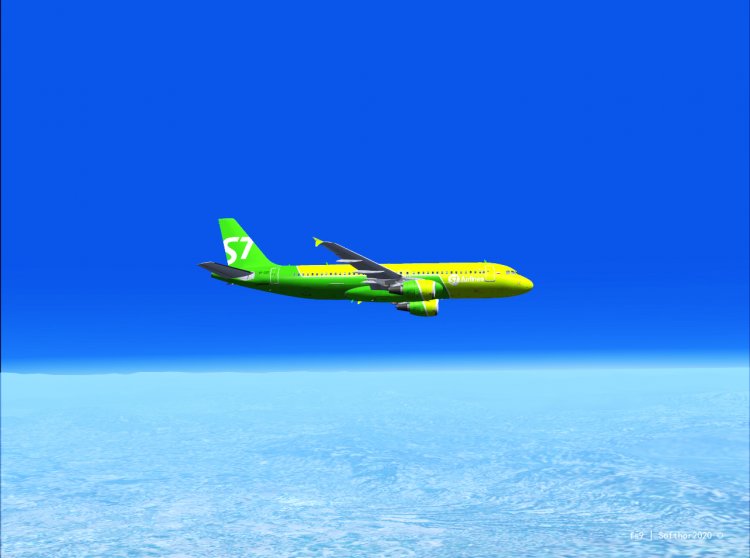
Hi!
It's 2020, and many of us still fly in our beloved fs2004.
I painted daytime sky textures and added atmospheric haze. All this works with Supersky2015 or SweetFX (SweetFX in the package)
Enjoy your flight!
It's 2020, and many of us still fly in our beloved fs2004.
I painted daytime sky textures and added atmospheric haze. All this works with Supersky2015 or SweetFX (SweetFX in the package)
Enjoy your flight!
→ Size:
1 MB
→ Date:
6 years ago (27.08.2020 14:03)
→ Author:
→ Approved by moderator:
Ляпучка
→ License:
Freeware - Free version, Unlimited Distribution
→ Downloaded:
799 time(s)