MU-2 VC Просмотр ZIP-архива
simobjects/airplanes/mu2s924x/READ_ME_docs/README Groundhandling5_01.txt
########################################################################
#                                                                      #
# RCBgh-50.zip:  Groundhandling gauges for FSX aircraft                #
#                                                                      #
#                        By Rob Barendregt                20 Oct 2006  #
#                                                         Release 5.0  #
########################################################################

Items 1 & 2 of this readme file have been removed by Premier Aircraft Design.
They concern the installation of the gauge, which has already been done.

Our thanks to Rob for allowing us to use this excellent gauge on our model.
=================================================================================


3. Gauge operation
==================
A few general remarks first:
- All gauges have Tooltips on their clickable area's, describing their function.
  Make sure you have the Tooltips enabled in FSX to see them.
  NOTE: Some videocards (like my Nvidia 7900GT) sometimes gives a distorted
        screen when a Tooltip pops up, if you fly FS9/FSX in Windowed Mode.
        Toggling from Windowed Mode to Fullscreen Mode and back, usually helps.
        This is NOT a gauge problem !!
- To set dials, you can also use the mouse scrollwheel instead of clicking.

3.1 Pushback operation
======================
3.1.1 Pushback timer/counters, buttons and phases
=================================================

The gauge has 4 clickable areas:
- A pushbutton, to activate Pushback.
  This button has an indicator light, giving the phase of pushback:
  - RED: Pushback cannot be activated; make sure your Parking Brakes are set,
         and the aircraft is standing still.
  - OFF: Click button to activate Pushback procedure.
  - Flashing GREEN: Waiting for release of the Parking Brakes.
  - GREEN: Pushing back.
  - Flashing YELLOW: Pushback finished, set your Parking Brakes.
  - YELLOW: Pushback procedure terminating.
- A StraightBack counter.
  This counter (0 - 999 meters, the right 3 digits) is started when  you
  release the Parking Brakes and determines how long the aircraft is pushed
  straight back before the turn sequence (if selected) starts.
  Click to increment or decrement the value.
- A Turn selector.
  Toggles between pushing straight back, or left/right turn (after the set
  straight back distance). When Left or Right turn is selected, the Turn
  counter is set to 90 degrees.
- A Turn Counter.
  This counter (0 - 90 degrees, the left two digits) determines the angle of
  the Turn that you want the aircraft to make.
  Click to increment or decrement the value.

A few notes:
1. "Turning Left" means: the aircraft turns clockwise in TopView c.q. the
   heading increases while turning. As the standard FS pushback does.
2. When Pushback is active (GREEN light), you cannot change the Timer/Counter
   values anymore.
3. When Pushback is active (GREEN light), you can terminate the Pushback
   at anytime by setting the Pushback switch again.
4. After setting up the Timer/Counters, and activating the Pushback by clicking
   the button, you can change the view mode at any time.
5. After the StraightBack counter becomes 0, the aircraft goes straight back
   for another 5-20 seconds before starting to turn. This time depends on the
   aircraft length (this is caused by the FS implementation of Pushback).
   Note: unlike commonly stated, this is a fixed TIME per aircraft, and NOT
   necessarily after "another full length back".
6. You can use Pushback either with Engines off, or with engines running.
   You can also start your engines during Pushback operation.
7. Manipulating the Parking Brakes during the entire pushback procedure is
   inhibited, except where the procedure requires setting resp. releasing the
   Parking Brakes.
8. During the entire pushback procedure, the throttles forced to Idle position.

About the FSX Pushback tugs:
Whether a pushback tug shows up for pushback, depends on the following:
- The setting of the AirportVehicleDensity slider in menu Options - Settings -
  Display, tab Traffic.
- The spot where your aircraft is parked.
  Obviously, these spots are defined in the FSX scenery, and your aircraft
  has to be properly parked at a gate (with a pushback tug visible in front of you).
The pushback gauge will work with or without a tug visible; but if a tug IS
used, the gauge detects it and the tug movement/release is synchronised with
the pushback procedure/conversation !!


3.2.2 Pushback Operation and Ground-Cockpit conversation
========================================================
- Set the Parking Brakes.
  The RED light goes off.
- Set the Straightback counter: number of meters before a turn.
- Select the Turn type: None, Left or Right.
- If Left/Right, adjust the turnangle if needed,
- Activate the Pushback procedure by clicking the Pushback button.
  The GREEN light starts flashing and the pushback truck is called.

When the pushback tug (if present) has arrived:

Cockpit: "Ground from cockpit"
Ground:  "Go ahead"
Cockpit: "Ready for pushback"
Ground:  "OK. Steering pin inserted, release brakes"

- The gauge now waits untill you release the Parking Brakes; a ticker sound is
  played in the mean time, to indicate that the gauge awaits a Parking Brakes
  operation.

Cockpit: "Brakes are released"
Ground (if engine1 is running): "OK. Pushing back"
Ground (if engine1 NOT running: "OK. Pushing back. All engines cleared for
                                 startup"

The following Pushback sequence is performed:
- The light goes solid GREEN.
- If the StraightBack Timer was set, it counts down to 0 while the aircraft is
  pushed straight back.
- If the LeftTurn or RightTurn Counter was set, the aircraft is pushed straight
  back ANOTHER FULL LENGTH, and then turns the angle dialed into the Counter.
  During the turn the Counter indicates the remaining turn angle, and therefore
  counts down to 0.
While a pushback is active, an aircraft "rolling" sound is played; this sound
is especially noticeable when the engines are off during the pushback.

Ground: "Set parking brakes"

- The AMBER light start flashing.
  The gauge waits untill you set the Parking Brakes; the ticker sound is played.

- The light goes solid AMBER.

Cockpit: "Parking brakes are set. Prepare aircraft for taxi and give
          handsignal on left side"
Ground:  "OK"

The pushback tug (if present) now moves away from the aircraft.
After a few seconds:

Ground: "Towing system removed. Wait for handsignal on left-hand side"

- Now the pushback is finished, and the light goes off.


3.2 Taxispeed operation.
========================
3.2.1 Taxispeed indicators and dials
====================================
The gauge consists of 3 clickable areas:
- A pushbutton, to activate/deactivate the gauge.
  This button has an indicator light, colored as follows:
  - OFF: Click button to arm the gauge.
  - FLASHING GREEN: Taxispeed control is Armed.
  - GREEN: Taxispeed control is Active.
- The Target Taxispeed (the Left two digits). Default: 15 knots.
  Click to increment or decrement the value.
  You can change the target speed at any time, even if the gauge is active.
- The Actual Groundspeed (the Right two digits).


3.2.2.How the Taxispeed control works
=====================================
When Off, and clicked, the gauge becomes Armed.
When Armed or Active, and clicked, the gauge goes to Off.

When Armed, the gauge will become Active when if ALL the following conditions
are true:
- The aircraft is on the ground.
- The engines are running.
- The ParkingBrakes are released.
- Pushback is inactive.
- Groundspeed is less than 50 knots.
  If this is the last condition to become true (when e.g. Taxispeed is Armed
  for landing), the gauge also sets:
  - The Spoilers/Airbrakes Off.
  - The Autobrakes Off.
  - The flaps to Retracted.

When Active, the Taxispeed gauge controls the groundspeed of the aircraft while
taxiing, by manipulating the throttles according to an adaptive algorithm.
- When activated, it disables the AP's AutoThrottle and SpeedHold functions.
- The target taxispeed can be adjusted from 4 - 40 knots.
- The actual taxispeed is kept constant within 1 knot of the set target
  speed when the aircraft is taxiing straight-ahead; the speed may deviate
  a bit more after initial acceleration, heavy braking or sharp turns.
- The gauge automatically deactivates when:
  - The Parking Brakes are set.
  - The throttle are manually set to > 60% (usually to start takeoff).
  - When Brakes are applied by the user, the gauge temporarily sets the
    throttles to idle, untill they are released again.
- When the actual groundspeed - targetspeed is more than 4 knots, the Brakes
  are applied automatically. This happens in the following cases:
  - If you activate the gauge after a landing, when the groundspeed is still
    much larger than the set target speed (but less than 50 Knots).
  - If you subtantially decrease the target speed while the gauge is already
    active.
  - Occasionally with heavy aircraft, after a long sharp turn (caused by the
    weight of the plane, combined with the engine spooldown time).
  - When your aircraft accellerates even with throttles set to idle, e.g.
    if there is a very strong tailwind while taxiing. Moreover, some aircraft
    in FS have the tendancy to start rolling even with throttles at idle.

A few notes:
1. The control is based on actual groundspeed, so it will also work with wind
   enabled.
2. The adaptive control algorithm is obviously a compromise between accuracy
   (overshoot, undershoot, reaction time), and is strongly influenced by
   aircraft characteristics like weight and spoolup/spooldown times. But you
   will find that it works rather smooth, without constant "jumping" throttles,
   for most types of aircraft.
3. When the Taxispeed gauge is activated, make sure that your physical throttle
   axis is in the idle position, to avoid interferance with the control (due to
   axis "jitter"). If your throttle controller still jitters in idle (you will
   have problems with Reverse Thrust too !), create a small deadzone by
   increasing the Nullzone for the Throttle axis via menu Options-Controls.


3.3 The Brakes gauge
========================
This gauge does the following:
- A lighted pushbutton switch that shows the position of the Parking Brakes,
  which is colored as follows:
  - Off:   Parking Brakes are released. Click to set.
  - GREEN: Parking Brakes are set. Click to release.

- It displays the braking pressure (0 - 100 %) you apply with the
  Left/Right brakes, indicated by two green bars. Note that when the Parking
  Brakes are set, both bars always indicate max. pressure.

- It triggers a brakes sound when the aircraft is on the ground, the brake
  pressure is > 20% and groundspeed is > 5 knots.


4. Copyrights and Disclaimer
============================
This gaugeset is freeware, NOT Public Domain and it is available for your
personal use.
Without my explicite permission, it may NOT be sold, re-distributed and/or
uploaded to another website or bulletin board (in ANY shape or form).

If you want to bundle (part of) this gaugeset with your (freeware !!) panel,
you may ONLY do so AFTER my explicite permission and inclusion of this
README file AS-IS.

And obviously, installing & using this gauges is at your own risk !!


5. Credits
==========
- Doug Dawson, for his great XMLsound gauge (included in this package).


6. Closure
==========
I hope you enjoy using these gauges; I know many people did with the previous
versions. And I'm always open to questions, or suggestions for improvement (no
guarantee that I will make them though).
But PLEASE PLEASE, before asking me questions or report "bugs", make sure that
the answer can't be found in this README file; I have spent considerable time
in making this README, just to avoid wasting both YOUR time and MINE with
trivial questions and "issues".
HOWEVER, FSX is as new to me as it is to you, so I might have missed something :-)

Rob Barendregt, The Netherlands
Email: [email protected]

               **************************************


Appendix-1: Used sounds
=======================
The following soundfiles are being used in this package:
- GH01_Conversation1:  "Ground from cockpit ... release brakes"
- GH02_Conversation2:  "Brakes are released. OK pushing back"
- GH03_Conversation3:  "Set Parking Brakes"
- GH04_Conversation4A: "Parking Brakes are set, prepare aircraft ...... OK"
- GH09_Conversation4B:  Towing system removed. Wait for handsignal on left-hand side"
- GH05_Conversation5:  "Brakes are released. OK pushing back. All engines ...."
- GH06_SoftClick:      Click sound, when a pushbutton is clicked.
- GH07_Error:          Procedure error, when clicking a button/dial at the wrong moment.
- GH08_PushbackRoll:   Groundroll sound during Pushback.
- GH10_Attention:      Attention sound, when Pushback awaits ParkingBrakes action.
- GH11_Brakes:         Brakes sound.

It's possible to replace this sound set with your own conversation sounds.
(the timing is not very time-critical).
You can use different file names for the .wav files; if you do, you only
need to edit the sound.ini file, using the replacement filenames.

If you find the pushback conversation sounds too loud, you can change
them yourself in the sound.ini file; individually per sound.
Just open the sound.ini file with Notepad, search for the GH_****.wav
file, and edit the volume number in that line:
- 100 is max. (default) volume.
- 70 is the min. volume (makes the sound almost inaudible)


Appendix-2: The "brakes" problem in FS2004/FSX
==============================================

For its brakes, FS uses a diffential, proportional braking system:
left and right brakes, pressure dependant.
There are three ways to operate the brakes:
- Via the keyboard (or joystick buttons):
  Commands BRAKES (works on left AND right brakes), BRAKES_LEFT, BRAKES_RIGHT.
  I call these non-proportional, although there is some proportionality
  induced by giving these commands repetitively.
- Via toebrake pedals, seperate for Left/Right brakes and proportional with
  the pedal pressure.
- Controlled from a gauge, either via proportional or non-proportional brake
  commands.

The FS2004/FSX brakes problem:
If FS2004/FSX detects that proportional brakes are used, either from toebrake
pedals or controlled from a gauge (like my Taxispeed gauge), it disables the
normal Brake commands, meaning that keyboard/button Brake commands no longer
work. This is not a problem if you have toebrake pedals, but if you don't,
you're stuck :-)

Hence the Taxispeed gauge can use both types of Brake commands, which is
selected by activating the RCB_Groundhandling!UseToebrakePedals gauge or not.
So, ONLY activate the UseToebrakePedals gauge (remove the "//") when you use
a proportional toebrakes controller, like the CH Pro pedals.

And as a personal note (please forgive me, I can't resist): I really don't
understand why, with all the effort put into a new FS version like FSX,
simple little "bugs" like these are not solved :-(


**************************** End Of Document **********************************
34564-mu2s924x.zip
| Имя файла | Дата | Размер |
|---|---|---|
| simobjects/airplanes/ | 24.11.2008 17:35 | |
| simobjects/airplanes/mu2s924x/ | 24.11.2008 17:35 | |
| simobjects/airplanes/mu2s924x/aircraft.cfg | 24.11.2008 15:40 | 16 KB |
| simobjects/airplanes/mu2s924x/CREDITS.txt | 11.12.2010 15:43 | 1 KB |
| simobjects/airplanes/mu2s924x/model/ | 24.11.2008 17:35 | |
| simobjects/airplanes/mu2s924x/model/model.cfg | 24.11.2008 13:32 | 36 B |
| simobjects/airplanes/mu2s924x/model/mu2s_fix11lip_2.mdl | 24.11.2008 14:00 | 2 MB |
| simobjects/airplanes/mu2s924x/MU-2_check.htm | 15.11.2008 14:18 | 55 KB |
| simobjects/airplanes/mu2s924x/MU-2_ref.htm | 14.11.2008 04:10 | 9 KB |
| simobjects/airplanes/mu2s924x/mu2s.air | 21.04.2006 13:05 | 15 KB |
| simobjects/airplanes/mu2s924x/mu2s924x.gif | 18.11.2008 22:52 | 9 KB |
| simobjects/airplanes/mu2s924x/mu2s_800.jpg | 15.11.2008 02:13 | 39 KB |
| simobjects/airplanes/mu2s924x/mu2s_cockpit.jpg | 15.11.2008 02:22 | 78 KB |
| simobjects/airplanes/mu2s924x/panel.mu2sx/ | 24.11.2008 17:35 | |
| simobjects/airplanes/mu2s924x/panel.mu2sx/Annunciators.bmp | 15.10.2008 01:13 | 110 KB |
| simobjects/airplanes/mu2s924x/panel.mu2sx/FP_HOBBS.CAB | 09.10.2008 00:06 | 372 KB |
| simobjects/airplanes/mu2s924x/panel.mu2sx/FP_RA55.CAB | 25.03.2008 17:59 | 171 KB |
| simobjects/airplanes/mu2s924x/panel.mu2sx/FuelPanel.bmp | 13.10.2008 20:11 | 105 KB |
| simobjects/airplanes/mu2s924x/panel.mu2sx/GH_Sound.gau | 15.04.2005 22:31 | 80 KB |
| simobjects/airplanes/mu2s924x/panel.mu2sx/Master.gau | 16.11.2008 13:51 | 4 MB |
| simobjects/airplanes/mu2s924x/panel.mu2sx/mu2.CAB | 06.11.2008 15:15 | 358 KB |
| simobjects/airplanes/mu2s924x/panel.mu2sx/MU2panelx.bmp | 18.11.2008 18:39 | 2 MB |
| simobjects/airplanes/mu2s924x/panel.mu2sx/mu2_annun.cab | 27.10.2008 15:59 | 88 KB |
| simobjects/airplanes/mu2s924x/panel.mu2sx/mu2_autopilot.CAB | 05.11.2008 22:14 | 28 KB |
| simobjects/airplanes/mu2s924x/panel.mu2sx/mu2_clock.CAB | 30.05.2008 14:01 | 52 KB |
| simobjects/airplanes/mu2s924x/panel.mu2sx/mu2_eng.CAB | 04.11.2008 20:20 | 141 KB |
| simobjects/airplanes/mu2s924x/panel.mu2sx/mu2_fuel.CAB | 16.11.2008 12:46 | 199 KB |
| simobjects/airplanes/mu2s924x/panel.mu2sx/mu2_inst.CAB | 16.11.2008 12:47 | 299 KB |
| simobjects/airplanes/mu2s924x/panel.mu2sx/mu2_quadrant.CAB | 15.10.2008 15:29 | 215 KB |
| simobjects/airplanes/mu2s924x/panel.mu2sx/mu2_radios.CAB | 12.11.2008 21:25 | 134 KB |
| simobjects/airplanes/mu2s924x/panel.mu2sx/mu2_sw.CAB | 15.11.2008 16:51 | 57 KB |
| simobjects/airplanes/mu2s924x/panel.mu2sx/ovhd.bmp | 10.10.2008 02:03 | 624 KB |
| simobjects/airplanes/mu2s924x/panel.mu2sx/panel.cfg | 20.11.2008 02:57 | 19 KB |
| simobjects/airplanes/mu2s924x/panel.mu2sx/rcb-gauges.CAB | 05.12.2007 20:33 | 27 KB |
| simobjects/airplanes/mu2s924x/panel.mu2sx/RCB_Groundhandling5.CAB | 20.10.2006 21:11 | 27 KB |
| simobjects/airplanes/mu2s924x/panel.mu2sx/RCB_Groundhandling5_Sound.dll | 19.10.2006 22:47 | 97 KB |
| simobjects/airplanes/mu2s924x/panel.mu2sx/README Groundhandling5_01.txt | 22.10.2006 08:27 | 21 KB |
| simobjects/airplanes/mu2s924x/panel.mu2sx/Xfs9gps.cab | 13.06.2003 02:17 | 297 KB |
| simobjects/airplanes/mu2s924x/README FIRST.txt | 11.12.2010 15:42 | 3 KB |
| simobjects/airplanes/mu2s924x/READ_ME_docs/ | 24.11.2008 17:35 | |
| simobjects/airplanes/mu2s924x/READ_ME_docs/MU-2 flying tips.txt | 18.11.2008 22:43 | 10 KB |
| simobjects/airplanes/mu2s924x/READ_ME_docs/MU-2_console.jpg | 18.11.2008 17:26 | 91 KB |
| simobjects/airplanes/mu2s924x/READ_ME_docs/MU-2_panel_map.jpg | 15.11.2008 14:16 | 176 KB |
| simobjects/airplanes/mu2s924x/READ_ME_docs/README Groundhandling5_01.txt | 16.11.2008 23:15 | 15 KB |
| simobjects/airplanes/mu2s924x/texture.N924PD/ | 24.11.2008 17:35 | |
| simobjects/airplanes/mu2s924x/texture.N924PD/chrome_brown.bmp | 16.09.2006 13:11 | 64 KB |
| simobjects/airplanes/mu2s924x/texture.N924PD/cockpit_mu2.bmp | 07.11.2008 20:20 | 512 KB |
| simobjects/airplanes/mu2s924x/texture.N924PD/Elevator.bmp | 04.11.2008 00:39 | 256 KB |
| simobjects/airplanes/mu2s924x/texture.N924PD/Engine.bmp | 17.11.2008 17:40 | 1 MB |
| simobjects/airplanes/mu2s924x/texture.N924PD/Fuse_MU2.bmp | 15.11.2008 15:09 | 1 MB |
| simobjects/airplanes/mu2s924x/texture.N924PD/lights.bmp | 18.11.2007 00:55 | 32 KB |
| simobjects/airplanes/mu2s924x/texture.N924PD/lights_L.bmp | 17.05.2008 00:58 | 65 KB |
| simobjects/airplanes/mu2s924x/texture.N924PD/mu2_Interiors.bmp | 14.11.2008 04:24 | 512 KB |
| simobjects/airplanes/mu2s924x/texture.N924PD/overhead.bmp | 21.10.2008 02:30 | 512 KB |
| simobjects/airplanes/mu2s924x/texture.N924PD/Paneltotal_large.bmp | 20.10.2008 13:33 | 512 KB |
| simobjects/airplanes/mu2s924x/texture.N924PD/pilots.bmp | 15.11.2008 19:38 | 128 KB |
| simobjects/airplanes/mu2s924x/texture.N924PD/pilots_L.bmp | 06.10.2005 19:30 | 257 KB |
| simobjects/airplanes/mu2s924x/texture.N924PD/prop_TBX.bmp | 26.10.2008 01:07 | 1 MB |
| simobjects/airplanes/mu2s924x/texture.N924PD/roue2.bmp | 16.09.2008 00:40 | 65 KB |
| simobjects/airplanes/mu2s924x/texture.N924PD/Seats.bmp | 27.09.2008 14:51 | 512 KB |
| simobjects/airplanes/mu2s924x/texture.N924PD/thumbnail.jpg | 15.11.2008 02:20 | 7 KB |
| simobjects/airplanes/mu2s924x/texture.N924PD/VC_PanelTotal.bmp | 13.11.2008 02:58 | 512 KB |
| simobjects/airplanes/mu2s924x/texture.N924PD/WingL.bmp | 04.11.2008 00:58 | 1 MB |
| simobjects/airplanes/mu2s924x/texture.N924PD/WingR.bmp | 04.11.2008 01:12 | 1 MB |
| simobjects/airplanes/mu2s924x/texture.N924PD/WingTanks.bmp | 21.10.2008 17:28 | 128 KB |
| simobjects/ | 31.08.2008 22:16 | |
| sound/Groundhandling/ | 17.07.2008 15:10 | |
| sound/Groundhandling5/ | 26.03.2008 19:45 | |
| sound/Groundhandling5/GH01_Conversation1.wav | 26.10.2003 20:17 | 189 KB |
| sound/Groundhandling5/GH02_Conversation2.wav | 30.10.2003 02:07 | 76 KB |
| sound/Groundhandling5/GH03_Conversation3.wav | 04.11.2003 15:21 | 55 KB |
| sound/Groundhandling5/GH04_Conversation4A.wav | 15.10.2006 01:23 | 115 KB |
| sound/Groundhandling5/GH05_Conversation5.wav | 30.10.2003 02:14 | 135 KB |
| sound/Groundhandling5/GH06_SoftClick.wav | 07.03.2005 07:40 | 551 B |
| sound/Groundhandling5/GH07_Error.wav | 26.10.2003 20:03 | 9 KB |
| sound/Groundhandling5/GH08_PushbackRoll.wav | 12.05.2005 01:11 | 45 KB |
| sound/Groundhandling5/GH09_Conversation4B.wav | 14.10.2006 23:51 | 68 KB |
| sound/Groundhandling5/GH10_Attention.wav | 14.10.2006 23:11 | 22 KB |
| sound/Groundhandling5/GH11_Brakes.wav | 06.11.2003 15:50 | 30 KB |
| sound/Groundhandling5/Sound.ini | 20.03.2007 11:54 | 925 B |
| sound/ | 10.08.2008 16:03 | |
| sound.0/ | 11.12.2010 15:45 | |
| sound.0/c4wind4.wav | 19.06.2007 01:35 | 275 KB |
| sound.0/carfltflap.wav | 19.06.2007 01:35 | 201 KB |
| sound.0/carfltgeardn.wav | 19.06.2007 01:35 | 737 KB |
| sound.0/carfltgearup.wav | 19.06.2007 01:35 | 960 KB |
| sound.0/carfltn11.wav | 19.06.2007 01:35 | 353 KB |
| sound.0/carfltn12.wav | 19.06.2007 01:35 | 275 KB |
| sound.0/carfltn13.wav | 19.06.2007 01:35 | 358 KB |
| sound.0/carfltn14.wav | 19.06.2007 01:35 | 355 KB |
| sound.0/carfltn1shut.wav | 19.06.2007 01:35 | 930 KB |
| sound.0/carfltn1strt.wav | 19.06.2007 01:35 | 2 MB |
| sound.0/carfltn21.wav | 19.06.2007 01:35 | 333 KB |
| sound.0/carfltn22.wav | 19.06.2007 01:35 | 444 KB |
| sound.0/carfltn23.wav | 19.06.2007 01:35 | 435 KB |
| sound.0/carfltn24.wav | 19.06.2007 01:35 | 450 KB |
| sound.0/carfltn2shut.wav | 19.06.2007 01:35 | 606 KB |
| sound.0/carfltn2strt.wav | 19.06.2007 01:35 | 1 MB |
| sound.0/carfltprop1a.wav | 19.06.2007 01:35 | 308 KB |
| sound.0/carfltprop1b.wav | 19.06.2007 01:35 | 262 KB |
| sound.0/carfltprop2a.wav | 19.06.2007 01:35 | 276 KB |
| sound.0/carfltprop2b.wav | 19.06.2007 01:35 | 340 KB |
| sound.0/carflt_apdisconnect.wav | 19.06.2007 01:35 | 165 KB |
| sound.0/carflt_gearwarndown.wav | 19.06.2007 01:35 | 173 KB |
| sound.0/carflt_gearwarnup.wav | 19.06.2007 01:35 | 170 KB |
| sound.0/carflt_gyro.wav | 19.06.2007 01:35 | 3 MB |
| sound.0/carflt_stallhorn01.wav | 19.06.2007 01:35 | 198 KB |
| sound.0/carflt_stallhorn02.wav | 19.06.2007 01:35 | 197 KB |
| sound.0/Car_FireAlrm.wav | 19.06.2007 01:35 | 258 KB |
| sound.0/Car_FuelPump.wav | 19.06.2007 01:35 | 467 KB |
| sound.0/door_medium_close.wav | 19.06.2007 01:35 | 60 KB |
| sound.0/door_medium_open.wav | 19.06.2007 01:35 | 63 KB |
| sound.0/GA_wind.wav | 19.06.2007 01:35 | 123 KB |
| sound.0/kap1c.wav | 19.06.2007 01:35 | 35 KB |
| sound.0/kap1d.wav | 19.06.2007 01:35 | 35 KB |
| sound.0/kapr.wav | 19.06.2007 01:35 | 37 KB |
| sound.0/SOUND.CFG | 19.06.2007 01:35 | 18 KB |
| sound.0/wind_general.wav | 19.06.2007 01:35 | 270 KB |
| sound.0/xcarfltn11.wav | 19.06.2007 01:35 | 176 KB |
| sound.0/xcarfltn12.wav | 19.06.2007 01:35 | 137 KB |
| sound.0/xcarfltn13.wav | 19.06.2007 01:35 | 179 KB |
| sound.0/xcarfltn14.wav | 19.06.2007 01:35 | 178 KB |
| sound.0/xcarfltn1shut.wav | 19.06.2007 01:35 | 652 KB |
| sound.0/xcarfltn1strt.wav | 19.06.2007 01:35 | 682 KB |
| sound.0/xcarfltn21.wav | 19.06.2007 01:35 | 261 KB |
| sound.0/xcarfltn22.wav | 19.06.2007 01:35 | 238 KB |
| sound.0/xcarfltn23.wav | 19.06.2007 01:35 | 239 KB |
| sound.0/xcarfltn24.wav | 19.06.2007 01:35 | 260 KB |
| sound.0/xcarfltn2shut.wav | 19.06.2007 01:35 | 230 KB |
| sound.0/xcarfltn2strt.wav | 19.06.2007 01:35 | 311 KB |
| sound.0/xcarfltprop1a.wav | 19.06.2007 01:35 | 308 KB |
| sound.0/xcarfltprop1b.wav | 19.06.2007 01:35 | 262 KB |
| sound.0/xcarfltprop2a.wav | 19.06.2007 01:35 | 276 KB |
| sound.0/xcarfltprop2b.wav | 19.06.2007 01:35 | 340 KB |
| sound.0/xCarN1a1.wav | 19.06.2007 01:35 | 204 KB |
| sound.0/xCarN1a2.wav | 19.06.2007 01:35 | 149 KB |
| sound.0/xCarN1a3.wav | 19.06.2007 01:35 | 291 KB |
| sound.0/xCarN1b1.wav | 19.06.2007 01:35 | 216 KB |
| sound.0/xCarN1b2.wav | 19.06.2007 01:35 | 494 KB |
| sound.0/xCarN1b3.wav | 19.06.2007 01:35 | 243 KB |
| sound.0/xCarN2a1.wav | 19.06.2007 01:35 | 202 KB |
| sound.0/xCarN2a2.wav | 19.06.2007 01:35 | 219 KB |
| sound.0/xCarN2a3.wav | 19.06.2007 01:35 | 235 KB |
| sound.0/xCarN2b1.wav | 19.06.2007 01:35 | 188 KB |
| sound.0/xCarN2b2.wav | 19.06.2007 01:35 | 222 KB |
| sound.0/xCarN2b3.wav | 19.06.2007 01:35 | 288 KB |
| sound.0/xkap1c.wav | 19.06.2007 01:35 | 35 KB |
| sound.0/xkap1d.wav | 19.06.2007 01:35 | 35 KB |
| sound.0/xkapr.wav | 19.06.2007 01:35 | 37 KB |
| avsim_su.diz | 11.12.2010 18:07 | 406 B |
| Итого: | 45 MB | |
MU-2 VC
| Rating: 4!
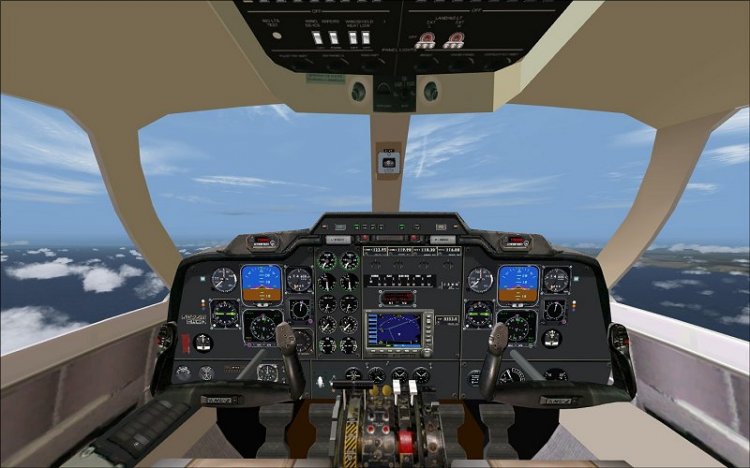
everything works! sound0 vstvte in a folder with the model! the fact that credit default sound of a Cessna C208 looks like a turbojet Garrett TPE331!!-who in real life is on MU-2
→ Size:
26 MB
→ Date:
15 years ago (11.12.2010 15:12)
→ Author:
Danny
→ Approved by moderator:
isc
→ License:
Freeware - Free version, Unlimited Distribution
→ Downloaded:
2229 time(s)