New files in: 1 day, 3 days, 7 days, 30 days
| Most downloaded for: all time,
year,
half a year,
month,
two weeks,
three days
Most popular by rating | Submit a file
Most popular by rating | Submit a file
| Folder: |
AutoCoPilot v2.0
| Rating: 5!
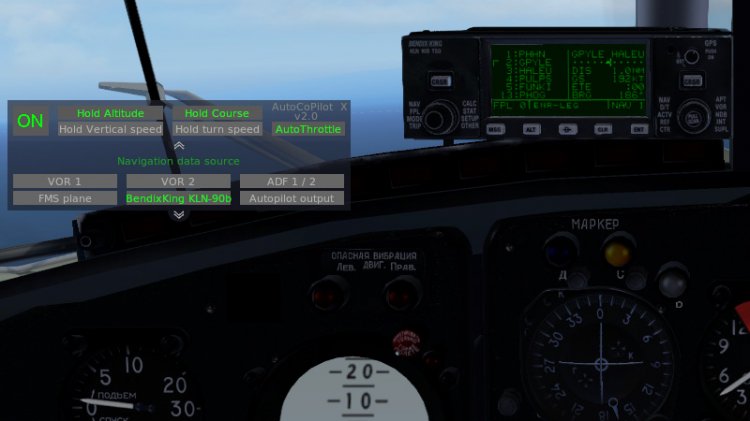
This plugin is simplified Autopilot emulator/Copilot analog. Plugin dont use the X-plane autopilot and himself manages flight controls.
Program modes: Hold mode a current Course/Constant rate turn. Hold mode a current Altitude/Vertical speed. Hold mode a current Air Speed.
Plugin is suitable for aircrafts not autopilot and GPS-navigation equipped or some situations when where you need quickly to transfer flight control to the co-pilot.
Also convenient to use only the hold air speed mode for everyone aircrafts not autothrottle equipped.
Since version 2.0, added navigation menu with the ability to fly along the route obtained from the GPS430/530, FMC, and also from the KLN-90b.
There is also a flight on VOR and ADF, and using autopilot Flight Directors.
Installation:
This plugin need FlyWithLua for working. Copy plugin file to [X-Plane folder]/Resources/plugins/FlyWithLua/Scripts.
After X-plane running you can assign a hot key to the plugin switch toggle. For this you need assign your key to "toggle" value in "autocopilot" category in "SETTINGS -> KEYBOARD". Here is the toggle interface switch.
Full Interface description and adjusting information in Readme.txt
If you have a problem in plugin or you have any suggestions, please contact me.
My theme on x-plane.org - https://forums.x-plane.org/index.php?/files/file/37735-autocopilot/ You can assistance me there. I'll be grateful!
Have a safe flight!
Program modes: Hold mode a current Course/Constant rate turn. Hold mode a current Altitude/Vertical speed. Hold mode a current Air Speed.
Plugin is suitable for aircrafts not autopilot and GPS-navigation equipped or some situations when where you need quickly to transfer flight control to the co-pilot.
Also convenient to use only the hold air speed mode for everyone aircrafts not autothrottle equipped.
Since version 2.0, added navigation menu with the ability to fly along the route obtained from the GPS430/530, FMC, and also from the KLN-90b.
There is also a flight on VOR and ADF, and using autopilot Flight Directors.
Installation:
This plugin need FlyWithLua for working. Copy plugin file to [X-Plane folder]/Resources/plugins/FlyWithLua/Scripts.
After X-plane running you can assign a hot key to the plugin switch toggle. For this you need assign your key to "toggle" value in "autocopilot" category in "SETTINGS -> KEYBOARD". Here is the toggle interface switch.
Full Interface description and adjusting information in Readme.txt
If you have a problem in plugin or you have any suggestions, please contact me.
My theme on x-plane.org - https://forums.x-plane.org/index.php?/files/file/37735-autocopilot/ You can assistance me there. I'll be grateful!
Have a safe flight!
→ Size:
13 KB
→ Date:
5 years ago (08.11.2020 17:20)
→ Author:
Ignatiy
→ Approved by moderator:
Lenya69
→ License:
Freeware - Free version, Unlimited Distribution
→ Downloaded:
675 time(s)
AutoCoPilot
| Rating: 5!
Description:
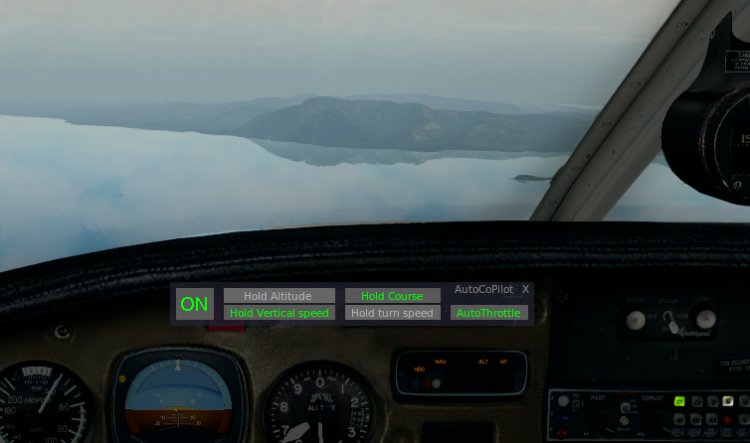
This plugin is very simplified Autopilot emulator/Copilot analog. Plugin dont use the X-plane autopilot and himself manages flight controls.
Program modes: Hold mode a current Course/Constant rate turn. Hold mode a current Altitude/Vertical speed. Hold mode a current Air Speed.
Plugin is suitable for aircrafts not autopilot equipped or some situations when where you need quickly to transfer flight control to the co-pilot.
Also convenient to use only the hold air speed mode for everyone aircrafts not autothrottle equipped.
Installation:
This plugin need FlyWithLua for working. Copy plugin file to X-Plane 10/Resources/plugins/FlyWithLua/Scripts.
After X-plane running you can assign a hot key to the plugin switch toggle. For this you need assign your key to "toggle" value in "autocopilot" category in "SETTINGS -> JOYSTICK & EQUIPMENT -> KEYS".
Interface description and adjusting information in Readme.txt
If you have a problem in plugin or you have any suggestions, please contact me in PM.
Have a safe flight!
This plugin is very simplified Autopilot emulator/Copilot analog. Plugin dont use the X-plane autopilot and himself manages flight controls.
Program modes: Hold mode a current Course/Constant rate turn. Hold mode a current Altitude/Vertical speed. Hold mode a current Air Speed.
Plugin is suitable for aircrafts not autopilot equipped or some situations when where you need quickly to transfer flight control to the co-pilot.
Also convenient to use only the hold air speed mode for everyone aircrafts not autothrottle equipped.
Installation:
This plugin need FlyWithLua for working. Copy plugin file to X-Plane 10/Resources/plugins/FlyWithLua/Scripts.
After X-plane running you can assign a hot key to the plugin switch toggle. For this you need assign your key to "toggle" value in "autocopilot" category in "SETTINGS -> JOYSTICK & EQUIPMENT -> KEYS".
Interface description and adjusting information in Readme.txt
If you have a problem in plugin or you have any suggestions, please contact me in PM.
Have a safe flight!
→ Size:
7 KB
→ Date:
9 years ago (12.05.2017 02:52)
→ Author:
Ignatiy
→ Approved by moderator:
aiRoNe
→ License:
Freeware - Free version, Unlimited Distribution
→ Downloaded:
881 time(s)
Flittermouse
| Rating: 5!

Description:
This plugin allows you to control yoke, rudder and throttle using the mouse, after press the hotkey.
Controls:
The yoke control is moved by the mouse on the screen area. The rudder control - moving mouse on x-axis. The throttle control - moving mouse wheel. You can use any combination of modes at your discretion.
Use rudder control mode is very convenient for taxiing and takeoff (basically if not have a game controller). Sometimes you can use the yoke and rudder control modes together in flight.
Installation:
This plugin need FlyWithLua for working. Copy plugin file to X-Plane 10/Resources/plugins/FlyWithLua/Scripts.
After X-plane running you need assign a hotkeys. For this you need to open "SETTINGS -> JOYSTICK & EQUIPMENT -> KEYS". In the upper right corner, select the category "flittermouse" (by clicking on the small white square).
Then assign the hotkeys for yoke, rudder and throttle. These keys will be toggle these modes.
Settings:
You can ajust yoke sensitivity and pitch of throttle in plugin file (its here). Ajust values of variables local mouse_wheel_step, local mouse_yoke_step_x and local mouse_yoke_step_y.
If you increase this value, increase the sensitivity. Defauls values is 50 and for Y-axis may be more, because mouse work area is the area of the screen, and monitors have a various resolution and aspect ratio.
If you have a problem in plugin or you have any suggestions, please contact me to forums.x-plane.org user IgnatAir, or to avsim.su user Ignatiy.
Have a safe flight!
This plugin allows you to control yoke, rudder and throttle using the mouse, after press the hotkey.
Controls:
The yoke control is moved by the mouse on the screen area. The rudder control - moving mouse on x-axis. The throttle control - moving mouse wheel. You can use any combination of modes at your discretion.
Use rudder control mode is very convenient for taxiing and takeoff (basically if not have a game controller). Sometimes you can use the yoke and rudder control modes together in flight.
Installation:
This plugin need FlyWithLua for working. Copy plugin file to X-Plane 10/Resources/plugins/FlyWithLua/Scripts.
After X-plane running you need assign a hotkeys. For this you need to open "SETTINGS -> JOYSTICK & EQUIPMENT -> KEYS". In the upper right corner, select the category "flittermouse" (by clicking on the small white square).
Then assign the hotkeys for yoke, rudder and throttle. These keys will be toggle these modes.
Settings:
You can ajust yoke sensitivity and pitch of throttle in plugin file (its here). Ajust values of variables local mouse_wheel_step, local mouse_yoke_step_x and local mouse_yoke_step_y.
If you increase this value, increase the sensitivity. Defauls values is 50 and for Y-axis may be more, because mouse work area is the area of the screen, and monitors have a various resolution and aspect ratio.
If you have a problem in plugin or you have any suggestions, please contact me to forums.x-plane.org user IgnatAir, or to avsim.su user Ignatiy.
Have a safe flight!
→ Size:
3 KB
→ Date:
9 years ago (11.05.2017 21:34)
→ Author:
Ignatiy
→ Approved by moderator:
Ляпучка
→ License:
Freeware - Free version, Unlimited Distribution
→ Downloaded:
1964 time(s)
Плагин позволяет настраивать виды камеры и быстро между ними переключаться. Является неким подобием ezdok для FSX, но мне не понравились аналоги для x-plane (показалось, что много лишнего) и по-этому написал свой.
Для работы плагина необходимо освободить клавиши F1-F12. Далее, находясь в самолете нажмите какую-либо из данных клавиш, чтобы на нее сохранить вид. Далее передвиньте камеру на нужную позицию и нажмите "2" на цифровой клавиатуре. Позиция будет запомнена. Далее по аналогии, следующая "F", нужный ракурс и цифра 2.
Все настройки записываются в ini файл, там же можно настроить FOV. Интерфейс у плагина отсутствует!
Для каждого самолета должны быть свои настройки, по-этому, пересаживаясь на другой самолет, нужно "подменить" файл mycamera.ini, на соответствующий. Я делаю так: допустим, пересаживаясь на "цессну", беру заранее сохраненный файл mycamera_c172.ini и переименовываю его в mycamera.ini сохраняя первый. Т.к. я летаю практически на одних и тех же самолетах, мне этого хватает, но буду рад вашим предложениям, если конечно данный плагин кого-то заинтересует.
Установка:
Для работы необходим FlyWithLua.
Архив распаковать в X-Plane 10/Resources/plugins/FlyWithLua/Scripts
В архиве имеются файлы-пресеты на некоторые самолеты, но сам файл с настройками mycamera.ini пустой.
Установка:
Для работы необходим FlyWithLua.
Файл поместить в X-Plane 10/Resources/plugins/FlyWithLua/Scripts
Для работы плагина необходимо освободить клавиши F1-F12. Далее, находясь в самолете нажмите какую-либо из данных клавиш, чтобы на нее сохранить вид. Далее передвиньте камеру на нужную позицию и нажмите "2" на цифровой клавиатуре. Позиция будет запомнена. Далее по аналогии, следующая "F", нужный ракурс и цифра 2.
Все настройки записываются в ini файл, там же можно настроить FOV. Интерфейс у плагина отсутствует!
Для каждого самолета должны быть свои настройки, по-этому, пересаживаясь на другой самолет, нужно "подменить" файл mycamera.ini, на соответствующий. Я делаю так: допустим, пересаживаясь на "цессну", беру заранее сохраненный файл mycamera_c172.ini и переименовываю его в mycamera.ini сохраняя первый. Т.к. я летаю практически на одних и тех же самолетах, мне этого хватает, но буду рад вашим предложениям, если конечно данный плагин кого-то заинтересует.
Установка:
Для работы необходим FlyWithLua.
Архив распаковать в X-Plane 10/Resources/plugins/FlyWithLua/Scripts
В архиве имеются файлы-пресеты на некоторые самолеты, но сам файл с настройками mycamera.ini пустой.
Установка:
Для работы необходим FlyWithLua.
Файл поместить в X-Plane 10/Resources/plugins/FlyWithLua/Scripts
→ Size:
6 KB
→ Date:
9 years ago (10.02.2017 05:17)
→ Author:
Ignatiy
→ Approved by moderator:
Ляпучка
→ License:
Freeware - Free version, Unlimited Distribution
→ Downloaded:
615 time(s)
mouse yoke and throttle
| Rating: 5!
Плагин позволяет самолетом при помощи мыши.
Управление РУДами осуществляется колесом мыши.
Чтобы управлять штурвалом, необходимо нажать клавишу TAB, после чего штурмал будет повторять ваши движения мышью. Для выхода из этого режима необходимо повторно нажать TAB.
Шаг управления РУДами и чувствительность штурвала можно настроить открыв плагин текстовым редактором, и настроив переменные local mouse_wheel_step, local mouse_yoke_step_x и local mouse_yoke_step_y.
Установка:
Для работы необходим FlyWithLua.
Файл поместить в X-Plane 10/Resources/plugins/FlyWithLua/Scripts
Управление РУДами осуществляется колесом мыши.
Чтобы управлять штурвалом, необходимо нажать клавишу TAB, после чего штурмал будет повторять ваши движения мышью. Для выхода из этого режима необходимо повторно нажать TAB.
Шаг управления РУДами и чувствительность штурвала можно настроить открыв плагин текстовым редактором, и настроив переменные local mouse_wheel_step, local mouse_yoke_step_x и local mouse_yoke_step_y.
Установка:
Для работы необходим FlyWithLua.
Файл поместить в X-Plane 10/Resources/plugins/FlyWithLua/Scripts
→ Size:
2 KB
→ Date:
9 years ago (15.01.2017 19:39)
→ Author:
Ignatiy
→ Approved by moderator:
SLAVJAN
→ License:
Freeware - Free version, Unlimited Distribution
→ Downloaded:
1241 time(s)